Shallow Thoughts : : 2008
Akkana's Musings on Open Source Computing and Technology, Science, and Nature.
Mon, 22 Dec 2008
Continuing the basic Linux command-line tutorial series, a
discussion of the difference between a terminal window and a shell:
The
Linux Command Shell For Beginners: What is the Shell?
(Digg
link, for those who digg).
Tags: writing, shell, CLI
[
17:16 Dec 22, 2008
More writing |
permalink to this entry |
]
Fri, 19 Dec 2008
![[R/C combat with streamers]](http://shallowsky.com/images/boomerfest08/img_7306T.jpg)
A couple of weekends ago, a handful of combat R/C flyers from Dublin
(Calif, not Ireland) came down to Sunnyvale Baylands for a Saturday
melee with our local crowd. We called it the "Boomer Fest" since
the group includes
"Boomer
Butch" and there are usually several Boomers among the group's
combat planes.
![[Full contact R/C combat]](http://shallowsky.com/images/boomerfest08/img_7314T.jpg) No long write-up, but I did upload some
still
images and
video
from the event. Adding streamers to the planes sounded silly (and
didn't last long in the high winds), but they sure made the
combat prettier!
No long write-up, but I did upload some
still
images and
video
from the event. Adding streamers to the planes sounded silly (and
didn't last long in the high winds), but they sure made the
combat prettier!
Kasra tried to shoot some onboard video, but unfortunately the camera
shut itself off a few seconds into the flight. Maybe next time.
Tags: planes, combat, dogfight, radio control, baitball
[
11:52 Dec 19, 2008
More misc |
permalink to this entry |
]
Sun, 14 Dec 2008
Dave has been fighting for I don't know how many weeks trying to get
a buildable set of gtk libraries installed on his Mac.
He doesn't need them to build GIMP -- the
GIMP on OS X
project (split off from Wilber Loves Apple) provides binaries
complete with all the libraries needed. Alas, it's just a binary
package with no development headers, so if you want to build any other
gtk packages, like pho,
or maybe some GIMP plug-ins, you're in for a much longer adventure.
Mac Ports used to make that easy,
but the Ports version of gtk2 doesn't build on OS X "Tiger".
It's a long story and I don't (want to) know all the hairy details,
but this weekend he finally gave up on it and began downloading all
the gtk2 packages and dependencies (cairo, pango, bonobo, atk etc.)
from their various project sites.
Oddly enough, building them went much more smoothly than Ports
had, and after a little twiddling of --disable flags in configure
and a lot of waiting, he had most of the libraries built.
Even gtk2 itself! Except ... gtk2's make install failed.
Seems that although gtk is configured to disable building docs by
default (configure --help shows a --enable-gtk-doc option),
nevertheless make install calls something
called gtkdoc-rebase from a lot of the subdirectories.
And gtkdoc-rebase doesn't exist, since it wasn't ever built. So
the whole make install process fails at that point --
after installing the libraries but before telling pkg-config that
gtk-2.0 is indeed present.
After twiddling configure dependencies all day, Dave was getting
frustrated. "How do I configure it to really disable docs,
so it won't try to run this gtkdoc-rebase thing I don't have?"
I was in the middle of a timed quiz for a class I'm taking.
"I have no idea. You'd think they'd check for that. Um ...
all you need is for gtkdoc-rebase to return success, right?
What if you make a script somewhere in your path that contains
nothing but a shebang line, #! /bin/sh?
It's a horrible hack, but ..."
"Horrible hacks R us!" he exclaimed, and created the script.
10 minutes later, he had gtk-2.0 installed, pkg-config notified
and pho built.
Sometimes horrible hacks are the best.
The gtk2 package list
Incidentally, for anyone trying to accomplish the same thing,
the packages he needed to download were:
pgk-config gettext glib pango atk jpeg jasper libpng tiff
pixman freetype libxml fontconfig cairo gtk2
and he had to configure gtk2 with --disable-cups
(because it introduced other errors, not because of CUPS itself).
The trickiest dependency was atk, because it wasn't in the place that
gtk.org points to and it wasn't on its own project site either;
he eventually found it by poking around on the
gnome ftp
site.
Tags: hack, gtk, OS X
[
21:44 Dec 14, 2008
More programming |
permalink to this entry |
]
Fri, 12 Dec 2008
My latest Linux Planet article covers how to find your way around
the Linux filesystem in the command-line, for anyone who wants to
graduate from file managers and start using the shell.
Navigating
the Linux Filesystem (and the
Digg
link for those so inclined).
Tags: writing, shell, CLI
[
13:49 Dec 12, 2008
More writing |
permalink to this entry |
]
Sat, 29 Nov 2008
Kurt Fisher wrote to draw my attention to the latest
Lunar Photo Of the Day (LPOD), a lovely shot he made of one of my
favorite places anywhere,
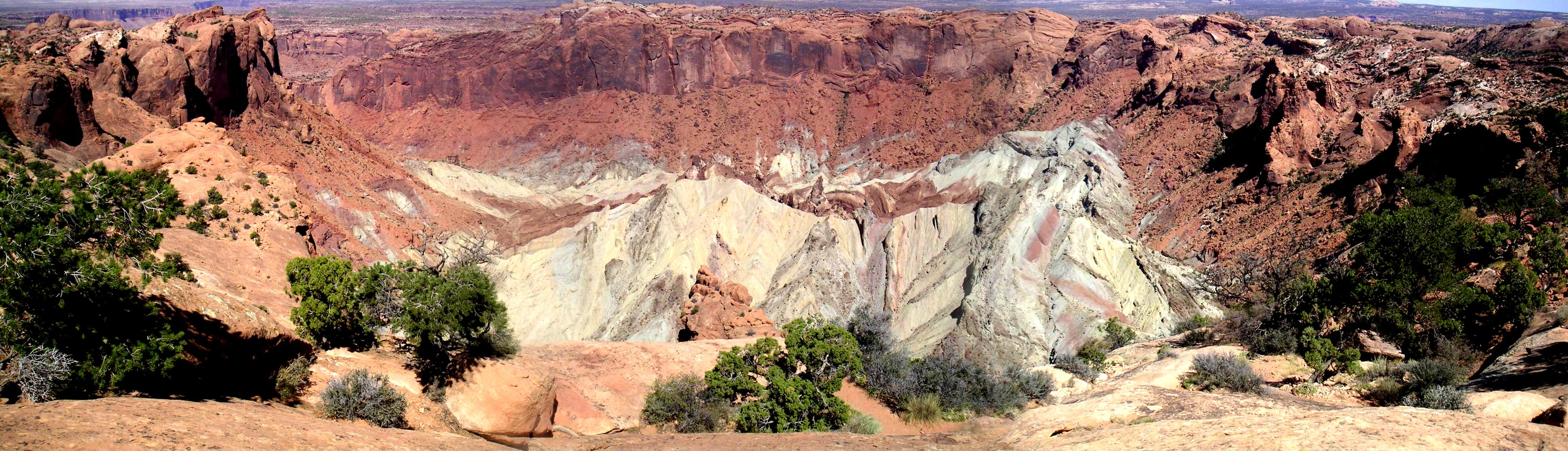
Upheaval Dome
in Utah's Canyonlands National Park.
Upheaval Dome has long been strongly suspected to be a massive,
eroded impact crater, but the LPOD highlights a study that finally
puts this (non-)controversy to rest,
Elmar Buchner and Thomas Kenkmann's
Upheaval
Dome, Utah, USA: Impact origin confirmed,
documenting shocked quartz grains in the Kayenta sandstone of
Upheaval's outer ring.
![[Upheaval Dome]](http://shallowsky.com/images/upheaval/upheavalT.jpg) It's about time -- it's been pretty clear for many years that
this structure was an impact formation, not a collapsed salt dome
(the relative lack of salt in the core might have been a clue)
but the park service doesn't seem to have gotten the message,
giving equal weight to the salt-dome theory in all its Canyonlands
literature and signs. Perhaps the Buchner and Kenkmann paper will
finally convince them.
It's about time -- it's been pretty clear for many years that
this structure was an impact formation, not a collapsed salt dome
(the relative lack of salt in the core might have been a clue)
but the park service doesn't seem to have gotten the message,
giving equal weight to the salt-dome theory in all its Canyonlands
literature and signs. Perhaps the Buchner and Kenkmann paper will
finally convince them.
Reading about this gave me the push I needed to update my own
Upheaval Dome page,
adding links to the latest research and to the excellent
Upheaval
Dome Bibliography Kurt has put together.
My page also badly needed a bigger view of the crater itself, so
I stitched together a quick
panorama
of the view from the rim
that I'd shot on a trip several years ago but never assembled.
Tags: geology, astronomy, trails, impact crater
[
13:15 Nov 29, 2008
More science/geology |
permalink to this entry |
]
Wed, 26 Nov 2008
I love my new monitor. The colors are great, it's sharp, the angles
are good. Only one problem: it's really really bright.
It has the usual baffling "push buttons at random trying to figure out
how to navigate the menu system" brightness control -- which dims
the monitor's perceived brightness by about .003% if I take it all
the way to the bottom of the scale. (This is apparently a bug that
some of these Dells have and others don't.)
It has contrast, too -- but
the monitor won't change contrast when running through the DVI cable
(this is even documented in the monitor's manual).
I have no idea why. It makes me wonder whether there's normally a way
of changing brightness over a DVI cable; but lots of googling hasn't
brought enlightenment on that score.
I tried the VGA cable. The display was very noticeably less sharp,
though pressing the monitor's "auto adjust" improved it a lot.
Contrast adjustment did work (and helped) using the VGA cable,
but it also turned everything green. I was able to improve the
color cast a bit with
xgamma -ggamma .75 -bgamma .9
but this was all looking like quite a hassle. I wanted an easier way
to change brightness. xgamma wasn't it: it works well for fine-tuning
but its brightness curve is way off if you try to depart by much from
full brightness.
Enter xbrightness and
xbrightness-gui (Mikael Magnusson to the rescue again! He
knew about these excellent programs, and perhaps equally important,
he had a copy of xbrightness-gui, which seems to have vanished from
the web.)
xbrightness is an excellent little command-line program that sets the
X gamma curve to appropriate values. Just run xbrightness BRIGHTNESS
passing it a value between 0 and 65535. xbrightness-gui is an
interactive program that lets you drag curves around for each of
the three color curves, or the combined image, with a user interface
very similar to GIMP's Curves tool. You can even save and load curves.
xbrightness-gui's coolness notwithstanding, the simple xbrightness was
really all I needed. It does a fine job of adjusting the monitor
brightness while keeping colors neutral. The version I was using
was Mikael's version, to which he'd added the ability to adjust colors
too (much like xgamma does, but using more useful curves). It turns
out I don't need the color correction, but it's nice to know it's there.
But what I did need was a way to query the current brightness, and,
more important, a way to bump the brightness a little bit up and down.
So I added those features. Getting the current brightness isn't
actually something you can do, since the whole gamma curve for the
three channels is what you perceive as brightness. I didn't try to
estimate perceived brightness based on the whole curve; I just took
the value of the highest value for each color, and their average or
maximum.
Then I tied my new increment/decrement into key bindings in Openbox.
I bound W-F5 (the Windows key plus F5) to xbrightness -2560, and
W-F6 to xbrightness +2560, so I can go up or down in brightness by
pressing keys without having to type any five-digit numbers.
I've made available the old xbrightness-gui, since it's no longer
available anywhere else; a patch that integrates my changes and Mika's
into xbrightness-0.3; and the patched xbrightness tarball.
They're all at http://shallowsky.com/software/xbrightness/.
One other fun thing about using X gamma settings to adjust
brightness. The first night I used it, I noticed at some point that my
cursor looked very different -- it had become blindingly white.
It turns out that the cursor is implemented at a lower level and
doesn't go through the X gamma system. So turning the brightness
down via gamma curves doesn't affect the cursor, which remains always
at full brightness. It's quite a nice side effect -- the cursor is
much more visible than it normally is.
Tags: linux, monitor, brightness
[
12:37 Nov 26, 2008
More linux |
permalink to this entry |
]
Thu, 20 Nov 2008
I have a new Firefox Tips article up on Linux Planet:
The
Plague of Ridiculously Long URLs
(note I didn't choose the title). It discussees how to handle
long URLs broken over several lines, of the sort we so often
see in email messages.
Tags: writing, mozilla, firefox
[
10:43 Nov 20, 2008
More writing |
permalink to this entry |
]
Sun, 16 Nov 2008
![[moonroot]](http://shallowsky.com/software/moonroot/moonroot-s.png)
I wrote
moonroot
more to figure out how to do it than to run it myself.
But on the new monitor I have so much screen real estate
that I've started using it -- but the quality of the images was
such an embarrassment that I couldn't stand it. So I took a few
minutes and cleaned up the images and made a moonroot 0.6 release.
Turned out there was a trick I'd missed when I originally made the
images, years ago. XPM apparently only allows 1-bit transparency.
When I was editing the RGB image and removing the outside edge of the circle,
some of the pixels ended up semi-transparent, and when I saved the
file as .xpm, they ended up looking very different (much darker)
from what I had edited.
Here are two ways to solve that in GIMP:
- Use the "Hard edge" option on the eraser tool (and a hard-edged
brush, of course, not a fuzzy one).
- Convert the image to indexed, in which case GIMP will only allow
one bit's worth of transparency. (That doesn't help for full-color
images, but for a greyscale image like the moon, there's no loss
of color since even RGB images can only have 8 bits per channel.)
Either way, the way to edit a transparent image where you're trying
to make the edges look clean is to add a solid-color background
layer (I usually use white, but of course it depends on how you're going
to use the image) underneath the layer you're trying to edit.
(In the layers dialog, click the New button, chose White for the
new layer, click the down-arrow button to move it below the original
layer, then click on the original layer so your editing will all
happen there.)
Once you're editing a circle with sharp edges, you'll probably need
to adjust the colors for some of the edge pixels too. Unfortunately
the Smudge tool doesn't seem to work on indexed images, so you'll
probably spend a lot of time alternating between the Color Picker
and the Pencil tool, picking pixel colors then dabbing them onto
other pixels. Key bindings are the best way to do that: o activates
the Color Picker, N the Pencil, P the Paintbrush. Even if you don't
normally use those shortcuts it's worth learning them for the
duration of this sort of operation.
Or use the Clone tool, where the only keyboard shortcut you have to
remember is Ctrl to pick a new source pixel. (I didn't think of that
until I was already finished, but it works fine.)
Tags: programming, astronomy, gimp
[
15:48 Nov 16, 2008
More gimp |
permalink to this entry |
]
Sat, 15 Nov 2008
Dave and I recently acquired a lovely trinket from a Mac-using friend:
an old 20-inch Apple Cinema Display.
I know what you're thinking (if you're not a Mac user): surely
Akkana's not lustful of Apple's vastly overpriced monitors when
brand-new monitors that size are selling for under $200!
Indeed, I thought that until fairly recently. But there actually
is a reason the Apple Cinema displays cost so much more than seemingly
equivalent monitors -- and it's not the color and shape of the bezel.
The difference is that Apple cinema displays are a technology called
S-IPS, while normal consumer LCD monitors -- those ones you
see at Fry's going for around $200 for a 22-inch 1680x1050 -- are
a technology called TN. (There's a third technology in between the
two called S-PVA, but it's rare.)
The main differences are color range and viewing angle.
The TN monitors can't display full color: they're only
6 bits per channel. They simulate colors outside that range
by cycling very rapidly between two similar colors
(this is called "dithering" but it's not the usual use of the term).
Modern TN monitors are
astoundingly fast, so they can do this dithering faster than
the eye can follow, but many people say they can still see the
color difference. S-IPS monitors show a true 8 bits per color channel.
The viewing angle difference is much easier to see. The published
numbers are similar, something like 160 degrees for TN monitors versus
180 degrees for S-IPS, but that doesn't begin to tell the story.
Align yourself in front of a TN monitor, so the colors look right.
Now stand up, if you're sitting down, or squat down if you're
standing. See how the image suddenly goes all inverse-video,
like a photographic negative only worse? Try that with an S-IPS monitor,
and no matter where you stand, all that happens is that the image
gets a little less bright.
(For those wanting more background, read
TN Film, MVA,
PVA and IPS – Which one's for you?, the articles on
TFT Central,
and the wikipedia
article on LCD technology.)
Now, the comparison isn't entirely one-sided. TN monitors have their
advantages too. They're outrageously inexpensive. They're blindingly
fast -- gamers like them because they don't leave "ghosts" behind
fast-moving images. And they're very power efficient (S-IPS monitors,
are only a little better than a CRT). But clearly, if you spend a lot
of time editing photos and an S-IPS monitor falls into your
possession, it's worth at least trying out.
But how? The old Apple Cinema display has a nonstandard connector,
called ADC, which provides video, power and USB1 all at once.
It turns out the only adaptor from a PC video card with DVI output
(forget about using an older card that supports only VGA) to an ADC
monitor is the $99 adaptor from the Apple store. It comes with a power
brick and USB plug.
Okay, that's a lot for an adaptor, but it's the only game in town,
so off I went to the Apple store, and a very short time later I had
the monitor plugged in to my machine and showing an image. (On Ubuntu
Hardy, simply removing xorg.conf was all I needed, and X automatically
detected the correct resolution. But eventually I put back one section
from my old xorg.conf, the keyboard section that specifies
"XkbOptions" to be "ctrl:nocaps".)
And oh, the image was beautiful. So sharp, clear, bright and colorful.
And I got it working so easily!
Of course, things weren't as good as they seemed (they never are, with
computers, are they?) Over the next few days I collected a list of
things that weren't working quite right:
- The Apple display had no brightness/contrast controls; I got
a pretty bad headache the first day sitting in front of that
full-brightness screen.
- Suspend didn't work. And here when I'd made so much progress
getting suspend to work on my desktop machine!
- While X worked great, the text console didn't.
The brightness problem was the easiest. A little web searching led me
to acdcontrol, a
commandline program to control brightness on Apple monitors.
It turns out that it works via the USB plug of the ADC connector,
which I initially hadn't connected (having not much use for another
USB 1.1 hub). Naturally, Ubuntu's udev/hal setup created the device
in a nonstandard place and with permissions that only worked for root,
so I had to figure out that I needed to edit
/etc/udev/rules.d/20-names.rules and change the hiddev line to read:
KERNEL=="hiddev[0-9]*", NAME="usb/%k", GROUP="video", MODE="0660"
That did the trick, and after that acdcontrol worked beautifully.
On the second problem, I never did figure out why suspending with
the Apple monitor always locked up the machine, either during suspend
or resume. I guess I could live without suspend on a desktop, though I
sure like having it.
The third problem was the killer. Big deal, who needs text consoles,
right? Well, I use them for debugging, but what was more important,
also broken were the grub screen (I could no longer choose
kernels or boot options) and the BIOS screen (not something
I need very often, but when you need it you really need it).
In fact, the text console itself wasn't a problem. It turns out the
problem is that the Apple display won't take a 640x480 signal.
I tried building a kernel with framebuffer enabled, and indeed,
that gave me back my boot messages and text consoles (at 1280x1024),
but still no grub or BIOS screens. It might be possible to hack a grub
that could display at 1280x1024. But never being able to change BIOS
parameters would be a drag.
The problems were mounting up. Some had solutions; some required
further hacking; some didn't have solutions at all. Was this monitor
worth the hassle? But the display was so beautiful ...
That was when Dave discovered TFT
Central's search page -- and we learned that the Dell 2005FPW
uses the exact same Philips tube as the
Apple, and there are lots of them for sale used,.
That sealed it -- Dave took the Apple monitor (he has a Mac, though
he'll need a solution for his Linux box too) and I bought a Dell.
Its image is just as beautiful as the Apple (and the bezel is nicer)
and it works with DVI or VGA, works at resolutions down to 640x480
and even has a powered speaker bar attached.
Maybe it's possible to make an old Apple Cinema display work on a Mac.
But it's way too much work. On a PC, the Dell is a much better bet.
Tags: linux, tech, graphics, monitor, S-IPS, TN, ADC, DVI
[
21:57 Nov 15, 2008
More tech |
permalink to this entry |
]
Fri, 14 Nov 2008
Usually I just delete spam after seeing the subject line.
But I couldn't resist one that arrived this morning:
Subject: You'll be saying WOW every time with ShamWow
Wondering whether the seller was familiar with the
meaning
of the word "sham",
I just had to take a look.
![[ Funny shamWOW ad ]](http://shallowsky.com/blog/images/shamwowT.jpg) I couldn't tell anything from the text -- it was all just random
verbiage to try to fool Baysian filters.
But the mail also attached two images, img001.png and img002.png.
The first was a big grey starburst thing; the second, at 348Kb, was the
actual ad
(click on it to get the full-sized version; the thumbnail
here doesn't do it justice).
I couldn't tell anything from the text -- it was all just random
verbiage to try to fool Baysian filters.
But the mail also attached two images, img001.png and img002.png.
The first was a big grey starburst thing; the second, at 348Kb, was the
actual ad
(click on it to get the full-sized version; the thumbnail
here doesn't do it justice).
There are just so many things to love about this ad, starting
with the name "ShamWow" itself.
I love the mixture of fonts and bright colors, with the slightly
lopsided hourglass shape of the ShamWow! logo.
I love the "AS SEEN ON TV" bug -- a charming image that hasn't
changed a whit since the 60's, maybe even the 50's.
I love the unidentifiable grey and yellow flat things with
unreadable text on them -- they look like file folders and folded
papers, but they're probably two different colors and sizes of
ShamWow -- covered with a square announcing
"10 Year [unreadable]", which made me wonder if they were selling
auto loans or securities. But if you magnify it you find that the
third word is probably "Warranty".
I love the presumption that you'll think that 20x the weight of
a small cloth object is a lot of water (is it? I have no idea, let
me grab a paper towel and a gram scale). I love the blurry red
and white "CLICK FOR DETAILS" button.
But what I like best about this image is that it's a PNG but it's
full of JPG artifacts. Now, I'm not very picky about jpeg artifacts.
(You'd think I would be, as a de-facto GIMP expert, but I'm really not.)
I shoot DSLR photos in jpeg rather than raw mode because most of the
time the difference just isn't enough for me to care about.
I use jpeg for most of the icons on my web site if they don't
need transparency, and I lower the jpeg quality level to make
them load faster. I'm not a PNG snob (actually, I'm more likely
to use GIF than PNG for web icons). But really -- this ad image
is a wonderful example of jpeg artifacts and why you can't
just turn the quality down arbitrarily far.
I could even understand using extreme jpeg compression because they were
sending out a hundred quotillion spam messages and wanted to reduce bandwidth.
But they're not sending a jpeg -- they've converted the low-quality JPG
back to a 348Kb PNG before sending the spam.
All I can figure is that someone designed the ad and saved it as
JPG, making it really small. And then someone in the business saw
lbrandy's
great cartoon on JPG vs. PNG -- and said "Oh, no! We'd better
use PNG instead! And loaded up the JPG and saved it as a PNG with
default settings.
(For further reading on PNG vs. JPEG and image file
size optimization, you can get an overview of formats at my
Image
Formats for the Web and some detailed tutorials at the
Bandwidth
Conservation Society; or chapters 2 and 8 in
my GIMP book, soon to be out in
its second edition.)
Tags: humor, advertising, gimp
[
11:54 Nov 14, 2008
More humor |
permalink to this entry |
]
Wed, 12 Nov 2008
I checked my Spam Assassin "probably" folder for the first time in too
long, and discovered that I was getting tons of false positives,
perfectly legitimate messages that were being filed as spam.
A little analysis of the X-Spam-Status: headers showed that all of
the misfiled messages (and lots of messages that didn't quite make it
over the threshold) were hitting a rule called DNS_FROM_SECURITYSAGE.
It turned out that this rule
is
obsolete and has been removed from Spam Assassin, but it
hasn't
yet been removed from Debian, at least not from Etch.
So I filed a Debian bug. Or at least I think I did -- I got an
email acknowledgement from submit@bugs.debian.org but it didn't
include a bug number and Debian's
HyperEstraier based search engine
linked off the bug page
doesn't find it (I used reportbug).
Anyway, if you're getting lots of SECURITYSAGE false hits, edit
/usr/share/spamassassin/20_dnsbl_tests.cf and comment out the
lines for DNS_FROM_SECURITYSAGE and, while you're at it, the lines
for RCVD_IN_DSBL, which is also
obsolete. Just to be safe, you might also want to add
score DNS_FROM_SECURITYSAGE 0
in your .spamassassin/user_prefs (or equivalent systemwide file) as well.
Now if only I could figure out why it was setting
FORGED_RCVD_HELO and UNPARSEABLE_RELAY on messages from what seems
to be perfectly legitimate senders ...
Tags: linux, spam, bugs
[
22:54 Nov 12, 2008
More linux |
permalink to this entry |
]
Sun, 09 Nov 2008
![[pho image viewer]](http://shallowsky.com/software/pho/phoTT.jpg)
Pho 0.9.6-pre3 has been working great for me for about a month, and
I've been trying to find the time to do a release. I finally managed
it this weekend, after making a final tweak to change the default
PHO_REMOTE command from
gimp-remote to
gimp since
gimp-remote is obsolete and is no longer built by default.
The big changes from 0.9.5 are Keywords mode, slideshow mode,
the new PHO_REMOTE environment variable,
swapping -f and -F, and a bunch of performance work and
minor bug fixing.
I built deb packages for Ubuntu (Hardy, but they should work on
Intrepid too) and Debian (Etch), as well as the usual source tarball,
and they're available at the usual place:
http://shallowsky.com/software/pho.
Tags: programming, pho, image viewer
[
18:11 Nov 09, 2008
More programming |
permalink to this entry |
]
Thu, 06 Nov 2008
My latest Linux Planet article,
Why
Firefox Rocks on Linux, discusses Linux-specific Firefox
shortcuts involving the middle mouse button, the URLbar and
the scrollbar.
It's getting
good
Diggs, too, and comments from people who found the tips helpful,
which is great. A lot of people don't know about some of these great
Linux time-savers, but these are the sort of things that make me
love Linux and stick with it even when it gets frustrating.
I hate to think of people missing out just because there's no
obvious way to discover some of the shortcuts!
Tags: writing, mozilla, firefox, linux
[
21:44 Nov 06, 2008
More writing |
permalink to this entry |
]
Mon, 03 Nov 2008
This posting ended up being published as a Linux Planet Quick Tip.
You can read about my nifty word counting bookmarklet there:
Quick
Firefox Tip: Word Count Bookmarklet.
Tags: firefox, mozilla, bookmarklets, writing, programming
[
23:41 Nov 03, 2008
More tech/web |
permalink to this entry |
]
Fri, 31 Oct 2008
Quite a while ago I noticed that drag-n-drop of images from Firefox
had stopped working for me in GIMP's trunk builds (2.6 and 2.7);
it failed with a "file not found" error. Opening URIs with
Open
Location also failed in the same way.
Since I don't run a gnome desktop, I assumed it probably had something
to do with requiring gnome-vfs services that I don't have. But
yesterday I finally got some time to chase it down with help from
various folk on #gimp.
I had libgnomevfs (and its associated dev package) installed on my
Ubuntu Hardy machine, but I didn't have gvfs. It was suggested that
I install the gfvs-backends package. I tried that, but it
didn't help; apparently gvfs requires not just libgvfs and
gvfs-backends, but also running a new daemon, gvfsd.
Finding an alternative was starting to sound appealing.
Turns out gimp now has three compile-time
configure options related to opening URIs:
  --without-gvfs          build without GIO/GVfs support
  --without-gnomevfs      build without gnomevfs support
  --without-libcurl       build without curl support
These correspond to four URI-getting methods in the source, in
plug-ins/file-uri:
- uri-backend-gvfs.c
- uri-backend-gnomevfs.c
- uri-backend-libcurl.c
- uri-backend-wget.c
GIMP can degrade from gvfs to gnomevfs to libcurl to wget, but only at
compile time, not at runtime: only one of the four is built.
On my desktop machine, --without-gvfs was all I needed.
Even without running the gnome desktop, the gnomevfs
front-end seems to work fine. But it's good to know about the other
options too, in case I need to make a non-gnomevfs version to run on
the laptop or other lightweight machines.
Tags: gimp, desktop, performance, gnome
[
12:09 Oct 31, 2008
More gimp |
permalink to this entry |
]
Mon, 27 Oct 2008
I wrote in my OSCON report a few months back that I came home from the
conference with an
Arduino
microcontroller kit and just enough knowledge and software to make
LEDs blink. And so it sat, for a month or two, while I tried to come
up with some reason I desperately needed a programmable LED blinker
(and time to play with it).
But it turned out I actually did have a practical need for a
customizable programmable gizmo. One of the problems with
R/C combat
flying is that you're so focused on keeping track of which plane
is yours that it's tough to keep track of how long you've gone on
the current battery. You don't want to fly a lithium-polymer battery
until it gets so weak you notice the drop in power -- that's really
bad for the battery. So you need a timer.
My transmitter (a JR 6102) has a built-in timer, but it's hard to use.
As long as you remember to reset it when you turn on the
transmitter, it displays minutes and seconds since reset.
Great -- so all I need is somebody standing next to me who can
read it to me. Looking away from the sky long enough
to read the timer is likely to result in flying into a tree, or worse.
(The new uber-fancy transmitters have programmable beeping
timers. Much more sensible. Maybe some day.)
I could buy a kitchen timer that dings after a set interval, but
what's the fun of that? Besides, I could use some extra smarts
that kitchen timers don't have.
Like audible codes for how long I've flown, so I can make my own
decision when to land based on how much throttle I've been using.
Enter the Arduino. Those digital outputs that can make an LED
blink work just dandy for powering a little piezo beeper, and it turns
out the Atmel ATmega168 has a built-in clock, which you can read
by calling millis().
So I wired up the beeper to pin 8 (keeping an LED on pin 13 for
debugging) and typed up a trivial timer program,
battimer.pde.
It gives a couple of short beeps when you turn it on (that's so you
know it's on if you can't see it), then gives a short beep at 9
minutes, a long one at 10, shorter one at 11, and thereafter gives
(minutes MOD 10) beeps, i.e. two for 12, three for 13 and so forth.
Fun and easy, and it works fine at the field once I worked out a way
to carry it (it's in a camera bag hanging on my belt, with the beeper
outside the bag so I can hear it).
Fun! It could use better codes, and a pause switch (for when I land,
fiddle with something then go back up on the same battery).
Of course, in the long run I don't actually want to devote my only
Arduino kit to being a glorified stopwatch forever. I have further
plans to address that, but that's for a later posting ...
Tags: hardware, arduino, electronics, maker
[
13:10 Oct 27, 2008
More tech/hardware |
permalink to this entry |
]
Sun, 26 Oct 2008
Mon, 20 Oct 2008
Someone on #openbox this morning wanted help in bringing up a window
without decorations -- no titlebar or window borders.
Afterward, Mikael commented that the app should really be coded
not to have borders in the first place.
Me: You can do that?
Turns out it's not a standard ICCCM request, but one that mwm
introduced, MWM_HINTS_DECORATIONS.
Mikael pointed me to the urxvt source as an example of an app that uses it.
My own need was more modest: my little
moonroot
Xlib program that draws the moon at approximately its current phase.
Since the code is a lot simpler than urxvt, perhaps the new version,
moonroot 0.4, will be useful as an example for someone (it's also
an example of how to use the X Shape extension for making
non-rectangular windows).
Tags: programming, xlib, astronomy, window managers
[
12:06 Oct 20, 2008
More programming |
permalink to this entry |
]
Sun, 12 Oct 2008
Someone on LinuxChix' techtalk list asked whether she could get
tcsh to print "[no output]" after any command that doesn't produce
output, so that when she makes logs to help her co-workers, they
will seem clearer.
I don't know of a way to do that in any shell (the shell would have
to capture the output of every command; emacs' shell-mode does that
but I don't think any real shells do) but it seemed like it ought
to be straightforward enough to do as a regular expression substitute
in vi. You're looking for lines where a line beginning with a prompt
is followed immediately by another line beginning with a prompt;
the goal is to insert a new line consisting only of "[no output]"
between the two lines.
It turned out to be pretty easy in vim. Here it is:
:%s/\(^% .*$\n\)\(% \)/\1[no results]\r\2/
Explanation:
- :
- starts a command
- %
- do the following command on every line of this file
- s/
- start a global substitute command
- \(
- start a "capture group" -- you'll see what it does soon
- ^
- match only patterns starting at the beginning of a line
- %
- look for a % followed by a space (your prompt)
- .*
- after the prompt, match any other characters until...
- $
- the end of the line, after which...
- \n
- there should be a newline character
- \)
- end the capture group after the newline character
- \(
- start a second capture group
- %
- look for another prompt. In other words, this whole
- expression will only match when a line starting with a prompt
- is followed immediately by another line starting with a prompt.
- \)
- end the second capture group
- /
- We're finally done with the mattern to match!
- Now we'll start the replacement pattern.
- \1
- Insert the full content of the first capture group
- (this is also called a "backreference" if you want
- to google for a more detailed explanation).
- So insert the whole first command up to the newline
- after it.
- [no results]
- After the newline, insert your desired string.
- \r
- insert a carriage return here (I thought this should be
- \n for a newline, but that made vim insert a null instead)
- \2
- insert the second capture group (that's just the second prompt)
- /
- end of the substitute pattern
Of course, if you have a different prompt, substitute it for "% ".
If you have a complicated prompt that includes time of day or
something, you'll have to use a slightly more complicated match
pattern to match it.
Tags: regexp, shell, CLI, linux, editors
[
14:34 Oct 12, 2008
More linux/editors |
permalink to this entry |
]
Thu, 09 Oct 2008
Ever been annoyed by the file in your home directory,
.sudo_as_admin_successful? You know, the one file with the name
so long that it alone is responsible for making ls print out your
home directory in two columns rather than three or four?
And if you remove it, it comes right back after the next time
you run sudo?
Here's what's creating it (credit goes to Dave North for figuring
out most of this).
It's there because you're in the group admin,
and it's there to turn off a silly bash warning.
It's specific to Ubuntu (at least, Fedora doesn't do it).
Whenever you log in under bash, if bash sees that you're in the
admin group in /etc/groups, it prints this warning:
To run a command as administrator (user "root"), use "sudo ".
See "man sudo_root" for details.
Once you sudo to root, if you're in the admin group, sudo
creates an empty file named .sudo_as_admin_successful
in your home directory.
That tells bash, the next time you log in, not to print the
stupid warning any more.
Sudo creates the file even if your login shell isn't bash and so
you would never have seen the stupid warning. Hey, you might some
day go back to bash, right?
If you want to reclaim your ls columns and get rid of the file
forever, it's easy:
just edit /etc/group and remove yourself from the admin group.
If you were doing anything that required being in the admin group,
substitute another group with a different name.
Tags: linux, bash, sudo, annoyances, ubuntu
[
18:33 Oct 09, 2008
More linux |
permalink to this entry |
]
Wed, 08 Oct 2008
Dear Asus, and other manufacturers who make Eee imitations:
The Eee laptops are mondo cool. So lovely and light.
Thank you, Asus, for showing that it can be done and that there's
lots of interest in small, light, cheap laptops, thus inspiring
a bazillion imitators. And thank you even more for offering
Linux as a viable option!
Now would one of you please, please offer some models that
have at least XGA resolution so I can actually buy one? Some of us
who travel with a laptop do so in order to make presentations.
On projectors that use 1024x768.
So far HP is the only manufacturer to offer WXGA, in the Mini-Note.
But I read that Linux support is poor for the "Chrome 9" graphics
chip, and reviewers seem very underwhelmed with the Via C7
processor's performance and battery life.
Rumours of a new Mini-Note with a Via Nano or, preferably, Intel
Atom and Intel graphics chip, keep me waiting.
C'mon, won't somebody else step up and give HP some competition?
It's so weird to have my choice of about 8 different 1024x600
netbook models under $500, but if I want another 168 pixels
vertically, the price from everyone except HP jumps to over $2000.
Folks: there is a marketing niche here that you're missing.
Tags: tech, netbook, laptop, resolution, projector
[
22:50 Oct 08, 2008
More tech |
permalink to this entry |
]
Sat, 04 Oct 2008
Dave and I were testing some ways of speeding up the booting process,
which is how he came to be looking at my Vaio's console with no X
running. "What's wrong with that font?" he asked.
I explained how Ubuntu always starts the boot process with a perfectly
fine font, then about 80% of the way through boot it deliberately
changes it to a garbled, difficult to read that was clearly not
designed for 1024x761. Been meaning for ages to figure out how to
fix it, never spent the time ... Okay, it said "Setting up console
font and keymap" just before it changes the font.
That message should be easy to find.
Maybe I should take a few minutes now and look into it.
The message comes from /etc/init.d/console-setup,
which runs a program called setupcons, which has a
man page. setupcons uses /etc/default/console-setup
which includes the following section:
# Valid font faces are: VGA (sizes 8, 14 and 16), Terminus (sizes
# 12x6, 14, 16, 20x10, 24x12, 28x14 and 32x16), TerminusBold (sizes
# 14, 16, 20x10, 24x12, 28x14 and 32x16), TerminusBoldVGA (sizes 14
# and 16), Fixed (sizes 13, 14, 15, 16 and 18), Goha (sizes 12, 14 and
# 16), GohaClassic (sizes 12, 14 and 16).
FONTFACE="Fixed"
FONTSIZE="16"
The hard part of changing the console font in the past has always been
finding out what console fonts are available. So having a list right
there in the comment is a big help.
Okay, let's try changing it to Terminus and running setupcons again.
Nope, error message. How about VGA? Success, looks fine. That was easy!
But while I was in that file, what about the keymap? That's another
thing I've been meaning to fix for ages ... under Debian, Redhat and
earlier Ubuntu versions I had a .kmap.gz console map that turned my
capslock key into a Control key (the way God intended). But Ubuntu
changed things all around so the old fix didn't work any more.
I found a thread from
December from someone who wanted to make the exact same change,
for the same reason, but the only real advice in the thread involved
an elaborate ritual involving defining keymaps for X and Gnome then
applying them to the console. Surely there was a better way.
It seemed pretty clear that /etc/console-setup/boottime.kmap.gz
was the keymap it was using. I tried substituting my old keymap, but
since I'd written it to inherit from other keymaps that no longer
existed, loadkeys can't use it. Eventually I just gunzipped
boottime.kmap.gz, found the Caps Lock key (keycode 29), replaced
all the Caps_Locks with Controls and gzipped
it back up again. And it worked!
Gary Vollink has a more detailed description, and the process hasn't
changed much since his page on
Getting "Control"
on the "Caps Lock".
Another gem linked to from the Ubuntu thread was this
excellent
article on keyboard layouts under X by Daniel Paul O'Donnell.
It's not relevant to the problem of setting the console keymap,
but it looks like a very useful reference on how various
international character input methods work under X.
Tags: linux, ubuntu, fonts
[
22:33 Oct 04, 2008
More linux |
permalink to this entry |
]
Thu, 02 Oct 2008
I've released
Pho 0.9.6-pre3.
The only change is to fix a sporadic bug where
pho would sometimes jump back to the first image after deleting
the last one, rather than backing up to the next-to-last image.
I was never able to reproduce the bug reliably, but
I cleaned up the image list next/prev code quite a bit and
haven't seen the bug since then. I'd appreciate having a few
testers exercising this code as much as possible.
Otherwise pho is looking pretty solid for a 0.9.6 release.
Tags: programming, pho, image viewer
[
10:57 Oct 02, 2008
More programming |
permalink to this entry |
]
Tue, 30 Sep 2008
I'm flying R/C electric planes again. I'd overdone it a few years
ago and burned out; it stopped being fun and I had to take a long
break from flying.
But lately I'd been hearing intriguing stories from Dave about the
group he flies with at Baylands. They weren't doing the endless
hovering-and-rolling-circles that's all the rage in electric R/C
circles. (Not to disparage 3-D flying; anyone who can coordinate a
rolling circle gets my respect as a pilot. I just lost interest
in spending much time at that sort of flying myself.
No, what they've been doing lately is combat flying ... dogfighting.
The kind of flying I always thought looked most fun, only
Dave and I could never get anyone else interested.
You mean, there's a whole group of people dogfighting
and I'm missing it?
When I came out to visit, a couple of my old dusty planes in tow,
Dave let me use one of his old Boomers
(a bit easier for a rusty pilot to fly than the full-on
Wild Wing)
for the combat. We only had 4-5 planes in the air, but I was hooked
right away. Dogfighting is way more fun with five planes than it is
with only two. It's still surprisingly difficult to hit each other,
even when that's what everyone's trying to do. But even when you
don't make contact, it's exciting and beautiful.
When you get a lot of planes in the air, twisting and turning and
looping and trying to stay in a little compact region because that
makes it more likely they'll hit, Dave put his finger on what it's
most like. You know those David Attenborough nature shows where
a huge school of sardines or anchovies has gathered, and dolphins
herd them into a tight compact ball of shining shimmering silvery
streaks, and then the seabirds come and dive from the air while
the dolphins are darting in and out from below? Attenborough calls
it a bait ball, and that's what Dave calls our combats.
We're gradually pulling in fresh mea--er--new recruits
to add to the fun.
A week ago last Saturday we all trooped up to Dublin to meet with
some east bay combat flyers. We had as many as ten planes all
fighting at once. Pete has a
video
online of the Dublin Melee ... video from a digital camera really
doesn't get the feeling across, but it's a start, and gives some
idea of the challenge of keeping track of which plane is yours.
Try imagining David Attenborough narrating about the bait ball while
you watch the video. Helps a little, doesn't it? Or if you're going
for the feel of combat, ditch the narration and play something like
the "Asteroid Field" theme from the first Star Wars.
Tags: planes, combat, dogfight, radio control, baitball
[
22:20 Sep 30, 2008
More misc |
permalink to this entry |
]
Sun, 28 Sep 2008
An interesting occurrence at a Toastmasters meeting last week
offered a lesson in the difficulties of writing or speaking
about technology.
The member who was running Table Topics had an interesting project
planned: "Bookmarks". I thought, things you put in books to mark your
place? Then I saw the three-page printout he had brought and realized
that, duh, of course, he means browser bookmarks.
The task, he explained, was to scan his eclectic list of bookmarks,
pick three, and tell a story about them.
Members reacted with confusion. Several of them said they didn't
understand what he meant at all. Would he give an example? So
he chose three and gave a short demonstration speech. But the members
still looked confused. He said if they wanted to pick just one, that
would be okay. Nobody looked relieved.
We did a couple rounds. I gave a rambling tale that incorporated
three or four bookmarks. One of our newer members took the list,
and wove a spirited story that used at least five (she eventually won
the day's Best Table Topic ribbon). Then the bookmark list passed to
one of the members who had expressed confusion.
She stared at the list, obviously baffled.
"I still don't understand. What do they have to do with bookmarks?"
"Browser bookmarks," I clarified, and a couple of other
people chimed in on that theme, but it obviously wasn't helping.
Several other members crowded around to get a look at the list.
Brows furrowed. Voices murmured. Then one of them looked up.
"Are these like ... Favorites?"
There was a immediate chorus of "Favorites?" "Oh, like in an Explorer
window?" "You mean like on the Internet?" "Ohhh, I think I get it ..."
Things improved from there.
I don't think the member who presented this project had any idea
that a lot of people wouldn't understand the term "Bookmark", as it
applies to a list of commonly-visited sites in a browser. Nor did I.
I was momentarily confused thinking me meant the other kind of
bookmark (the original kind, for paper books), but realizing that
he meant browser bookmarks cleared it right up for me.
A bigger surprise to me was that
the word "browser" wasn't any help to half the membership --
none of them understood what a "browser" was any more than they knew
what a "bookmark" was. "Like in an Explorer window?" or "on the internet"
was the closest they got to the concept that they were running a
specific program called a web browser.
These aren't stupid people;
they just don't use computers much, and haven't ever learned the
terminology for some of the programs they use or the actions they take.
When you're still learning something, you fumble around, sometimes
getting where you need to go be accident; you don't always know
how you got there, much less the terms describing the steps you took.
Even if you're an übergeek, I'm sure you have programs where
you fumble about and aren't quite sure how you get from A to B.
You may sometimes be surprised at meeting people who still use
Internet Explorer and haven't tried Firefox, let alone Opera.
You may wonder if it's the difficulty of downloading and installing
software that stops them.
But the truth may be that questions like "Have you tried Firefox?"
don't really mean anything to a lot of people; they're not really
aware that they're using Internet Explorer in the first place.
It's just a window they've managed to open to show stuff
on the internet.
Avoiding technical jargon is sometimes harder than you think.
Seemingly basic concepts are not so basic as they seem; terms you
think are universal turn out not to be. You have to be careful with
terminology if you to be understood ... and probably the only way
to know for sure if you're using jargon is to try out your language
on an assortment of people.
Tags: tech, browsers, writing, muggles
[
12:23 Sep 28, 2008
More tech |
permalink to this entry |
]
Wed, 24 Sep 2008
Last night we spotted a masked bandit at the office door.
![[Raccoon at the door]](http://shallowsky.com/images/raccoon/img_1151-sm.jpg) The raccoon was in a nutty mood --
or at least in a mood to eat a lot of hazelnuts and cashews.
The raccoon was in a nutty mood --
or at least in a mood to eat a lot of hazelnuts and cashews.
Happily, I had the DSLR on my desk and was able to sneak
some shots. Last time we were visited by raccoons I established
that unlike most wildlife, raccoons definitely do notice
a camera's flash, and don't like it a bit. (Most birds, reptiles,
amphibians and even rodents are remarkably un-bothered by flash
and don't seem to notice it at all.) So the Rebel's ISO1600 and
ability to focus in dim light came in very handy.
(Have I mentioned how much fun it is having an SLR again?)
The 'coon licked the nut shelf clean, then headed north to the
neighbor's house. This bandit worked alone -- no partner this time.
A few more
raccoon photos
here.
Tags: nature, raccoons, urban wildlife
[
23:44 Sep 24, 2008
More nature |
permalink to this entry |
]
Mon, 22 Sep 2008
Part
III in the Linux Astronomy series on Linux Planet covers two 3-D apps,
Stellarium and Celestia.
Writing this one was somewhat tricky because
the current Ubuntu, "Hardy", has a bug in its Radeon handling
and both these apps lock my machine up pretty quickly, so I went
through a lot of reboot cycles getting the screenshots.
(I found lots of bug reports and comments on the web, so I know
it's not just me.)
Fortunately I was able to test both apps and grab a few screenshots
on Fedora 8 and Ubuntu "Feisty" without encountering crashes.
(Ubuntu sure has been having a lot of
trouble with their X support lately! I'm going to start keeping
current Fedora and Suse installs around for times like this.)
Tags: writing, astronomy, linux, ubuntu, bugs
[
22:10 Sep 22, 2008
More writing |
permalink to this entry |
]
Thu, 18 Sep 2008
On a trip a couple years ago, Dave and I sought out an interesting
geologic phenomenon: the
Victorville
Narrows of the Mojave river, after reading the discussion of it
in
Geology
Underfoot in Death Valley and Owens Valley by Robert P. Sharp.
The Mojave river is interesting because for most of its length it
flows entirely underground. Looking at the wide, sandy, dry washes
along the many miles of its length you'd never suspect that a
year-round river was flowing beneath the surface.
One of the few places it comes to the surface is near Victorville, CA,
where a big chunk of rock gets in the way and forces the water to the
surface for a short distance before it disappears back into another
sandy wash.
That's all background to the interesting discovery we made at Alum
Rock park yesterday, where Penitencia creek and its tributary, Aguage
creek, have been looking progressively drier over this past month.
![[big fish in Penitencia Cr]](http://shallowsky.com/blog/images/alum/cascadefishT.jpg) Walking upstream along the creek trail, we saw a fairly normal looking
lower creek up to the bridge at the last parking lot. Just a little
further upstream beyond that parking lot, the creek follows a series
of little cascades and pools. The pools are only a few feet deep at
this time of year ... but in one, we saw quite a large fish, about
a foot long and looking vaguely catfishy. How does something that
big live in a stream this shallow and ephemeral?
Walking upstream along the creek trail, we saw a fairly normal looking
lower creek up to the bridge at the last parking lot. Just a little
further upstream beyond that parking lot, the creek follows a series
of little cascades and pools. The pools are only a few feet deep at
this time of year ... but in one, we saw quite a large fish, about
a foot long and looking vaguely catfishy. How does something that
big live in a stream this shallow and ephemeral?
Update, 2020: I've been told that
sucker fish
at least used to be found in Alum Rock park, and they get that big
and bigger. So that's probably what it was. Apparently there also
used to be small rainbow trout in Penitencia Creek, though I don't
know if they still are. Amazing to think of trout living in such
a small stream. Were they stocked, or did they swim upstream
from the bay?
Not only that, but just upstream, as the stream crossed under the park
road near Sycamore Grove, it disappeared. We knew there had to be
water because something was feeding those pools and the lower creek --
but it was all underground here. We continued upstream, and discovered
... the Alum Rock Narrows! Right by the steel bridge over the creek,
the dry Penitencia and Aguage creeks become wet as water is forced to
the surface at their confluence, only to disappear again some fifty
feet downstream of the bridge.
It was very like the Victorville Narrows in miniature ... right here
in the big city. Not for the first time, I wish I could find a decent
geologic map of this fascinating park!
Tags: nature, geology, narrows, creek, fish
[
22:26 Sep 18, 2008
More nature/trails |
permalink to this entry |
]
Sat, 13 Sep 2008
I turned on my printer to print out a form I needed to mail and it
emitted a nasty high-pitched noise ... not quite a squeal, but almost.
And it refused to feed paper more than about an inch at a time.
Pressing the paper feed button made it roll the paper about an inch
farther down, stop, and squee again. Another press, another inch,
stop and squee. Each time it seemed to advance the paper quite
smoothly -- it wasn't slipping, jamming or feeding at an angle.
How do you google for a weird high pitched noise? I tried a few
phrases in combination with epson c86 OR c84 OR c88
and hit several promising-looking URLs with domain names like
fixyourownprinter.com ... but every hit turned out either to be
someone describing a problem, then the discussion morphing into
a discussion of unclogging ink cartridges, or someone describing
a paper feed problem like mine and someone answering with
unhelpful advice like "you could fix the mechanism if you could
get the back panel off, but that's hard if you're not a printer
repair shop and printer repair shops charge more than the printer
is worth, so throw it away and buy a new printer."
I try to be green -- I recycle, turn off lights, try to use low
power PC and monitor, and I'll be damned if I'm going to throw out
a great big hunk of mostly nonrecycleable plastic every couple years
without at least trying to fix it.
Giving up on web searching, I unplugged the printer and started
pushing and poking at it to see what I could disassemble.
The back cover clearly was tucked into the two side covers ...
it clearly wasn't going anywhere until those side covers came off.
The side covers had several holes to the plastic piece underneath, with
arrows near them seeming to invite "push and slide". But there
didn't seem to be much consistency to whether I was supposed to push
the outer cover, or the inner tab, in the direction of the arrow.
I finally just ignored the arrows and used screwdrivers and pliers
to poke and compress and wedge and slide until I got the left side
cover (left as seen from the front of the printer) off.
The right side cover was more challenging -- I had all the tabs
loose, but the cover seemed to stick at a point near the front, near
the "Dura-Brite" oval. After twenty minutes of attempted finesse, I
switched to trying to force it (since the alternatives were to throw
the printer in the garbage or pay a repair shop more than the price
of a new printer). I heard two sharp CRACKs as of
plastic tabs breaking ... and the stuck front side popped loose.
Curiously, I couldn't find any obviously broken plastic inside; forcing
it was apparently the right and only way to get that side cover off.
![[Epson with paper jam]](http://shallowsky.com/blog/images/epsonjamT.jpg) Inside ... everything in the paper path looked fine. I pulled out an
errant paper shard that's been floating in there for about a year (I
knew right away when I fed that sheet of business cards with some of
the cards already removed that it had been a bad idea) but it hadn't been
touching any of the mechanism.
Inside ... everything in the paper path looked fine. I pulled out an
errant paper shard that's been floating in there for about a year (I
knew right away when I fed that sheet of business cards with some of
the cards already removed that it had been a bad idea) but it hadn't been
touching any of the mechanism.
What's this on the left side, though? There was a tiny ink-smudged
piece of paper between one of the pulleys and its toothed belt.
Hmm. Doesn't look like it ought to be related, but it clearly
doesn't belong ... so I pulled it out.
I poked and prodded and shone flashlights for a while longer, but
couldn't find anything else. Darn! Well, just for the heck of it, I
plugged the printer back in and switched it on. No squee tone!
Hmm ... I fed it a piece of scratch paper and pushed the paper feed
key ... and the paper went straight through, no noise, no fuss.
Whee! I hooked it up to the computer and tried a nozzle
test (escputil -r /dev/usblp0 -mC86 -u -n) and it seems
fine! The printer is back in its normal place now ... sans side
covers, of course. I figure putting them back on so soon is just
an invitation for the problem to come back. I'll put them back on
eventually ...
The moral of the story is: don't let ignorance stop you from trying
to fix things.
Maybe the problem was that little piece of paper wedged in the wheel after all.
Or maybe, as I often suspect, sometimes hardware just gets lonely and wants
some attention ... and if you're willing to spend an hour dinking with it,
it doesn't matter how little you know about what's actually wrong.
All it really wanted was your attention.
Tags: hardware, printing, maker
[
14:12 Sep 13, 2008
More tech |
permalink to this entry |
]
Fri, 12 Sep 2008
I have a new article on XEphem on Linux Planet,
following up to the KStars article two weeks ago:
Viewing
the Night Sky with Linux, Part II: Visit the Planets With XEphem.
Tags: writing, astronomy, linux
[
11:50 Sep 12, 2008
More writing |
permalink to this entry |
]
Mon, 08 Sep 2008
Among Firefox 3's whizzy new features, compared to Firefox 2, is the
drag images. If you drag from anywhere in the browser, instead of
getting the little cursor-sized drag image following the cursor, you
get a preview -- sometimes even a full-sized copy -- of what you're
dragging.
It's really startling and neat and whizzy looking. Except ...
when you're dragging and you have this large very pretty, and very
opaque, image under your mouse,
you can no longer see whatever should be under the image --
like the tab where you're trying to drop it.
After two or three weeks of never being able to drag a URL to another
tab to open it there (I kept guessing where the tab was, guessing
wrong and having it open as a new tab) I went exploring.
Fortunately it turns out they've provided an easy way to turn it off.
Go to about:config and search for "drop". Find the line for
nglayout.enable_drag_images and double-click it.
Or add this line to your user.js or prefs.js:
user_pref("nglayout.enable_drag_images", false);
Tags: firefox, mozilla, user interface
[
20:21 Sep 08, 2008
More tech/web |
permalink to this entry |
]
Tue, 02 Sep 2008
I thought it would never happen ... I've finally joined the
Digital SLR world.
Why would it never happen? I enjoyed film SLRs for years ...
from the Olympus OM-1 (great little manual camera) I had as a teenager
to the Nikkormat EL and Nikon FG I used a decade ago. I only stopped
because processing and scanning slides was such a hassle compared
to the ease of uploading digital images. So why not a DSLR?
The problem was that when Nikon went digital, they orphaned all their
old manual-focus lenses. They're still physically compatible (they'll
screw on to the DSLR body), but peeved Nikon DSLR owners inform me
(and camera store clerks agree) that the Nikon cameras won't meter
with the old lens attached.
I don't mind doing my own focusing (manual focusing is one of the
prime advantages of an SLR, not a disadvantage) but having
to guess at the exposure setting too? "Oh, just carry a light meter,"
people say. On a camera that costs over $600? That bothers me.
So I was peeved at Nikon and not about to buy anything from them ...
but meanwhile I had all these lenses, and hated to buy some other
brand where the lenses wouldn't even screw on. So, no DSLR for me ...
Until I was pouring out my lens-mount frustrations during a camera
discussion one night on #gimp and one of the regulars (thanks, Liam!)
said "Well then, why don't you just get an adaptor that lets you use
Nikon MF lenses on a Canon?"
A what? said I.
Sure enough, there are lots of them on Ebay ... search for
canon nikon adaptor or look at
Gadget
Infinity's "lens adaptor" section. You can even (for a little more
money) get a "confirm" lens that lights up the autofocus-confirm
points in the viewfinder to tell you when the camera thinks you're
in focus.
A few months passed (too busy to do camera research) but eventually I
found the time and budget ... and now I have a 5-day-old Canon Rebel
Xsi, which indeed takes excellent photos (correctly metered) through
my old Nikon AI-mount Sigma 70-300 APO zoom macro. And the 18-55 kit
lens (the equivalent of a 29-88 in a 35mm camera) isn't bad either --
a little slow (f/3.5 at the widest) but decently wide at the wide end
(in the years of using pocket digicams I'd forgotten how much nicer
it is to have a true wide-angle lens) and with a nice close focus
for macros at the long end.
Even the autofocus isn't bad -- there are still plenty of times when
I need manual, but the Rebel's autofocus is
much faster and more accurate than any I'd seen on earlier cameras.
![[The Canon says F00]](http://shallowsky.com/blog/images/canonfooT.jpg) It's such a great feeling to use an SLR again. The morning after the
camera arrived, I looked up and saw goldfinches at the feeder just
outside the window. I picked up the camera, switched it on, pointed,
zoomed, focused and snapped. No worries about whether the camera
might have decided to focus on the window, or the window frame, or
the tree, or the bush -- just focus and shoot. What a pleasure!
It's such a great feeling to use an SLR again. The morning after the
camera arrived, I looked up and saw goldfinches at the feeder just
outside the window. I picked up the camera, switched it on, pointed,
zoomed, focused and snapped. No worries about whether the camera
might have decided to focus on the window, or the window frame, or
the tree, or the bush -- just focus and shoot. What a pleasure!
And the best part: this must be a camera made by geeks,
because when it has the Nikon lens attached ... it says F00!
Tags: photography
[
20:59 Sep 02, 2008
More photo |
permalink to this entry |
]
Sun, 31 Aug 2008
I wanted to get a list of who'd been contributing the most in a
particular open source project. Most projects of any size have a
ChangeLog file, in which check-ins have entries like this:
2008-08-26  Jane Hacker  <hacker@domain.org>

        * src/app/print.c: make sure the Portrait and Landscape
        * buttons update according to the current setting.
I wanted to take each entry, save the name of the developer checking
in, then eventually count the number of times each name occurs (the
number of times that developer checked in) and print them in order
from most check-ins to least.
Getting the names is easy: for check-ins in the last 9 years, I just
want the lines that start with "200". (Of course, if I wanted earlier
check-ins I could make the match more general.)
grep "^200" ChangeLog
But now I want to trim the line so it includes only the
contributor's name. A bit of sed geekery can do that: the date is a
fixed format (four characters, a dash, two, dash, two, then two
spaces, so "^....-..-.. " matches that pattern.
But I want to remove the email address part too
(sometimes people use different email addresses
when they check in). So I want a sed pattern that will match
something at the front (to discard), something in the middle (keep that part)
and something at the end (discard).
Here's how to do that in sed:
grep "^200" ChangeLog | sed 's/^....-..-.. \(.*\)<.*$/\1/'
In English, that says: "For each line in the ChangeLog that starts
with 200, find a pattern at the beginning consisting of any four
characters, a dash, two characters, dash, two characters, dash, and
two spaces; then immediately after that, save all characters up to
a < symbol; then throw away the < and any characters that follow
until the end of the line."
That works pretty well! But it's not quite right: it includes the
two spaces after the name as part of the name. In sed, \s matches
any space character (like space or tab).
So you'd think this should work:
grep "^200" ChangeLog | sed 's/^....-..-.. \(.*\)\s+<.*$/\1/'
\s+ means it will require that at least one and maybe more space
characters immediately before the < are also discarded.
But it doesn't work. It turns out the reason is that the \(.*\)
expression is "greedier" than the \s+: so the saved name expression
grabs the first space, leaving only the second to the \s+.
The way around that is to make the name expression specify that it
can't end with a space. \S is the term for "anything that's not a
space character"; so the expression becomes
grep "^200" ChangeLog | sed 's/^....-..-.. \(.*\S\)\s\+<.*$/\1/'
(the + turned out to need a backslash before it).
We have the list of names! Add a | sort on the end to
sort them alphabetically -- that will make sure you get all the
"Jane Hacker" lines listed together. But how to count them?
The Unix program most frequently invoked after sort
is uniq, which gets rid of all the repeated lines.
On a hunch, I checked out the man page, man uniq,
and found the -c option: "prefix lines by the number of occurrences".
Perfect! Then just sort them by the number, from largest to
smallest:
grep "^200" ChangeLog | sed 's/^....-..-.. \(.*\S\)\s+<.*$/\1/' | sort | uniq -c | sort -rn
And we're done!
Now, this isn't perfect since it doesn't catch "Checking in patch
contributed by susan@otherhost.com" attributions -- but those aren't in
a standard format in most projects, so they have to be handled by hand.
Disclaimer: Of course, number of check-ins is not a good measure of
how important or productive someone is. You can check in a lot of
one-line fixes, or you can write an important new module and submit
it for someone else to merge in. The point here wasn't to rank
developers, but just to get an idea who was checking into the tree
and how often.
Well, that ... and an excuse to play with nifty Linux shell pipelines.
Tags: shell, CLI, linux, pipelines, regexp
[
12:12 Aug 31, 2008
More linux |
permalink to this entry |
]
Thu, 28 Aug 2008
I have an article on Linux Planet! The first of many, I hope.
At least the first of a short series on Linux astronomy programs,
starting with the one that's easiest to use: KStars.
It's oriented toward binocular observing, with suggestions
for good targets for beginners.
Viewing
the Night Sky with Linux, Part I: KStars
Tags: writing, astronomy, linux
[
22:46 Aug 28, 2008
More writing |
permalink to this entry |
]
Sat, 23 Aug 2008
I've wanted to know forever how to forward a message with all or
some of its attachments from mutt.
You can set the variable mime_forward so that when you forward
a message, it includes the entire message, headers, attachments and
all, as a single attachment. You can't edit this or change it in
any way. If you want to trim the original message, or omit one
of the attachments, you're out of luck.
I've found two ways to do it.
First: type v to get to the attachments screen. Type t repeatedly to
tag all the attachments, including the initial small text/plain
attachment (that's the original message body). When they're all
tagged, type ;f (forward all tagged attachments). After you fill
in the To: prompt, you'll be able to edit the message body, and
when you leave the editor, you'll have the attachment list there
to edit as you see fit.
If that doesn't work (I haven't tried it on HTML messages),
there's a slightly more elaborate procedure: use
Esc-e resend-message
use the current message as a template for a new one.
This calls up an editor on the current message, including headers.
Change the From to your name, the To to your intended recipient, and
edit the message body to your heart's content. When you're done,
you're sent to the Compose screen, where you can adjust the
attachment list and send the message.
Forwarding is pretty clearly not what Esc-E was intended for ...
but it does the job and might be a handy trick to know.
Tags: mutt, forward, attachments, mime
[
23:14 Aug 23, 2008
More linux |
permalink to this entry |
]
Fri, 22 Aug 2008
![[Mediun earnings]](/blog/images/mediun.jpg) One of the local community colleges sent out glossy flyers
advertising their program, with the tag line "College pays
for itself; don't put it off!"
One of the local community colleges sent out glossy flyers
advertising their program, with the tag line "College pays
for itself; don't put it off!"
To prove how valuable college can be, they include a helpful
table showing the "Mediun earnings" for people with various
education levels.
West Valley actually has a decent sciences program, and some
other interesting programs like Park Management (ranger training).
But I suspect I should stay away from their English and Statistics
classes.
Tags: humor, education
[
16:47 Aug 22, 2008
More humor |
permalink to this entry |
]
Thu, 21 Aug 2008
On a short afternoon hike at Sanborn today, Dave and I decided to go
by the tiny koi pond near the visitors' center to see if any newts
were left this late into summer.
![[newt stuck in mud]](http://shallowsky.com/images/mudpond/pict1303T.jpg)
What a scene! In the current semi-drought, the pond has become a mud
flat, its surface
criss-crossed with
tracks and squirming with newts and crayfish trying to push
themselves out of the sticky mud.
In the few holes where the water was more than a couple inches
deep, fish flopped -- several 6-8" long golden koi plus something brown
but similarly large. A few of the newts thrashed in the water holes, too,
seemingly trying to get clean of the mud that coated them;
but most of the newts wriggled across the shallower mud flats,
heading nowhere in particular but looking very unhappy.
The crayfish seemed most numerous at the dryer edges of the pond,
pushing themselves laboriously up out of the mud with their claws
and dragging themselves across the mud.
Newts normally migrate, and can go surprisingly long distances
(miles) across land, so I think at least some of these newts will
survive. The fish, I must assume, are doomed unless someone rescues them.
I wonder if the rangers have considered selling the non-native
koi to someone who wants them, and replacing them with native fish?
Are there any fish native here this far upstream? Penitencia Creek
(at Alum Rock) has small fish (up to about 3" long), but it carries
more water in dry seasons than any creek near Sanborn.
What about the crayfish? Can crayfish survive long out of water,
bury themselves in mud (the ones here didn't seem too happy about
that idea) or migrate overland?
I suspect there will be some happy park raccoons tonight.
Tags: nature, newts, crayfish, drought
[
21:21 Aug 21, 2008
More nature |
permalink to this entry |
]
Chase sent us replacement MasterCards out of the blue. They came with
a brochure touting their wonderful new
Chase's
"Blink"
feature. So convenient! You just hold the card near a reader
and it charges your account, no need for any of that pesky swiping
of cards or signing of forms!
Yes, it's RFID (Radio Frequency ID tags), the small low-power radio
transmitters also used by Walmart and various other retailers,
and in other applications such as company security badges/access cards
(and, unfortunately, new passports in quite a few countries).
It seems a little odd to me that Chase's marketing implies that most
people would think it's a good thing to have a credit card that
can be charged easily without even taking it out of your wallet ...
to have a card that can be charged from some distance away without
your even knowing about it.
It's apparently easy and cheap to build an RFID credit card skimmer:
Bruce Schneier has
collected
several articles about it, and in a later article he
offers several links to articles on how to
build
your own RFID skimmer.
We called Chase right away and told them we didn't want the "Blink"
cards. They said we could keep our old, non-RFID cards and continue
to use them, and destroy the new ones. Whew!
Googling for links for this article, I found that we're not
the only Chase customers to want to decline Blink.
For anyone wondering how secure this technology is, the recent
debacle of the cracked Dutch RFID subway cards gives you an idea
(Bruce
Schneier, "Dutch RFID Transit Card Hacked";
The
Register, "Dutch transit card crippled by multihacks",
and a followup where the MBTA, Boston's transit agency,
used
the courts to muzzle three MIT students who were trying to present
a paper at Defcon on the security holes in the MBTA's RFID-based pay system.
For anyone who gets stuck with an RFID credit card, here's how to make an
RFID-blocking
wallet, and how to make an
RFID
zapper.
Tags: RFID, security, finance
[
11:26 Aug 21, 2008
More tech/security |
permalink to this entry |
]
Sat, 16 Aug 2008
Last night Joao and I were on IRC helping someone who was learning
to write gimp plug-ins. We got to talking about pixel operations and
how to do them in Python. I offered my arclayer.py as an example of
using pixel regions in gimp, but added that C is a lot faster for
pixel operations. I wondered if reading directly from the tiles
(then writing to a pixel region) might be faster.
But Joao knew a still faster way. As I understand it, one major reason
Python is slow at pixel region operations compared to a C plug-in is
that Python only writes to the region one pixel at a time, while C can
write batches of pixels by row, column, etc. But it turns out you
can grab a whole pixel region into a Python array, manipulate it as
an array then write the whole array back to the region. He thought
this would probably be quite a bit faster than writing to the pixel
region for every pixel.
He showed me how to change the arclayer.py code to use arrays,
and I tried it on a few test layers. Was it faster?
I made a test I knew would take a long time in arclayer,
a line of text about 1500 pixels wide. Tested it in the old arclayer;
it took just over a minute to calculate the arc. Then I tried Joao's
array version: timing with my wristwatch stopwatch, I call it about
1.7 seconds. Wow! That might be faster than the C version.
The updated, fast version (0.3) of arclayer.py is on my
arclayer page.
If you just want the trick to using arrays, here it is:
from array import array

[ ... setting up ... ]
        # initialize the regions and get their contents into arrays:
        srcRgn = layer.get_pixel_rgn(0, 0, srcWidth, srcHeight,
                                     False, False)
        src_pixels = array("B", srcRgn[0:srcWidth, 0:srcHeight])

        dstRgn = destDrawable.get_pixel_rgn(0, 0, newWidth, newHeight,
                                            True, True)
        p_size = len(srcRgn[0,0])
        dest_pixels = array("B", "\x00" * (newWidth * newHeight * p_size))

[ ... then inside the loop over x and y ... ]
                        src_pos = (x + srcWidth * y) * p_size
                        dest_pos = (newx + newWidth * newy) * p_size

                        newval = src_pixels[src_pos: src_pos + p_size]
                        dest_pixels[dest_pos : dest_pos + p_size] = newval

[ ... when the loop is all finished ... ]
        # Copy the whole array back to the pixel region:
        dstRgn[0:newWidth, 0:newHeight] = dest_pixels.tostring()
Good stuff!
Tags: gimp, python, programming, performance
[
22:02 Aug 16, 2008
More gimp |
permalink to this entry |
]
Mon, 11 Aug 2008
I've been using my pre-released 0.9.6-pre1 version of
pho, my image
viewer, for ages, now, and it's been working fine. I keep wanting
to release it, but there were a
couple of minor bugs that irritated me and I hadn't had time to
track down. Tonight, I finally got caught up with my backlog and
found myself with a few extra minutes to spare, and fixed the last
two known bugs. Quick, time to release before I discover anything else!
(There were a couple other features I was hoping to implement --
multiple external commands, parsing a .phorc file, and having
Keywords mode read and write the Keywords file itself -- but
none of those is terribly important and they can wait.)
It's only a -pre release, but I'm not going to have a long
protracted set of betas this time. 0.9.6-pre1 is very usable,
and I'm finding Keywords mode to be awfully useful for classifying
my mountain of back photos.
So, pho users, give it a try and let me know if you see any bugs!
It's my hope to release the real 0.9.6 in a week or two, if nobody
finds any monstrous bugs in the meantime.
Get Pho here.
Tags: programming, pho
[
21:30 Aug 11, 2008
More programming |
permalink to this entry |
]
Sat, 09 Aug 2008
Every summer I volunteer as an instructor for a one-day Javascript
programming class at the GetSET
summer technology camp for high school girls. GetSET is a great
program run by the Society of Women Engineers.
it's intended for minority girls from relatively poor neighborhoods,
and the camp is free to the girls (thanks to some great corporate
sponsors). They're selected through a competitive interview process
so they're all amazingly smart and motivated, and it's always rewarding
being involved.
Teaching programming in one day to people with no programming
background at all is challenging, of course. You can't get into any
of the details you'd like to cover, like style, or debugging
techniques. By the time you get through if-else, for and while loops,
some basic display methods, the usual debugging issues like reading
error messages, and typographical issues like
"Yes, uppercase and lowercase really are different" and "No, sorry,
that's a colon, you need a semicolon", it's a pretty full day and
the students are saturated.
I got drafted as lead presenter several years ago, by default by
virtue of being the only one of the workshop leaders who actually
programs in Javascript. For several years I'd been asking for a chance
to rewrite the course to try to make it more fun and visual
(originally it used a lot of form validation exercises), and
starting with last year's class I finally got the chance. I built
up a series of graphics and game exercises (using some of Sara
Falamaki's Hangman code, which seemed perfect since she wrote it
when she was about the same age as the girls in the class) and
it went pretty well. Of course, we had no idea how fast the girls
would go or how much material we could get through, so I tried to
keep it flexible and we adjusted as needed.
Last year went pretty well, and in the time since then we've
exchanged a lot of email about how we could improve it.
We re-ordered some of the exercises, shifted our emphasis in a few
places, factored some of the re-used code (like windowWidth()) into
a library file so the exercise files weren't so long, and moved more of
the visual examples earlier.
I also eliminated a lot of the slides. One of the biggest surprises
last year was the "board work". I had one exercise where the user
clicks in the page, and the student has to write the code to figure
out whether the click was over the image or not. I had been nervous
about that exercise -- I considered it the hardest of the exercises.
You have to take the X and Y coordinates of the mouse click, the X and
Y coordinates of the image (the upper left corner of the <div>
or <img> tag), and the size of the image (assumed to be 200x200),
and turn that all into a couple of lines of working Javascript code.
Not hard once you understand the concepts, but hard to explain, right?
I hadn't made a slide for that, so we went to the whiteboard to draw
out the image, the location of the mouse click, the location of the
image's upper left corner, and figure out the math ...
and the students, who had mostly been sitting passively
through the heavily slide-intensive earlier stuff, came alive. They
understood the diagram, they were able to fill in the blanks and keep
track of mouse click X versus image X, and they didn't even have much
trouble turning that into code they typed into their exercise. Fantastic!
Remembering that, I tried to use a lot fewer slides this year.
I felt like I still needed to have slides to explain the basic
concepts that they actually needed to use for the exercises -- but
if there was anything I thought they could figure out from context,
or anything that was just background, I cut it. I tried for as few
slides as possible between exercises, and more places where we could
elicit answers from the students. I think we still have too many slides
and not enough "board work" -- but we're definitely making progress,
and this year went a lot better and kept them much better engaged.
We're considering next year doing the first several exercises on the
board first, then letting them type it in to their own copies to
verify that it works.
We did find we needed to leave code examples visible:
after showing slides saying something like "Ex 7:
Write a loop that writes a line of text in each color", I had to
back up to the previous slide where I'd showed what the code actually
looked like. I had planned on their using my "Javascript Quick
Reference" handout for reference and not needing that information
on the slides; but in fact, I think they were confused about the
quickref and most never even opened it. Either that information needs
to be in the handout, or it needs to be displayed on the screen as
they work, or I have to direct them to the quickref page explicitly
("Now turn to page 3 in ...") or put that information in the exercises.
The graphical flower exercises were a big hit this year (I showed them
early and promised we'd get to them, and when we did, just before
lunch, several girls cheered) and, like last year, some of the girls
who finished them earlier decided on their own that they wanted to
change them to use other images, which was also a big hit. Several
other girls decided they wanted more than 10 flowers displayed, and
others hit on the idea of changing the timeout to be a lot shorter,
which made for some very fun displays. Surprisingly, hardly anyone
got into infinite loops and had to kill the browser (always a
potential problem with javascript, especially when using popups
like alert() or prompt()).
I still have some issues I haven't solved, like what to do about
semicolons and braces. Javascript is fairly agnostic about
them. Should I tell the girls that they're required? (I did that
this year, but it's confusing because then when you get to "if"
statements you have to explain why that's different.) Not mention
them at all? (I'm leaning toward that for next year.)
And it's always a problem figuring out what the fastest girls should
do while waiting for the rest to finish.
This year, in addition to trying to make each exercise shorter,
we tried having the girls work on them in groups of
two or three, so they could help each other. It didn't quite work out
that way -- they all worked on their own copies of the exercises
but they did seem to collaborate more, and I think that's the best
balance. We also encourage the ones who finish first to help the girls
around them, which mostly they do on their own anyway.
And we really do need to find a better editor we can use on the
Windows lab machines instead of Wordpad. Wordpad's font is too small on
the projection machine, and on the lab machines it's impossible for
most of us to tell the difference between parentheses, brackets and
braces, which leads to lots of time-wasting subtle bugs. Surely
there's something available for Windows that's easy to use,
freely distributable, makes it easy to change the font, and has
parenthesis and brace matching (syntax highlighting would be nice too).
Well, we have a year to look for one now.
All in all, we had a good day and most of the girls gave the class
high marks. Even the ones who concluded "I learned I shouldn't
be a programmer because it takes too much attention to detail"
said they liked the class. And we're fine with that --
not everybody wants to be a programmer, and the point isn't to
force them into any specific track. We're happy if we can give
them an idea of what computer programming is really like ...
then they'll decide for themselves what they want to be.
Tags: education, javascript, programming, speaking
[
12:54 Aug 09, 2008
More education |
permalink to this entry |
]
Tue, 05 Aug 2008
The tech press is in a buzz about the new search company,
Cuil (pronounced "cool").
Most people don't like it much, but are using it as an excuse
to rhapsodize about Google and why they took such
a commanding lead in the search market, PageRank and huge
data centers and all those other good things Google has.
Not to run down PageRank or other Google inventions -- Google
does an excellent job at search these days (sometimes spam-SEO sites
get ahead of them, but so far they've always caught up) -- but that's
not how I remember it. Google's victory over other search engines
was a lot simpler and more basic than that. What did they bring?
Logical AND.
Most of you have probably forgotten it since we take Google so for
granted now, but back in the bad old days when search engines were
just getting started, they all did it the wrong way. If you searched
for red fish, pretty much all the early search engines would
give you all the pages that had either red or fish
anywhere in them. The more words you added, the less likely you
were to find anything that was remotely related to what you wanted.
Google was the first search engine that realized the simple fact
(obvious to all of us who were out there actually doing
searches) that what people want when they search for multiple words
is only the pages that have all the words -- the pages that
have both red and fish. It was the search
engine where it actually made sense to search for more than one word,
the first where you could realistically narrow down your search to
something fairly specific.
Even today, most site searches don't do this right. Try searching for
several keywords on your local college's web site, or on a retail site
that doesn't license Google (or Yahoo or other major search engine)
technology.
Logical and. The killer boolean for search engines.
(I should mention that Dave, when he heard this, shook his
head. "No. Google took over because it was the first engine that just
gave you simple text that you could read, without spinning blinking
images and tons of other crap cluttering up the page."
He has a point -- that was certainly
another big improvement Google brought, which hardly anybody else
seems to have realized even now. Commercial sites get more and more
cluttered, and
nobody notices that Google, the industry leader, eschews all that crap
and sticks with simplicity. I don't agree that's why they won, but
it would be an excellent reason to stick with Google even if their search
results weren't the best.)
So what about Cuil? I finally got around to trying it this morning,
starting with a little "vanity google" for my name.
The results were fairly reasonable, though oddly slanted toward
TAC, a local astronomy group
in which I was fairly active around ten years ago
(three hits out of the first ten are TAC!)
Dave then started typing colors into Cuil to see what he would get,
and found some disturbing results. He has Firefox' cookie preference
set to "Ask me before setting a cookie" -- and it looks like Cuil loads
pages in the background, setting cookies galore for sites you haven't
ever seen or even asked to see. For every search term he thought of,
Cuil popped up a cookie request dialog while he was still typing.
Searching for blu wanted to set a cookie for bluefish.something.
Searching for gre wanted to set a cookie for www.gre.ac.uk.
Searching for yel wanted to set a cookie for www.myyellow.com.
Searching for pra wanted to set a cookie for www.pvamu.edu.
Pretty creepy, especially when combined with Cuil's propensity
(noted by every review I've seen so far, and it's true here too)
for including porn and spam sites. We only noticed this because he
happened to have the "Ask me" pref set. Most people wouldn't even know.
Use Cuil and you may end up with a lot of cookies set from sites
you've never even seen, sites you wouldn't want to be associated
with. Better hope no investigators come crawling through your
browser profile any time soon.
Tags: tech, search, privacy
[
11:10 Aug 05, 2008
More tech |
permalink to this entry |
]
Mon, 04 Aug 2008
No postings for a while -- I was too tied up with getting ready for
OSCON, and now that it's over, too tied up with catching up with
stuff that gotten behind.
A few notes about OSCON:
It was a good conference -- lots of good speakers, interesting topics
and interesting people. Best talks: anything by Paul Fenwick,
anything by Damian Conway.
The Arduino
tutorial was fun too. It's a little embedded processor with a
breadboard and sockets to control arbitrary electronic devices,
all programmed over a USB plug using a Java app.
I'm not a hardware person at all (what do
those resistor color codes mean again?) but even I, even after coming
in late, managed to catch up and build the basic circuits they
demonstrated, including programming them with my laptop. Very cool!
I'm looking forward to playing more with the Arduino when I get a
spare few moments.
The conference's wi-fi network was slow and sometimes flaky (what else is new?)
but they had a nice touch I haven't seen at any other conference:
Wired connections, lots of them, on tables and sofas scattered
around the lounge area (and more in rooms like the speakers' lounge).
The wired net was very fast and very reliable. I'm always surprised
I don't see more wired connections at hotels and conferences, and
it sure came in handy at OSCON.
The AV staff was great, very professional and helpful. I was speaking
first thing Monday morning (ulp!) so I wanted to check the room Sunday
night and make sure my laptop could talk to the projector and so
forth. Everything worked fine.
Portland is a nice place to hold a convention -- the light rail is
great, the convention center is very accessible, and street parking
isn't bad either if you have a car there.
Dave went with me, so it made more sense for us to drive.
The drive was interesting because the central valley was so thick
with smoke from all the fires (including the terrible Paradise fire
that burned for so long, plus a new one that had just started up near
Yosemite) that we couldn't see Mt Shasta when driving right by it.
It didn't get any better until just outside of Sacramento. It must
have been tough for Sacramento valley residents, living in that for
weeks! I hope they've gotten cleared out now.
![[Redding Sundial bridge]](http://shallowsky.com/images/sundial/showpix.php?pic=img_6968.jpg) I finally saw that Redding Sundial bridge I've been hearing so much
about. We got there just before sunset, so we didn't get to check the
sundial, but we did get an impressive deep red smoky sun vanishing
into the gloom.
Photos here.
I finally saw that Redding Sundial bridge I've been hearing so much
about. We got there just before sunset, so we didn't get to check the
sundial, but we did get an impressive deep red smoky sun vanishing
into the gloom.
Photos here.
End of my little blog-break, and time to get back to
scrambling to get caught up on writing and prep for the
GetSET Javascript class for high
school girls. Every year we try to make it more relevant and
less boring, with more thinking and playing and less rote typing.
I think we're making progress, but we'll see how it goes next week.
Tags: oscon08, conferences, linux, travel, portland, hardware, maker
[
23:00 Aug 04, 2008
More conferences |
permalink to this entry |
]
Wed, 16 Jul 2008
I had a silly problem: I needed to make some screenshots, but my
window borders were too pretty.
The problem isn't actually that they're pretty; it's that the theme
I wrote for openbox is very different from the much simpler theme I
used to use in fvwm, and I needed new screenshots that matched
the old fvwm look. Preferably without actually going back to
using fvwm -- I'm quite happy with openbox these days.
Anyway, the obvious solution is to run a second X.
I had done that in the past (when I needed to test something repeatedly,
like a wacom tablet, and didn't want to be restarting X all the
time) so I knew that was possible. But then someone told me about
Xnest. It's a way to run an X server embedded in a window of the
current X session. What a neat idea! I wanted to try it.
I made a simple .xinitrc.xnest file that starts
fvwm after loading .Xdefaults.
It took some fiddling to find a combination of arguments that worked.
In the end, this was it:
xinit ~/.xinitrc.xnest -- /usr/bin/Xnest -ac :1 -geometry 1024x768
And indeed, a 1024x768 window popped up with an fvwm running inside
it. Cool! Except it turned out to be not so cool -- because as soon
as I switched desktops, I found that the Xnest window wouldn't
repaint itself. Not even after being covered with another window
then uncovered -- it just didn't seem to get any expose events.
Bummer!
Next I tried Xephyr -- I heard that it was similar to Xnest, a
little more heavyweight but a little more reliable. It turned out
the arguments were just the same, so I ran it exactly like Xnest:
xinit ~/.xinitrc.xnest -- /usr/bin/Xephyr -ac :1 -geometry 1024x768
but Xephyr was even worse about window redrawing, plus it had some
problems with the mouse pointer, which kept jumping to random
places.
Too bad! They both sounded fun, and I'm sure they'll improve and
will eventually become usable. But for now, I'm back to the simpler
solution, running a second X server. Here's how that works:
first I have to log in on console 2 (ctl-alt-F2).
For some reason, I can't run a second X except from there.
Then I run:
startx ~/.xinitrc.xnest -- :1
and I get a new X session, on ctl-alt-F8 (with my regular session still
accessible on ctl-alt-F7).
Tags: X11, screenshots
[
21:01 Jul 16, 2008
More linux |
permalink to this entry |
]
Fri, 11 Jul 2008
They're repaving the streets where I live.
![[Repavng notice with no time, date or contact info]](http://shallowsky.com/blog/images/repaving.jpg) They left this flyer on our door to alert us.
It's good of them to keep us informed.
They left this flyer on our door to alert us.
It's good of them to keep us informed.
I guess they don't want us to ask any questions.
It's helpful to know where the cars will be safe.
I wonder when we should start parking somewhere else?
Tags: humor
[
14:49 Jul 11, 2008
More humor |
permalink to this entry |
]
Fri, 04 Jul 2008
Oops! Right after I posted that last entry, I discovered that my
little kitfox extension wasn't working as well as I'd thought.
And the more I hacked it, the less well it worked, and the more
I discovered was missing, like a chrome.manifest file (which
firefox 2 hadn't seemed to need).
Eventually some very helpful folks on #extdev pointed me to
Ted Mielczarek's excellent Extension
Wizard. Give it some details about your extension (its name and
version, your name, and a couple things you might want like a
toolbar button, a prefs panel and a context menu) and it generates
a zipped directory containing a bare bones extension, even including
niceties like internationalized strings.
Even better, your new extension skeleton includes a readme that
tells you how to leave the extension expanded while you work on
it. That's quite a bit easier than building the XPI file and installing
it each time.
So kitfox has a
0.3 version (in the unlikely event that anybody besides me wants it).
There's a project called
fizzypop
to develop and extend useful Mozilla dev tools like the Extension Wizard ...
watch that space for more details.
Tags: mozilla, firefox, open source
[
21:12 Jul 04, 2008
More tech/web |
permalink to this entry |
]
I finally broke down and spent the time to get Firefox 3 working
properly for me ... meaning, mostly, finding replacement extensions
for the bare minimum of what I need in a browser: control over cookies
(specifically, enabling/disabling them for specific sites),
flashblock, and blocking of animated images. I'd downloaded extensions
for all those a few weeks ago, but I found that although Firefox 3.0
said the FF3 extensions were active, and Firefox 2 said the old ones
were, neither set actually worked.
I decided to start from scratch: remove all extensions --
rm -rf .mozilla/firefox/extensions/* .mozilla/firefox/extensions.*
plus apt-get remove firefox-2-dom-inspector --
then install a new set of Firefox 3 add-ons.
After much hunting
(I sure wish addons.mozilla.org
would offer a way to limit the view to only extensions that work with
Firefox 3! Combing through 15 pages of extensions looking for the
handful that will actually install gets old fast) I found the
replacements I needed:
CS Lite for the cookie controls,
a newer Flashblock,
and Custom Toolbar Buttons as a stopgap for image animation
(though I suspect updating anidisable will be a better solution
in the long run). This time, with the old firefox 2 extensions purged,
the new ones took hold and worked.
I also added a nice extension called OpenBook that fixes the horrible
Firefox "Add bookmark" dialog. You know: the one that has two nearly
identical dropdown category menus side by side, with the bigger one
giving you only a tiny subset of your bookmark categories, and the
smaller one being the real one. The one that doesn't offer a space for
keyword, so to set up a bookmarklet you have to Add Bookmark, OK,
Organize Bookmarks, find the bookmark you just added, Ctrl-I to
get the Bookmark info dialog, and finally you can add your
keyword. OpenBook gives you a dialog where you can set the keyword
to begin with, and it only gives you one menu to list categories
so you aren't constantly tempted to click on the wrong one.
Now for the urlbar -- that new firefox 3 "smarter" urlbar that slows
down typing in the middle of a word so it can pop up a big fancy
window full of guesses (all wrong) about where I might be trying to
go. Actually, even if the guesses were right, it wouldn't help,
because I'd have to stop typing, search the list visually, then if
one of the suggestions was right, move my hand to the mouse or the
arrow keys to choose that suggestion. That takes way longer than just
typing the url.
But I guess I don't mind unhelpful suggestions popping up as long as
it doesn't mess up focus (preventing me from clicking or tabbing to
other apps on my screen) or slow down typing. Firefox 3 seems to be
handling the focus issue better than firefox 2 did, but the slowdown
was quite noticeable on the poor old laptop. So I wanted a way to
disable the behavior. A little googling revealed that the Firefox crew
immodestly calls their new urlbar the "awesomebar", which aside from
giggle factor also proves quite useful in googling: a search on
firefox
disable awesomebar reveals that I'm not the only one who doesn't
like it, and got me several preferences
I could tweak in about:config plus a couple of extensions to
turn it off entirely. I won't try to summarize, since the best
settings depend on your machine's spec, plus personal preference.
Making progress! Now the only issue was getting my urlbar tweaks working,
so that typing <Ctrl-Return> after typing a URL opened the URL in a new
tab instead of tacking on various silly extensions (oh, yes, of course
I wanted to go to http://www.firefox disable awesomebar.com
rather than googling for those terms in a new tab).
Fortunately, it turned out that the javascript that runs the urlbar
has changed very little since firefox 2, and I hardly needed to change
anything to get my
kitfox extension (v. 0.2)
working in Firefox 3.
Only one more issue: this blog. The CSS that handles the right sidebar
wasn't displaying right. Seems that Firefox 2 has changed something
about its interpretation of CSS, so it was floating the right sidebar
way down to the bottom of the page below the last content line.
Eventually (after adding firefox-3.0-dom-inspector,
another extension that had stopped working in the transition)
I discovered the problem: the #content was set to width: 77%
while the #rightsidebar's left-margin was at 76%. Apparently Firefox 2
rounded up as needed, whereas Firefox 3 just ignores the left-margin
if it would overlap the content, and then floats the sidebar anywhere
it thinks it can fit it. Fixing those percentages helped quite a bit,
and I added an overflow-x: hidden (on a tip from a helpful person in
#firefox) so that wide calendar doesn't hurt layout for narrow windows.
I think it's working now ... any readers having problems with the
layout in any browser, by all means let me know.
Tags: mozilla, firefox, user interface, css, bookmarklets
[
12:04 Jul 04, 2008
More tech/web |
permalink to this entry |
]
Wed, 02 Jul 2008
There's a store down the road from me that offers an unusual
combination of items. It always makes me stop and wonder when
I pass by.
![[CIGARETTES & PURE WATER]](http://shallowsky.com/blog/images/purewater.jpg)
It must be my naivety and lack of marketing accumen, but
it never would have occurred to me that cigarettes and pure
water were two products that ought to be sold side by side.
The most amazing part is that another store just a few blocks away
has started offering the same combination! (Though their sign
is much less striking.)
Tags: humor, marketing
[
23:56 Jul 02, 2008
More humor |
permalink to this entry |
]
Part of my reason for keeping this blog is keeping records of when
particular events happen. If there's no story attached, that doesn't
necessarily make for interesting reading. So I'll be brief, and just
mention that last weekend the mysterious chlorine smell (Dave calls
it a bleach smell) was fairly strong up on Skyline near Castle Rock;
but it was not noticable at all the previous super-hot week.
There goes the theory that it's temperature related.
And the bullfrogs are back at Walden West pond, though they're not
croaking very actively. We even managed to spot a (huge!) tadpole,
and the feet of something that looked like a crab but was probably
a crayfish.
Tags: nature, chlorine
[
23:55 Jul 02, 2008
More nature |
permalink to this entry |
]
Sun, 22 Jun 2008
I decided to stick a tentative toe into the current millennium and
get myself a cellphone.
I sense your shock and amazement -- from people who know me, that
I would do such a thing, and from everybody else at the concept that
there's anybody in 2008 who didn't already have one.
I really don't think cellphones are evil, honest!
(Except in the hands of someone driving a car -- wouldja please
just put the phone down and pay attention to the friggin' road?)
The truth is that I just don't much like talking on the phone, and
generally manage fine with email. The land-line phone works fine for
the scant time I spend on the phone, and I have to have the land line
anyway (as part of the DSL package) so why pay another monthly bill
for a second phone?
Prepaid plans looked like just the ticket, and that's what I got.
With a cute little Motorola V195s. New toy! Rock!
It can take custom MP3 ringtones and Java games ...
but of course I don't want theirs, I want to
make my own. So I wanted to talk to the phone from Linux.
The charger plug was a familiar shape -- looked a lot like a standard
mini USB connector. Could the hardware be that easy? Sure enough, it's
a standard mini USB. Kudos to Motorola for making that so easy!
Now what about software?
My initial web searches led me down a false trail paved with programs
like wammu and gnokii. I learned that I needed to enable ACM in my
kernel (that's the modem protocol most cellphones use over USB),
so as long as I was building a new kernel anyway, I grabbed the
latest tarball from kernel.org (2.6.25.7). With that done,
I was able to talk to the phone with gnokii, but the heavily
Nokia-oriented program didn't show me much that looked useful.
Moto4lin is the answer
I set the project aside for a while. But half a week later while
looking for something else, I stumbled across
moto4lin,
which turned out to be exactly what I needed.
I had to run as root, or else when I try to connect, it prints on stderr:
sendControl Error:[error sending control message: Operation not permitted]
) but I'm sure that can be solved somehow.
So run as root, click Connect, click File Manager if you're not
already in that mode, then click Update List and it reads
the files. Once they're there, you can click around in the folder
list on the left looking for the audio files (on my phone, they're in
a directory called audio somewhere under C, not A). Excellent!
Creating a ringtone leads to a kernel debugging digression
Okay, now I needed a ringtone. I wanted to use a bit of birdsong,
so I loaded one of the tracks I use for
tweet
into Audacity and fiddled semi-randomly until I figured out how
to cut and save a short clip. It would only save as WAV, but
lame clip.wav clip.mp3 solved that just fine.
(Update: the easiest way is to select the clip
you want, then do File->Export Selection...)
Except ... somewhere along the way, the clips stopped playing.
I couldn't even play the original ogg track from tweet. It *looked*
like it was playing ... it found the track, printed information about
it, showed a running time-counter for the appropriate amount of time
... but made no sound.
It eventually turned out that the problem was that shiny new 2.6.25.7
kernel I'd downloaded. A bug introduced in 2.6.24 to the ymfpci sound
card driver makes Yamaha sound cards unable to play anything with a
bitrate of 44100 (which happens to be the typical CD bitrate).
After a lot of debugging I eventually filed
bug 10963
with a patch that reverts the old, working code from 2.6.23.17.
Ringtone success
Okay, a typical open source digression. But while I was still trying
to track down the kernel bug, I meanwhile found
this
Razr page that tipped me off that I might need a different
bitrate for ringtones anyway. So I converted it with:
lame -b 40 mock.wav mock.mp3
(which also made it playable on the new kernel.)
I also found some useful information in the lengthy
Ubuntu
forums discussion of moto4lin.
In the end, I was able to transfer the file easily to the motorola
phone, and to use it as my nifty new ringtone. Success! Too bad nobody
ever calls me and this phone is mostly for outgoing calls ...
Now to look for some fun Java apps.
Tags: cellphone, usb, linux
[
20:27 Jun 22, 2008
More linux |
permalink to this entry |
]
Thu, 12 Jun 2008
I discovered a handy tip for Linux Firefox' printing Page Setup today.
Normal web page printing uses "Portrait" mode: you read the page
with the paper oriented so that it's taller than it is wide.
Once a week, I need to print a form from a club web site to bring
to the meetings. It's a table that's much wider than it is tall,
so I want to print it that way: in "Landscape" mode.
In Firefox 2 (at least on Linux), you can't do that from the Print
dialog -- there's no Portrait/Landscape option. So you have to use
a separate dialog, Page Setup, following these steps:
- Run Page Setup
- Change Portrait to Landscape
- Click OK
- Print (bring up the Print dialog and click OK)
- Run Page Setup
- Change Landscape to Portrait
- Click OK
Kind of a lot of steps just to print one landscape page!
But if you forget,
the next page you print from Firefox will be printed in Landscape
mode and will take twice as many pages as it should (if you don't
notice what's happening and dive for the printer's OFF switch in time,
that being the only way to cancel a printing job once it hits the printer).
This morning, it finally occurred to me that Firefox was storing this
setting somehow, most likely in prefs.js.
If I could find the setting and force it in user.js (which takes
precedence over prefs.js and is not updated by Firefox), I could make
Firefox set itself back to Portrait every time it starts up.
(prefs.js and user.js are both generally found in $HOME/.mozilla/firefox/).
Some greppery-pokery revealed the solution.
I needed only to add a line in user.js that looks like this:
user_pref("print.printer_CUPS/Epson.print_orientation", 0);
and presto! my problem was solved.
Oddly, it's set separately for every printer you have defined, even
though there's no way to set one printer to Landscape while another
one is still on Portrait (the Page Setup dialog is global, and applies
to every printer Firefox knows about). "Epson" is the CUPS name of my
primary printer; replace that with your printer's name (as set in
CUPS), and add a similar line for each printer you have. For the
printers I've used, 0 is Portrait and 1 is Landscape, but you can
verify that by typing:
grep orientation prefs.js | grep name
That command will also help you
if you're not sure what printers you have defined, or you don't use
CUPS but want to try this under a different print spooler.
(Don't be misled by all the orientation prefs with "tmp" in the name.)
As a minor digression, there's actually a secret pref that's supposed
to give another way around the problem:
user_pref("print.whileInPrintPreview", true);
This lets you do all your printing from the Print Preview window,
which offers its own Portrait and Landscape buttons. That would
be a nice solution. Alas, the Portrait and Landscape buttons in that
dialog currently don't work, and since this preference is undocumented
and unmaintained, filing more bugs isn't likely to help.
(I should mention that this all pertains to Firefox 2.
I haven't switched to Firefox 3 yet,
so I don't know the state of its printing UI, or whether this
preference is either helpful or effective there.)
Tags: mozilla, firefox, printing, tips
[
21:07 Jun 12, 2008
More tech/web |
permalink to this entry |
]
Tue, 10 Jun 2008
I'm confused about ODF. Remember a few years back when we kept reading
about how governments and schools and everybody else should switch away
from proprietary formats, and therefore they should use software
that supported the open international standard of ODF (Open Document
Format)? Never mind that at the time, there was only one program
in existence that could read ODF (the then brand new Open Office 2,
usually present only on new installs of cutting-edge Linux distros).
Honest, we were told, lots of other open source word processors
(meaning basically Abiword and Kword -- are there others?)
would soon add ODF support in their upcoming releases -- so
everybody should stop using .doc
now and switch to Open
Office 2.0.
Fast forward a few years. Now all the open source word processors
support ODF, no problem, and there's even a plug-in available for
MS Word even though MS is fighting with their usual underhanded
tactics to get their latest Word format (OOXML) blessed as a standard too.
Meanwhile, Open Office 3.0 is in beta ... and since it actually has
comment support that's usable (you can write new comments and read
existing ones, and even see where they were in the document),
I downloaded a copy and have been using it.
OOo 3.0 beta has a lot of problems reading and writing to .doc
format, as it turns out. If I save something in any of the (three?)
available .doc formats, then read it back in, lots of the formatting
will have disappeared or changed. And about half the time, .doc
files that I write will crash Dave's copy of Word 2003 if he tries
to read them (yes, crashing says more about the quality of Word 2003
than about the quality of OOo 3 ... until you try to explain to your
editor why your documents cause Word to crash.)
Anyway, I decided that the way to go was to save my intermediates as
ODF until they're ready to submit, at which point I'll export a copy to
Word 2000 format. Sounds straightforward, right?
So today, I was on the laptop (which doesn't have OOo 3 beta) and
I used Ubuntu's existing OOo 2.4.0 to read in one of those .odt
files I'd been saving.
And I got this warning:
![[ screenshot of OOo3 format warning ]](http://shallowsky.com/blog/images/screenshots/OOo3-2Warning.gif)
This document was created by a newer version of OpenOffice.org. It may contain features not supported by your current version.
Click 'Update Now...' to run online update and get the latest version of OpenOffice.org.
I'm a little confused now. Wasn't ODF (.odt) was the format we were
all supposed to use because it was an international standard, and
therefore documents written by any program could be read by any
other ODF-supporting program? And no one would be tied to any
particular program or version?
I double-checked OOo 3's "Save as" file type menu, and the format
I was using was:
ODF Text Document (.odt)
I don't see anything there about "OpenOffice 3.0 format (may not be
readable by earlier versions or by other programs)." I just see the
exact same string OOo 2.4.0 gives me for ODT -- for a format that
apparently is not the same. Even Microsoft at least gives the option
in Word of saving in formats that older Word versions used.
It looks to me like ODF in OOo3 is a step backward, not a step forward.
(In fact, it looks like OOo2 is reading the document just fine ...
but I can't be sure after seeing that warning, and will have to check
it very carefully before I send it anywhere.)
Can one of you ODF-enthusiasts please explain where I'm going wrong
here, and why it makes sense to define an international standard
format that's nevertheless different depending on what software
wrote it? (I know this blog doesn't have comments, but I promise
to publish here any comments I get if you say you want them
published (and only then ... private comments are okay too).
Here's my contact page.
Update, Jun 11 2008:
Two helpful replies this morning.
Markku Korkeala tells me that the ODF standard has more than one version.
OpenOffice 2.x writes ODF 1.1, while OO 3 writes 1.2.
He also points me to Rob Weir's
ODF
Validation for Dummies, which includes a long discussion on
XML validation methods (specifically, validation of ODF vs.
Microsoft's OOXML).
Harm Hilvers writes a longer reply with some more useful
information, which I'll include here:
ODF is a standard, but it's a constantly developing one. This should
not be a problem, since as we all know the first ISO ODF was already quite
comprehensive and complete. Newer versions are making ODF even more
complete. This should not mean that ODF should be versioned in the Save As
dialogue (although there might be differences in the ODF version's
features) if OOo gives a list of the things that don't work in the older
OOo if a newer ODF document is opened.
Personally I don't use Linux, but Mac OS X, and I use both OOo 3 and Pages
(from the iWork office suite). Every time I open a Word document in Pages,
it gives me a list of things that weren't imported properly because certain
features are missing. OOo should do the same I guess: if a newer ODF
document is opened in OOo 2 and one of the newer features is used, it
should tell the user exactly that. That's a lot better than just telling
the user that something might be wrong (or not).
(Akkana here:) What an excellent solution! I agree with Harm: if OOo
had either mentioned ODF version numbers, or said something like
"This document may use the 'foo' feature, which is not implemented
in this version of Open Office", it would have gone a long way
toward making me feel better about using ODF.
I still consider it a problem, though, that
OpenOffice doesn't give you any option to save in a more backwards
compatible format, nor does either version of OOo give you any hints
about what might be incompatible. If you're using OOo 3 and you have
to send a document to someone using software that can only read ODF
1.1 or 1.0, there's no way of knowing how much of your document
they'll be able to read.
Thanks, both Markku and Harm, for the information.
Update, November 2008:
Tom Wright wrote to let me know that the OpenOffice 3.0 final
release does allow choosing between ODF 1.1 or 1.2. Excellent news!
That'll make it a lot easier to work with older versions.
Thanks to Tom for letting me know.
Tags: ODF, standards, Open Office, formats
[
22:49 Jun 10, 2008
More tech |
permalink to this entry |
]
Sat, 07 Jun 2008
At Wunderlich today, while hiking up the Alambique trail a bit
above the function with Meadow, we heard the bzzzzzzz of a swarm
up ahead.
A beehive? No ... ladybugs! Hundreds of 'em, flying at trail
level and just above it. When we stopped to watch, we had ladybugs
landing on our legs and arms and shirts. We passed through the
swarm, then just a few hundred feet up the trail there was another
one just as big.
And then another few hundred feet and yet another buzzing ... this
one seeming to go much higher than the other two, way up in the
treetops. Sure enough, this time it was bees, from a hive in a tree
just to the right of the trail. We hurried on by.
But I must have acquired some sort of karmic load there, because
as we returned on the Meadow trail, a bee took exception to the
top of my head, buzzing me persistently and eventually diving into
my hair and stinging me before I could dislodge it. I have no idea
why it was so upset -- this was one of the few places during today's
hike when there wasn't any visible or audible insect swarm
nearby. Must've used the wrong shampoo this morning.
In these days of Colony Collapse Disorder and since I don't own a
decent insect field guide, in the interest of science I'll report
that the bee was a bit smaller than a typical honeybee (maybe 3/4
the size) and quite a bit thinner, but with similar color and
stripes (perhaps a tad less contrasty).
Tags: nature, bees, swarm
[
22:43 Jun 07, 2008
More nature |
permalink to this entry |
]
Thu, 05 Jun 2008
From a BBC story on the wife of France's president:
She said her husband was so bright he appeared to have "five or even
six brains".
Raises all kinds of intriguing followup questions, doesn't it?
Tags: headlines, humor, brains
[
21:46 Jun 05, 2008
More headlines |
permalink to this entry |
]
Sat, 31 May 2008
Ah, I so love progress. I was working with powertop to try to make my
system more efficient, and kept seeing a USB device I didn't recognize
showing up as a frequent source of wakeups.
lsusb didn't
show it either, so I tried firing up
usbview.
Except it didn't work: on Hardy it brings up an error window
complaining about not being able to open /proc/bus/usb, which, indeed,
is not mounted despite being enabled in my kernel.
A little googling showed this was an oft-reported bug in Ubuntu Hardy:
for instance, bug
156085 and bug
151585, both with the charming attitude I so love in open
source projects, "No, we won't enable this simple fix that reverts
the software to the way it worked in the last release; we'd prefer
to keep it completely broken indefinitely until someone happens to get
around to fixing it right."
Okay, that's being a little harsh:
admittedly, most of the programs broken by this are in the "universe"
repository and thus not an official part of Ubuntu. Still, why be rude
to users who are just trying to find a way around bustage that was
deliberately introduced? Doesn't Ubuntu have any sort of process to
assign bugs in universe packages to a maintainer who might care about them?
Anyway, the workaround, in case you need usbview or qemu/kvm or
anything else that needs /proc/bus/usb, is to edit the file
/etc/init.d/mountdevsubfs.sh and look for the line that says:
# Magic to make /proc/bus/usb work
Uncomment out the lines immediately following that line, then either
reboot or run the last command there by hand.
(In case you're wondering, usbview showed that the USB device causing
the powertop wakeups was the multi-flash card reader. I'm suspecting
hald-addons-storage is involved -- powertop already flagged hal's cdrom
polling as the number-one power waster. I don't know why the flash
multicard reader shows up in usbview but not in lsusb.)
Tags: ubuntu, usb
[
21:45 May 31, 2008
More linux |
permalink to this entry |
]
Fri, 30 May 2008
We went for a little afternoon walk at RSA yesterday. I was out of the
car and waiting for Dave when I saw motion out of the corner of my eye
and heard a
thump! of something hitting the ground a few
feet away. Maybe something fell out of that tree?
It sounded like it fell right ... there ... what's that? It looks
almost like ... a bird? But why would a bird fall out of a tree?
Is it dead?
And then the bird came to life, stretched its wings, and turned into a
kestrel that exploded off the ground and flew away. I never did see
if it caught whatever it was after, but I'm happy to have had the
chance to see the little falcon make a strike so close to me.
![[small owl, maybe a young screech owl?]](http://shallowsky.com/Birds/Raptors/unknown_owl.jpg) Later, on the trail, a spotted towhee burst out of a tree and flew
past us. Then a small woodpecker emerged from the
same cluster of branches the towhee had just left. As we drew nearer
we could hear quite a commotion up in the branches ... a dozen or more
small birds, mostly chickadees, chattering and darting in and out
like bees around a hive. It seemed centered on ... that unmoving
spot there ... wait, doesn't it look a bit owl-shaped to you?
Later, on the trail, a spotted towhee burst out of a tree and flew
past us. Then a small woodpecker emerged from the
same cluster of branches the towhee had just left. As we drew nearer
we could hear quite a commotion up in the branches ... a dozen or more
small birds, mostly chickadees, chattering and darting in and out
like bees around a hive. It seemed centered on ... that unmoving
spot there ... wait, doesn't it look a bit owl-shaped to you?
I snapped a few pictures, but none of the small owls in the bird
guides have a facial pattern like this. It was smaller than a screech
owl, but young screech owl is still my best guess.
![[bullfrog]](http://shallowsky.com/blog/images/bullfrog.jpg) And as long as I'm posting nature pictures, the bullfrogs are back
at the Walden West Scum Lake. Just floatin' there, though ... they
weren't making any noise or moving around.
And as long as I'm posting nature pictures, the bullfrogs are back
at the Walden West Scum Lake. Just floatin' there, though ... they
weren't making any noise or moving around.
Tags: nature, birds, owl, falcon, kestrel, bullfrog
[
23:18 May 30, 2008
More nature/birds |
permalink to this entry |
]
Sun, 25 May 2008
A user on the One Laptop Per Child (OLPC, also known as the XO)
platform wrote to ask me how to use crikey on that platform.
There are two stages to getting crikey running on a new platform:
- Build it, and
- Figure out how to make a key run a specific program.
The crikey page
contains instructions I've collected for binding keys in various
window managers, since that's usually the hard part.
On normal Linux machines the first step is normally no problem.
But apparently the OLPC comes with gcc but without make or the X
header files. (Not too surprising: it's not a machine aimed at
developers and I assume most people developing for the machine
cross-compile from a more capable Linux box.)
We're still working on that (if my correspondant gets it working,
I'll post the instructions), but while I was googling for
information about the OLPC's X environment I stumbled upon
a library I didn't know existed: python-xlib.
It turns out it's possible to do most or all of what crikey does
from Python. The OLPC is Python based; if I could write crikey
in Python, it might solve the problem.
So I whipped up a little key event generating script as a test.
Unfortunately, it didn't solve the OLPC problem (they don't include
python-xlib on the machine either) but it was a fun exercises, and
might be useful as an example of how to generate key events in
python-xlib. It supports both event generating methods: the X Test
extension and XSendEvent. Here's the script:
/pykey-0.1.
But while I was debugging the X Test code, I had to solve a bug that
I didn't remember ever solving in the C version of crikey. Sure
enough, it needed the same fix I'd had to do in the python version.
Two fixes, actually. First, when you send a fake key event through
XTest, there's no way to specify a shift mask. So if you need a
shifted character like A, you have to send KeyPress Shift, KeyPress a.
But if that's all you send, XTest on some systems does exactly what
the real key would do if held down and never released: it
autorepeats. (But only for a little while, not forever. Go figure.)
So the real answer is to send KeyPress Shift, KeyPress a, KeyRelease
a, KeyRelease Shift. Then everything works nicely. I've updated
crikey accordingly and released version 0.7 (though since XTest
isn't used by default, most users won't see any change from 0.6).
In the XSendEvent case, crikey still doesn't send the KeyRelease
event -- because some systems actually see it as another KeyPress.
(Hey, what fun would computers be if they were consistent and
always predictable, huh?)
Both C and Python versions are linked off the
crikey page.
Tags: programming, crikey, X11, python
[
15:50 May 25, 2008
More programming |
permalink to this entry |
]
Thu, 22 May 2008
Dave needed something scanned. Oh, good! The first use of a scanner under
a new distro is always an interesting test. Though the last few
Ubuntu releases have been so good about making scanners "just work"
that I was beginning to take scanners for granted.
"Sure, no problem," I told Dave, taking the sketch he gave me.
Ha! Famous last words.
For Hardy, I guess the Ubuntu folks decided that users had
had it too easy for a while and it was time to throw us a challenge.
Under Hardy, scanning works fine as root, but normal users can't
access the scanner. sane-find-scanner sees the scanner,
but xsane and the xsane-gimp plug-in can't talk to it (except as root).
It turns out the code for noticing you plugged in a scanner and
setting appropriate permissions (like making it group "scanner")
has been removed from udev, the obvious place for it ... and moved
into hal. Except, you guessed it, whatever hal is supposed to be
doing isn't working, so the device's group is never set to "scanner"
to make it accessible to non-root users.
Lots of people are hitting this and filing bugs (search for
scanner permissions), in particular
bug
121082 and bug
217571.
Fortunately, the fix is quite easy if you have a copy of your old
gutsy install: just copy /etc/udev/rules.d/45-libsane.rules from
gutsy to the same place on hardy.
(If you don't have your gutsy udev rules handy, I attached the file to the
latter of the two bugs I linked above.)
Then udev will handle your scanner just like it used to,
and you don't have to wait for the hal developers to figure out
what's wrong with the new hal rules.
Tags: linux, ubuntu, scanner, udev, hal
[
16:56 May 22, 2008
More linux |
permalink to this entry |
]
Fri, 16 May 2008
My laptop's clock has been drifting. I suspect the clock battery is
low (not surprising on a 7-year-old machine). But after an hour of
poking and prodding, I've been unable to find a way to expose the
circuit board under the keyboard, either from the top (keyboard)
side -- though I know how to remove individual keycaps, thanks to a reader
who sent me detailed instructions a while back (thanks, Miles!) --
or the bottom. Any expert on Vaio SR laptops know how this works?
Anyway, that means I have to check and reset the time periodically.
So this morning I did a time check and found it many hours off.
No, wait -- actually it was pretty close; it only looked like it
was way off because the system had suddenly decided it was in UTC,
not PDT. But how could I change that back?
I checked /etc/timezone -- sure enough, it was set to UTC. So I
changed that, copying one from a debian machine -- "US/Pacific",
but that didn't do it, even after a reboot.
I spent some time reading man hwclock -- there's a lot
of good reading in that manual page, about the relation between the
system (kernel) clock and the hardware clock. Did you know that
you're not supposed to use the date command to set the system
time while the system is running? Me neither -- I do that all the
time. Hmm. Anyway, interesting reading, but nothing useful about
the system time zone.
It has an extensive SEE ALSO list at the end, so I explored some
of those documents.
/usr/share/doc/util-linux/README.Debian.hwclock
is full of lots of interesting information, well worth reading,
but it didn't have the answer. man tzset sounded
promising, but there was no such man page (or program) on my system.
Just for the heckofit, I tried typing tz[tab]
to see if I had any other timezone-related programs installed ...
and found tzselect. And there was the answer, added almost as an
afterthought at the end of the manual page:
Note that tzselect will not actually change the timezone for you.
Use 'dpkg-reconfigure tzdata' to achieve this.
Sure enough,
dpkg-reconfigure tzdata let me set
the time zone. And it even seems to be remembered through a reboot.
Tags: linux, debian, ubuntu, vaio
[
11:04 May 16, 2008
More linux |
permalink to this entry |
]
Mon, 12 May 2008
![[young mockingbird who thinks he's a quail or a wren]](http://shallowsky.com/images/mockchicks/oak2T.jpg) The young mockingbird fledgelings have decided they like us.
Oak in particular took a liking to our backyard, and particularly
the lawn. It seems he wants to be a quail when he grows up: he loves
to run (not hop) around the yard, and flies only when threatened
(though once he gets going, he flies quite competently). When he's
not being a quail he practices being a wren, cocking his tail up
the way wrens do.
I managed to get couple of
pictures
of Oak.
The young mockingbird fledgelings have decided they like us.
Oak in particular took a liking to our backyard, and particularly
the lawn. It seems he wants to be a quail when he grows up: he loves
to run (not hop) around the yard, and flies only when threatened
(though once he gets going, he flies quite competently). When he's
not being a quail he practices being a wren, cocking his tail up
the way wrens do.
I managed to get couple of
pictures
of Oak.
Cedar likes the backyard too, but stays above ground in the
chinquapin or the orange tree. In the evenings, they sing a duet,
somewhat lower EEPs from Cedar and higher ones from Oak (Oak can
sing two notes, but when Cedar's singing Oak takes the soprano
line). Holly remains in the front yard, a distant third EEP.
![[goldfinch and two house sparrows at the thistle sock]](http://shallowsky.com/images/feeder/feeder_goldfinch1T.jpg)
Meanwhile, I've finally managed to attract some goldfinches to the
thistle sock hanging outside the office window.
Photos
(not good ones) here.
Update: Oak continued to play quail in the backyard for the next
week, gradually spending more time flying and less time EEPing for
his parents. The turning point was when Oak and Cedar discovered the sweet
petals of the guava tree's flowers. It takes some flying skill to
get into a guava tree: you have to hover a bit while you pick your
entry spot, then power your way in. The chicks begged their parents
to get them guava petals, but when the petals didn't materialize
fast enough they got motivated to improve their flying skills to
get their own petals. By May 22 they were pretty much fending for
themselves, emitting an occasional half-hearted EEP but mostly
foraging for themselves. I see them both most evenings, but I never
see three chicks at one time; I may have been wrong about there
being a third chick, though it certainly seemed that way on that
first day.
Tags: nature, birds, urban wildlife
[
21:46 May 12, 2008
More nature/birds |
permalink to this entry |
]
Thu, 08 May 2008
After I wrote about the mockingbird fledgelings the other day, someone
asked me how long the parents keep feeding them. I checked past blog
entries -- that year they
fledged
on June 25, were
still
being fed on July 10 and were
still
EEPing but no longer being fed on July 20. A little over two weeks.
Two of this year's chicks, who fledged four days ago,
can fly pretty well now for short bursts, but they tire very
quickly and can't stay up for a long flight.
Just now, at sunset, Oak (I'm naming them for to the
trees they ended up in when they fledged) flew from the oak over to
the back porch roof and spent ten or fifteen minutes begging from
there, in nice view of my office window. He was EEPing louder than
the other chicks,
and both parents were feeding him as fast as they could find
bugs. Oak is as big as a towhee, and fat and fluffy, with a spotted
breast and a short stubby tail less than two inches long.
He still has some of that
scrowly
wide yellow bill that says "Feed me, mama!"
At one point a parent showed up with a pyracantha berry, but Oak was
already being fed. The parent tried a little squawk, maybe to see if
Cedar wanted anything, but almost dropped the berry in the process.
So with an air of "oh, what the heck!" it swallowed the berry.
Then Cedar started crying from the chinquapin
(or whatever the weird tree in the backyard is) and drew the
parents' attention away from Oak. After another few minutes of
fruitless eeping Oak decided to get some of that action and joined
Cedar. Then they both flew down to the lawn, where for the first time
I could see both at the same time. Cedar is a lot slimmer than Oak,
but with a longer tail, maybe half the length of an adult's.
Oak was in
the wildflower bed, actively hunting for food and occasionally finding
something to swallow, though I don't have a lot of confidence that
they were insects rather than dirt clods. Cedar wasn't hunting for
food very actively, but took a few desultory pecks at the pavement
and once picked up and swallowed something (a piece of a leaf, I think).
Every now and then one parent would glide in from the front yard, and
whichever chick noticed it first and eeped would get fed.
I haven't seen Holly today. I thought I heard some eeping from the
direction of the holly in the front yard, but never definitely located
the third chick.
The evening wore on, though, and the chicks have found trees to
roost in for the night and have finally stopped eeping.
Mom is taking a well-deserved break while Dad sings the family a lullaby.
Tags: nature, birds, urban wildlife
[
22:00 May 08, 2008
More nature/birds |
permalink to this entry |
]
Sun, 04 May 2008
It's definitely spring now! The air is filled with the cheeping
of baby birds demanding feeding.
I thought we didn't have a nesting mockingbird pair this year, because
there's been almost no singing. I've heard chicks cheeping from the
yard across the street, but nothing in our yard.
Until today, that is. This morning, there's a mocker chick in the
holly tree in the front yard and another one in the red oak in the
back yard, both making noisy demands to be fed. The parents are having
a hard time, between hunting and flying back and forth between the
two chicks.
The chicks are staying too high up for any good photos, but they're
easy to see in binoculars. They're a bit bigger than house sparrows,
but still very baby-like, with short tails, fluffy spotted downy
chests and big wide yellow bills. They can flutter from branch to
branch pretty well, but aren't comfortable going farther than that,
especially on this windy morning. I wonder if the wind explains how
the two fledgelings ended up in trees so far apart?
(Update a couple of days later: turns out there are actually three
chicks. One of them is confident enough to fly in the open and perch
on power lines; the other two haven't moved from their respective
trees.)
I'm hearing lots of California towhee pings, too (they make a noise
like a submarine sonar ping) and there's a towhee pair foraging more
actively than usual in the garden, so I'm pretty sure there are some
towhee chicks somewhere nearby, getting ready to fledge.
After watching the fledgelings in the yard for a while, I decided to
take a peek at some Peregrine falcon webcams. The
IndyStar falcon-cam
is easy -- two views to choose from, and it pops up a window with an
image that refreshes every 30 seconds. Works everywhere. The San Jose
falcon-cam is a lot trickier, since their page is loaded with
elaborate "pop up the Microsoft Windows Media Player plug-in,
and if you don't have that, you're out of luck" code. But Sarah and
I and some folks in #linuxchix worked it out a few months ago before
there was much to see: it's actually a Realplayer stream, which
realplay itself can't play but vlc sometimes can:
vlc rtsp://bird-mirror.ucsc.edu/birdie-sj.sdp
It doesn't work every time -- I have to try it five or six times
before I get anything. I'm told that this is a common problem --
RTSP streams are notorious for having problems with NAT, so if
you're anywhere behind a firewall, keep cheeping with vlc and
eventually the server will feed you some falcon images.
Tags: nature, birds, urban wildlife
[
13:24 May 04, 2008
More nature/birds |
permalink to this entry |
]
Fri, 02 May 2008
This has been a good week for fonts: two longstanding mysteries solved.
The first concerns the bitstream vera sans mono I've been using
as a terminal font in apps like rxvt and xterm. I'd been specifying it in
~/.Xdefaults like this:
XTerm*font: -bitstream-bitstream vera sans mono-bold-r-normal-*-12-*-*-*-*-*-iso10646-1
The mystery is that I'd noticed that in xterm, the font looked
slightly different -- slightly uglier -- than in rxvt (both apps
use the same X class name of XTerm). It was hard to put my finger on
what was different -- the shape of all the letters looked the same,
but it just seemed a little more ragged, and a little less compact,
in xterm. I figured it was just a minor difference in their drawing
code, or something.
Well, I was fiddling with fonts (trying to get the new-to-me
"Inconsolata" font working) and I noticed that iso10646 bit.
I didn't know what 10646 was, but shouldn't it be 8859-1 or 8859-15,
the codes for the Latin-1 alphabet? After finishing up my Inconsolata
experiments, when I set the font back to Vera I changed the line to
XTerm*font: -bitstream-bitstream vera sans mono-bold-r-normal-*-12-*-*-*-*-*-iso8859-15
and moved on to other things.
Until the next morning, when I booted up to a surprise: my main
terminal window no longer fit on the screen. It seems it had reverted
to the other (uglier) version of Vera Sans Mono, which is also very
slightly taller, so instead of being a couple of lines shorter than
the screen height, it was a couple of lines too tall to fit.
I checked .Xdefaults -- yes, it was still Vera. What was going on?
I finally remembered the one thing I had changed:
the language setting on the font, from 10646-1 to 8858-15. I changed
it back: sure enough, now the font was pretty again and the terminal
was short enough to fit.
I fired up xfontsel and did some experimenting. It turned out the
difference between the two almost-identical Vera sans mono bold roman
fonts is a field xfontsel calls "spc". It can be either 'c' or 'm'.
The 'c' version is the pretty, compact font; the 'm' is the uglier,
taller one. For some reason, specifying 10646-1 makes "spc" default
to 'c', while 8859-15 makes it default to 'm'. But specifying 'c'
in the font specifier gets the good version regardless of which
language is specified.
So this would work:
XTerm*font: -bitstream-bitstream vera sans mono-bold-r-normal-*-12-*-*-*-c-*-*-*
But then I read up on 10646-1 and it turns out to mean "the
whole unicode character set". That sounds like a good idea,
so I kept it in my font specifier after all:
XTerm*font: -bitstream-bitstream vera sans mono-bold-r-normal-*-12-*-*-*-c-*-iso10646-1
(For the moment I still didn't know what spc, c or n meant;
read on if you're curious.)
The second insight concerned a longstanding mystery of Dave's.
He has been complaining for quite a while about the way
Ubuntu's modern pango-based apps all refuse to see bitmapped fonts.
(It bothered me too, but less so, because the terminal and editor
apps I use can see X fonts.)
Dave has an Ubuntu install on one machine that he's been upgrading
release after release, which does see his bitmapped fonts.
But any fresh Ubuntu installation fails to see the fonts.
What was the difference?
We knew about the trick of going into /etc/fonts/conf.d,
removing the symbolic link 70-yes-bitmaps.conf and replacing it
with a link to /etc/fonts/conf.avail/70-yes-bitmaps.conf ...
But doing that doesn't actually change anything, and bitmap
fonts still don't show up.
The secret turned out to be that you need to run
fc-cache -fv
after changing the font/conf.d links. This apparently never
happens on its own -- not on a reboot, not on installing or
uninstalling font packages. Somehow it had happened once on Dave's
good install, and that's why it worked there but nowhere else.
I'm not sure how anyone is supposed to find out about fc-cache --
there's no man fontconfig,
and the /etc/fonts/conf.avail/README offers no clue,
just misleadingly says "Fontconfig scans this directory".
man fc-cache
mentions /usr/share/doc/fontconfig/fontconfig-user.html,
which doesn't exist; it turns out on Ubuntu it's actually
/usr/share/doc/fontconfig-config/fontconfig-user.html.
But wait, that's just an html-ized manual page for fonts-conf,
so actually you could just run man fonts-conf ...
your guess is as good as mine why the fc-cache man page sends
you on a hunt for html files instead.
man fonts-conf is good reading -- it even solves the
mystery of that spc parameter. It stands for spacing
and can be proportional, dual-width, monospace or charcell.
Aha! And there's lots more useful-looking information in that
manual page as well.
Tags: linux, fonts, i18n, mysteries
[
15:58 May 02, 2008
More linux |
permalink to this entry |
]
Tue, 29 Apr 2008
Since updating to Hardy, I've been getting mail from Anacron:
/etc/cron.weekly/slocate:
slocate: fatal error: load_file: Could not open file: /etc/updatedb.conf: No such file or directory
That's the script that updates the database for locate,
Linux's fast find system.
I figured I must have screwed something up when I moved
that slocate cron script from cron.daily
to cron.weekly (because I hate having my machine slow to a
crawl as soon as I boot it in the morning, and it doesn't bother me
if the database doesn't necessarily have files added in the
last day or two).
But after talking to some other folks and googling for Ubuntu bugs,
I discovered I wasn't the only one getting that mail, and there was
already a
bug covering it. Comparing my setup with another Hardy user's,
I found that the file slocate was failing to find, /etc/updatedb.conf,
belongs to a different package, mlocate. If mlocate is installed,
then slocate's cron script works; otherwise, it doesn't.
Sounds like slocate should have a dependency that pulls in mlocate,
no?
But wait, what do these two packages do? Let's try a little
aptitude search locate:
p   dlocate                         - fast alternative to dpkg -L and dpkg -S
p   kio-locate                      - kio-slave for the locate command
i   locate                          - maintain and query an index of a directory
p   mlocate                         - quickly find files on the filesystem based
i   slocate                         - Secure replacement of findutil's locate
Okay, forget the first two, but we have locate, mlocate, and slocate.
How do they relate?
Worse, if I install mlocate (so slocate will work) and then look in my
cron directories, it turns out I now have, count 'em, five
different cron scripts that run updatedb. They are:
In cron.daily:
locate: 72 lines! but a lot of that is comments and pruning,
and a lot of fiddling to figure out what version of the kernel is
running to see whether it can pass any advanced flags when it tries
to renice the process. In the end it calls
updatedb.findutils (note no full path, though it
uses a full path when it checks for it earlier in the script).
slocate: A much simpler but unfortunately buggy 20 lines.
It checks for /etc/updatedb.conf, runs it if it exists, fiddles
with ionice, checks again for /etc/updatedb.conf, and based
on whether it finds it, runs either /usr/bin/slocate -u
or /usr/bin/slocate -u -f proc. The latter path is what
was failing and sending root mail every time the script was run.
mlocate: an even slimmer 12 line script, which checks for
/usr/bin/updatedb.mlocate and, if it exists, fiddles ionice then
runs /usr/bin/updatedb.mlocate.
In cron.weekly:
Two virtually identical scripts called find.notslocate and
find.notslocate.dpkg-new, which differ only in dpkg-new having
more elaborate ionice options. They both run updatedb.
And which updatedb would that be? Probably /usr/bin/updatedb, which
links to /etc/alternatives/updatedb, which probably links to either
updatedb.mlocate or updatedb.slocate, whichever you've installed
most recently. But in either case, it's hard to see why you'd need
this script running weekly if you're already running both flavors
of updatedb from other scripts cron.daily. And having two copies
of the script is just plain wrong (and there was already a
bug
filed on it). (As long as you're poking around
in cron.daily and cron.weekly, check and see if you have
any more of these extra dpkg-new or dpkg-old scripts -- they might be
slowing down your machine for no reason.)
Further research reveals that mlocate is a new(ish) package intended
to replace slocate. (There was a long discussion of that on
ubuntu-devel,
leading to the replacement of slocate with mlocate very late in
the Hardy development cycle. There was also lots of discussion of
"tracker", apparently a GUI fast find tool that can only search in
the user's home directory.)
What is this mlocate?
The m stands for "merge": the advantage of mlocate is
that it can merge new results into its existing database instead
of replacing the whole thing every time. Sounds good, right?
However, the down side is that mlocate apparently can't
to purge its database of old files that no longer
exist, and these files will clutter up your locate results.
Running locate -e will keep them from being printed --
but there seems
to be no way to set this permanently, via an environment variable
or .locaterc file, nor to tell updatedb.mlocate to clean up its database.
So you'll need to alias locate to locate -e
if you want sensible behavior. Or go back to slocate. Sigh.
Cleaning up
The important thing is to get rid of most of those spurious updatedb
cron scripts. You might choose to run updatedb daily, weekly, or only
when you choose to run it; but you probably don't want five different
scripts running two different versions of updatedb at different times.
The packages obviously aren't cleaning up after themselves, so let's
do a little manual cleanup.
That find.slocate script looks suspicious. In fact, if you run
dpkg -S find.notslocate, you find out that it doesn't
belong to any package -- not only should the .dpkg-old version not
be there, neither should the other one! So out they go.
As for slocate and mlocate,
it's important to know that the two packages can coexist:
installing mlocate doesn't remove slocate or vice versa.
A clean Hardy install should have only mlocate; upgrades from Gutsy
are more likely to have a broken slocate.
Having both packages probably isn't what you want. So pick one, and
remove or disable the other. If mlocate is what you want,
apt-get purge slocate and just make sure that
/etc/cron.*/slocate disappears. If you decide you want slocate,
it's a little trickier since the slocate package is broken;
but you can fix it by creating an empty /etc/updatedb.conf so
updatedb.slocate won't fail.
Tags: linux, boot, ubuntu, install
[
21:48 Apr 29, 2008
More linux/install |
permalink to this entry |
]
Sat, 26 Apr 2008
Dahlia Lithwick wrote a
terrific article in yesterday's Slate about the shameful
behavior of the Republicans in the Senate in blocking a bill
that would have allowed women to sue for pay discrimination.
The Lilly Ledbetter Fair Pay Act was written in response to
the case brought by Lilly Ledbetter against the Goodyear Tire and
Rubber Company. Courts had found that she was definitely the subject
of discrimination: her pay was as much as 40% less than men doing
a similar job (despite her excellent reviews), one year she was
actually paid below Goodyear's own minimum threshold for that
position, she had been explicitly barred from discussing salary with
her coworkers (this is apparently legal, at least in Alabama),
and she had been told explicitly by a manager at Goodyear that that
the "plant did not need women, that [women] didn't help it, [and]
caused problems."
No one at any level has disputed that Ms. Ledbetter was
discriminated against -- even the Supreme Court. However, the
Supremes threw out her appeal last year on the basis that the
statute of limitations had run out and she should have filed
her case within 180 days of receiving her first paycheck.
In other words, as long as you don't know when you're hired that
your pay is discriminatory, it doesn't matter if you find out later;
it'll be too late then, so forget it. Pay discrimination is fine,
and not actionable, as long as you can delay the victim's finding
out about it for a few months.
Senate Republicans believe so strongly in a company's right to discriminate
that they not only argued against the bill, they actually
filibustered against it!
For more gory details of the case, read Lithwick's excellent Slate
article. But even if you don't, be aware if you're considering
voting for John McCain in November that although he was campaigning
instead of voting on this bill, he proclaimed agreement with the
rest of his party in opposing the Fair Pay Act.
So if you're against pay discrimination ... or if you're a woman and
might be the victim of such discrimination ... be aware that
John McCain is not on your side.
Tags: politics, chix, election08
[
20:26 Apr 26, 2008
More politics |
permalink to this entry |
]
Tue, 22 Apr 2008
Seems like each new Ubuntu release makes a few gratuitous changes
to the syntax of system files. Today's change involves autologin,
controlled by the "upstart" system (here's what I wrote about the
previous syntax for
autologin
under upstart).
The /usr/bin/loginscript still hasn't changed, and this still works:
#! /bin/sh
/bin/login -f yourusername
But the syntax has changed a little for the getty line in
/etc/event.d/tty1:
respawn is now on its own line (I don't know if that matters --
I still can't find any documentation on this file's syntax,
though I found a new upstart
page that links to some blog entries illustrating how upstart
can be used to start system daemons like dbus).
And the getty now needs an exec before it.
Like this:
respawn
exec /sbin/getty -n -l /usr/bin/loginscript 38400 tty1
Update: this changed
again in Karmic Koala: the file has moved from /etc/event.d/tty1
to /etc/init/tty1.conf.
Tags: linux, ubuntu, boot
[
15:27 Apr 22, 2008
More linux |
permalink to this entry |
]
Sun, 20 Apr 2008
I finally had a moment to upgrade my desktop to Ubuntu's "Hardy Heron".
I followed the same procedure as when I went from feisty to gutsy:
- cp -ax / /hardy
- cp -ax /dev/.static/dev/* /hardy/dev/
- Fix up files like /hardy/etc/fstab and /boot/grub/menu.lst
- Reboot into the newly copied gutsy
- do-release-upgrade -d
It took an hour or two to pull down all the files, followed by a long
interval of occasionally typing Y or N, and then I was ready to start
cleaning up some of the packages I'd noticed flying by that I didn't
want. Oops! I couldn't remove or install anything with apt-get,
because: dpkg --configure -a
But I couldn't dpkg --configure -a because several
packages were broken.
The first broken package was plucker,
which apparently had failed to install any files.
Its postinstall script was failing because it had no
files to operate on; and then I couldn't do anything further with it
because apt-get wouldn't do anything until I did a
dpkg --reconfigure -a
I finally got out of that by dpkg -P plucker; then after several
more dpkg --reconfigure -a rounds I was eventually able to apt-get
install plucker (which installed just fine the second time).
But apt still wasn't happy, because it wanted to run the trigger for
initramfs-tools, which wouldn't run because it wanted kernel modules
for some specific kernel version in /lib/modules. I didn't have any
kernel modules because I'm not running Ubuntu's kernel (I'm stuck on
2.6.23 because
bug 10118
makes all 2.6.24 variants unable to sync with USB Palm devices).
But I couldn't remove initramfs-tools because udev
(along with a bunch of other less important packages) depends on it.
I finally found my way out of that by removing
/var/lib/dpkg/triggers/initramfs-tools.
I reported it as
bug 220094.
Update: I forgot to mention one important thing I hit both on
this machine and earlier, on the laptop: /usr/bin/play (provided by
the "sox" package) no longer works because it now depends on a
zillion separate libraries. apt-get install libsox-fmt-all
to get all of them.
Tags: linux, ubuntu, debian, install
[
21:02 Apr 20, 2008
More linux/install |
permalink to this entry |
]
Sat, 12 Apr 2008
I've been helping out with an extracurricular GIMP class that a
local Linux and free software advocate, Christian Einfeldt,
has organized at a middle school in San Francisco.
The class meets on a Saturday once or twice a month, so there's plenty
of time to forget things between sessions, and most of the kids don't
have a lot of prior computer experience (I'm told many of them are
behavior problems or otherwise "at risk", but I sure wouldn't have
guessed that from their exemplary behavior in class.)
Despite the obstacles, the kids have
learned some impressive image editing skills in a very short time!
Lots of them have figured out how to set their Edubuntu desktop background;
I've seen abstract patterns, photographs decorated in various ways
(today one girl was painting a mouth, hair and jewelry on a photograph
of a chimpanzee's face, and it came out looking very funny), photos
of the students themselves pasted into exotic locales, and so on.
It's also an interesting exercise for me in seeing what
beginning users find difficult to understand and what aspects
of GIMP's user interface are difficult to explain.
An additional challenge is that this classroom
has no projector or centrally visible screen. So you can't just
demonstrate how something works; everything must be explained slowly
in words while the students follow along with each step, and then
we have to go through the room helping students as they try to
remember the steps.
One of the first tasks they take on is combining images: start with
a photo of themselves, or of an animal or car, select it and paste it
into another image. What's the easiest way of explaining selection of
arbitrary shapes?
Which method can be explained in less than a minute, and yet they'll
remember how to do it after you leave and move on to the next student?
There are three obvious candidates for a general-purpose selection
tool: the intelligent scissors, the paths tool, and the quickmask.
We had a miscommunication in one of the early classes and didn't
discuss which technique to teach, so I taught some students the
paths tool while Christian was teaching others the iscissors.
I found that both methods had some serious problems.
With Bezier paths, it's easy to click points around your object.
Students get a little flustered the first few times they accidentally
drag rather than click and drag handles appear, but they can get over
that. The part that's difficult comes at the end, where they have to
click Path to Selection, then Feather as a separate step (they don't
need to feather the first time, but eventually they'll need it).
And then there's the problem that the path as well as the selection
remains visible, a distraction that they don't understand.
When I saw that Christian had been teaching some students the
iscissors while I was teaching others paths, I thought, gee, good
idea. Iscissors should be more straightforward, no? Well, no, as it
turns out. New students have great difficulty making an iscissors
selection. They're fine as long as they're clicking their points; the
problem comes when they get to the last point, when in order to make a
selection you must click carefully on your first point, then click
again inside the figure. A lot of students don't understand this no
matter how many times you explain: they don't remember which was their
first point (it doesn't look any different from the others), they
can't see it anyway (it usually doesn't contrast much with the image),
and they can't tell whether they clicked it successfully.
At that point they try to click inside the image and get a spurious
extra point -- and then they
panic and start clicking all over the place, ending up with a mess
that is (as far as I've been able to tell) unrecoverable. The only
fix is to toss out that figure and start over, but even that isn't
easy to do (click on another tool then back on the iscissors tool
button). Basically, the iscissors tool is far too confusing and most
students need to be personally walked through it at least three times
(some of them a lot more than that) before they get it.
Anyone who's read my writing on GIMP probably knows that I'm a
quickmask zealot. I'm a born again quickmask prophet: I used GIMP for
years without really understanding the quickmask, and when I finally
grokked it, it made a huge difference in ease of selection.
I sometimes joke that "the quickmask changed my life", and that's
hyperbole, or course; but it sure did change my GIMP editing.
People seem to fear the quickmask so I usually don't present it
first, but maybe I should. These students are very eager and competent
at painting, and I think they'd take to the quickmask very easily
with far fewer stumbles than the other two methods have given them.
There's one other variant of shaped selection that I didn't list:
the lasso tool in add and subtract mode. The lasso tool is
terrifically hard to use to try to select a whole figure from
an image. You'd have to have a preternaturally steady hand, plus
you can't zoom in and scroll around since the whole figure has to
be completed in one movement. But what you can do is make a rough
selection with the lasso, understanding that you'll have some errors;
then alternate between Add mode and Subtract mode as you use the lasso
on smaller areas to get the selection just right. It's nearly as easy
as the quickmask, and doesn't require a big conceptual shift. The only
reason I'm leery is that I suspect the three modes would confuse a lot
of students -- especially since the mode buttons have no labels,
merely tooltips.
While I'm on the topic, there's another issue that gives the students
trouble besides selection: the floating selection that results from a
paste. There's really no way to explain to a schoolkid why it's there
(heck, maybe some day someone will explain that to me).
And it's useless to try to get them to keep their Layers dialogs
visible. (They don't even keep the toolbox visible most of the time;
it's always covered by image windows. Most of these Edubuntu machines
are working at 800x600 resolution, and there just isn't room on the
screen for the normal GIMP window collection.)
So I try to drill them that "Every time you paste, you have to find
the Layers window and click that button on the bottom left."
Understandably, they often forget that step, then get into trouble because
they can't see all their pasted layer, or some functions are greyed out.
Aside from selection and paste, the students seem to cope with GIMP
remarkably well. Some of them have been exploring the menus for fun
plug-ins, others are trying different patterns to make interesting
backgrounds, and one even discovered how to make interesting effects
with some of the specialized gradients. At the beginning I wondered
if teaching GIMP might not be too ambitious, and maybe something
simple like Tux Paint might be better. But GIMP is working out just
fine except for those few stumbling blocks.
The kids have a refreshing willingness to explore and try things, and
the result is a whole lot of really fun images.
Tags: gimp, education, user interface
[
23:44 Apr 12, 2008
More gimp |
permalink to this entry |
]
Fri, 11 Apr 2008
A local chain Mexican restaurant, Acapulco, has window booths that
overlook a tiny fake pond belonging to an apartment complex.
The pond is popular with mallards and Canada geese, birds that
don't mind making their home in the back yard of an apartment complex.
If you get there early enough to get a window booth, you can get a
nice view of the birds over your meal.
I love watching the mallards splash down. Ducks are heavy birds, with
fairly small wings. They have one flying speed: fast. So landing can
be a bit tricky. Generally they come in with a long, shallow glide,
big webbed feet outstretched. The goal is to get the feet down
smoothly and use them as waterskis until you've bled off enough speed
to drop down into a nice, sedate swimming position.
This is just as hard as it sounds, and the young ducks aren't too good
at it, so over the course of a meal you get to watch lots of
crash-landings where the waterski technique doesn't quite work and
the duck goes splashing face-first into the water.
A couple of weeks ago, I got an interesting view of another aspect of
duck life: sleeping. A mallard pair floated together, side by side.
The female had her nead neatly tucked backward into the top of one of
her wings, but the male had his head in almost a normal swimming
position. The clue that he, too, was asleep was that the head never
moved. But as he drifted closer, I could see something else
interesting. His eye (the one on our side -- I couldn't see the
other eye) alternated every two seconds between fully open, and
closed with a nictitating membrate. So the eye would be open and dark
for two seconds, then cloudy blue for two seconds, then open for two
seconds ... quite odd!
Last night, we had an even better view than that. On the tiny rock in
the middle of the pond sat a Canada goose, and next to her (I say
"her" as if I could tell the difference) were goslings! Tiny, yellow,
fluffy ones, lots of them, too many to count. And they must have been
just hatched, because there was at least one egg still visible in the
nest. The goslings were active, swarming around the mother and
climbing around the rock.
But one of them was bolder than the others -- it wasn't on the rock,
but in the water next to (I can only presume) the other parent.
The adult goose glided sedately across the pond, the tiny gosling
keeping up without seeming to try very hard.
Eventually they got to the edge of the lake, where the parent got out
of the water and walked up the rocky beach to the manicured grass,
where he sat down to rest. The gosling followed, clambering
energetically up the rocks of the beach. But when the older goose
settled down in the grass, the gosling wasn't content. It climbed
up and down, from the water's edge to the grass and back to the
water's edge, for the next fifteen minutes while the parent rested.
Finally the adult got up and went back to the water, closely followed
by the chick, and they went back to tandem swimming.
Meanwhile, the goose on the rock had settled back down on the
remaining egg, and the rest of the goslings quieted down and
cuddled up next to her. A lovely and tranquil scene.
South bay bird fans, check out Acapulco. Maybe the last egg has
hatched by now! I never expected to wish I'd brought binoculars to a
Mexican restaurant ...
Tags: nature, birds, urban wildlife
[
10:46 Apr 11, 2008
More nature/birds |
permalink to this entry |
]
Thu, 10 Apr 2008
Dave has been experimenting with xorg configuration lately -- trying
to figure out why the latest Xorg no longer supports 1600x1200 on
his monitor. (I've looked for bug reports and found gazillions of
them, all blaming it on the video card but involving three different
makes of video card, so color me skeptical.)
Anyway, part of this has involved taking out parts of his
/etc/X11/xorg.conf file to see which parts might be causing the
problem, and he's found something interesting.
What do you suppose is the minimal useful xorg.conf file?
You might suppose, oh, screen and monitor sections, an input section
for the keyboard and another one for a generic mouse, and that might
be all you need ... right?
Okay, try it. Let's start with a really minimal file -- nothing --
and gradually add sections. To try it, make a backup of your current
xorg.conf, then zero out the file:
cd /etc/X11
mv xorg.conf xorg.conf.sav
cp /dev/null xorg.conf
Now exit X if you hadn't already, and start it up again (or
let gdm do it for you).
Be prepared to do repairs from the console in case X doesn't start up: e.g.
sudo cp /etc/X11/xorg.conf.bak /etc/X11/xorg.conf
What happened?
In my case, on the laptop running Hardy beta, X starts right up and
looks just the same as it did before.
xorg.conf -- who needs it?
A specious question, of course, which has a perfectly good answer:
anyone who needs a resolution other than whatever xorg picks as the default;
anyone with additional hardware, like a wacom tablet;
anyone who wants customizations like XkbOptions = ctrl:nocaps.
There are lots of reasons to have an xorg.conf. But it's fun to
know that at least on some machines, it's possible to run without one.
Update: turns out this is part of Ubuntu's new
BulletProof X
feature. It doesn't work on other distros or older versions.
Thanks to James D for the tip.
Tags: linux, X11
[
11:25 Apr 10, 2008
More linux |
permalink to this entry |
]
I burned a CD for the Ubuntu hardy beta alternate installer.
I used k3b since that's been a good, fairly reliable burning app
with a well designed UI -- I've been using it for years despite
not running a KDE desktop.
I selected "Burn CD Image", reduced the speed (burning apps are
always wildly optimistic about speed, with the result that they
create a lot of coasters) and checked the box for "verify contents
after burning".
The burn went fine, and k3b ejected the CD, then sucked it back in
again for the verification stage. At that point k3b started spewing
lots of errors to the terminal, things like "/dev/hdd: READ 10
failed!" and "Failed to init HAL context!"
repeated many times.
How annoying! k3b has added a new dependency on hal, and although it
can burn a CD just fine, without hal it then forgets where the CD
drive was so it can read the CD back in to verify it.
Fortunately dd /dev/cdrw | md5sum worked fine to verify
that the burn was correct. I guess it's time to investigate other
CD burning programs.
Tags: linux, hal
[
11:04 Apr 10, 2008
More linux |
permalink to this entry |
]
Tue, 08 Apr 2008
A friend pointed me to a story she'd written. It was online as a .txt
file. Unfortunately, it had no line breaks, and Firefox presented it
with a horizontal scrollbar and no option to wrap the text to fit in
the browser window.
But I was sure that was a long-solved problem -- surely there must
be a userContent.css rule or a bookmarklet to handle text with long
lines. The trick was to come up with the right Google query.
Like this one:
firefox OR mozilla wrap text userContent OR bookmarklet
I settled on the simple CSS rule from Tero Karvinen's page on
Making
preformated <pre> text wrap in CSS3, Mozilla, Opera and IE:
pre {
 white-space: -moz-pre-wrap !important;
}
Add it to
chrome/userContent.css and you're done.
But some people might prefer not to apply the rule to all text.
If you'd prefer a rule that can be applied at will, a bookmarklet
would be better. Like the
word
wrap bookmarklet from Return of the Sasquatch
or the one from Jesse Ruderman's
Bookmarklets
for Zapping Annoyances collection.
Tags: tech, web, mozilla, firefox, css, bookmarklets
[
11:47 Apr 08, 2008
More tech/web |
permalink to this entry |
]
Mon, 07 Apr 2008
On a lunchtime bird walk on Monday I saw one blue heron and at least
five green herons (very unusuual to see so many of those).
Maybe that helped prepare me for installing the latest
Ubuntu beta, "Hardy Heron", Monday afternoon.
I was trying the beta primarily in the hope that it would fix a
serious video out regression that appeared in Gutsy (the current
Ubuntu) in January.
My beloved old Vaio SR17 laptop can't switch video signals on the
fly like some laptops can; I've always needed to boot it with an
external monitor or projector connected. But as long as it saw a
monitor at boot time, it would remember that state through many
suspend cycles, so I could come out of suspend, plug in to a projector
and be ready to go. But beginning some time in late January, somehow
Gutsy started doing something that turned off the video signal when
suspending. To talk to a projector, I could reboot with the projector
connected (I hate making an audience watch that! and besides, it takes
away the magic). I also discovered that switching to one of
the alternate consoles, then back (ctl-alt-F2 ctl-alt-F7) got a signal
going out on the video port -- but I found out the hard way, in front
of an audience, that it was only a 640x480 signal, not the 1024x768
signal I expected. Not pretty! I could either go back to Feisty ...
or try upgrading to Hardy.
I've already written about the handy
debootstrap
lightweight install process I used.
(I did try the official Hardy "alternate installer" disk first, but
after finishing package installation it got into a spin lock
trying to configure kernel modules, so I had to pull the plug and
try another approach.)
This left me with a system that was very minimal indeed, so I spent
the next few hours installing packages, starting with
tcsh, vim (Ubuntu's minimal install has something called vim, but
it's not actually vim so you tend to get lots of errors about parsing
your .vimrc until you install the real vim),
acpi and acpi-support (for suspending),
and the window system: xorg and friends. To get xorg, I started with:
apt-get install xserver-xorg-video-savage xbase-clients openbox xloadimage xterm
Then there was the usual exercise of aptitude search font
and installing everything on that list that seemed relevant to
European languages (I don't really need to scroll through dozens of
Tamil, Thai, Devanagari and Bangla fonts every time I'm looking for a
fancy cursive in GIMP).
But I hit a problem with that pretty early on: turns out most of
the fonts I installed weren't actually showing up in xlsfonts,
xfontsel, gtkfontsel, or, most important, the little xlib program
I'm using for a talk I need to give in a couple weeks.
I filed it as bug
212669, but kept working on it, and when a clever person on
#ubuntu+1 ("redwhitewaldo") suggested I take a look at the
x-ttcidfont-conf README, that gave me enough clue to get me
the rest of the way. Turns out there's a Debian
bug with the solution, and the workaround is easy until the
Ubuntu folks pick up the update.
I hit a few other problems, like the
PCMCIA/udev
problem I've described elsewhere ... but mostly, my debootstrapped
Hardy Heron is working quite well.
And in case you're wondering whether Hardy fixed the video signal
problem, I'm happy to say it does. Video out is working just fine.
Tags: linux, ubuntu, install, fonts, vaio
[
19:31 Apr 07, 2008
More linux/install |
permalink to this entry |
]
Sun, 06 Apr 2008
Some time ago, I wished for a simple Linux
"Tarball
installer", something that could install a minimal install of
a Linux distribution onto an existing partition or directory,
skipping all the flaky and error-prone hardware-guessing that
installers do.
It turns out Debian (and therefore also Ubuntu) has had this for
years, and it's totally cool. It's called debootstrap.
Some folks on the #ubuntu+1 channel told me about it, and I found
a nice clear
howto
article on how to use it for Debian. It works just the same
for Ubuntu.
First, get the .deb package for the debootstrap you want to use.
Here's
debootstrap
for Ubuntu Hardy Heron. Install it with dpkg -i.
Then run it, giving it the name of the system you want to install
and the directory (or mounted partition) where you want to install
it. Like this:
debootstrap hardy /mnt/hda3
That's all! It fetches the files it needs from the online
repositories. It takes no time at all -- this really is a minimal
system.
Then you need to do some fiddling to turn it into a bootable system.
That includes (all paths relative to the newly installed filesystem
unless otherwise stated):
- Set up etc/fstab to list the fileystems on the disk,
and to mount / from the filesystem you just installed
- Define the hostname in etc/hostname
- Set up a grub boot stanza in /boot/grub/menu.lst
(that's /boot on the current system, which should be the
same as /boot in the new fstab you just created).
Use whatever kernel you were using for your old system, for now.
Now you're read to reboot into the new system. Of course, since this is
a very minimal system, you have a lot more work to do.
Hardly anything is installed, and nothing has been configured for you.
Some things may be challenging (for example, as I write this, X is
installed but most of the fonts aren't showing up properly, which
may be a bug in Hardy).
Anyway, you can get a good start by mounting your old system's root
directory and copying some starter files from there, starting with these:
- Set up your important configuration files:
/etc/network/interfaces, /etc/hosts, /etc/resolv.conf,
/etc/passwd etc.
- edit /etc/apt/sources.list to include
restricted universe multiverse
- Install a kernel package if you're using distro kernels
- Install vim if you're a vim user -- remember, ubuntu comes with
something called vim that
isn't really vim.
- Create users and homedirs and such
- Install all the other stuff you want -- X, gimp/gtk, development
tools, editors, shells -- all that stuff that makes the system
feel like home. You're on your own there, so have fun!
Tags: linux, debian, install
[
13:54 Apr 06, 2008
More linux/install |
permalink to this entry |
]
Fri, 04 Apr 2008
I'm experimenting with Ubuntu's "Hardy Heron" beta on the laptop, and
one problem I've hit is that it never configures my network card properly.
The card is a cardbus 3Com card that uses the 3c59x driver.
When I plug it in, or when I boot or resume after a suspend, the
card ends up in a state where it shows up in ifconfig eth0,
but it isn't marked UP. ifup eth0 says it's already up;
ifdown eth0 complains
error: SIOCDELRT: No such process
but afterward, I can run ifup eth0 and this time it
works. I've made an alias, net, that does
sudo ifdown eth0; sudo ifup eth0. That's silly --
I wanted to fix it so it happened automatically.
Unfortunately, there's nothing written anywhere on debugging udev.
I fiddled a little with udevmonitor and
udevtest /class/net/eth0 and it looked like udev
was in fact running the ifup rule in
/etc/udev/rules.d/85-ifupdown.rules, which calls:
/sbin/start-stop-daemon --start --background --pid file /var/run/network/bogus --startas /sbin/ifup -- --allow auto $env{INTERFACE}
So I tried running that by hand (with $env{INTERFACE} being eth0)
and, indeed, it didn't bring the interface up.
But that suggested a fix: how about adding --force
to that ifup line? I don't know why the card is already in a state
where ifup doesn't want to handle it, but it is, and maybe
--force would fix it. Sure enough: that worked fine,
and it even works when resuming after a suspend.
I filed bug
211955 including a description of the fix. Maybe there's some
reason for not wanting to use --force in 85-ifupdown
(why wouldn't you always want to configure a network card when it's
added and is specified as auto and allow-hotplug in
/etc/network/interfaces?) but if so, maybe someone will
suggest a better fix.
Tags: linux, ubuntu, udev, networking
[
14:41 Apr 04, 2008
More linux |
permalink to this entry |
]
Thu, 03 Apr 2008
We had some new visitors to our office door this evening: a pair
of raccoons! We've had opossums here a few times, but this is the
first time we've seen raccoons here.
They're curious and smart: the less fearful one stands up on hind legs
and takes long looks at each of us, then decides we don't seem too
threatening. Then it uses one "hand" to scoop food from the shelf
into the other hand, and retreats back to where the water dish is.
Its companion is a little more nervous: it comes to the door and
looks in, then backs off to where it's just at the edge of the door
peeking in.
They've already figured out that when the door opens, that's when
more food appears, so don't retreat too far. It takes squirrels ages
to get over running away when we open the door to add more food.
(It may be an ominous sign that we also saw the bolder raccoon
stand up tall on its hind legs and reach toward the door latch.)
They've also figured out something else:
they like chocolate chip cookies a lot more than nuts.
Tags: nature, raccoons, urban wildlife
[
23:55 Apr 03, 2008
More nature |
permalink to this entry |
]
Mon, 31 Mar 2008
My mother is temporarily in a wheelchair due to a broken ankle, so
we've been helping out and learning all about wheelchairs.
I've actually been fascinated by wheelchairs for years. I'm not sure
why; maybe it was seeing some of the interesting off-road racing
wheelchairs built by bike companies like Cannondale, and the amazing
feats of various sorts of wheelchair athletes. But it's been fun and
interesting getting some firsthand experience. And, I have to say, Mom
looks pretty cool in her slick little wheelchair and black high-tech
looking ankle boot.
I already knew about some of the inconveniences that go along
with not walking, like all the stuff on the high shelves in stores
(fortunately Mom can stand up on her one good leg), and how much more
complicated baths and showers become. Not much we can do to help there.
The first big issue where we can help is getting in and out of the house.
The front porch is out -- it's three steps down, so no chance of
managing it in a wheelchair. The garage is the same way. But the door
to the back patio is a lot more promising: only one relatively small
step down. Getting out is easy as long as you're prepared for the
lurch as the chair goes over the edge. Getting back up with no ramp
is the trick.
But we found several ways of handling it. My first tries involved
getting a running start and trying to wheelie up -- that works for
the front wheels, but the rear wheels don't have enough traction to
get over the lip. Dave had an idea worked better: lean forward and grab
the doorway with your hands and just pull yourself up. (This is really
easy if you can cheat and use one foot; without that, it does take a
bit of arm strength.)
Mom found her own way, though: stand up on the good foot, reach down
and lift the chair up over the edge then sit back down.
We've learned a few other things:
Handicapped parking spots are almost always full.
I'm amazed at how often we've seen this.
It's not cheaters -- when I've bothered to check, the other cars
always the correct placard. Apparently there are just a lot more
people with handicapped placards than there are spaces to park in.
Related: A lot of places don't have sidewalk ramps, so you may
have to go way out of your way if you need a ramp.
On the positive side,
people are pretty accomodating. One of my mom's friends told
her "The seas part for you when you're in a wheelchair". We haven't
quite seen that, but when people happen to notice the chair, they do
try to make way. The biggest problems have been in places like Fry's,
full of nerds so intent on their shopping that they have no idea
what's around them.
Good thing people are accomodating, because
Wheelchairing is hard work: harder than you think it will be,
at least on rough surfaces like carpeting or grass.
Good way to build up those shoulder muscles! Especially uphill (though
going backwards makes the really steep ascents a lot easier).
Perhaps that explains why, when I've visited elderly relatives in
nursing homes, I've noticed that although many of the residents
are in wheelchairs, none of them use their hands to wheel around.
Instead, they push themselves slowly along by shuffling with their
feet, looking like something out of One Flew Over the Cuckoo's Nest.
And speaking of nursing homes, another minor mystery.
They initially sent Mom home with a walker (like the walking denizens
of the nursing home use) instead of crutches. I'm curious why. I've tried
crutches a few times, and remember them as being fairly easy to
use. The walker seems much more difficult. You have to limit yourself
to slow baby steps, or else you tend to bump into the front of the
walker with your legs as you swing through. It's harder, too: your
hands get sore from holding so much weight on your palms. I can see
how it would be a good balance aid for someone who moves very slowly
anyway. But Mom isn't like that -- she gets around just fine when she
has two good legs. I hope she won't be stuck using the walker for long
once she starts walking again.
Tags: accessibility, wheelchair
[
19:50 Mar 31, 2008
More misc |
permalink to this entry |
]
Sat, 29 Mar 2008
Dave and I were helping out with replacing the keyboard on a friend's
computer. Isn't it funny how keyboards never come with cables that
are quite long enough to go from the front of a desk to the back,
down and around to the computer that sits underneath?
This particular desk has a backboard that makes the cable take a
more circuitous path than most, and when we unplugged the old
keyboard, we discovered that it was plugged in using an extension
cord.
![[keyboard cable by Rube Goldberg]](http://shallowsky.com/blog/images/rubegoldbergcable.jpg)
And what an extension cord! It's a PS/2 to 5-pin AT plug
adaptor ... connected to an AT to AT extension cable ... connected
to an AT to PS/2 cable on the other end. Each of the three pieces
is yellowed with age, but to three different colors.
Unfortunately the mass spectrometer is on the fritz again so we
weren't able to establish accurate Carbon-14 dates for each of
the three pieces.
Tags: humor, hardware, maker
[
13:09 Mar 29, 2008
More misc |
permalink to this entry |
]
Sun, 23 Mar 2008
Happy three-days-past-vernal-equinox, or
whatever spring holiday you celebrate!
Turns out this time of year is a holiday in
just
about every culture. Who doesn't want to celebrate spring?
The sun was out today, and a mockingbird and a house finch were
having a singing contest (usually the mockingbird would win that
one easily, but this one wasn't very persistent).
And for those of you in the southern hemisphere ... well, fall can be
lovely too.
Slate had an odd article a couple of days ago, on
Why Easter stubbornly
resists the commercialism that swallowed Christmas.
Jesuit priest James Martin speculates that Easter, unlike Christmas,
remains a religious holiday because its subject matter is too, well,
gory and serious to adapt well to fluffy children's stories.
It's more fun to decorate your front yard with a scene of barnyard
animals, angels and a newborn baby than a scene of a bleeding man
being tortured and killed.
Well, okay, he may have a point. Except ... what religious holiday
is he talking about? All through my childhood, Easter was the holiday
of running around searching for brightly dyed hard-boiled eggs hidden
outside, plus fluffy bunny rabbits, and lots of chocolate. (Well, on
that last point, I suppose when you're a kid, just about any holiday
calls for chocolate if you can talk your parents into it. Still, there
generally were a lot of chocolate eggs and chocolate rabbits.)
It wasn't just my parents; just about everybody I knew, even
the ones who went to church on Easter morning, did some sort of
egg decorating or hunting. And I didn't see a lot of crucifixion
figures decorating the neighborhood flyers or seasonal ads, just
bunnies and painted eggs.
If anything, I'd say that the non-fluffy nature of the Christian
Easter story makes Easter a much less religious holiday than
Christmas. We may not send out Easter cards, but neither are we
deluged with images of crucifixion.
Anyway, happy Vernal Equinox, Easter, Purim, Norooz, Holi, Magha Puja,
and house finch singing day to everyone! Here, have some chocolate.
Tags: religion, holiday
[
21:42 Mar 23, 2008
More misc |
permalink to this entry |
]
Sat, 22 Mar 2008
Dave was browsing old airplane pages and stumbled across a neat find.
The Convair B-36
Peacemaker
has a wingspan of 230 feet (for comparison, a Boeing 767's wingspan
is 156 feet), and it's powered by four pusher-prop radial engines
plus four turbojets, ten engines total. Wow!
But that's not even the cool part. The cool part is the list of
B-36es
still in existence. There are apparently only five of them left:
one at Castle Air Force Base (hey, that's not that far from here --
a two or three hour drive, and we used to autocross there now and then);
one at the Air Force Museum at Wright-Patterson AFB in Dayton, Ohio;
one at the Pima Air Museum in Tuscon, Arizona;
one at the Strategic Air & Space Museum in Nebraska;
and one in pieces in a field in Newbury, Ohio owned by a Mr. Walter
Soplata, who bought the plane when the Air Force was about to scrap it.
Wouldn't that be a cool accessory to liven up your back yard?
Tags: planes
[
14:50 Mar 22, 2008
More misc |
permalink to this entry |
]
Tue, 18 Mar 2008
I was looking at Dave's little phase-of-the-moon Mac application,
and got the urge to play with moonroot, the little xlib ditty I
wrote several years ago to put a moon (showing the right phase)
on the desktop.
I fired it up, and got the nice moon-shaped window ... but with a
titlebar. I didn't want that! Figuring out how to get rid of the
titlebar in openbox was easy, just
<application name="moonroot">
    <decor>no</decor>
    <desktop>all</desktop>
</application>
... but it didn't work! A poke with
xwininfo showed the likely
cause: instead of "moonroot", the window was listed as "Unnamed window".
Whoops!
A little poking around revealed three different ways to set "name"
for a window: XStoreName, XSetClassHint (which sets both class
name and app name), and XSetWMName. Available online documentation
on these functions was not very helpful in explaining the differences;
fortunately someone hanging out on the openbox channel knew the
difference (thanks, Crazy_Hopper). Thus:
- XSetWMName sets a property called XA_NAME which is
primarily used to update the window's titlebar.
Note that this may be more than the app name (for instance,
Firefox puts the title of the current page in the titlebar).
To use XSetWMName, you have to set up and populate an
XTextProperty structure, which first requires that you set up
a string list then run XStringListToTextProperty
-- not difficult but it's several annoying steps.
- XStoreName is a shortcut to XSetWMName, a way to set
the XA_NAME (titlebar name) in one step.
- XSetClassHint sets two properties at once: a name hint
and a class hint. This is the name and class that the window
manager uses for directives like suppressing the titlebar.
I didn't see much in the way of example code for what an app ought to
do with these, so I'll post mine here:
    char* appname;
    XClassHint* classHint;
[ ... ]
    if (argv && argc > 1)
        appname = basename(argv[0]);
    else
        appname = "moonroot";

    /* set the titlebar name */
    XStoreName(dpy, win, appname);

    /* set the name and class hints for the window manager to use */
    classHint = XAllocClassHint();
    if (classHint) {
        classHint->res_name = appname;
        classHint->res_class = "MoonRoot";
    }
    XSetClassHint(dpy, win, classHint);
    XFree(classHint);
And if anyone is interested in my silly moon program, it's at
moonroot-0.3.tar.gz.
moonroot gives you a large moon,
moonroot -s gives a smaller one.
I'm not terribly happy with its accuracy and wasted too much time
today fiddling with it and verifying that it's doing the right time
conversions. All I can figure is that the approximation in Meeus'
Astronomical Algorithms is way too approximate (it's
sometimes off by more than a day) and I should just rewrite all my
moon programs to calculate moon phase the hard (and slow) way.
Tags: programming, xlib, astronomy
[
21:15 Mar 18, 2008
More programming |
permalink to this entry |
]
Thu, 06 Mar 2008
With all the zillions of Toastmasters club web pages, very few
people seem to write about them. A conversation in our club today
about the advanced manuals made me realize that I'd never seen a
review of the various Toastmasters advanced manuals -- which ones
are useful, which ones are fun, which ones are poorly written or
contain gotchas that makes it hard to complete their projects?
So I wrote one: a
Review of
Toastmasters manuals.
Tags: speaking, toastmasters
[
21:16 Mar 06, 2008
More speaking |
permalink to this entry |
]
Fri, 29 Feb 2008
Python is so cool. I love how I'll be working on a script and
suddenly think "Oh, it should also do X, but I bet that'll be a
lot more work", and then it occurs to me that I can do exactly that
by adding about 2 more lines of python. And I add them and it
works the first time.
Anyway, it turned out to be very easy to go through all existing
blog articles and add tags for the current category hierarchy,
being careful to preserve each file's last-modified date since
that's what pyblosxom uses for the date of the entry.
add-tags.py
Tags: blogging, programming
[
19:37 Feb 29, 2008
More blogging |
permalink to this entry |
]
Wed, 27 Feb 2008
Entries on this blog are arranged by category. But all too often I
have something that really belongs equally well in two
categories. Since pyblosxom's categories follow the hierarchy on disk,
there's no way to have an entry in two categories. Enter tags.
Tags are a way of assigning any number of keywords to each blog
entry. Search engines apparently pay attention to tags, and most
tagged blogs also let you search by tag.
I wanted my tags to follow whatever canonical tag format the big
blogging sites use, so search engines would index them. Unfortunately,
this isn't well documented anywhere. Wikipedia has a
tags
entry that mentions a couple of common formats; the HTML format
given in that entry (<a rel="tag" ...>) turns out
to be the format used on most popular sites like livejournal and
blogspot, so that's what I wanted to use. Later, someone pointed me
to a much better tag
explanation on technorati, which is useful whether or not you
decide to register with technorati.
Next: how to implement searching?
The simplest pyblosxom tags plug-in is called simply
tags.py.
All the others are much more complex and do tons of things I'm
not interested in.
But tags.py doesn't support static mode, and points
to a modified tags.py
that's supposedly modified to work with static blogs.
Alas, when I tried that version, it didn't work (and an inquiry on the
pybloxsom list got a response from someone who agreed it didn't work).
So I hacked around and eventually got it working.
Here's a
diff
for what I changed or just the
tags-static.py
plug-in.
Additional steps I needed that weren't mentioned in tags.py:
- Add "#tags foo,bar" directives as the second line of an entry,
right under the title; anywhere else in the file it will be ignored.
- You may ned to create the tag directories
http://yoursite/tags/$tagname
yourself (pyblosxom created the directories for me on the web
server, but not on the machine where I first tested).
- In addition to the config file entries discussed below, if you use
an extension other than .txt (or maybe even if you don't) you also
need to set
py[ 'taggable_files' ] = [ "ext" ]
- In your story.html template, include
$tag_links
wherever you want the tags line to go. But make "Tags:
" or something similar be part of the pretext, so it won't
be included on un-tagged entries.
I also wrote a little python
index.cgi
for my blog's /tags directory, so you can see the list of tags used so
far. Strangely, tags.py didn't create any such index, and it was
easier to make a cgi than to figure out how to do it from a blosxom
plug-in.
And as long as I'm posting pyblosxom diffs, here's the little
filename
diff for 1.4.3 that I apply to pyblosxom whenever I update it, to
let me use the .blx extension rather than .txt for my blog source files.
(That way I can configure my editor to treat blog files as html, which
they are -- they aren't plaintext.)
Anyway, it all seems to be working now, and in theory I can tag all
future articles. I'll probably go back and gradually add tags to
older articles, but that's a bigger project and there's no rush.
Tags: blogging, programming
[
16:04 Feb 27, 2008
More blogging |
permalink to this entry |
]
Tue, 26 Feb 2008
I've wished forever that GIMP could open files and URLs as easily as
Mozilla (and Netscape before it) does by selecting the filename in
another app then middleclicking to "paste" in the toolbox.
(Note: in Mozilla this is controlled by the
middlemouse.contentLoadURL preference, and Ubuntu users have
to enable it explicitly.)
Well, it turns out GIMP has that feature too, and has had it for a
long time. The reason it had never worked for me is that it only
works if you click on one (any) of the tool buttons. I was clicking
in empty areas of the toolbox window, because it feels weird to
click over a button when I don't mean to use that tool.
Now that I know to middleclick on a tool button, middlemouse open
works great for Unix paths, file: URLs and even remote URLs
(assuming you have Open URL working, of course, which on some
systems may require installing gimp-libcurl or gimp-gnomevfs).
Nice! That'll save me some gimp-remote calls.
Tags: gimp
[
16:21 Feb 26, 2008
More gimp |
permalink to this entry |
]
Sun, 24 Feb 2008
When Dave went to take out the recycling bin this afternoon,
he found a surprise under it.
![[Arboreal salamander in the backyard]](http://shallowsky.com/blog/images/spotmander-sm.jpg) It was motionless at first, and Dave worried that he'd hurt it
moving the bin. But it was just resting; eventually it woke up and
moved off to find a damper and less exposed spot.
It was motionless at first, and Dave worried that he'd hurt it
moving the bin. But it was just resting; eventually it woke up and
moved off to find a damper and less exposed spot.
My best guess is that it's an Arboreal salamander, Aneides
lugubris ... and probably the same species as the
baby salamanders
from a few years ago.
It's fun to see amphibians in the backyard: makes me feel like
the environment isn't a lost cause yet. I still don't see many frogs
these days, but last week walking through a Google parking lot after
a talk there was quite a frog chorus, so they're around even if
they're not easy to see.
Tags: nature
[
16:44 Feb 24, 2008
More nature |
permalink to this entry |
]
Wed, 20 Feb 2008
![[Ad: Parenting Instincts]](http://shallowsky.com/blog/images/parentingad-sm.jpg)
I encountered the
curious ad
(shown at right) in the Sunday paper.
The bold text says: "You use parenting instincts every day. Trust the
one that says he's not learning the way he should." The small print
isn't any clearer: basically, if your child is having trouble
learning and might need a different approach, call this phone number
right away.
The image shows a spoon, rubber banded to a toy airplane. The spoon is
overflowing with ... what? It looks a little like dog kibble, or
possibly deer or rabbit droppings. Or slightly furry peas. All I
can tell for sure is that the pieces are dark (perhaps brown) and
almost but not quite spherical.
And why has one fallen out? Perhaps the pieces of kibble are
metaphorical children. And your child has fallen off
the spoon, and won't be getting to go for a ride strapped underneath
a jet.
So, parents, if your child seems to be struggling in school and
you think he or she may need a different approach to learning,
don't let your child fall off the spoon!
Put some dogfood in the spoon and rubber-band it to a toy plane!
Then call the number. Act now, before it's too late!
Maybe if you call early enough, they'll even let you use their spoon
and toy plane.
Tags: humor
[
20:34 Feb 20, 2008
More humor |
permalink to this entry |
]
In election news today, we have the report
Wounded
Clinton eyes big contests on Barak Obama's widening lead over
Hillary Clinton:
Mrs Clinton continued to try to depict Mr Obama as a man of fine words
but little action.
"It's time that we move from good words to good works, from sound
bites to sound solutions... This campaign goes on!" she said
Hey, wait ... isn't that a sound bite against sound bites?
McCain joined in the fun, saying "I will fight every moment of every
day in this campaign to make sure that Americans are not deceived by
an eloquent but empty call for change."
So let's see if I have this straight: the worst that either Clinton or
McCain can think of to say about Obama is that ... he's a really
good speaker.
Hmm. Time was when people thought being a good speaker was actually
a good thing to have in a president. Isn't that something
presidents are called upon to do now and then?
Tags: politics
[
19:43 Feb 20, 2008
More politics |
permalink to this entry |
]
BBC was full of interesting news today.
Definitely the most interesting story was the one about the
F-15
pilots rescued off Florida. It begins:
Two US fighter pilots have been rescued after their jets went missing
over the Gulf of Mexico, the Air Force says.
Air Force spokeswoman Shirley Pigott said the pilots were rescued
after their F-15C Eagles disappeared on a training mission.
The disappearance had triggered a search involving Coast Guard
personnel, helicopters, planes and boats.
The Air Force has not yet determined if the planes collided or
otherwise malfunctioned. The weather was clear.
Wow, that's quite a story! Not only do we have fighter planes
disappearing in midair, but even after the pilots have been rescued,
no one has any idea whether they collided.
Tags: headlines
[
19:15 Feb 20, 2008
More headlines |
permalink to this entry |
]
Sun, 17 Feb 2008
There's been some discussion on the gimp-developer list about that
unwieldy layer mode option menu you see in both the Layers dialog and
in drawing tool options.
Bill
introduced the topic
by suggesting a redesign of the menu to use
two side-by-side columns instead of one. That makes the menu more
compact and vastly shortens the average mouse movement needed to
change modes.
But Sven didn't like the side by side option, pointing out that it
implies some equivalence to modes that end up listed next to each other.
More discussion ensued, with Bill posting a
screenshot of the unwieldy
menu to illustrate how bad it is
(including the bizarre gtk "the top half of the menu is blank"
misfeature that always looks like a bug but is apparently intentional).
That Mode menu has always bothered me.
Typically when I'm using layer modes, I try lots of them
one by one to see which mode works best.
But that's difficult with the current very tall menu, especially
(as Bill pointed out on IRC)
if you need to jump back and forth between two modes that aren't close
to each other in the menu. And gtk option menu's behavior doesn't help,
where clicking on it pops up the menu but not necessarily with the current
item selected -- sometimes the previous item is selected, so you can't
just arrow down once and assume you'll get the next mode.
That night after going to bed I got to thinking about it.
I realized that the Mode menu problem was similar to the problem
selecting a font from the combo box in the Text tool options --
I usually find it much easier to bring up the Fonts dialog and choose
a font from there. What I really wanted for layer modes was a
"Modes dialog".
And suddenly it came to me that I
could solve most of my problem with a simple "Next mode" script.
Once I had that, I could bind it to a key, or "tear off" the menu it
was in so that it would stay visible and I could click it repeatedly.
It took about ten minutes the following morning to write the script
in python.
Cool!
I posted my solution back to the list, and some discussion ensued on
IRC. Bill pointed out that enabling tear-offs for the existing
Mode option menu (which can be done in two lines of C code)
gives essentially the Fonts dialog I wanted.
Several of us thought that was a great idea.
But when Bill posted to the list, Sven nixed the idea, saying
tear-offs were deprecated. (They're not officially deprecated in GTK,
or at least the GTK documentation doesn't say so and I can't find
anything with google; but in any case Sven apparently doesn't like
tear-offs and won't allow adding any new ones in GIMP.)
Fortunately, gimp-python comes to the rescue here too. Writing a
mode-dialog.py
turned out to be a little trickier than "next mode",
only because it took me a while to realize I needed to call
pdb.gimp_displays_flush() to update the display after
changing the mode of the current layer (thanks Alexia and Bill).
So now I have both "next mode" and a separate mode dialog,
making layer mode operations so much easier!
Tags: gimp
[
12:50 Feb 17, 2008
More gimp |
permalink to this entry |
]
Sun, 10 Feb 2008
The Great Ocean Rd drive had been lovely, but now my plans took me
away from the coast and north, to the national park known as the
Grampians.
I didn't know much about the Grampians -- going there was a whim.
My Australian wildlife book
said it was a good place to see kangaroos, emus, and koalas, and that
as an island of old sandstone sticking up out of a sea of younger
basalt terrain, they had a lot of relict species which aren't seen
much in other parts of Western Victoria. Beyond that, I knew nothing.
I didn't have much of a road map, either. Although the Grampians are
more or less straight north from Warrnambool, the maps I had weren't
entirely clear about how to find the highway going north to Hall's
Gap. But it looked like it should be easy -- just find the highway
going to Dunkeld (one of the maps even had the highway number) and
if I kept going past Dunkeld, eventually I'd end up in Hall's Gap.
Easy!
So I headed west out of Warrnambool, keeping an eye open for the
highway numbers. Nothing for a while, then a sign for a highway
heading toward Caramut. I stopped and checked the map; Caramut was
the next town east of Dunkeld, so I figured the next highway would
likely be my turn-off.
A few miles later, I saw another highway sign ... but it was for
Hamilton, the next town west of Dunkeld. Hey, wait a minute! What
happened to that highway on the map that went straight to Dunkeld?
So that's how I found myself sailing along on one-lane unmarked
country roads in the pleasant farming country north of Warrnambool.
It's all bucolic green rolling hills and fields dotted with big hay rolls,
crisscrossed with relatively straight roads. The roads reminded me
enough of California's central valley (though the Victoria terrain
here was much greener and prettier) that I felt relatively sure
I'd be able to find my way in the right direction eventually.
(We'll just ignore for the moment my skewed sense of direction caused
by the sun being in the wrong part of the sky.)
After the road narrowed to a single lane, I quickly learned the
protocol for oncoming cars: slow down barely at all, edge over onto
the wide, smooth left shoulder and keep driving. The other car does
the same, and everything works out fine.
Gradually, I saw the tips of the rocky crags that must be the Grampians
looming out of the haze far ahead. I started seeing Dunkeld signs,
and after a few twists and jogs, I arrived at Dunkeld itself, a tiny
but picturesque looking town in the Grampian foothills, one just large
enough to have a cafe where I was able to get a latte for the road.
North of Dunkeld the terrain becomes more winding and wooded, with
vaguely exotic looking trees just different enough from the eucalypts
we're used to in California that it looked a bit exotic. I'd been
keeping my eyes peeled for roadside kangaroos all along, without
seeing one, but I did see some road wildlife -- something that looked
like a big stick lying on the road, until I realized the big stick was
moving -- rather rapidly -- across the road. I slowed enough to make
sure I avoided the blue-tongue lizard and watched it disappear in the
roadside brush. Besides the one blue-tongue and the constant presence
of sulfur-crested cockatoos in the trees above, the woods were
remarkably quiet.
The last part of the road to Hall's Gap follows the valley between
two high ridges of upturned sandstone. In a way it's reminiscent of
the drive from Banff to Jasper in the Canadian Rockies -- of course the
elevation and climate are totally different, but there's the same
striking sense of following the trough between two adjacent up-tilted
hogbacks. You can see that in aerial photographs (my wildlife book had
one illustrating the Grampians) but I didn't expect it to be so
obvious from the road. (I later had excellent looks from the other
end, from some of the park lookouts north of Hall's Gap.)
And before long, I arrived at Hall's Gap. I checked in to the
apartment I'd booked; then since it was still quite early in the day,
plenty of time for a hike, I backtracked to the park visitor's center
to inquire about trails.
On the ranger's advice, I made the hike to "The Pinnacle", a
relatively hike over sloping and pitted black sandstone, winding
through a slot canyon and up onto a clifftop.
There were lots of other
hikers on this popular trail despite the steep climb and the hot
weather, and everyone exchanged cheerful words of encouragement and
tips ("There's a nice cool spot to rest just a little way ahead",
"You're almost to the top!"). The view at the end was spectacular and
well worth the climb, with panoramic views of
Hall's gap, the long valley between the two upraised ridges, and the
farmland stretching for miles to the east.
Happy but thoroughly overheated from the hike, I took a quick shower
then whiled away the time before dinner exploring some of the
park's scenic overviews, during which time the weather clouded up
and began to sprinkle. By the time I got back to my room it was
raining buckets. This seemed to set off a black cockatoo outside my
window, who flew from tree to tree screeching incessantly.
For dinner I'd already bought a ticket to
the Australia Day BBQ and aboriginal dance at the
Brambuk Aboriginal Cultural Centre. The festivities had be hastily
re-arranged due to the rain, so we were treated to a prevew of the
evening's digeridoo while they moved the BBQ to somewhere sheltered
from the rain.
The BBQ was excellent ('roo, beef and sausage) and the
digeridoo I heard impressed me. I'd heard recordings, of course, and
Americans blowing into 'doos they'd brought from Australia, but I'd never
listened live to someone who really knew how to play. It's a whole
different experience: the 'doo is very directional, and the effects
of the changing sound as the player moves the instrument around gives
the experience much more presence than you can ever hear in a
recording. I wish I could have stayed longer ... but I had too much
to do before hitting the road in the morning. On the short trip back
to my room I was treated to views of herds of kangaroos grazing in the
fields on the outskirts of town.
I headed out fairly early Sunday morning.
I didn't have much of a plan: just drive back to Melbourne in time
to check in at the college and drop off the rental car.
I didn't expect to start the morning with one of the trip's great sights:
herds of emu grazing in fields by the side of the road below the
sandstone knobs of the Grampians peeking through the morning fog.
Lovely!
Halfway back to Melbourne, I stopped to check out the town of
Ballarat, but it was disappointing. Somehow I'd gotten the impression
of it as a scenic and remote mining town, akin to the California
desert town of the same name. But it was just an ordinary little
Victoria town, with some old buildings and a main street full of
pricy cafes and shops. I arrived back at Melbourne a bit earlier than
planned, which was just as well since it took four or five circuits of
the university before I finally found a way to sneak in to Trinity
college (as another car came out). I checked in to my room, dropped
off the Elantra, and joined a group of fellow conference-goers in
the search for linux.conf.au registration.
Tags: travel, melbourne08
[
13:33 Feb 10, 2008
More travel/melbourne08 |
permalink to this entry |
]
Fri, 08 Feb 2008
Here I am in LA at the start pf
SCALE, still
catching up on blogging LCA and the Australia trip.
I didn't write about the Lightning Talks session just before the
closing ceremonies. I love lightning talks -- to make a point in three
minutes you really have to condense your talk to the single most
important point.
Alas, I didn't come up with a topic in time, so I didn't give a
lightning talk myself. But there were some excellent talks!
Some of them included:
- a live demo going "from database to web app in 45 seconds" by
someone listed only as "Flame";
- Paul Wayper describing some of the pitfalls of trying to fit a
real wood veneer onto a laptop;
- a discussion of a PHP code quality analysis tool;
- A talk entitled "Getting Laid", by Jeff Waugh, which turned out to
be a more general discussion of open source involvement;
- Pia Waugh describing her plans for OLPC Australia, to distribute
XO laptops to needy children;
- I (Still) Hate Threads, in which Rusty Russell explained why
threads are often less efficient than a separate process;
and finally:
- "Fixing the Web", in which Paul Fenwick demonstrated the
Greasemonkey extension to Firefox, and how you can use it to
turn a cluttered, impossible myspace page into a nice neat login
page.
Paul's demo concluded to overwhelming applause, and there wasn't much
question as to who had won the lightning talks session. I believe Paul
won an Asus Eee (nice prize!) (Oops, Paul tells me after reading
this that it was nothing quite that cool, but he did get a very nice
book voucher), and deserved it for a very polished
and funny talk. You can watch the video of
Paul's Lightning
talk on youtube.
Other observations from the week of LCA 2008:
Linus was around and listening to kernel talks, but not
presenting. Rusty's "LCA for Newbies" presentation on Sunday night
included a bullet point on "Don't fanboy the speakers" presumably
applies, and everybody behaved themselves pretty well (myself included).
I stayed in Trinity College. We didn't have wi-fi in the dorm rooms
like last year, only in the common room; but actually it was just as
well to have a good reason to hang out in the common room and talk to
people. The bathrooms were co-ed, but the doors closed so there was
enough privacy.
But the weirdest thing about Trinity was the corridor
and outside doors. Every corridor had doors at both ends, usually
locked doors that required a card key from one direction, and the push
of a button from the other direction. Sometimes an alarm went off
if you didn't wait quite long enough between pressing the button and
opening the door (fortunately, pressing the button again cancelled the
alarm). It was very strange to walk down the building corridor
continually pushing buttons and then carding back in; I have to
wonder whether the high security was worth it. The outside gates
were worse: to get out to the street you need a card key, there's
no button press allowed. (Fortunately on the weekend most of us
checked out, they left one of the outer gates open so we could
leave even after we'd returned the card key.)
There were tons of Asus Eees around. Turns out other Linux geeks find
that little laptop just as interesting as I did! Everybody seems quite
happy with them, and I mostly saw them being used as real laptops ...
in contrast to the many OLPCs, which were numerous but mostly being
used as toys to network with other OLPCs. I saw more and more of them
as the week progressed -- turns out a lot of people were heading over
to a nearby computer store to buy one, either because of hardware
problems with their normal laptop, or just for a toy.
(In contrast, here at the first day of SCALE I haven't seen a single
Eee yet, nor any other small laptops besides my own Vaio.)
I talked to someone who'd tried one with a projector, one of my main
concerns with the very low resolution Eee. He said it drove the
projector just fine ... but only at the Eee's native resolution
of 800x480. Hard to imagine giving a GIMP talk (or, indeed, any
sort of technical talk) like that. Bummer!
I also got a good look at one of the modern Toshiba Librettos (a
year-old model). Lovely machine, smaller but thicker than the Eee,
but much more capable (also much more expensive). The keyboard was
noticably smaller than my Vaio or the Eee, but quite well designed
and apparently it's no problem typing full speed on it once you adjust
to the size.
Other interesting small laptops I noticed were a couple of Vaios (the
10-inch models descended from my SR17), a couple of Toshibas and
Lenovos, and a couple of rare birds like Val's uber-cool grey-market
Panasonic.
Also highly popular were Macs. Some were running Linux, but a
surprising number were running OS X; I wasn't able to get an estimate
of percentages.
Tags: lca2008, conferences
[
13:49 Feb 08, 2008
More conferences/lca2008 |
permalink to this entry |
]
Tue, 05 Feb 2008
A month or so back, I spent some time fiddling with the
options for the Synaptics touchpad driver. The Alps (not Synaptics)
trackpad on my laptop has always worked okay with just the standard
PS/2 mouse driver, but in recent kernels it's become overly sensitive
to taps, registering spurious clicks when I'm in the middle of typing
a word (so suddenly I'm typing in a completely different window
without knowing it).
I eventually got it working. I tried various options, but here's what I
settled on:
Section "InputDevice"
        Identifier      "Trackpad"
        Driver          "synaptics"
        Option          "SHMConfig"             "true"
        Option          "SendCoreEvents"        "true"
        Option          "Device"                "/dev/psaux"
        Option          "Protocol"              "auto-dev"
        Option          "MinSpeed"              "0.5"
        Option          "MaxSpeed"              "0.75"
# AccelFactor defaults to .0015 -- synclient -l to check
        Option          "TouchpadOff"           "2"
        Option          "Emulate3Buttons"       "true"
EndSection

Section "InputDevice"
        Identifier      "Configured Mouse"
        Driver          "mouse"
        Option          "CorePointer"
        Option          "Device"                "/dev/input/mice"
        Option          "Protocol"              "ExplorerPS/2"
        Option          "ZAxisMapping"          "4 5"
        Option          "Emulate3Buttons"       "true"
EndSection
Life was groovy (I thought).
Fast forward to LCA, a few days before my talk,
when I decide to verify that I can run my USB mouse and the
slide-advancing presentation gizmo through a hub off the single USB
port. Quel surprise: the USB mouse doesn't work at all!
I didn't really need a mouse for that presentation (it was on GIMP
scripting, not GIMP image editing) so I put it on the back burner,
and came back to it when I got home. As I suspected, the USB mouse
was working fine if I commented out the Synaptics entry from
xorg.conf; it just couldn't run both at the same time.
A little googling led me to the answer, in a thread called Can't
use Synaptics TouchPad and USB Mouse -- it wasn't the first google
hit for synaptics "xorg.conf" usb mouse, so perhaps this entry
will help its google-fu. The important part I was missing was in the
"ServerLayout" section:
        InputDevice     "Trackpad"              "AlwaysCore"
        InputDevice     "Configured Mouse"      "CorePointer"
Adding "AlwaysCore" and "CorePointer" parts was what did the trick.
Thanks to "finferflu" who posted the right answer in the thread.
Tags: linux, X11
[
22:54 Feb 05, 2008
More linux |
permalink to this entry |
]
Mon, 04 Feb 2008
Finally home from Melbourne and with a good night's sleep behind me,
I finally had to take a look at the Indian gaming propositions on
tomorrow's ballot: Propositions 94 through 97.
There are a bunch of issues here which I'm not going to try to write
about: you can read the legislative analyst's summary and the pro and
con arguments in the Supplemental Voter's Handbook. But the really
interesting part of the is the section at the back of the SVH: the
TEXT OF PROPOSED LAWS section. It's always good to take a look at a
law's actual text before making a decision. Sometimes they surprise
you. Especially in this case.
Ready to follow along? Okay, we'll start with Prop 94. Open your SVH
to page 44 (or use the PDF
or
Google's
HTML translation)
and start at SECTION 1.
(Presumably there's some way to get to these links via
www.sos.ca.gov/elections/
but I didn't have much luck finding it.)
SECTION 1. Section 12012.49 is added to the
Government Code, to read:
12012.49. (a) The amendment tothe tribal-state gaming
compact entered into in accordance with the Indian
Gaming Regulatory Act of 1988 (18 U.S.C. Sec. 1166 to
1168, incl., and 25 U.S.C. Sec. 2701 et seq.) between the
State of California and the Pechanga Band of Luiseño
Mission Indians, executed on August 28, 2006, is hereby
ratified.
(b) (1) In deference to tribal sovereignty, none of the
following shall be deemed a project for purposes of the
California Environmental Quality Act (Division 13
(commencing with Section 21000) of the Public Resources
Code):
(A) The execution of an amendment to the amended
tribal-state gaming compact ratified by this section.
(B) The execution of the amended tribal-state gaming
compact ratified by this section.
(C) The execution of an intergovernmental agreement
between a tribe and a county or city government
negotiated pursuant to the express authority of, or as
expressly referenced in, the amended tribal-state gaming
compact ratified by this section.
... hey, wait a minute, where are the details? The proposed law
continues in this fashion, referencing "the amended tribal-state gaming
compact ratified by this section" over and over. Remember, this is the
actual wording that would become part of California law if these
propositions are approved.
Dave looked into this more. Turns out these Indian gaming compacts are
complicated by an amusing legal problem: since each reservations is
technically a foreign government, negotiation has to be done by the
Governor's office, not legislated by the state legislature. But the
agreements the Gov makes have to be ratified by the legislature or
the voters.
Okay, so what we're voting on is whether to ratify the agreement the
Governator reached with the set of tribes under discussion (mostly
along I-10 in Riverside County, plus one down near San Diego).
Great. So ... where are these agreements we're voting to ratify?
Not in the Supplemental Voter's Handbook, that's clear enough.
So where can we find them?
Dave went to Google, and thought he found something -- wait, no, it
turns out it's even more complicated than that. See, there are lots
of earlier revisions of the compacts, too.
Apparently when the time comes to get it ratified, how it generally
works is: Someone writes up a bill that sounds harmless and has
nothing to do with the actual issues being discussed ("Proposed:
that we will provide the Pachenga Indians with educational information
on tooth decay prevention for their schools"). This is made public,
and sits in the public place for bills under consideration until the
last minute, when it is amended to add whatever the real subject of
discussion is. Then everybody votes on it (probably without reading
the amendments), and the agreement is ratified.
But something went wrong in the process this time, and somehow the
agreements weren't ratified and ended up getting sent to the voters.
Okay, that's all very entertaining, but meanwhile we still need the
text of the agreements we're being asked to ratify.
Where are they?
After much searching, Dave thought he had a lead:
Denise
Moreno Ducheny's page has a link for SB 174 - Tribal gaming:
compact ratification. which supposedly corresponds to Prop 95.
That link doesn't work for me (I get "The connection has been reset:
try again later" -- either it doesn't like Firefox on Linux or it
wants cookies or something) but it worked for Dave in Safari, and
it turns out it was one of these pre-amended versions, not the version
we're actually being asked to vote on.
But he finally found what apparently are the final versions of the
compacts, linked from a press release on the
governor's site.
Note that you can't get there by actually searching the Governor's
site (searching for tribal compact gets you three press
releases that don't include that one). Here's a direct link to the
Pechanga
agreement and the San
Manuel agreement. You're on your own for the rest.
Anyway, the PDFs on the Governor's site do appear to say pretty much
what the legislative analyst says they say. So the analysis in the
Supplemental Voter Handbook is probably fine and you cat vote on
that basis. That's assuming you believe that those PDFs, findable only
through google and not through any official link, are the real ones
that are being voted on. The filenames both include the word "final"
-- isn't that all you need to know?
Me, I'm not too happy about being asked to vote on a basis
of "We won't show you the actual text, just trust us". I don't like
the idea of laws that reference unknown other documents, stored in
an unspecified place and possibly subject to who knows what sorts
of revisions. I'll probably vote no for that reason.
Tags: politics
[
17:54 Feb 04, 2008
More politics |
permalink to this entry |
]
Fri, 01 Feb 2008
How can it be the last day of LCA?
Wait! I'm not ready for it to end yet!
Well, at least Friday was a pretty full day, starting with the keynote,
Anthony Baxter's "One Snake Enter, Two Snakes Leave" covered the two
upcoming Python releases: 2.X (a minor stability/feature release)
and 3.0 ("the release which will break all your code").
I hadn't seen him give a technical talk before, only the talk he'd
given on flashy talks last year at the LCA Speakers' Dinner, and I was
curious about how well his style worked for a real talk. Very well,
as it turns out -- he was entertaining, clear and still plenty
technical. The video of the keynote is well worth checking for anyone
who programs in Python and needs to know about the upcoming changes.
Next up was
Ralph Giles' "Seeking is Hard", an explanation of the Ogg container
format (as he recovered from running across campus to find a needed
video adaptor to get his Mac to talk to the projector).
I got a little lost in the discussion early on distinguishing packets
from pages (someone asked what the motivation was for each, and that
would have helped me too).
But the core of his presentation -- why seeking is hard
(for a media format that has to encompass video as well as audio) --
was clear and interesting. Seeking means finding a file location
corresponding to a specific time offset; Ralph discussed the
difference between seeking to a file position directly proportional
to the time (which works only in uncompressed formats no one uses
any more), using a seek table (a good optimization, but they're
often wrong so you can't count on them) and the real solution,
putting timestamps in each page.
He covered problems like keyframes (a video frame from which a set
of subsequent frames are calculated, so you can't seek and then start
playing right away; you have to search backward to the last keyframe)
and multiple tracks (you have to seek in each track to get them all
in sync before starting to play).
Quite interesting, and I understand video formats a little more than
I did before (which was "not at all").
Of course, you have to laugh at the title of Matthew Garrett's talk:
"Suspend to Disk: Why it doesn't work, can't work and never worked in
the first place (and what to do about it)." And we kept laughing
throughout the talk. Who knew that kernel swsusp was such a funny
topic? But the talk was informative and detailed as well as funny
... a strong contender for best talk I saw at the conference.
After lunch, Keith Packard of Intel told of "Pain and Redemption on
the Linux Desktop." At the beginning of his talk,
Keith announced Intel's release of a Programmers Reference Manual
for their graphics chipsets -- some 1700 pages of detail used in their
current driver, all released under a Creative Commons license (no
derivative works). Horray, Intel!
The meat of the talk was a discussion of problems with the current X
model, and fixes for them, including lots of information about who was
working on what. Sort of a "state of the server address".
Tags: lca2008, conferences
[
00:44 Feb 01, 2008
More conferences/lca2008 |
permalink to this entry |
]
Thu, 31 Jan 2008
Thursday's keynote was Stormy Peters' "Would you do it again for free?"
She talked about motivation: what motivates open source developers,
and does paying them reduce the motivation to work for free?
She reviewed lots of motivation studies (like the Israeli day-care
experiment) and discussed the implications for open source contributors.
(During the Q&A period, she recognized one of the questioners
and said "Oh, you're going to tell me how many 'um's I had."
Indeed she did have a few, though not many for an hour-long keynote.
But it made me wonder if she's in Toastmasters.)
Moving on to the tutorial slots ...
Dangit, I got the time wrong on Wednesday and missed Rusty Russell's
prep session for his Thursday morning hands-on tutorial on kernel
hacking with lguest. He'd made it very clear that no one should come
without being fully prepped, and indeed, I had severe doubts about my
poor old Vaio's ability to survive a 2-hour session of kernel
compiling -- certainly the battery I'd brought couldn't last that
long without an external power source.
And my second choice, Malcom Tredinnick's
tutorial on website performance, was packed to the rafters and
not letting anyone else in. So I took the opportunity to catch up
on some email and do some shopping.
I got back in time for
Peter Hutterer's interesting talk, "Redefining Input in X".
Finally, an explanation of what that confusing "core" terminology
means in the xorg.conf file when fiddling with graphics tablets.
Basically, X has two different sets of input events: core pointer,
and XI (X input). But GIMP is the only Linux app that registers
for XI events -- everything else only gets core events.
So to deal with this, when X sees an event from an XI device,
it also generates a core pointer event.
His real subject was a new model which would allow X to have
multiple pointers and keyboards at once. X would have "master"
(virtual) devices with which "slave" (physical) devices can be
associated. It makes the event setup more, not less, complicated:
for each physical input event, you generate not
two but three events: an XI event from the slave, an XI event from
the master and a core event. Maybe there's no way around that.
His demo, showing two mice and two keyboards active at the same time,
was quite fun to watch.
Skipping forward to the
final talk of the day, it was a tough choice between Vic
Olliver's talk on his "RepRap" 3-D printer, and Elizabeth Garbee's
"Introduction to Open Source Animation".
I finally chose the animation talk, because I know the Vic would have
the RepRap at Open Day on Saturday.
Elizabeth is 15 and can
already hold her own as a clear and confident speaker. She covered
the pros and cons of a wide range of options for making animations
with open source software, ending with a recommendation for her
favorite, synfig. Hurray for smart up-and-coming Linux-using Chix!
Tags: lca2008, conferences
[
18:52 Jan 31, 2008
More conferences/lca2008 |
permalink to this entry |
]
Wednesday was W-Day -- the day I was giving my tutorial on
GIMP Scripting, first thing after the keynote. (Cue portentous music.)
But first, the keynote:
the day opened with a highly anticipated appearance by Bruce Schneier.
He discussed the illusion of security versus the reality, and how to
bring the two closer together. Most of his points were familiar to
anyone familiar with his writing, but he's still an excellent and
polished presenter. Worth noting: no slides, just Bruce. Worked great.
After the keynote I skipped the morning tea and headed over to the
lecture room to make sure I had enough time for setup. (You never know
when a particular projector and laptop will develop a dislike for each
other, though I'm happy to say I've been pretty lucky with my Vaio.)
The talk went well. I had been worried about the code-heavy topic
being too dry, so after watching Jacinta's coding talk on Tuesday
I'd made an effort to find more graphics and add more variety to
the slides. I think it worked -- I got laughs where I hoped for them,
and people were certainly following closely, as they were quick to
point out when I made typos or other errors in the live coding
section. A great audience -- I hope I lived up to their expectations.
In the afternoon, Dirk Horndel's "Make hardware vendors love open
source" was right on target and very well presented. (Again, no
slides, and as with the keynote, there was no need for them.)
Dirk offered plenty of food for thought, even for those of us who
don't often interact directly with hardware vendors.
Following afternoon tea, I squeezed into Bdale Garbee's
standing-room-only "Peace, Love and Rockets" presentation.
He has a little board bristling with
sensors (a pressure sensor for altitude, a three-axis accelerometer
and I forget what else) that includes a processor and enough RAM to
record a rocket's flight profile. It's all designed under the Open
Hardware License and driven by GPL software, of course.
Very cool!
Tags: lca2008, conferences
[
16:27 Jan 31, 2008
More conferences/lca2008 |
permalink to this entry |
]
Wed, 30 Jan 2008
Monday I wandered among several different miniconfs. In the morning
I checked in at the Debian and Wireless miniconfs, but found nothing
inspiring there (unfortunately I missed the wireless mapping talk,
which sounded like it might have been interesting).
But I ended up spending the afternoon in the security miniconf,
ending with a massive keysigning. Unfortunately, the room had no
document projector, and the attempts at using a mac with a camera
to project people's IDs made several people uncomfortable since the
mac offered no way to project an image without also saving it.
So we ended up with two long lines out in the hallway, checking
IDs one-on-one.
I spent Tuesday morning in the LinuxChix miniconf.
Pia Waugh got us
off to a rousing start with an energetic and cogent discussion of
women in open source. There are more of us than most people realize
I was glad to hear that I'm not the only one who questions the
numbers in the oft-quoted FLOSSPOLS study -- the one that claimed
that the percentage of women in open source was vastly less than
in proprietary software. (My own problem with the study is that they
compared numbers from two completely different surveys.)
Pia began by challenging everyone in the audience to write a list of
ten women we know who inspire or impress us. By the end of the talk,
I hope even the people who couldn't think of ten have a better idea of
who we are and what we do.
Then Joh Clarke kept the audience laughing with true stories of
sysadmin mishaps and words of wisdom to avoid making the same
mistakes.
Jacinta Richardson spoke next -- she raced through an informative and
entertaining discussion of code optimization and algorithm complexity.
From watching her I learned as much about how to put together a good
presentation on code as I did about code optimization -- she kept a
potentially dry subject lively by alternating between funny pictures
and source code listings. It inspired me to go find some images to
spice up my tutorial, scheduled for the following day.
Brenda Wallace finished up the morning session with a talk about
memcache, a useful daemon which can speed access to commonly used
database queries, generated web pages or other CPU-intensive
functions.
One thing that struck me about the chix miniconf was how well I
understood everyone's speech. I'd noticed in several of Monday's
presentations that I was having some trouble understanding several of
the speakers, particularly one in the wireless miniconf who mumbled. I
thought the aussie accent was giving me trouble. But Pia's and
Jacinta's talks dispelled any such notion. Pia talks about twice as
fast as any other speaker I've heard, and Jacinta had a lot of
information to get across in a short time, yet I had no problem
understanding anything they said. It's not the accent ... just
inexperienced speakers who weren't enunciating clearly. (In the main
conference, where all the speakers are quite experienced, I found I
didn't have trouble understanding anyone.)
Tags: lca2008, conferences
[
21:50 Jan 30, 2008
More conferences/lca2008 |
permalink to this entry |
]
Mon, 28 Jan 2008
Geelong's great claim to fame is the Wool Museum. That gives you an
idea of what a happenin' place this is.
Its chief attractions were that it was (1) fairly close to the
beginning of the Great Ocean Road, that famous drive that everyone
tells you you have to see when venturing out from Melbourne, and
(2) I was able to book a reasonably priced room there online (via the
very handy Wotif).
I somehow managed to get through my stay without visiting the Wool
Museum, though, so someone else will have to report on that.
I wasn't originally planning to take the GOR. Not that I doubted its
beauty ... but the descriptions and photos sounded an awful lot
like Highway 1, the coastal road in Northern California. Not that
there's anything wrong with Highway 1 -- it's a great drive --
but after going halfway around the globe, I'd like to do stuff
that's significantly different from what you have at home.
But the recommendations seemed so universal, I gave in and decided to
try it. Gotta follow local knowledge, right?
So is the GOR similar to Highway 1? Yes. The ocean is a different
color, a shimmering aquamarine versus California's steely olive green;
and the plants are different (California has lots of imported
Eucalypts, but generally not on the coastal road. I did wonder whether
the trees in Victoria that look so much like the Monterey Cypress of
California's coast were native, or imports).
And those big white birds sailing overhead aren't egrets -- they're
cockatoos.
And the sea stacks are better: I won't claim that California has
anything that quite rivals the limestone majesty of the Twelve
Apostles, or the even more impressive London Bridge.
It's a nice driving road; while it would have been a lot more fun
in my X1/9, it was even fun in a rented automatic Hyundai Elantra.
There's a section in the middle where it goes inland for a while
(with an optional spur going off to a lighthouse) that reminded me
of some of the great driving roads in the Santa Cruz mountains.
Some of the ocean parts are less fun, mostly because they're so
narrow, yet so choked with tour buses and trucks pulling trailers,
none of which seem able to stay in their own lane.
All in all,, a fun but not not entirely exotic drive.
Do I regret it? Not at all. I had a lot of fun driving it and admiring
the scenery.
I ended the drive in the pleasant town of Warrnambool, a fun name to
say even if I seem incapable of remembering the spelling.
Tags: travel, melbourne08
[
04:04 Jan 28, 2008
More travel/melbourne08 |
permalink to this entry |
]
Fri, 25 Jan 2008
Of course I had to stop. How could you drive by a roadside stand
advertising the Giant Earthworms of South Gippsland and not stop?
Besides, Bill Bryson had written about it.
But the Giant Worm museum was a disappointment. They had a sign up
apologizing for not having any actual live giant worms on display
(it's an endangered species), so all they had was models and one yucky
preserved specimen in a jar.
It still was a fun stop, though. They have a little wildlife center --
not nearly as nice as the one on Phillip Island, but they had a very
tame and sweet baby wombat, and a shy but very cute baby wallaby.
Plus a variety of other animals like dingos, full sized adult wombats,
an assortment of kangaroos, cockatoos, pythons, etc. And ... alpacas?
Not something I normally think of as a native Australian animal,
but they were cute.
The worm stuff was fairly pedestrian in comparison. If you want to
learn about the Giant Earthworm of South Gippsland, either read Bill
Bryson's In a Sunburned Country or, better yet, rent the
appropriate episode of Life in the Undergrowth and let
David Attenborough fill you in on the details.
After leaving the worm museum, I headed over to the Mornington
peninsula (I'll let Bryson tell you about that, too, since I didn't
stop there) to take the car ferry across to Queenscliff.
I'd never been on a car ferry before, and was a bit shocked when I
found out it would cost me $57 to cross. Yikes! I probably would have
taken the long way round, had I known. But it's just as well I didn't
know, because then I would have missed the dolphins -- four of them,
escorting the ferry and playing in its wake. I'm sure it's nothing
unusual, but it my first time ever seeing dolphins in the wild.
When we landed at Queenscliff I found out that it's the place where
you go if you want to pay to "swim with the dolphins", so I guess
they're unusually tame there. I didn't stop to swim with them (nor
was I much tempted to take a dip, on a chilly overcast day); I was
on my way to Geelong to drive the Great Ocean Road.
Tags: travel, melbourne08
[
14:18 Jan 25, 2008
More travel/melbourne08 |
permalink to this entry |
]
One of the joys of travel is checking out regional newspapers to
see what the locals care about.
The morning after the Penguin Parade,
that meant the
South Gippsland Sentinel-Times.
The Sentinel-Times features regular items like a page of
fishing news (some local kids caught a Mako shark)
and a page of farming news (an unusually high demand for heifers).
The week's editorial concerns a "former doubter" who
has his picnic/camping trip disrupted by a huge black feline,
three times the size of a normal house cat, skulking in the bushes
near the picnic tables. The writer elects not to leave the safety of
the car, and drives away. Now he no longer doubts people's
stories of huge black cats (apparently an ongoing issue in South
Gippsland). He still doesn't believe in UFOs, though.
But the top story in the Sentinel-Times is the new
desalinization plant being built against the protests of residents.
There were at least five different stories about it.
But isn't desalinization a good thing, in a region which is under
severe water restrictions already? Most of the articles assumed that
readers already knew the issues, but finally I found the answer:
the plant is far larger than needed for the region, it's feared that
it will have (unspecified) environmental impact upon the local ecology
and no environmental studies have been done, and, finally, the most
telling fact: the plant will be owned by an Israeli firm which will
own rights to the water.
Anyone remember Bolivia's water riots, when the peasants rose up
against foreign companies overcharging them for their own water?
Handing over local control of the water supply sounds like a bad plan.
I'd be against it too.
Good luck to the folk of South Gippy in their fight.
Tags: travel, melbourne08
[
14:17 Jan 25, 2008
More travel/melbourne08 |
permalink to this entry |
]
I'll just start with the summary:
the Penguin Parade is completely amazing.
Phillips Island, a couple hours' drive south of Melbourne,
is home to a colony of little penguins. (That's the species name,
not just a descriptive adjective, though it does describe them:
they're only about a foot tall.)
Little penguins nest in burrows in the rolling dune terrain above the
beach. They swim many miles out into the ocean on hunting trips, but
when they've eaten their fill, they come back to their burrows on the
island. They prefer to do this at dusk, to avoid diurnal predators
like hawks. So every night just after sunset, the penguins who have
been out hunting need to cross the beach and walk/run/waddle to their
burrows.
They're so regular about this that it has become a major tourist
attraction: there's a permanent viewing area where hordes of tourists
can watch the penguins on their daily journey. Wooden boardwalks over
the dunes. Floodlights so people can see the penguins better (the
penguins don't seem to mind). Tickets are sold, and there are scads of
bus tours from Melbourne. I mean, there are a lot of bus tours;
you can throw your back out just hefting a stack of all the brochures
from all the tour companies.
I was tempted to go the tour route. They take care of all that
driving-on-the-left stuff and figuring out where to go, and the
price isn't all that high when you compare it to car rental and
gas and ticket prices. But ... reading about the Parade I kept seeing
comments like "Stay a bit later and you'll get to see more" ... if
the Parade actually turned out to be something cool, I didn't want to
be shooed out early because the bus driver wanted to leave. Better to
have my own transportation and a room on the island.
So there I was, sitting on a concrete step at sunset in the chill
ocean wind. (The smarter folk stayed in the comfy warm visitor center
until past sunset.)
Silver gulls showed off their soaring skills inches above our heads, buzzing
the crowd looking for dropped bits of food. Kids jostled and fiddled.
(The little boy from the family in front of me on the steps wanted to
play with the little foam Tux Linux penguin hanging on my backpack.)
(I imagined the penguins, swimming around there in the ocean before us,
chatting with each other: "Every night, you can see thousands of humans
gathered on this beach. No penguin knows why they all gather here
and not at other beaches. But it's an amazing show, seeing all those
humans together. You just have to walk a little way up the beach to
see them.")
As the sky darkned and stars started to appear, a ranger stepped
forward and told us a little about the penguins and what we'd be
seeing. Then they played recorded messages in Japanese and Chinese
(though I heard more European languages than Asiatic in the crowd that
night). I didn't try to estimate the crowd. I heard an estimate of
two thousand, but I doubt it was anywhere near that high.
We were there at a good time, the ranger told us. There were lots of
chicks in the burrows, old enough that the parents were kept busy
foraging. That means lots of penguins crossing the beach.
But crossing the beach is a dangerous trip for a foot-tall penguin,
even if they wait until after sunset.
So penguins hang out in the shallows until there are enough of
them; then they all land together and make their way inland as a group.
The floodlights came on, but it was another ten minutes or so before
we saw the first penguins. A group of maybe ten tiny figures stood on
the rocks, obviously trying to work up the courage to proceed.
They'd move a few feet, to the next rock, then
stop for a while, working up the nerve for the next move.
Before long there was another, larger group assembling off to the
left, and then a third group. Group one finally made it
off the rocks and started heading for the dunes -- toward the
special boardwalk for the people who bought the $60 "Penguin Plus"
tickets. We proles in the cheap seats still had plenty to watch,
though, as a fourth and fifth group began to assemble. Pretty soon
there were groups of tiny penguins all over the beach making their
waddling way toward the dunes.
In the pre-parade talk, the ranger had told us that a lot of the
action is up in the dunes, the wooden boardwalks we'd taken on our
way down from the visitors center. Watch several groups cross the beach,
he said, but then go back up to the boardwalks and you'll see
plenty of action up there too. Indeed: now I understood the point of
the raised boardwalks, as we watched determined penguins following
trails right beneath our feet. Burrows were everywhere: a lot of the
burrows were just a few feet from a floodlit boardwalk filled with people.
The night filled with the warbling cries of little penguins searching
for a partner, chick or parent. A reunited pair would sing
a duet, caressing each other with their flippers and bills.
Other times, a penguin would climb to the wrong burrow, to be
driven off by the penguin already waiting there. Some penguins preferred
mansions in the hills, climbing determinedly up near-vertical gully
walls to reach a high burrow; others stayed down in the
easier-to-reach lowland slums.
There were other animals active besides penguins. As soon as darkness
fell, dark long-winged birds began flying by: short-tailed
shearwaters, the ranger told me. And in the darkness of the dunes,
penguins weren't the only animals moving between burrows: quite a
few rabbits (two or three times the size of the penguins) were
there as well.
And the penguins kept coming. An hour passed, and still the waves of
ten, twelve, fifteen penguins at a time struggled their
way up the dunes. Sometimes a straggler would collapse, exhausted,
and just lie there in the sand until the next group came along.
Sometimes a penguin would get a burst of energy and run to catch
up to the group ahead of them. A second hour passed, with no letup
in the supply of penguins. There must be thousands of them.
By about 11:15, the rangers started turning off the floodlights and
gently nudging people up the boardwalks. They weren't pushy about it,
but you could tell they wished we'd leave so they could go home.
There were only a few dozen of us spectators left by then, and a
kangaroo had wandered in from somewhere to watch the show.
(I'd had to stop for another kangaroo on the road on the way up
to the show. Very cool.)
A ranger answered a few last questions as we clustered on the concrete
pad next to the visitor's center.
Another ranger nudged two dawdling spectators to move to one side:
"Those penguins there are waiting for you to get out of the
way so they can cross." Indeed, as soon as the two gents moved aside,
one penguin left the group and waddled decisively across the tarmac
and into the dunes across the way.
Did I mention that the whole experience was completely amazing?
I was one of the last to leave, but I could easily have stayed for
yet another hour, watching soap opera stories of partners reunited,
chicks found and fed, wanderers lost and then found.
The next morning I drove out to "The Nobbies", the trail at the end
of the road past the Penguin Parade. Looking with new eyes, I realized
that the hill where the lookout stood, maybe 1500 feet above the water,
was peppered with penguin burrows. Indeed, as I started down the trail
I could see that some of the burrows were occupied.
The Penguin Parade was a magical experience. But the most amazing
thing about it is that it isn't anything unusual.
This happens every night. It's not the
same penguins from one night to the next: they'll go hunting for
several days or a week, come back to land, then stay that long in the
burrow before going out again.
But the thousands of penguins I saw ... there wasn't
anything special about the night I was there. You can go out there
any night of the year and see thousands of penguins swimming up out
of the water, landing on the beach and marching past you to their
burrows. Nothing special ... happens every night.
Completely amazing.
Tags: travel, melbourne08
[
14:16 Jan 25, 2008
More travel/melbourne08 |
permalink to this entry |
]
I'm in Melbourne, for
Linux.conf.au.
But I'm spending the week before the conference exploring greater
Melbourne ... beginning with Phillip Island.
After a couple of days in Melbourne to recover from the flight,
I checked out of my hotel and faced the scariest task of the day:
schlepping across town to the rental car place carrying
all my luggage, fearing that when I got there they'd take one look
at my driver's license and say "Are you crazy? We don't give out
cars to people who only know how to drive on the right!"
But as sensible as that would have been, in fact they gave me the keys
to a Hyundai Elantra and directions out of town. I was on my way to
Phillip Island.
It took me a couple of hours to get there, being very
mellow and repeating "left, left, left" to myself. But in fact,
it turns out to be surprisingly easy to stay on the correct side of
the road, and Victoria's ubiquitous roundabouts actually make it
easier, oddly enough. The only hard part is keeping from wearing
out the windshield wipers, which stubbornly persist in coming on when
I flip the stalk where the turn signals ought to be.
Anyway, Phillip Island.
The point of going there is the island's famous Penguin Parade,
a huge tourist attraction involving watching penguins come up
out of the water and trek across the beach to their nests.
This happens at sunset, which was still many hours away, so I
decided to while away some of the time checking out the wild animal park.
The wildlife park is down a short dusty driveway. There were only
a couple of cars parked there, which surprised me since Melbourne
is full of brochures from at least ten different companies that run
bus tours to what sounded like the same place ("See koalas!
hand-feed kangaroos and emus!") It looked like the kind of place
you'd expect to find one tiny corral with a couple of sad,
moth-eaten animals enduring the hordes of tourists. But there I was --
might as well give it a chance.
I'm glad I did. The place is huge and has a very good selection of
Australian animals, kept in large pens and apparently well cared
for. I saw koalas, all right -- four of them, snoozing on branches in
the afternoon sun, barely more than an arm's length away from the
elevated boardwalk. I lost count of the different species of kangaroos
and wallabies, some of them in large pens and some just wandering
around at large, begging food from passing visitors. (A wallaby's
facial fur is very soft as it snuffles your hand; its back and
neck fur are coarser.)
The emus found out early on that I was an easy target. I fed the two
adults and two youngsters through a fence, only discovering later that
their enclosure also houses red kangaroos and you can walk in.
But when I tried, the emus recognized me and came running, to surround
me and peck at my pocket where the food was; eventually I
gave up and made my escape from the emu compound.
There were a few animals that remained hidden. Their two or three
Tasmanian devils were all in hiding, alas. But I got some close looks
at several animals I think of as fairly exotic: the echidna obligingly
came out and stood in a patch of sun to get his picture taken, and the
quolls were snoozing in a hollow log that was fortunately quite easy
to see from where I was standing (though too dark for photos).
All in all a very fun experience, made better by the
lack of crowds (I was very glad to have arrived at a time when no tour
buses were around, so I shared the place with three or four families).
I spent an enjoyable hour or so, leaving me plenty of time to wash
the wallaby spit off my hands, have dinner and drive out to the
Penguin Parade (which deserves a separate article).
Tags: travel, melbourne08
[
14:14 Jan 25, 2008
More travel/melbourne08 |
permalink to this entry |
]
![[ Funny shamWOW ad ]](http://shallowsky.com/blog/images/shamwow.png)
![[big fish in Penitencia Cr]](http://shallowsky.com/blog/images/alum/cascadefish.jpg)
![[Epson with paper jam]](http://shallowsky.com/blog/images/epsonjam.jpg)
![[The Canon says F00]](http://shallowsky.com/blog/images/canonfoo.jpg)
![[Ad: Parenting Instincts]](http://shallowsky.com/blog/images/parentingad.jpg)
![[RSS feed]](https://shallowsky.com/images/logos/rssicon-25x25.png)
![[Mastodon icon]](https://shallowsky.com/images/logos/mastodon.svg)
![[Twitter icon]](https://shallowsky.com/images/logos/twitter-bird-white-on-blue-25x25.png)
![[envelope]](https://shallowsky.com/images/logos/envelope-25x25.png)