Shallow Thoughts : tags : browsers
Akkana's Musings on Open Source Computing and Technology, Science, and Nature.
Thu, 28 Sep 2023
My search for a good desktop Mastodon client has led me down a path
that involved learning some fun ways to interact with existing
browser windows on Linux with X programs like
xdotool and wmctrl.
Like many people, I've switched from The App Formerly Known As Twitter
to Mastodon (where I'm
@akkana@fosstodon.org).
But the next question was which Mastodon app to use.
Read more ...
Tags: linux, firefox, browsers, python, X11, window managers, openbox
[
11:48 Sep 28, 2023
More linux |
permalink to this entry |
]
Sat, 20 Jul 2013
Sometimes when I middleclick on a Firefox link to open it in a new tab,
I get an empty new tab. I hate that.
It happens most often on Javascript links. For instance, suppose a
website offers a Help link next to the link I'm trying to use.
I don't know what type of link it is; if it's
a normal link, to an HTML page, then it may open in my current tab,
overwriting the form I just spent five minutes filling out.
So I want to middleclick it, so it will open in a new tab.
On the other hand, if it's a Javascript link that pops up a new
help window, middleclicking won't work at all; all it does is open
an empty new tab, which I'll have to close.
A similar effect happens on PDF links; in that case, middleclicking
gives me the "What do you want to do with this?" dialog but
I also get a new tab that I have to close. (Though I'm
not sure what happens with Firefox's new built-in PDF reader.)
Anyway, since there seems to be no way of making middleclick just
do the sensible thing and open these links in a new tab like I asked,
it, I can do something almost as good: a user stylesheet that warns me when
I'm about to click on one of these special links. This rule changes
the cursor to a crosshair, and turns the link bold with colors of red
on yellow. Hard to miss!
I put this into userContent.css, inside the chrome
directory inside my profile:
/*
 * Make it really obvious when links are javascript,
 * since middleclicking javascript links doesn't do anything
 * except open an empty new tab that then has to be closed.
 */
a:hover[href^="javascript"] {
  cursor: crosshair; font-weight: bold;
  text-decoration: blink;
  color: red; background-color: yellow
  !important
}

/*
 * And the same for PDFs, for the same reason.
 * Sadly, we can't catch all PDFs, just the ones where the actual
 * filename ends in .pdf.
 * Apparently there's no way to make a selector case insensitive,
 * so we have separate cases for .pdf and .PDFb
 */
a:hover[href$=".pdf"], a:hover[href$=".PDF"] {
  cursor: crosshair;
  color: red; background-color: yellow
  !important
}
In selectors, ^="javascript" means "starts with javascript",
for links like javascript:do_something().
$=".pdf" means "ends with .pdf".
If you want to match a string anywhere inside the href,
*= means "contains".
What about that crosshair cursor?
Here are some of the cursors you can use:
Mozilla's
cursor documentation page. Don't trust the images on that page --
hover over each cursor to see what your actual browser shows.
You can also warn about links that would open a new window or tab.
If you prefer to keep control of that, rather than letting each web
page designer decide for you where each link should open, you
can control it with the
browser.link.open newwindow
preference. But whatever you do with that preference you can add a rule for
a:hover[target="_blank"] to help you notice links that
are likely to open in a new tab.
You can even make these special links blink, with
text-decoration: blink.
Assuming you're not a curmudgeon like I am who disables blinking
entirely by setting the "browser.blink_allowed" preference to false.
Tags: firefox, web, css, browsers, mozilla
[
20:26 Jul 20, 2013
More tech/web |
permalink to this entry |
]
Mon, 09 May 2011
Mostly the transition to Firefox4 has pretty smooth. But there's been one
big hassle: middlemouse content load URL doesn't work as well as it used to.
Middlemouse content load is a great Firefox feature on Linux and other Unix
platforms. You see a URL somewhere that doesn't have clickable URLs --
say, a plaintext mail message, or something somebody typed in IRC.
You highlight it with the mouse --
no need to Copy explicitly -- X does that automatically whenever you
highlight text). Then move to the Firefox window and click the middle mouse
button somewhere in the content window -- anywhere as long as it's not
over a link or text input -- and Firefox goes straight to the URL you pasted.
A few silly Linux distros, like Ubuntu, disable this feature
by default. You can turn it back on by going to about:config,
searching for middlemouse, and setting
middlemouse.contentLoadURL to true.
Except, in Firefox 4, much of the time nothing happens. In Firefox 4,
contentLoadURL only works if the URL you pasted is a complete URL,
like http://example.com. This is completely silly, because
most of the time, if you had a complete URL, it would have been
clickable already in whatever window you originally found it in.
When you need contentLoadURL is
when someone types "Go to example.com if you want to see this".
It's also great for when
you get those horrible Facebook or Stumbleupon or Google URLs like
http://www.facebook.com/l/bfd4f/example.com/somelink
and you want just the real link (example.com/somelink),
without the added cruft.
Hacking the jar
Hooray! It turns out the offending code is in browser.js,
so it's hackable without needing to recompile all of Firefox.
You just need to unpack omni.jar,
patch browser.js, then zip up a new omni.jar.
In other words, something like this (on Ubuntu Natty,
starting in an empty directory):
$ cp /usr/lib/firefox-4.0/omni.jar ~/omni-jar.sav
$ unzip /usr/lib/firefox-4.0/omni.jar
  [ edit or patch chrome/browser/content/browser/browser.js ]
$ rm -f /tmp/new-omni.jar; zip /tmp/new-omni.jar `find .`
$ sudo cp /tmp/new-omni.jar /usr/lib/firefox-4.0/omni.jar
Getting Firefox to notice code changes
Except, as I was testing this, I discovered: I could make changes and
most of the time Firefox wouldn't see them. I would put in something
obvious like alert("Hello, world");, verify that the alert
was really in omni.jar, run Firefox, click the middle mouse button and --
no alert. Where was Firefox getting the code it was actually running,
if not from omni.jar?
I'll spare you the agonizing details of the hunt and just say that
eventually I discovered that if I ran Firefox from a different profile
on the same machine, I got a different result.
It turns out that if you remove either of two files,
extensions.sqlite and XUL.mfasl,
Firefox4 will re-read the new code in omni.jar.
Removing XUL.mfasl seems to be a little safer: extensions.sqlite
contains some details of which extensions are enabled.
Of course, back up both files first before experimenting with
removing them.
Why these files are keeping a cache of code that's already in omni.jar is
anybody's guess.
The Patch: fix contentLoadURL
Oh, and the change? Mikachu came up with a cleaner fix than
mine, so this is his. It accepts partial URLs like
example.com and also bookmarklet keywords:
--- browser.js.sav      2011-05-07 16:40:03.672540242 -0700
+++ omni/chrome/browser/content/browser/browser.js      2011-05-08 16:29:28.943313984 -0700
@@ -10597,12 +10597,10 @@
   clipboard.replace(/\s*\n\s*/g, "");

   let url = getShortcutOrURI(clipboard);
-  try {
-    makeURI(url);
-  } catch (ex) {
-    // Not a valid URI.
-    return;
-  }
+  var URIFixup = Components.classes["@mozilla.org/docshell/urifixup;1"]
+                           .getService(Components.interfaces.nsIURIFixup);
+  url = URIFixup.createFixupURI(url, 1).spec;
+  // 1 is FIXUP_FLAG_ALLOW_KEYWORD_LOOKUP

   try {
     addToUrlbarHistory(url);
Tags: firefox, mozilla, programming, browsers
[
20:28 May 09, 2011
More tech/web |
permalink to this entry |
]
Sun, 20 Jun 2010
Regular readers probably know that I use
HTML
for the slides in my talks, and I present them either with Firefox
in fullscreen mode, or with my own Python
preso
tool based on webkit.
Most of the time it works great. But there's one situation that's
always been hard to deal with: low-resolution projectors.
Most modern projectors are 1024x768, and have been for quite a few years,
so that's how I set up my slides. And then I get asked to give a talk
at a school, or local astronomy club, or some other group that
has a 10-year-old projector that can only handle 800x600. Of course,
you never find out about this ahead of time, only when you plug in
right before the talk. Disaster!
Wait -- before you object that HTML pages shouldn't use pixel values and
should work regardless of the user's browser window size: I completely
agree with you. I don't specify absolute font sizes or absolute
positioning on web pages -- no one should.
But presentation slides are different: they're designed for
a controlled environment where everyone sees the same thing using the
same software and hardware.
I can maintain a separate stylesheet -- that works for making the
font size smaller but it doesn't address the problem of pictures too
large to fit (and we all like to use lots of pictures in presentations,
right?) I can maintain two separate copies of the slides for the two sizes,
but that's a lot of extra work and they're bound to get out of sync.
Here's a solution I should have thought of years ago: full-page zoom.
Most major browsers have offered that capability for years, so the
only trick is figuring out how to specify it in the slides.
IE and the Webkit browsers (Safari, Konqueror, etc.) offer a wonderful
CSS property called zoom. It works like this:
body {
  zoom: 78.125%;
}
78.125% is the ratio between an 800-pixel projector and a 1024-pixel one.
Just add this line, and your whole page will be scaled down to the
right size. Lovely!
Lovely, except it doesn't work on Firefox
(bug 390936).
Fortunately, Firefox has another solution: the more general and not yet
standardized CSS transform, which Mozilla has implemented as the
Mozilla-specific property
-moz-transform.
So add these lines:
body {
  position: absolute; left: 0px; top: 0px;
  -moz-transform: scale(.78125, .78125);
}
The position: absolute is needed because when Firefox scales
with -moz-transform, it also centers whatever it scaled, so the
slide ends up in the top center of the screen.
On my laptop, at least, it's the upper left part of the screen that
gets sent to the projector, so slides must start in the upper left corner.
The good news is that these directives don't conflict; you can put
both zoom and -moz-transform in the same rule and things
will work fine. So I've added this to the body rule in my slides.css:
  /* If you get stuck on an 800x600 projector, use these:
  zoom: 78.125%;
  position: absolute; left: 0px; top: 0px;
  -moz-transform: scale(.78125, .78125);
   */
Uncomment in case of emergency and all will be well.
(Unless you use Opera, which doesn't seem to understand either version.)
Tags: speaking, html, css, browsers, firefox, mozilla
[
12:14 Jun 20, 2010
More tech/web |
permalink to this entry |
]
Tue, 01 Dec 2009
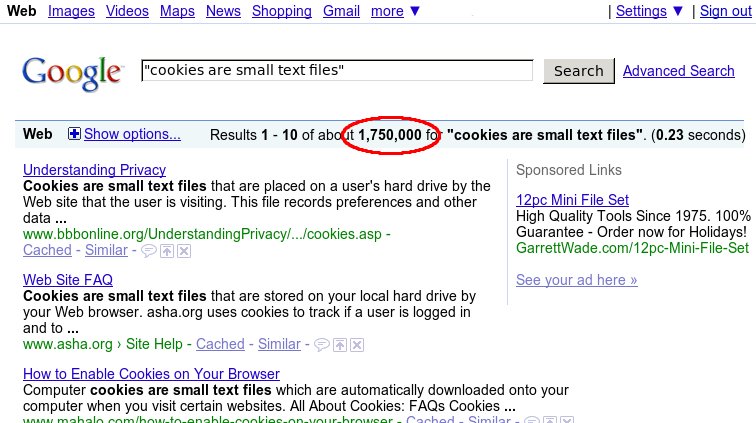
"Cookies are small text files which websites place on a visitor's
computer."
I've seen this exact phrase hundreds of times, most recently on a site
that should know better,
The Register.
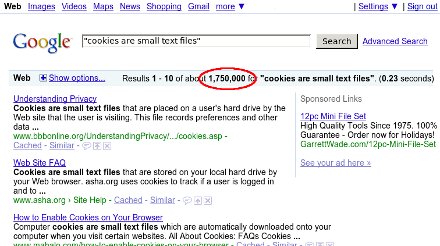
I'm dying to know who started this ridiculous non-explanation,
and why they decided to explain cookies using an implementation
detail from one browser -- at least, I'm guessing IE must implement cookies
using separate small files, or must have done so at one point. Firefox
stores them all in one file, previously a flat file and now an sqlite
database.
How many users who don't know what a cookie is do know what a
"text file" is? No, really, I'm serious. If you're a geek, go ask a few
non-geeks what a text file is and how it differs from other files.
Ask them what they'd use to view or edit a text file.
Hint: if they say "Microsoft Word" or "Open Office",
they don't know.
And what exactly makes a cookie file "text" anyway?
In Firefox, cookies.sqlite is most definitely not a "text file" --
it's full of unprintable characters.
But even if IE stores cookies using printable characters --
have you tried to read your cookies?
I just went and looked at mine, and most of them looked something like this:
Name: __utma
Value: 76673194.4936867407419370000.1243964826.1243871526.1243872726.2
I don't know about you, but I don't spend a lot of time reading text
that looks like that.
Why not skip the implementation details entirely, and just tell users
what cookies are? Users don't care if they're stored in one file or many,
or what character set is used. How about this?
Cookies are small pieces of data which your web browser stores at the
request of certain web sites.
I don't know who started this meme or why people keep copying it
without stopping to think.
But I smell a Fox Terrier. That was Stephen Jay Gould's example,
in his book Bully for Brontosaurus, of a
factoid invented by one writer and blindly copied by all who come later.
The fox terrier -- and no other breed -- was used universally for years to
describe the size of Eohippus. At least it was reasonably close;
Gould went on to describe many more examples where people copied the
wrong information, each successive textbook copying the last with
no one ever going back to the source to check the information.
It's usually a sign that the writer doesn't really understand what
they're writing. Surely copying the phrase everyone else uses must
be safe!
Tags: web, browsers, writing, skepticism, tech, firefox, mozilla
[
21:25 Dec 01, 2009
More tech/web |
permalink to this entry |
]
Tue, 14 Jul 2009
Dave just discovered a useful preference in Firefox.
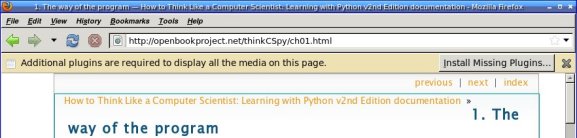
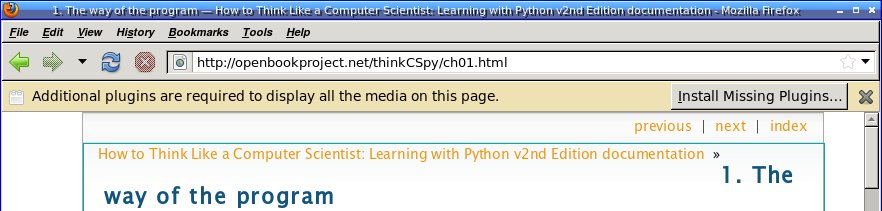
So many pages give that annoying info bar at the top that says
"Additional plugins are needed to view this page."
It doesn't tell you which plugins, but for Linux users it's a safe bet
that whatever they are, you can't get them. Why have the stupid
nagbar taking up real estate on the page for something you can't do
anything about?
Displaying the info bar is the right thing for Firefox to do, of
course. Some users may love to go traipsing off installing random
plugins to make sure they see every annoying bit of animation and
sound on a page. But Dave's excellent discovery was that the rest
of us can turn off that bar.
The preference is
plugins.hide_infobar_for_missing_plugin
and you can see it by going to about:config and
typing missing. Then double-click the line, and
you'll never see that nagbar again.
Tags: web, browsers, firefox, tips
[
12:09 Jul 14, 2009
More tech/web |
permalink to this entry |
]
Sun, 12 Jul 2009
I was reading a terrific article on the New York Times about
Watching
Whales Watching Us.
At least, I was trying to read it -- but the NYT website forces font
faces and sizes that, on my system, end up giving me a tiny font
that's too small to read. Of course I can increase font size with
Ctrl-+ -- but it gets old having to do that every time I load a NYT page.
The first step was to get Greasemonkey working on Firefox 3.5.
"Update scripts" doesn't find a new script, and if you go to
Greasemonkey's home page, the last entry is from many months ago
and announces Firefox 3.1 support. But curiously, if you go to the
Greasemonkey
page on the regular Mozilla add-ons site, it does support 3.5.
I've had Greasemonkey for quite some time, but
every time I try to get started writing a script I have trouble
getting started. There are dozens of Greasemonkey tutorials on the
web, but most of them are oriented toward installing scripts and
don't address "What do you type into the fields of the Greasemonkey
New User Script dialog?"
Fortunately, I did find one that explained it:
The
beginner's guide to Greasemonkey scripting.
I gave my script a name (NYT font) and a namespace (my own domain),
added http://*nytimes.com/* for Includes,
and nothing for Excludes.
Click OK, and Greasemonkey offers a "choose editor" dialog. I chose
emacs, which mostly worked though the emacs window unaccountably
came up with a split window that I had to dismiss with C-x 1.
Now what to type in the editor? Firebug came to the rescue here.
I went back to the NYT page with the too-small fonts and clicked on
Firebug. The body style showed that they're setting
font-family: Georgia, serif
font-size: 84.5%
84.5%? Where does that come from? What happens if I change that
to 100%? Fortunately, I can test that right there in the Firebug
window. 100% made the fonts fairly huge, but 90% was about right.
I went back to greasemonkey's editor window and added:
document.body.style.fontSize = "90%";
Saved the file, and that was all I needed! Once I hit Reload on the
NYT page I got a much more readable font size.
Tags: web, browsers, firefox, greasemonkey, programming
[
12:30 Jul 12, 2009
More tech/web |
permalink to this entry |
]
Wed, 10 Jun 2009
Lots has been written about
Bing,
Microsoft's new search engine.
It's better than Google, it's worse than Google, it'll never catch
up to Google. Farhad Manjoo of Slate had perhaps the best reason
to use Bing:
"If you switch,
Google's going to do some awesome things to try to win you back."
![[Bing in Omniweb thinks we're in Portugal]](http://shallowsky.com/blog/images/screenshots/omnigalT.jpg) But what I want to know about Bing is this:
Why does it think we're in Portugal when Dave runs it under Omniweb on Mac?
But what I want to know about Bing is this:
Why does it think we're in Portugal when Dave runs it under Omniweb on Mac?
In every other browser it gives the screen you've probably seen,
with side menus (and a horizontal scrollbar if your window isn't
wide enough, ugh) and some sort of pretty picture as a background.
In Omniweb, you get a cleaner layout with no sidebars or horizontal
scrollbars, a different pretty picture -- often
prettier than the one you get on all the other browsers, though
both images change daily -- and a set of togglebuttons that don't
show up in any of the other browsers, letting you restrict results
to only English or only results from Portugal.
Why does it think we're in Portugal when Dave uses Omniweb?
Equally puzzling, why do only people in Portugal have the option
of restricting the results to English only?
Tags: tech, browsers, mapping, geolocation, GIS
[
10:37 Jun 10, 2009
More tech |
permalink to this entry |
]
Sun, 28 Sep 2008
An interesting occurrence at a Toastmasters meeting last week
offered a lesson in the difficulties of writing or speaking
about technology.
The member who was running Table Topics had an interesting project
planned: "Bookmarks". I thought, things you put in books to mark your
place? Then I saw the three-page printout he had brought and realized
that, duh, of course, he means browser bookmarks.
The task, he explained, was to scan his eclectic list of bookmarks,
pick three, and tell a story about them.
Members reacted with confusion. Several of them said they didn't
understand what he meant at all. Would he give an example? So
he chose three and gave a short demonstration speech. But the members
still looked confused. He said if they wanted to pick just one, that
would be okay. Nobody looked relieved.
We did a couple rounds. I gave a rambling tale that incorporated
three or four bookmarks. One of our newer members took the list,
and wove a spirited story that used at least five (she eventually won
the day's Best Table Topic ribbon). Then the bookmark list passed to
one of the members who had expressed confusion.
She stared at the list, obviously baffled.
"I still don't understand. What do they have to do with bookmarks?"
"Browser bookmarks," I clarified, and a couple of other
people chimed in on that theme, but it obviously wasn't helping.
Several other members crowded around to get a look at the list.
Brows furrowed. Voices murmured. Then one of them looked up.
"Are these like ... Favorites?"
There was a immediate chorus of "Favorites?" "Oh, like in an Explorer
window?" "You mean like on the Internet?" "Ohhh, I think I get it ..."
Things improved from there.
I don't think the member who presented this project had any idea
that a lot of people wouldn't understand the term "Bookmark", as it
applies to a list of commonly-visited sites in a browser. Nor did I.
I was momentarily confused thinking me meant the other kind of
bookmark (the original kind, for paper books), but realizing that
he meant browser bookmarks cleared it right up for me.
A bigger surprise to me was that
the word "browser" wasn't any help to half the membership --
none of them understood what a "browser" was any more than they knew
what a "bookmark" was. "Like in an Explorer window?" or "on the internet"
was the closest they got to the concept that they were running a
specific program called a web browser.
These aren't stupid people;
they just don't use computers much, and haven't ever learned the
terminology for some of the programs they use or the actions they take.
When you're still learning something, you fumble around, sometimes
getting where you need to go be accident; you don't always know
how you got there, much less the terms describing the steps you took.
Even if you're an übergeek, I'm sure you have programs where
you fumble about and aren't quite sure how you get from A to B.
You may sometimes be surprised at meeting people who still use
Internet Explorer and haven't tried Firefox, let alone Opera.
You may wonder if it's the difficulty of downloading and installing
software that stops them.
But the truth may be that questions like "Have you tried Firefox?"
don't really mean anything to a lot of people; they're not really
aware that they're using Internet Explorer in the first place.
It's just a window they've managed to open to show stuff
on the internet.
Avoiding technical jargon is sometimes harder than you think.
Seemingly basic concepts are not so basic as they seem; terms you
think are universal turn out not to be. You have to be careful with
terminology if you to be understood ... and probably the only way
to know for sure if you're using jargon is to try out your language
on an assortment of people.
Tags: tech, browsers, writing, muggles
[
12:23 Sep 28, 2008
More tech |
permalink to this entry |
]
![[Bing in Omniweb thinks we're in Portugal]](http://shallowsky.com/blog/images/screenshots/omnigal.jpg)
![[RSS feed]](https://shallowsky.com/images/logos/rssicon-25x25.png)
![[Twitter icon]](https://shallowsky.com/images/logos/twitter-bird-white-on-blue-25x25.png)
![[Mastodon icon]](https://shallowsky.com/images/logos/mastodon.svg)
![[envelope]](https://shallowsky.com/images/logos/envelope-25x25.png)