Shallow Thoughts : tags : fonts
Akkana's Musings on Open Source Computing and Technology, Science, and Nature.
Fri, 27 Jan 2017
A web page I maintain (originally designed by someone else) specifies
Times font. On all my Linux systems, Times displays impossibly
tiny, at least two sizes smaller than any other font that's ostensibly
the same size. So the page is hard to read. I'm forever tempted to
get rid of that font specifier, but I have to assume that other people
in the organization like the professional look of Times, and that this
pathologic smallness of Times and Times New Roman is just a Linux font quirk.
In that case, a better solution is to alias it, so that pages that use
Times will choose some larger, more readable font on my system.
How to do that was in this excellent, clear post:
How To Set Default Fonts and Font Aliases on Linux .
It turned out Times came from the gsfonts package, while
Times New Roman came from msttcorefonts:
$ fc-match Times
n021003l.pfb: "Nimbus Roman No9 L" "Regular"
$ dpkg -S n021003l.pfb
gsfonts: /usr/share/fonts/type1/gsfonts/n021003l.pfb
$ fc-match "Times New Roman"
Times_New_Roman.ttf: "Times New Roman" "Normal"
$ dpkg -S Times_New_Roman.ttf
dpkg-query: no path found matching pattern *Times_New_Roman.ttf*
$ locate Times_New_Roman.ttf
/usr/share/fonts/truetype/msttcorefonts/Times_New_Roman.ttf
(
dpkg -S doesn't find the file because msttcorefonts
is a package that downloads a bunch of common fonts from Microsoft.
Debian can't distribute the font files directly due to licensing
restrictions.)
Removing gsfonts fonts isn't an option; aside from some documents and web
pages possibly not working right (if they specify Times or Times New Roman
and don't provide a fallback), removing gsfonts takes gnumeric and abiword
with it, and I do occasionally use gnumeric. And I like having the
msttcorefonts installed (hey, gotta have Comic Sans! :-) ).
So aliasing the font is a better bet.
Following Chuan Ji's page, linked above,
I edited ~/.config/fontconfig/fonts.conf (I already had one,
specifying fonts for the fantasy and cursive web families),
and added these stanzas:
    <match>
        <test name="family"><string>Times New Roman</string></test>
        <edit name="family" mode="assign" binding="strong">
            <string>DejaVu Serif</string>
        </edit>
    </match>
    <match>
        <test name="family"><string>Times</string></test>
        <edit name="family" mode="assign" binding="strong">
            <string>DejaVu Serif</string>
        </edit>
    </match>
The page says to log out and back in, but I found that restarting
firefox was enough. Now I could load up a page that specified Times
or Times New Roman and the text is easily readable.
Tags: linux, fonts
[
14:47 Jan 27, 2017
More linux |
permalink to this entry |
]
Tue, 04 Jan 2011
![[Fontasia, a font viewer and categorizer]](http://shallowsky.com/software/fontasia/fontasia-ssT.jpg)
I had a nice relaxing holiday season. A little too relaxing -- I
didn't get much hacking done, and spent more time fighting with
things that didn't work than making progress fixing things.
But I did spend quite a bit of time with my laptop,
currently running Arch Linux,
trying to get the fonts to work as well as they do in Ubuntu.
I don't have a definite solution yet to my Arch font issues,
but all the fiddling with fonts did lead me to realize that
I needed an easier way to preview specific fonts in bold.
So I added Bold and Italic buttons to
fontasia,
and called it Fontasia 0.5. I'm finding it quite handy for previewing
all my fixed-width fonts while trying to find one emacs can display.
Tags: fonts, programming, python
[
23:00 Jan 04, 2011
More programming |
permalink to this entry |
]
Fri, 03 Sep 2010
A couple of weeks ago I posted about
fontasia,
my new font-chooser app.
It's gone through a couple of revisions since then, and Mikael Magnusson
contributed several excellent improvements, like being able to
render each font in the font list.
I'd been holding off on posting 0.3, hoping to have time to do
something about the font buttons -- they really need to be smaller,
so there's space for more categories. But between a new job and
several other commitments, I haven't had time to implement that.
And the fancy font list is so cool it really ought to be shared.
So here it is: fontasia 0.3.
Tags: fonts, programming, python
[
10:31 Sep 03, 2010
More programming |
permalink to this entry |
]
Tue, 17 Aug 2010
We were talking about fonts again on IRC, and how there really isn't
any decent font viewer on Linux that lets you group fonts into categories.
Any time you need to choose a font -- perhaps you know you need one
that's fixed-width, script, cartoony, western-themed --
you have to go through your entire font list, clicking
one by one on hundreds of fonts and saving the relevant ones somehow
so you can compare them later. If you have a lot of fonts installed,
it can take an hour or more to choose the right font for a project.
There's a program called fontypython that does some font categorization,
but it's hard to use: it doesn't operate on your installed fonts, only
on fonts you copy into a special directory. I never quite understood
that; I want to categorize the fonts I can actually use on my system.
I've been wanting to write a font categorizer for a long time, but
I always trip up on finding documentation on getting Python to render fonts.
But this time, when I googled, I found jan bodnar's
ZetCode
Pango tutorial, which gave me all I needed and I was off and running.
Fontasia is initially a font viewer. It shows all your fonts in a list
on the left, with a preview on the right. But it also lets you add
categories: just type the category name in the box and click
Add category and a button for that category will appear,
with the current font added to it. A font can be in multiple categories.
Once you've categorized your fonts, a menu at the top of the window
lets you show just the fonts in a particular category. So if you're
working on a project that needs a Western-style font, show that
category and you'll see only relevant fonts.
You can also show only the fonts you've categorized -- that way you can
exclude fonts you never use -- I don't speak Tamil or Urdu so I don't
really need to see those fonts when I'm choosing a font. Or you can
show only the uncategorized fonts: this is useful when you add
some new fonts to your system and need to go through them and categorize
them.
I'm excited about fontasia. It's only a few days old and already used
it several times for real-world font selection problems.
If you want to try it, it's here:
Fontasia: View and
categorize fonts.
Tags: fonts, programming, python
[
12:20 Aug 17, 2010
More programming |
permalink to this entry |
]
Mon, 13 Apr 2009
I'm taking a CSS class, hoping to get a more solid understanding of
these CSS parameters I tweak and why they do or don't work, and
one of the exercises involved using the CSS font family "cursive".
Which, on my Firefox, displayed in MS Comic Sans. That doesn't look
very cursive to me!
To test what you're seeing now for cursive and fantasy, use the
W3C
font-family test page ... or these might work (though they might
not survive RSS feeds to other sites):
This is a Cursive font
... ...
This is a Fantasy font
Being a font junkie, I have plenty of nice cursive fonts installed.
The question was how to tell Firefox about them, since its font
dialog (unlike the old Seamonkey/Mozilla suite's) doesn't
make any allowance for setting them, nor do the categories show up
in about:config.
Method 1: Firefox prefs
The answer was in this
Mozillazine
thread. Edit user.js in your Firefox profile
and add lines like:
// Set cursive and fantasy fonts
user_pref("font.name.cursive.x-western", "Allegro");
user_pref("font.name.fantasy.x-western", "Dragonwick");
(of course, use fonts you have installed, not necessarily Allegro
and Dragonwick).
The bug (marked WONTFIX) requesting Firefox offer this in the
Preferences window is
bug 196405,
and related
bug 61883.
Method 2: fontconfig
But wait! Soon after I figured out how to set the font family for
Firefox, I noticed that the font was still MS Comic Sans in other
browsers -- konqueror, midori, opera. It occurred to me that that
Comic Sans cursive was probably coming from fontconfig settings,
and it should be possible to change fontconfig's defaults
for these categories.
And indeed it was, and fairly simple, too. Just make a file named
.fonts.conf in your home directory and add this to it:
<?xml version='1.0'?>
<!DOCTYPE fontconfig SYSTEM 'fonts.dtd'>
<fontconfig>
  <alias>
    <family>cursive</family>
    <prefer>
      <family>Allegro</family>
    </prefer>
  </alias>
  <alias>
    <family>fantasy</family>
    <prefer>
      <family>BoomerangItalic</family>
    </prefer>
  </alias>
</fontconfig>
Again, substitute your own fonts ... but beware. The hard part of
this exercise turned out to be that some fonts worked and some
didn't, following no rhyme or reason. My first five choices for a
fantasy font weren't picked up by fontconfig, but finally I found a
few that were. It isn't related to whether they have spaces in the
font name; it isn't where they're installed (I was using only fonts in
~/.fonts); I have no idea why some fonts work in ~/.fonts.conf and
others don't.
It's rather tedious to test, since the only way to test it is to
exit and re-start firefox. I've never found a font viewer that
will display the fonts visible to fontconfig or pango; you have to
start up some full-fledged application like firefox or gimp, and
gimp doesn't see categories like cursive or fantasy.
In the end I did find fonts that worked in firefox.
But ironically, although the system-level fix seems like a better
way to go, my font changes still don't show up in other browsers.
In opera, cursive shows up in bold block letters,
while its fantasy is MS Comic Sans.
Konqeror and Midori don't handle cursive and fantasy at all,
showing them as plain sans-serif.
And in IE6 running under wine, cursive still shows up as MS
Comic Sans ... while fantasy displays in Greek letters.
Tags: mozilla, firefox, fonts, css
[
21:30 Apr 13, 2009
More tech/web |
permalink to this entry |
]
Fri, 06 Mar 2009
We were talking about fonts on #gimp-users and someone mentioned
fontmatrix as a way to tag and organize fonts. (Tagging of resources
like fonts is on ongoing GIMP project, and with any luck will be
available in a future release.)
I tried fontmatrix and found it complex and inscrutable.
But it made me look for smaller font-tagging projects, and that led me to
FontyPython.
It's fairly small, it's Python, it's already included in Ubuntu ...
and how can you not like a project with a name like that?
When you start up, you need to choose a font folder to view any fonts.
Unfortunately,
the standard place to put fonts on a modern Linux system, ~/.fonts,
is not an option: fontypython won't look in directories starting with
a dot. The only way to view fonts installed in .fonts is to specify
it on the command line:
fontypython .fonts
I talked to the author, and it turns out the intent is quite
different: you're intended to keep your font list somewhere else
(say, ~/myfonts) and use fontypython to move fonts in and
out of ~/.fonts, with the Install button.
That model doesn't quite match my workflow --
I'd have to keep telling apps like GIMP to rescan the font list as
I added and removed fonts (and other apps besides GIMP mostly need
to be restarted to see new fonts) --
but it's probably ideal for some people.
When you first start up fontypython it displays the first page of your fonts.
Instead of a scrollbar, you page through using the Back/Forward
buttons or the option menu down below the font list.
By default, fonts are displayed quite large; you can change the size
in File->Settings if you want to see more at once.
It's time to start categorizing!
To do that, you need to create some pogs,
a silly term taken from tyPOGraphy. Pogs are just categories of font.
Click on New Pog in the buttons at the bottom right of the
window and choose a name for your first pog -- you might want pogs
for "script", or "handwriting", or "gothic", or "outline".
Once you've created some pogs, select one in
the Target list along the right edge of the window.
That's your active pog. Add fonts to the pog by clicking
on them in the list (a big red checkmark will appear over the font).
Mark as many as you want to move, then click
"Put fonts into pogname"
at the bottom of the window. Those fonts will grey out, to indicate
that they're members of the current pog.
To view fonts by pog -- to view all your handwriting or
script fonts --
use the Pogs tab near the upper left of the window.
Nothing to it! Unfortunately, the python routines fontypython uses
fails on a few fonts; but that's true of most font viewers
(like gtkfontsel), and fontypython does better than many.
It does offer a way to screen out bad fonts that can't display,
in case you have any fonts that cause serious problems like crashes
(I didn't).
Quite a useful program if you're a font junkie like I am!
I'm looking forward to using it for real projects.
Tags: fonts, linux
[
13:13 Mar 06, 2009
More linux |
permalink to this entry |
]
Sat, 04 Oct 2008
Dave and I were testing some ways of speeding up the booting process,
which is how he came to be looking at my Vaio's console with no X
running. "What's wrong with that font?" he asked.
I explained how Ubuntu always starts the boot process with a perfectly
fine font, then about 80% of the way through boot it deliberately
changes it to a garbled, difficult to read that was clearly not
designed for 1024x761. Been meaning for ages to figure out how to
fix it, never spent the time ... Okay, it said "Setting up console
font and keymap" just before it changes the font.
That message should be easy to find.
Maybe I should take a few minutes now and look into it.
The message comes from /etc/init.d/console-setup,
which runs a program called setupcons, which has a
man page. setupcons uses /etc/default/console-setup
which includes the following section:
# Valid font faces are: VGA (sizes 8, 14 and 16), Terminus (sizes
# 12x6, 14, 16, 20x10, 24x12, 28x14 and 32x16), TerminusBold (sizes
# 14, 16, 20x10, 24x12, 28x14 and 32x16), TerminusBoldVGA (sizes 14
# and 16), Fixed (sizes 13, 14, 15, 16 and 18), Goha (sizes 12, 14 and
# 16), GohaClassic (sizes 12, 14 and 16).
FONTFACE="Fixed"
FONTSIZE="16"
The hard part of changing the console font in the past has always been
finding out what console fonts are available. So having a list right
there in the comment is a big help.
Okay, let's try changing it to Terminus and running setupcons again.
Nope, error message. How about VGA? Success, looks fine. That was easy!
But while I was in that file, what about the keymap? That's another
thing I've been meaning to fix for ages ... under Debian, Redhat and
earlier Ubuntu versions I had a .kmap.gz console map that turned my
capslock key into a Control key (the way God intended). But Ubuntu
changed things all around so the old fix didn't work any more.
I found a thread from
December from someone who wanted to make the exact same change,
for the same reason, but the only real advice in the thread involved
an elaborate ritual involving defining keymaps for X and Gnome then
applying them to the console. Surely there was a better way.
It seemed pretty clear that /etc/console-setup/boottime.kmap.gz
was the keymap it was using. I tried substituting my old keymap, but
since I'd written it to inherit from other keymaps that no longer
existed, loadkeys can't use it. Eventually I just gunzipped
boottime.kmap.gz, found the Caps Lock key (keycode 29), replaced
all the Caps_Locks with Controls and gzipped
it back up again. And it worked!
Gary Vollink has a more detailed description, and the process hasn't
changed much since his page on
Getting "Control"
on the "Caps Lock".
Another gem linked to from the Ubuntu thread was this
excellent
article on keyboard layouts under X by Daniel Paul O'Donnell.
It's not relevant to the problem of setting the console keymap,
but it looks like a very useful reference on how various
international character input methods work under X.
Tags: linux, ubuntu, fonts
[
22:33 Oct 04, 2008
More linux |
permalink to this entry |
]
Fri, 02 May 2008
This has been a good week for fonts: two longstanding mysteries solved.
The first concerns the bitstream vera sans mono I've been using
as a terminal font in apps like rxvt and xterm. I'd been specifying it in
~/.Xdefaults like this:
XTerm*font: -bitstream-bitstream vera sans mono-bold-r-normal-*-12-*-*-*-*-*-iso10646-1
The mystery is that I'd noticed that in xterm, the font looked
slightly different -- slightly uglier -- than in rxvt (both apps
use the same X class name of XTerm). It was hard to put my finger on
what was different -- the shape of all the letters looked the same,
but it just seemed a little more ragged, and a little less compact,
in xterm. I figured it was just a minor difference in their drawing
code, or something.
Well, I was fiddling with fonts (trying to get the new-to-me
"Inconsolata" font working) and I noticed that iso10646 bit.
I didn't know what 10646 was, but shouldn't it be 8859-1 or 8859-15,
the codes for the Latin-1 alphabet? After finishing up my Inconsolata
experiments, when I set the font back to Vera I changed the line to
XTerm*font: -bitstream-bitstream vera sans mono-bold-r-normal-*-12-*-*-*-*-*-iso8859-15
and moved on to other things.
Until the next morning, when I booted up to a surprise: my main
terminal window no longer fit on the screen. It seems it had reverted
to the other (uglier) version of Vera Sans Mono, which is also very
slightly taller, so instead of being a couple of lines shorter than
the screen height, it was a couple of lines too tall to fit.
I checked .Xdefaults -- yes, it was still Vera. What was going on?
I finally remembered the one thing I had changed:
the language setting on the font, from 10646-1 to 8858-15. I changed
it back: sure enough, now the font was pretty again and the terminal
was short enough to fit.
I fired up xfontsel and did some experimenting. It turned out the
difference between the two almost-identical Vera sans mono bold roman
fonts is a field xfontsel calls "spc". It can be either 'c' or 'm'.
The 'c' version is the pretty, compact font; the 'm' is the uglier,
taller one. For some reason, specifying 10646-1 makes "spc" default
to 'c', while 8859-15 makes it default to 'm'. But specifying 'c'
in the font specifier gets the good version regardless of which
language is specified.
So this would work:
XTerm*font: -bitstream-bitstream vera sans mono-bold-r-normal-*-12-*-*-*-c-*-*-*
But then I read up on 10646-1 and it turns out to mean "the
whole unicode character set". That sounds like a good idea,
so I kept it in my font specifier after all:
XTerm*font: -bitstream-bitstream vera sans mono-bold-r-normal-*-12-*-*-*-c-*-iso10646-1
(For the moment I still didn't know what spc, c or n meant;
read on if you're curious.)
The second insight concerned a longstanding mystery of Dave's.
He has been complaining for quite a while about the way
Ubuntu's modern pango-based apps all refuse to see bitmapped fonts.
(It bothered me too, but less so, because the terminal and editor
apps I use can see X fonts.)
Dave has an Ubuntu install on one machine that he's been upgrading
release after release, which does see his bitmapped fonts.
But any fresh Ubuntu installation fails to see the fonts.
What was the difference?
We knew about the trick of going into /etc/fonts/conf.d,
removing the symbolic link 70-yes-bitmaps.conf and replacing it
with a link to /etc/fonts/conf.avail/70-yes-bitmaps.conf ...
But doing that doesn't actually change anything, and bitmap
fonts still don't show up.
The secret turned out to be that you need to run
fc-cache -fv
after changing the font/conf.d links. This apparently never
happens on its own -- not on a reboot, not on installing or
uninstalling font packages. Somehow it had happened once on Dave's
good install, and that's why it worked there but nowhere else.
I'm not sure how anyone is supposed to find out about fc-cache --
there's no man fontconfig,
and the /etc/fonts/conf.avail/README offers no clue,
just misleadingly says "Fontconfig scans this directory".
man fc-cache
mentions /usr/share/doc/fontconfig/fontconfig-user.html,
which doesn't exist; it turns out on Ubuntu it's actually
/usr/share/doc/fontconfig-config/fontconfig-user.html.
But wait, that's just an html-ized manual page for fonts-conf,
so actually you could just run man fonts-conf ...
your guess is as good as mine why the fc-cache man page sends
you on a hunt for html files instead.
man fonts-conf is good reading -- it even solves the
mystery of that spc parameter. It stands for spacing
and can be proportional, dual-width, monospace or charcell.
Aha! And there's lots more useful-looking information in that
manual page as well.
Tags: linux, fonts, i18n, mysteries
[
15:58 May 02, 2008
More linux |
permalink to this entry |
]
Mon, 07 Apr 2008
On a lunchtime bird walk on Monday I saw one blue heron and at least
five green herons (very unusuual to see so many of those).
Maybe that helped prepare me for installing the latest
Ubuntu beta, "Hardy Heron", Monday afternoon.
I was trying the beta primarily in the hope that it would fix a
serious video out regression that appeared in Gutsy (the current
Ubuntu) in January.
My beloved old Vaio SR17 laptop can't switch video signals on the
fly like some laptops can; I've always needed to boot it with an
external monitor or projector connected. But as long as it saw a
monitor at boot time, it would remember that state through many
suspend cycles, so I could come out of suspend, plug in to a projector
and be ready to go. But beginning some time in late January, somehow
Gutsy started doing something that turned off the video signal when
suspending. To talk to a projector, I could reboot with the projector
connected (I hate making an audience watch that! and besides, it takes
away the magic). I also discovered that switching to one of
the alternate consoles, then back (ctl-alt-F2 ctl-alt-F7) got a signal
going out on the video port -- but I found out the hard way, in front
of an audience, that it was only a 640x480 signal, not the 1024x768
signal I expected. Not pretty! I could either go back to Feisty ...
or try upgrading to Hardy.
I've already written about the handy
debootstrap
lightweight install process I used.
(I did try the official Hardy "alternate installer" disk first, but
after finishing package installation it got into a spin lock
trying to configure kernel modules, so I had to pull the plug and
try another approach.)
This left me with a system that was very minimal indeed, so I spent
the next few hours installing packages, starting with
tcsh, vim (Ubuntu's minimal install has something called vim, but
it's not actually vim so you tend to get lots of errors about parsing
your .vimrc until you install the real vim),
acpi and acpi-support (for suspending),
and the window system: xorg and friends. To get xorg, I started with:
apt-get install xserver-xorg-video-savage xbase-clients openbox xloadimage xterm
Then there was the usual exercise of aptitude search font
and installing everything on that list that seemed relevant to
European languages (I don't really need to scroll through dozens of
Tamil, Thai, Devanagari and Bangla fonts every time I'm looking for a
fancy cursive in GIMP).
But I hit a problem with that pretty early on: turns out most of
the fonts I installed weren't actually showing up in xlsfonts,
xfontsel, gtkfontsel, or, most important, the little xlib program
I'm using for a talk I need to give in a couple weeks.
I filed it as bug
212669, but kept working on it, and when a clever person on
#ubuntu+1 ("redwhitewaldo") suggested I take a look at the
x-ttcidfont-conf README, that gave me enough clue to get me
the rest of the way. Turns out there's a Debian
bug with the solution, and the workaround is easy until the
Ubuntu folks pick up the update.
I hit a few other problems, like the
PCMCIA/udev
problem I've described elsewhere ... but mostly, my debootstrapped
Hardy Heron is working quite well.
And in case you're wondering whether Hardy fixed the video signal
problem, I'm happy to say it does. Video out is working just fine.
Tags: linux, ubuntu, install, fonts, vaio
[
19:31 Apr 07, 2008
More linux/install |
permalink to this entry |
]
Tue, 12 Apr 2005
A recent change to the Debian font system has caused some odd
font problems which Debian users might do well to know about.
The change has to do with the addition in /etc/fonts of a
directory conf.d containing symbolic links to scripts,
and the overwriting of some of the existing files in /etc/fonts.
The symptoms are varied and peculiar. On my sid system, on each
boot, the system would toggle between two different font resolutions.
I'd start xchat, and the fonts would be too teeny to read; so I'd call
up the preferences dialog, see the font was at 9, and increase it to
12, at which point I'd see the font I was used to seeing (though the
UI font in the tabs would still be teeny). Subsequent runs of xchat
would be fine (except for the still-teeny tab fonts). But upon
reboot, xchat would come up with the tab font correct and the channel
font HUGE. Prefs dialog again: it's still at 12 where I set it last
time, so now I reset it to 9, which makes it the right size.
Until the next reboot, when everything became teeny again and
I have to go back to 12.
The system resolution never changed, nor did the rendering of the
bitmapped fonts I use in emacs and terminal clients; only the
rendering of freetype scalable fonts changed with each reboot.
Back in the days when all fonts were bitmapped, I would have guessed
that the font system was alternating between 100dpi fonts and 72dpi fonts.
At a loss as to what might cause this strange behavior, I took a
peek into /etc/fonts/conf.d, which Dave had discovered a
few weeks ago when he updated his sarge system and all his bitmapped
fonts disappeared. Though my problem didn't sound remotely
similar to his: my bitmapped fonts were fine, it was the scalable
ones which were flaky.
Turns out the symlink I'd aquired in the update,
/etc/fonts/conf.d/30-debconf-no-bitmaps.conf, did indeed
point to a file called no-bitmaps.conf, just as Dave's had.
Just to see what would happen, I removed it, and made a new symlink,
30-debconf-yes-bitmaps.conf, pointing to yes-bitmaps.conf.
Voila! The size-toggling problem disappeared,
and, even better, bitmapped fonts like "clean" now show up in
gtkfontsel and in gtk font selection dialogs, which they never did
before. I can use all my fonts now!
The moral is: if you've updated sarge or sid recently, and see
any weirdness at all in fonts, go to /etc/fonts/conf.d and
fiddle with the symlinks. Even if it doesn't seem directly related to
your problem.
As to why no-bitmaps.conf causes the system to toggle between
two different font scalings, that's still a mystery. The only
difference between no-bitmaps.conf and yes-bitmaps.conf
is that one rejects, and the other accepts, fonts that have "scalable"
set to false. Why that would change the scale at which fonts are
rendered is beyond me. I'll leave that up to someone who understands
the new debian font system. If any such person exists.
Update 5/24/2005: turns out you can change this on a per-user
basis too, with ~/.fonts.conf. man fonts.conf for details.
Tags: linux, debian, fonts
[
22:45 Apr 12, 2005
More linux |
permalink to this entry |
]
Thu, 13 Jan 2005
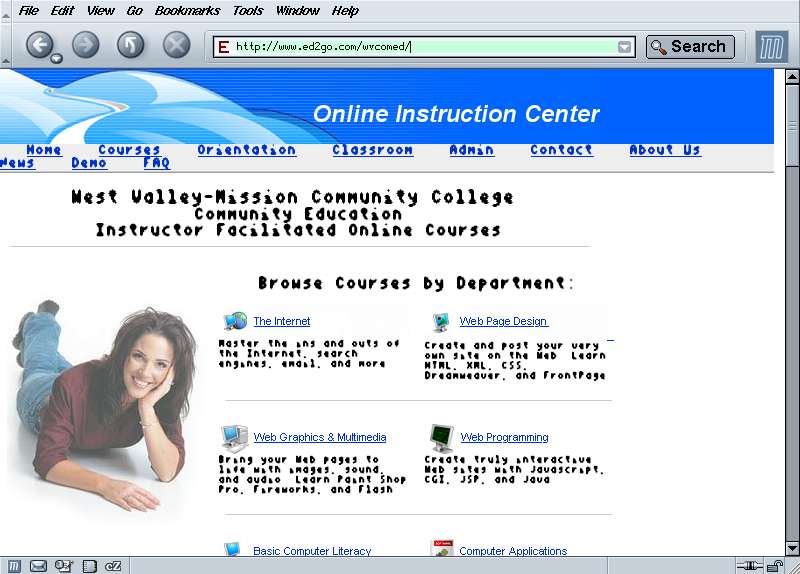
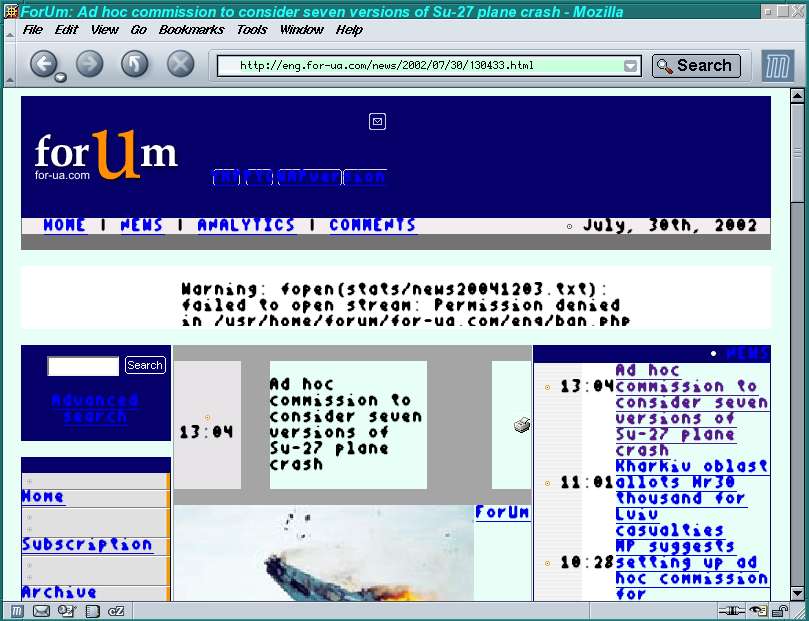
For years I've been plagued by having web pages occasionally display
in a really ugly font that looks like some kind of ancient OCR font
blockily scaled up from a bitmap font.
For instance, look at West Valley College
page, or this news page.
I finally discovered today that pages look like this because Mozilla
thinks they're in Cyrillic! In the case of West Valley, their
server is saying in the http headers:
Content-Type: text/html; charset=WINDOWS-1251
-- WINDOWS-1251 is Cyrillic --
but the page itself specifies a Western character set:
<META http-equiv=Content-Type content="text/html; charset=iso-8859-1">
On my system, Mozilla believes the server instead of the page,
and chooses a Cyrillic font to display the page in. Unfortunately,
the Cyrillic font it chooses is extremely bad -- I have good ones
installed, and I can't figure out where this bad one is coming from,
or I'd terminate it with extreme prejudice. It's not even readable
for pages that really are Cyrillic.
The easy solution for a single page is to use Mozilla's View menu:
View->Character Encoding->Western (ISO-8851-1).
Unfortunately, that has to be done again for each new link
I click on the site; there seems to be no way to say "Ignore
this server's bogus charset claims".
The harder way: I sent mail to the contact address on the server
page, and filed bug
278326 on Mozilla's ignoring the page's meta tag (which you'd
think would override the server's default), but it was closed with
the claim that the standard requires that Mozilla give precedence
to the server. (I wonder what IE does?)
At least that finally inspired me to install Mozilla 1.8a6, which
I'd downloaded a few days ago but hadn't installed yet, to verify
that it saw the same charset. It did, but almost immediately I hit
a worse bug: now mozilla -remote always opens a new window,
even if new-tab or no directive at all is specified.
The release notes have nothing matching "remote, but
someone had already filed bug
276808.
Tags: tech, web, fonts, linux
[
20:15 Jan 13, 2005
More tech/web |
permalink to this entry |
]
Fri, 09 Jul 2004
This evening, thanks to
Rob Weir's
Debian Font Guide and some suggestions from Rob himself, I finally
got rid of that ugly oversized scaled-bitmap helvetica (or similar)
font that has plagued all my Debian installs since I first started
using Debian. It turns out that it comes from the gsfonts-x11
(ghostscript and gv). Remove gsfonts-x11, and gtk windows now use
a much much smaller, clean, truetype helvetica font. Alternately,
keeping gsfonts-x11 installed, but removing /usr/lib/X11/fonts/Type1
from the font path, gives me a medium sized, cleanly rendered
helvetica in gtk windows. I may have trouble viewing postscript
documents in gv; we'll see. But having all my other windows use
clean fonts makes it worth risking some gv breakage.
Other things I had to do: install x-ttcidfont-conf (defoma was
already installed); disable the font server (comment out the
unix/:7100 line from XF86Config-4, plus update-rc.d -f xfs remove);
reorder the FontPath lines in XF86Config-4 as suggested in the font
guide, and remove (comment out) the
/var/lib/defoma/x-ttcidfont-conf.d/dirs/CID line.
Strangely, even if I list the Type1 directory after all the others
in XF86Config-4, it still takes precedence over all the other
helveticas. Neither Rob nor I could figure out why.
Why do packages include fonts like that? Abiword used to have a
font like that on Redhat. It's almost always for helvetica (which
has a gazillion other implementations anyway, so it's not as though
they have to worry that they won't be able to find a helvetica on
the system if they don't install theirs).
Tags: linux, fonts
[
19:00 Jul 09, 2004
More linux |
permalink to this entry |
]
![[RSS feed]](https://shallowsky.com/images/logos/rssicon-25x25.png)
![[Twitter icon]](https://shallowsky.com/images/logos/twitter-bird-white-on-blue-25x25.png)
![[Mastodon icon]](https://shallowsky.com/images/logos/mastodon.svg)
![[envelope]](https://shallowsky.com/images/logos/envelope-25x25.png)