Shallow Thoughts : tags : writing
Akkana's Musings on Open Source Computing and Technology, Science, and Nature.
Mon, 04 Sep 2017
![[Raspberry Pi Zero W]](http://shallowsky.com/blog/images/pi-no-headers.jpg) My new book is now shipping! And it's being launched via a terrific Humble
Bundle of books on electronics, making, Raspberry Pi and Arduino.
My new book is now shipping! And it's being launched via a terrific Humble
Bundle of books on electronics, making, Raspberry Pi and Arduino.
Humble Bundles, if you haven't encountered them before, let you pay
what you want for a bundle of books on related subjects. The books are
available in ePub, Mobi, and PDF formats, without DRM, so you can read
them on your choice of device. If you pay above a certain amount,
they add additional books. My book is available if you pay $15 or more.
You can also designate some of the money you pay for charity.
In this case the charity is Maker Ed,
a crowdfunding initiative that supports Maker programs primarily
targeted toward kids in schools. (I don't know any more about them
than that; check out their website for more information.)
Jumpstarting the Raspberry Pi Zero W is a short book,
with only 103 pages in four chapters:
- Getting Started: includes tips on headless setup and the Linux
command line;
- Blink an LED: includes ways to blink and fade LEDs from the shell
and from several different Python libraries;
- A Temperature Notifier and Fan Control: code and wiring
instructions for three different temperature sensors (plus humidity
and barometric pressure), and a way to use them to control your house
fan or air conditioner, either according to the temperature in the room
or through a Twitter command;
- A Wearable News Alert Light Show: wire up NeoPixels or DotStars
and make them respond to keywords on Twitter or on any other web page
you choose, plus some information on powering a Pi portably with batteries.
All the code and wiring diagrams from the book, plus a few extras, are
available on Github, at my
Raspberry Pi Zero
Book code repository.
To see the book bundle, go to the
Electronics
& Programming Humble Bundle and check out the selections.
My book, Jumpstarting the Raspberry Pi Zero W, is available if
you pay $15 or more -- along with tons of other books you'll probably
also want. I already have Make: Electronics and it's one of the
best introductory electronics books I've seen, so I'm looking forward
to seeing the followup volume. Plus there are books on atmospheric and
environmental monitoring, a three-volume electronic components
encyclopedia, books on wearable electronics and drones and other cool stuff.
I know this sounds like a commercial, but this bundle really does look
like a great deal, whether or not you specifically want my Pi book,
and it's a limited-time offer, only good for six more days.
Tags: writing, raspberry pi, electronics, maker, arduino
[
13:21 Sep 04, 2017
More writing |
permalink to this entry |
]
Sun, 16 Jul 2017
For the Raspberry Pi Zero W book I'm writing, the publisher, Maker
Media, wants submissions in Word format (but stressed that LibreOffice
was fine and lots of people there use it, a nice difference from
Apress). That's fine ... but when I'm actually writing, I want to be
able to work in emacs; I don't want to be distracted fighting with
LibreOffice while trying to write.
For the GIMP book, I wrote in plaintext first, and formatted it later.
But that means the formatting step took a long time and needed
exceptionally thorough proofreading. This time, I decided to
experiment with Markdown, so I could add emphasis, section headings,
lists and images all without leaving my text editor.
Of course, it would be nice to be able to preview what the formatted
version will look like, and that turned out to be easy with a markdown
editor called ReText, which has a lovely preview mode, as long as you
enable Edit->Use WebKit renderer (I'm not sure why that
isn't the default).
Okay, a chapter is written and proofread. The big question: how to get
it into the Word format the publisher wants?
First thought:
ReText has a File->Export menu. Woohoo -- it offers ODT.
So I should be able to export to ODT then open the resulting file in
LibreOffice.
Not so much. The resulting LibreOffice document is a mess, with formatting
that doesn't look much like the original, and images that are all sorts
of random sizes. I started going through it, resizing all the images
and fixing the formatting, then realized what a big job it was going to
be and decided to investigate other options first.
ReText's Export menu also offers HTML, and the HTML it produces looks
quite nice in Firefox. Surely I could open that in LibreOffice, then
save it (maybe with a little minor reformatting) as DOCX?
Well, no, at least not directly. It turns out LibreOffice has no
obvious way to import an HTML file into a normal text document. If you
Open the HTML file, it displays okay (except the images are all tiny
thumbnails and need to be resized one by one); but LibreOffice can't
save it in any format besides HTML or plaintext. Those are the only
formats available in the menu in the Save dialog. LibreOffice also has
a Document Converter, but it only converts Office formats, not
HTML; and there's no Import... in LO's File. There's
a Wizards->Web Page, but it's geared to creating a new web
page and saving as HTML, not importing an existing HTML-formatted
document.
But eventually I discovered that if I "Create a new Text Document" in
LibreOffice, I can Select All and Copy in Firefox, followed
by Paste into Libre Office. It works great. All the images are the
correct size, the formatting is correct needing almost no corrections,
and LibreOffice can save it as DOCX, ODT or whatever I need.
Image Captions
I mentioned that the document needed almost no corrections. The exception
is captions.
Images in a book need captions and figure numbers, unlike images in HTML.
Markdown specifies images as
![Image description][path/to/image.jpg)
Unfortunately, the Image description part is only visible as a
mouseover, which only works if you're exporting to a format intended
for a web browser that runs on desktop and laptop computers. It's no
help in making a visible caption for print, or for tablets or phones
that don't have mouseover. And the mouseover text disappears completely
when you paste the document from Firefox into LibreOffice.
I also tried making a table with the image above and the caption
underneath. But I found it looked just as good in ReText, and much
better in HTML, just to add a new paragraph of italics below the image:
![][path/to/image.jpg)

*Image description here*
That looks pretty nice in a browser or when pasted into LibreOffice.
But before submitting a chapter, I changed them into real
LibreOffice captions.
In LibreOffice, right-click on the image; Add Caption is in the
context menu. It can even add numbers automatically. It initially
wants to call every caption "Illustration" (e.g. "Illustration 1",
"Illustration 2" and so on), and strangely, "Figure" isn't one of the
available alternatives; but you can edit the category and change it to
Figure, and that persists for the rest of the document, helpfully
numbering all your figures in order. The caption dialog when you add
each caption always says that the caption will be "Illustration 1:
(whatever you typed)" even if it's the fourteenth image you've
captioned; but when you dismiss the dialog it shows up correctly as
Figure 14, not as a fourteenth Figure 1.
The only problem arises if you have to insert a new image in the
middle of a chapter. If you do that, you end up with two Figure 6 (or
whatever the number is) and it's not clear how to persuade LibreOffice
to start over with its renumbering. You can fix it if you remove all
the captions and start over, but ugh. I never found a better way, and
web searches on LibreOffice caption numbers suggest this
is a perennial source of frustration with LibreOffice.
The bright side: struggling with captions in LibreOffice convinced me
that I made the right choice to do most of my work in emacs and markdown!
Tags: writing, markdown
[
14:12 Jul 16, 2017
More writing |
permalink to this entry |
]
Thu, 06 Jul 2017
It's official: I'm working on another book!
This one will be much shorter than Beginning
GIMP. It's a mini-book for Make Media on the Raspberry Pi Zero W
and some fun projects you can build with it.
![[Raspberry Pi Zero W]](http://shallowsky.com/blog/images/pi-and-quarter.jpg)
I don't want to give too much away at this early stage, but I predict
it will include light shows, temperature sensors, control of household
devices, Twitter access and web scraping. And lots of code samples.
I'll be posting more about the book, and about various Raspberry Pi
Zero W projects I'm exploring during the course of writing it.
But for now ... if you'll excuse me, I have a chapter that's due today,
and a string of addressable LEDs sitting on my desk calling out to be
played with as part of the next chapter.
Tags: writing, raspberry pi, hardware
[
09:50 Jul 06, 2017
More writing |
permalink to this entry |
]
Wed, 11 Dec 2013
When I wrote recently about my
Dactylic
dinosaur doggerel, I glossed over a minor problem with my final poem:
the rules of
double-dactylic
doggerel say that the sixth line (or sometimes the seventh) should
be a single double-dactyl word -- something like "paleontologist"
or "hexasyllabic'ly". I used "dinosaur orchestra" -- two words,
which is cheating.
I don't feel too guilty about that.
If you read the post, you may recall that the verse was the result of
drifting grumpily through an insomniac morning where I would have
preferred to be getting back to sleep. Coming up with anything that
scans at all is probably good enough.
Still, it bugged me, not being able to think of a double-dactylic word
that related somehow to Parasaurolophus. So I vowed that, later that
day when I was up and at the computer, I would attempt to find one and
rewrite the poem accordingly.
I thought that would be fairly straightforward. Not so much. I thought
there would be some utility I could run that would count syllables for
me, then I could run /usr/share/dict/words through it, print
out all the 6-syllable words, and find one that fit. Turns out there
is no such utility.
But Python has a library for everything, doesn't it?
Some searching turned up
PyHyphen,
which includes some syllable-counting functions.
It apparently uses the hyphenation dictionaries that come with
LibreOffice.
There's a Debian package for it, python-pyhyphen -- but it doesn't work.
First, it depends on another package, hyphen-en-us, but doesn't
have that dependency encoded in the package, even as a suggested or
recommended package. But even when you install the hyphenated dictionary,
it still doesn't work because it doesn't point to the dictionary in
the place it was installed.
Looks like that problem was reported almost two years ago,
bug 627944:
python-pyhyphen: doesn't work out-of-the-box with hyphen-* packages.
There's a fix there that involves editing two files,
/usr/lib/python2.7/dist-packages/hyphen/config.py and
/usr/lib/python2.7/dist-packages/hyphen/__init__.py.
Or you can just give up on Debian and pip install pyhyphen,
which is a lot easier.
But once you get it working, you find that it's terrible.
It was wrong about almost every word I tried.
I hope not too many people are relying on this hyphen-en-us dictionary
for important documents. Its results seemed nearly random, and I
quickly gave up on it for getting a useful list of words around
six syllables.
Just for fun, since my count syllables web search turned
up quite a few websites claiming that functionality, I tried entering
some of my long test words manually. All of the websites I tried were
wrong more than half the time, and often they were off by more than
two syllables. I don't mind off-by-ones -- I can look at words
claiming 5 and 7 syllables while searching for double dactyls --
but if I have to include 4-syllable words as well, I'll never find
what I'm looking for.
That discouraged me from using another Python suggestion I'd seen, the
nltk (natural language toolkit) package. I've been looking for an
excuse to play with nltk, and some day I will, but for this project
I was looking for a quick approximate solution, and the nltk examples
I found mostly looked like using it would require a bigger time
commitment than I was willing to devote to silly poetry. And if
none of the dedicated syllable-counting websites or dictionaries
got it right, would a big time investment in nltk pay off?
Anyway, by this time I'd wasted more than an hour poking around
various libraries and websites for this silly unimportant problem,
and I decided that with that kind of time investment, I could probably
do better on my own than the official solutions were giving me.
Why not basically just count vowels?
So I whipped up a little script,
countsyl,
that did just that. I gave it a list of vowels, with a few simple rules.
Obviously, you can't just say every vowel is a new syllable -- there
are too many double vowels and silent letters and such. But you can't
say that any run of multiple vowels together counts as one syllable,
because sometimes the vowels do count; and you can't make absolute
rules like "'e' at the end of a word is always silent", because
sometimes it isn't. So I kept both minimum and maximum syllable counts
for each word, and printed both.
And much to my surprise, without much tuning at all my silly little
script immediately much better results than the hyphenation dictionary
or the dedicated websites.
Alas, although it did give me quite a few hexasyllabic words in
/usr/share/dict/words, none of them were useful at all for a program
on Parasaurolophus. What I really needed was a musical term (since
that's what the poem is about). What about a musical dictionary?
I found a list of musical terms on
Wikipedia:
Glossary of musical terminology, saved it as a local file,
ran a few vim substitutes and turned it into a plain list of words.
That did a little better, and gave me some possible ideas:
(non?)contrapuntally?
(something)harmonically?
extemporaneously?
But none of them worked out, and by then I'd run out of steam.
I gave up and blogged the poem as originally written, with the
cheating two-word phrase "dinosaur orchestra", and vowed to write
up how to count words in Python -- which I have now done.
Quite noncontrapuntally, and definitely not extemporaneously.
But at least I have a useful little script next time I want to
get an approximate syllable count.
Tags: dinosaur, poetry, writing, programming, python, language
[
17:51 Dec 11, 2013
More programming |
permalink to this entry |
]
Thu, 21 Nov 2013
I woke up thinking about dinosaurs.
 Specifically, Pachycephalosaurus, the bone-headed dinosaur, and her
long-crested cousin
Parasaurolophus
(pictured at right).
Specifically, Pachycephalosaurus, the bone-headed dinosaur, and her
long-crested cousin
Parasaurolophus
(pictured at right).
The previous night, I had been reading
The Know-It-All,
A. J. Jacob's entertaining account of his adventures reading the whole
Encyclopedia Britannica. I'd left off in the Ps, which included a very
short entry on Pachycephalosaurus (A.J. is not particularly into
dinosaurs).
Drifting along in a typical insomniac "I wish I could get back to sleep"
haze, I couldn't help noticing that Parasaurolophus was six syllables --
in fact, it was a double dactyl.
And that meant it was a prime candidate for my favorite verse form,
double-dactylic
doggerel, a form with fairly strict rules which require, among
other things, that the second line be a double-dactylic proper name.
And as double-dactylic junkies know, once you've noticed a
double-dactylic name, you can't rest until it's turned into a poem.
So now I couldn't sleep because I was thinking about Parasaurolophus.
Now, even aside from its mellifluous name, Parasaurolophus and the whole
Hadrosaur family
are pretty interesting. The biggest puzzle is why they had those
elaborate bony crests.
Decoration for mating purposes? Fighting, like horns and antlers
on modern hoofed mammals? But in the late 1990s, CT scans of hadrosaur
fossils revealed long air passages inside the crests of many
Hadrosaurs, including Parasaurolophus ... and those air passages were
connected to the nasal passages.
That led to suggestions that the crests might have been tuned for
sound production -- a built-in wind instrument.
![[computer model of Parasaurolophus crest]](http://www.sandia.gov/media/images/dino.gif) In Scientists Use
Digital Paleontology to Produce Voice of Parasaurolophus Dinosaur
a team at Sandia made computer models of the air passages,
and you can even listen to sound files of what Parasaurolophus might have
sounded like. The sound is wonderful, like a trombone. Sandia's
pages use a, <embed> tag that didn't work for me in Firefox, so
if you have trouble with their links, I've separated out the
wav file URLs:
songLQ.wav (588k)
and a higher quality version,
song2.wav (2.7M).
In Scientists Use
Digital Paleontology to Produce Voice of Parasaurolophus Dinosaur
a team at Sandia made computer models of the air passages,
and you can even listen to sound files of what Parasaurolophus might have
sounded like. The sound is wonderful, like a trombone. Sandia's
pages use a, <embed> tag that didn't work for me in Firefox, so
if you have trouble with their links, I've separated out the
wav file URLs:
songLQ.wav (588k)
and a higher quality version,
song2.wav (2.7M).
Anyway, I never did get back to sleep, but I did end up with some
insomniacal doggerel:
Dinosaur, schminosaur
Parasaurolophus
How do you use that
Magnificent crest?
"I play trombone in the
Dinosaur orchestra
All hadrosaurs play, but
I am the best."
Tags: dinosaur, poetry, writing
[
16:49 Nov 21, 2013
More writing |
permalink to this entry |
]
Thu, 29 Dec 2011
My SJAA planet-observing column for January is about
the Analemma and the
Equation of Time.
The analemma is that funny figure-eight you see on world globes in the
middle of the Pacific Ocean. Its shape is the shape traced out by
the sun in the sky, if you mark its position at precisely the same
time of day over the course of an entire year.
The analemma has two components: the vertical component represents
the sun's declination, how far north or south it is in our sky.
The horizontal component represents the equation of time.
The equation of time describes how the sun moves relatively faster or
slower at different times of year. It, too, has two components: it's
the sum of two sine waves, one representing how the earth speeds up
and slows down as it moves in its elliptical orbit, the other a
function the tilt (or "obliquity") of the earth's axis compared to
its orbital plane, the ecliptic.
![[components of the Equation of time]](http://ephemeris.sjaa.net/1201/graph.jpg) The Wikipedia page for
Equation of
time includes a link to a lovely piece of
R code by
Thomas Steiner showing how the two components relate. It's labeled
in German, but since the source is included, I was able to add English
labels and use it for my article.
The Wikipedia page for
Equation of
time includes a link to a lovely piece of
R code by
Thomas Steiner showing how the two components relate. It's labeled
in German, but since the source is included, I was able to add English
labels and use it for my article.
But if you look at photos
of real analemmas in the sky, they're always tilted. Shouldn't they
be vertical? Why are they tilted, and how does the tilt vary with
location? To find out, I wanted a program to calculate the analemma.
Calculating analemmas in PyEphem
The very useful astronomy Python package
PyEphem
makes it easy to calculate the position of any astronomical object
for a specific location. Install it with: easy_install pyephem
for Python 2, or easy_install ephem for Python 3.
import ephem
observer = ephem.city('San Francisco')
sun = ephem.Sun()
sun.compute(observer)
print sun.alt, sun.az
The alt and az are the altitude and azimuth of the sun right now.
They're printed as strings: 25:23:16.6 203:49:35.6
but they're actually type 'ephem.Angle', so float(sun.alt) will
give you a number in radians that you can use for calculations.
Of course, you can specify any location, not just major cities.
PyEphem doesn't know San Jose, so here's the approximate location of
Houge Park where the San Jose Astronomical
Association meets:
observer = ephem.Observer()
observer.name = "San Jose"
observer.lon = '-121:56.8'
observer.lat = '37:15.55'
You can also specify elevation, barometric pressure and other parameters.
So here's a simple analemma, calculating the sun's position at noon
on the 15th of each month of 2011:
    for m in range(1, 13) :
        observer.date('2011/%d/15 12:00' % (m))
        sun.compute(observer)
I used a simple PyGTK window to plot sun.az and sun.alt, so once
it was initialized, I drew the points like this:
    # Y scale is 45 degrees (PI/2), horizon to halfway to zenith:
    y = int(self.height - float(self.sun.alt) * self.height / math.pi)
    # So make X scale 45 degrees too, centered around due south.
    # Want az = PI to come out at x = width/2.
    x = int(float(self.sun.az) * self.width / math.pi / 2)
    # print self.sun.az, float(self.sun.az), float(self.sun.alt), x, y
    self.drawing_area.window.draw_arc(self.xgc, True, x, y, 4, 4, 0, 23040)
So now you just need to calculate the sun's position at the same time
of day but different dates spread throughout the year.
![[analemma in San Jose at noon clock time]](http://shallowsky.com/blog/images/analemma/sj-analemma-clocktimes.jpg) And my 12-noon analemma came out almost vertical! Maybe the tilt I saw
in analemma photos was just a function of taking the photo early in
the morning or late in the afternoon? To find out, I calculated the
analemma for 7:30am and 4:30pm, and sure enough, those were tilted.
And my 12-noon analemma came out almost vertical! Maybe the tilt I saw
in analemma photos was just a function of taking the photo early in
the morning or late in the afternoon? To find out, I calculated the
analemma for 7:30am and 4:30pm, and sure enough, those were tilted.
But wait -- notice my noon analemma was almost vertical -- but
it wasn't exactly vertical. Why was it skewed at all?
Time is always a problem
As always with astronomy programs, time zones turned out to be the
hardest part of the project. I tried to add other locations to my
program and immediately ran into a problem.
The ephem.Date class always uses UTC, and has no concept
of converting to the observer's timezone. You can convert to the timezone
of the person running the program with localtime, but
that's not useful when you're trying to plot an analemma at local noon.
At first, I was only calculating analemmas for my own location.
So I set time to '20:00', that being the UTC for my local noon.
And I got the image at right. It's an analemma, all right, and
it's almost vertical. Almost ... but not quite. What was up?
Well, I was calculating for 12 noon clock time -- but clock time isn't
the same as mean solar time unless you're right in the middle of your
time zone.
You can calculate what your real localtime is (regardless of
what politicians say your time zone should be) by using your longitude
rather than your official time zone:
    date = '2011/%d/12 12:00' % (m)
    adjtime = ephem.date(ephem.date(date) \
                    - float(self.observer.lon) * 12 / math.pi * ephem.hour)
    observer.date = adjtime
Maybe that needs a little explaining. I take the initial time string,
like '2011/12/15 12:00', and convert it to an ephem.date.
The number of hours I want to adjust is my longitude (in radians)
times 12 divided by pi -- that's because if you go pi (180) degrees
to the other side of the earth, you'll be 12 hours off.
Finally, I have to multiply that by ephem.hour because ...
um, because that's the way to add hours in PyEphem and they don't really
document the internals of ephem.Date.
![[analemma in San Jose at noon clock time]](http://shallowsky.com/blog/images/analemma/sj-analemma-localtime.jpg) Set the observer date to this adjusted time before calculating your
analemma, and you get the much more vertical figure you see here.
This also explains why the morning and evening analemmas weren't
symmetrical in the previous run.
Set the observer date to this adjusted time before calculating your
analemma, and you get the much more vertical figure you see here.
This also explains why the morning and evening analemmas weren't
symmetrical in the previous run.
This code is location independent, so now I can run my analemma program
on a city name, or specify longitude and latitude.
PyEphem turned out to be a great tool for exploring analemmas.
But to really understand analemma shapes, I had more exploring to do.
I'll write about that, and post my complete analemma program,
in the next article.
Tags: analemma, astronomy, science, programming, python, writing
[
20:54 Dec 29, 2011
More science/astro |
permalink to this entry |
]
Thu, 22 Dec 2011
Today is the winter solstice -- the official beginning of winter.
The solstice is determined by the Earth's tilt on its axis, not
anything to do with the shape of its orbit: the solstice is the point
when the poles come closest to pointing toward or away from the sun.
To us, standing on Earth, that means the winter solstice is the day
when the sun's highest point in the sky is lowest.
You can calculate the exact time of the equinox using the handy Python
package PyEphem.
Install it with: easy_install pyephem
for Python 2, or easy_install ephem for Python 3.
Then ask it for the date of the next or previous equinox.
You have to give it a starting date, so I'll pick a date in late summer
that's nowhere near the solstice:
>>> ephem.next_solstice('2011/8/1')
2011/12/22 05:29:52
That agrees with my RASC Observer's Handbook: Dec 22, 5:30 UTC. (Whew!)
PyEphem gives all times in UTC, so, since I'm in California, I subtract
8 hours to find out that the solstice was actually last night at 9:30.
If I'm lazy, I can get PyEphem to do the subtraction for me:
ephem.date(ephem.next_solstice('2011/8/1') - 8./24)
2011/12/21 21:29:52
I used 8./24 because PyEphem's dates are in decimal days, so in order
to subtract 8 hours I have to convert that into a fraction of a 24-hour day.
The decimal point after the 8 is to get Python to do the division in
floating point, otherwise it'll do an integer division and subtract
int(8/24) = 0.
The shortest day
The winter solstice also pretty much marks the shortest day of the year.
But was the shortest day yesterday, or today?
To check that, set up an "observer" at a specific place on Earth,
since sunrise and sunset times vary depending on where you are.
PyEphem doesn't know about San Jose, so I'll use San Francisco:
>>> import ephem
>>> observer = ephem.city("San Francisco")
>>> sun = ephem.Sun()
>>> for i in range(20,25) :
...   d = '2011/12/%i 20:00' % i
...   print d, (observer.next_setting(sun, d) - observer.previous_rising(sun, d)) * 24
2011/12/20 20:00 9.56007901422
2011/12/21 20:00 9.55920379754
2011/12/22 20:00 9.55932991847
2011/12/23 20:00 9.56045709446
2011/12/24 20:00 9.56258416496
I'm multiplying by 24 to get hours rather than decimal days.
So the shortest day, at least here in the bay area, was actually yesterday,
2011/12/21. Not too surprising, since the solstice wasn't that long
after sunset yesterday.
If you look at the actual sunrise and sunset times, you'll find
that the latest sunrise and earliest sunset don't correspond to the
solstice or the shortest day. But that's all tied up with the equation
of time and the analemma ... and I'll cover that in a separate article.
Tags: astronomy, science, programming, python, writing
[
11:28 Dec 22, 2011
More science/astro |
permalink to this entry |
]
Wed, 30 Mar 2011
Since switching to the
Archos 5 Android tablet
for my daily feed reading, I've also been using it to read books in EPUB format.
There are tons of places to get EPUB ebooks -- I won't try
to list them all, but Project Gutenberg
is a good place to start. The next question was how to read them.
Reading EPUB books: Aldiko or FBReader
I've already mentioned Aldiko in my post on
Android
as an RSS reader. It's not so good for reading short RSS feeds,
but it's excellent for ebooks.
But Aldiko has one fatal flaw: it insists on keeping its books in one
place, and you can't change it. When I tried to add a big
technical book, Aldiko spun for several minutes with no feedback,
then finally declared it was out of space on the device. Frustrating,
since I have a nearly empty 8-gigabyte micro-SD card and there's no
way to get Aldiko to use it. Fiddling with symlinks didn't help.
A reader gave me a tip a while back that I should check out FBReader.
I'd been avoiding it because of a bad experience with the
early FBReader on the Nokia 770 -- but it's come a long way since then,
and FBReaderJ, the Android port, works very nicely. It's as good a
reader as Aldiko (except I wish the line spacing were more
configurable). It has better navigation: I can see how far along in
the book I am or jump to an arbitrary point, tasks Aldiko makes quite
difficult. Most important, it lets me keep my books anywhere I want them.
Plus it's open source.
Creating EPUB books: Calibre and ebook-convert
I hadn't had the tablet for long before I encountered an article that was only
available as PDF. Wouldn't it be nice to read it on my tablet?
Of course, Android has lots of PDF readers. But most of them aren't
smart about things like rewrapping lines or changing fonts and colors,
so it's an unpleasant experience to try to read PDF on a five-inch screen.
Could I convert the PDF to an EPUB?
Sadly, there aren't very many open-source options for handling EPUB.
For converting from other formats, you have one choice: Calibre.
It's a big complex GUI program for organizing your ebook library and a
whole bunch of other things I would never want to do, and it has a ton
of prerequisites, like Qt4.
But the important thing is that it comes with a small Python
script called ebook-convert.
ebook-convert has no built-in help -- it takes lots of options,
but to find out what they are, you have to go to the
ebook-convert
page on Calibre's site. But here's all you typically need
ebook-convert --authors "Mark Twain" --title "Huckleberry Finn" infile.pdf huckfinn.epub
Update:
They've changed the syntax as of Calibre v. 0.7.44, and now it insists
on having the input and output filenames first:
ebook-convert infile.pdf huckfinn.epub --authors "Mark Twain" --title "Huckleberry Finn"
Pretty easy; the only hard part is remembering that it's --authors
and not --author.
Calibre (and ebook-convert) can take lots of different input formats,
not just PDF. If you're converting ebooks, you need it. I wish
ebook-convert was available by itself, so I could run it on a server;
I took a quick stab at separating it, but even once I separated out
the Qt parts it still required Python libraries not yet available on
Debian stable. I may try again some day, but for now, I'll stick to
running it on desktop systems.
Editing EPUB books: Sigil
But we're not quite done yet. Calibre and ebook-convert do a fairly
good job, but they're not perfect. When I tried converting
my GIMP book from a PDF,
the chapter headings were a mess and there was no table of contents.
And of course I wanted the cover page to be right, instead of the
default Calibre image. I needed a way to edit it.
EPUB is an XML format, so in theory I could have fixed this with a
text editor, but I wanted to avoid that if possible.
And I found Sigil.
Wikipedia claims it's the
only
application that can edit EPUB books.
There's no sigil package in Ubuntu (though Arch has one), but it was
very easy to install from the sigil website.
And it worked beautifully. I cleaned
up the font problems at the beginnings of chapters, added chapter
breaks where they were missing, and deleted headings that didn't belong.
Then I had Sigil auto-generate a table of contents from headers in the
document. I was also able to fix the title and put the real book cover
on the title page.
It all worked flawlessly, and the ebook I generated with Sigil looks
very nice and has working navigation when I view it in FBReaderJ
(it's still too big for Aldiko to handle).
Very impressive. If you've ever wanted to generate your own ebook, or
edit one you already have, you should definitely check out Sigil.
Tags: ebook, writing, android
[
11:17 Mar 30, 2011
More tech |
permalink to this entry |
]
Fri, 25 Feb 2011
This week's Linux Planet article continues the Plug Computer series,
with
Cross-compiling
Custom Kernels for Little Linux Plug Computers.
It covers how to find and install a cross-compiler (sadly, your
Linux distro probably doesn't include one), configuring the Linux
kernel build, and a few gotchas and things that I've found not to
work reliably.
It took me a lot of trial and error to figure out some of this --
there are lots of howtos on the web but a lot of them skip the basic
steps, like the syntax for the kernel's CROSS_COMPILE argument --
but you'll need it if you want to enable any unusual drivers like
GPIO. So good luck, and have fun!
Tags: tech, linux, plug, kernel, writing
[
12:30 Feb 25, 2011
More tech |
permalink to this entry |
]
Thu, 10 Feb 2011
This week's Linux Planet article continues my
Plug
Computing part 1 from two weeks ago.
This week, I cover the all-important issue of "unbricking":
what to do when you mess something up and the plug doesn't boot
any more. Which happens quite a lot when you're getting started
with plugs.
Here it is:
Un-Bricking
Linux Plug Computers: uBoot, iBoot, We All Boot for uBoot.
If you want more exhaustive detail, particular on those uBoot scripts and
how they work, I go through some of the details in a brain-dump I wrote
after two weeks of struggling to unbrick my first GuruPlug:
Building
and installing a new kernel for a SheevaPlug.
But don't worry if that page isn't too clear;
I'll cover the kernel-building part more clearly in my next
LinuxPlanet article on Feb. 24.
Tags: tech, linux, plug, uboot, writing
[
10:15 Feb 10, 2011
More tech |
permalink to this entry |
]
Thu, 13 Jan 2011
My latest article on Linux Planet is a
review
of Arch Linux.
I've been quite favorably impressed with Arch. It's a good, solid,
straightforward distro that's very well suited to folks who like
to administer their systems via the command-line -- or who want to
learn how to do that.
I've been running it on my laptop for a few months, because it has
excellent performance, without a lot of the bloatware you see in
a lot of other distros, and it boots fast.
The only real problem I've had involves fonts. I see nasty font
artifacts -- sometimes subtle, a line or a few pixels missing from
certain letters -- but sometimes severe, as in
this screenshot
or this one.
In the article I talk about some solutions I've found that make
the problems less bad, but I haven't found any way to make them
go away entirely.
Unfortunately, since the font problems are worst inside browsers and
I use my laptop for presentations at conferences, this may eventually
drive me off Arch. I hope not -- I hope I can find a solution --
because otherwise, Arch has been nothing short of a pleasure.
Tags: writing, linux
[
20:36 Jan 13, 2011
More writing |
permalink to this entry |
]
Thu, 23 Dec 2010
![[David's Batch Processor]](http://www.linuxplanet.com/graphics/screenshots/1293028454Fig2-resize_1.jpg)
Have a lot of images to edit, but confused by command-line tools
like ImageMagick? Try David's Batch Processor, a GIMP plug-in that
lets you apply multiple operations like resize, rotate, or
brightness/contrast to groups of photos.
The article is on Linux Planet:
Editing
Batches of Photos Easily on Linux.
Tags: writing, gimp
[
11:07 Dec 23, 2010
More gimp |
permalink to this entry |
]
Thu, 09 Dec 2010
My article this week on Linux Planet concerns
Advanced
Linux Server Troubleshooting (part 2).
It's two loosely related topics: exploring the /proc filesystem, and
how to use it to find information on a running process; and several
ways to get stack traces from Python programs.
This (as well as
Troubleshooting
part I) arose from a problem we had at work, where we use
Linux plug computers (ARM-based Linux appliances) running Python
scripts. It's not uncommon for Python networking scripts to go into
never-never-land, waiting forever on a network connection without
timing out. Since plug computers tend not to be outfitted with the
latest and greatest tools like gdb and debug versions of libraries,
we've needed to find more creative ways of figuring out what
processes are doing to make sure our programs are ready for anything.
Tags: writing, debugging, linux
[
11:44 Dec 09, 2010
More linux |
permalink to this entry |
]
Wed, 24 Nov 2010
How do you troubleshoot a process that's running away, sucking up
too much CPU, or not doing anything at all?
Today on Linux Planet:
Troubleshooting
Linux Servers: top and Other Basic System Tools.
This is part I, covering basics like top, strace and gdb.
Part II will get into hairier stuff and tips for debugging Python
applications.
Tags: writing, debugging, linux
[
21:06 Nov 24, 2010
More linux |
permalink to this entry |
]
Mon, 15 Nov 2010
![[Butterfly in space, screenshot]](http://www.linuxplanet.com/graphics/screenshots/1289515329Fig8-butterfly-in-space_1.jpg)
My previous Linux Planet article covered beginner tips for cutting
foreground objects out of photographs. Part 2, from last week,
covers some more flexible advanced techniques you'll want to use as your
GIMP skills increase.
Find out how to put a butterfly in space!
Read it here:
More GIMP
tricks for cutting objects of photos
Tags: writing, gimp
[
15:14 Nov 15, 2010
More gimp |
permalink to this entry |
]
Thu, 28 Oct 2010
![[GIMP screenshot]](http://www.linuxplanet.com/graphics/screenshots/Fig1-erase-noalpha_1.jpg)
Today's Linux Planet article covers some basic tips for how to cut a
foreground object out of a photograph, so you can grab that penguin
or flower or motorcycle and paste it somewhere else.
Read it here:
GIMP
tricks for isolating parts of photos
This is mostly beginner stuff, for people who haven't done this at
all. Part II, in two weeks, will cover more advanced techniques.
Tags: writing, gimp
[
15:37 Oct 28, 2010
More gimp |
permalink to this entry |
]
Fri, 15 Oct 2010
Part II of my CouchDB tutorial is out at Linux Planet.
In it, I use Python and CouchDB to write a simple application
that keeps track of which restaurants you've been to recently,
and to suggest new places to eat where you haven't been.
Snakes
on a Couch, Part 2: Where do you want to eat?
Tags: writing, python, programming, database, couchdb
[
21:00 Oct 15, 2010
More writing |
permalink to this entry |
]
Thu, 23 Sep 2010
I've been learning CouchDB, the hot NoSQL database, as part of my
new job. It's interesting -- a very different mindset compared to
classic databases like MySQL.
There's a fairly good Python package for it, python-couchdb ...
but the documentation is somewhat incomplete and there's very little
else written about it, and virtually no sample code to steal.
That makes it a perfect topic for a Linux Planet tutorial!
So here it is, Part 1:
Snakes
on a Couch! Using Python with CouchDB.
I have a rather fun application for the database I introduce in the
article, but you'll have to wait until Part 2, two weeks from now,
to see the details.
Tags: writing, python, programming, database, couchdb
[
11:55 Sep 23, 2010
More writing |
permalink to this entry |
]
Thu, 09 Sep 2010
![[tricky Hugin panorama]](http://www.linuxplanet.com/graphics/screenshots/Fig4-fit_1.jpg)
Part 2 in my Hugin series is out, in which I discuss how to rescue
difficult panoramas that confuse Hugin.
Hugin is an amazing program, but if you get outside the bounds of
the normal "Assistant" steps, the user interface can be a bit
confusing -- and sometimes it does things that are Just Plain Weird.
But with help from some folks on IRC, I found out that a newer
version of Hugin can fix those problems, and worked out how to do
it (as well as lots of ways that seemed like they should work, but
didn't).
Read the gory details in:
Hugin
part 2: Rescuing Difficult Panoramas.
There will be a Hugin Part 3, and possibly even a Part 4, discussing
things Hugin can do beyond panoramas.
Tags: writing, linux, graphics, panorama, hugin
[
14:58 Sep 09, 2010
More writing |
permalink to this entry |
]
Thu, 26 Aug 2010
![[Hugin panorama]](http://www.linuxplanet.com/graphics/screenshots/Fig2-fastpreview_1.jpg)
A couple of weeks ago in my
Fotoxx
article I discussed using Fotoxx to create panoramas.
But for panoramas bigger than a couple of images, you're much better
off using the Linux panorama app: Hugin.
Hugin is very impressive, and much too capable to be summarized in a
single short article, so I'm planning three. This week's article is a
basic introduction:
Painless
Panorama Stitching with Hugin.
Tags: writing, linux, graphics, panorama, hugin
[
15:11 Aug 26, 2010
More writing |
permalink to this entry |
]
Thu, 12 Aug 2010
Dave stumbled on a neat little photo editor while tricking out his
old Vaio (P3/650 MHz, 192M RAM) and looking for lightweight apps.
It's called Fotoxx and it's quite impressive: easy to use and packed
with useful features.
So I wrote about it in this week's Linux Planet article:
Fotoxx,
the Greatest Little Linux Photo Editor You've Never Heard Of.
At first, I was most impressed by the Warp tool -- much easier to
use than GIMP's IWarp, though it's rather slow and not quite as
flexible as IWarp. But once I got to writing the article, I was
blown away by two additional features: it has an automatic panorama
stitcher and an HDR tool. GIMP doesn't have either of these
features, at all.
Now, panorama stitching used to be a big deal, but it isn't so much
any more now that Hugin has gotten much easier to use. (My article
in two weeks will be about Hugin.) Fotoxx isn't quite that flexible:
it can only stitch two images at a time, and can't handle images
with a lot of overlap. (But Hugin has some limitations too.)
But HDR -- wow! I've been meaning to learn more about making HDR
images in GIMP -- although it has no HDR tool, there are plug-ins to
make it a bit easier to assemble one, just like my Pandora plug-in
makes it a little easier to assemble panoramas. But now I don't need
to -- fotoxx handles it automatically.
I won't be switching from GIMP any time soon for regular photo
editing, of course -- GIMP is still much more flexible. But fotoxx
is definitely worth a look, and I'll be keeping it installed to make
HDR images, if nothing else.
Tags: writing, linux, graphics, panorama, HDR
[
15:44 Aug 12, 2010
More writing |
permalink to this entry |
]
Wed, 21 Jul 2010
On Linux Planet yesterday: an article on how to write scripts for chdk,
the Canon Hack Development Kit -- Part 3 in my series on CHDK.
Time-Lapse
Photography with your Inexpensive Canon Camera (CHDK p. 3)
I found that CHDK scripting wasn't quite as good as I'd hoped -- some
of the functions, especially the aperture and shutter setting, were
quite flaky on my A540 so it really didn't work to write a bracketing
script. But it's fantastic for simple tasks like time-lapse photography,
or taking a series of shots like the Grass Roots Mapping folk do.
If you're at OSCON and you like scripting and photos, check out my
session on Thursday afternoon at 4:30:
Writing
GIMP Plug-ins and Scripts, in which I'll walk through several GIMP
scripts in Python and Script-Fu and show some little-known tricks
you can do with Python plug-ins.
Tags: photo, writing, programming, mapping, conferences, oscon, speaking
[
10:31 Jul 21, 2010
More photo |
permalink to this entry |
]
Thu, 08 Jul 2010
Part 2 of my series on hacking Canon point-and-shoot cameras with CHDK:
Turn
Your Compact Canon Camera Into a Super-Camera With CHDK,
discusses some of CHDK's major features, like RAW image file
support, "zebra mode" and on-screen histograms, and custom video modes
(ever been annoyed that you can't zoom while shooting a video?)
Perhaps equally important, it discusses how to access these modes
and CHDK's other special menus, how to load CHDK automatically
whenever you power the camera on, and how to disable it temporarily.
Part 3, yet to come, will discuss how to write CHDK scripts.
Tags: writing, photo
[
17:27 Jul 08, 2010
More photo |
permalink to this entry |
]
Wed, 23 Jun 2010
My latest Linux Planet article came out a day early:
RAW
Support (and more) For Your Canon Camera With CHDK.
CHDK is a cool way you can load custom firmware onto a Canon camera.
It lets you do all sorts of useful hacks, from saving in RAW format
even in cameras that supposedly don't allow that, to getting more
control over aperture, shutter speed and other parameters, to
writing scripts to control the camera.
I didn't have space for all that in one article, so today's Part 1
simply covers how to install CHDK; Part 2, in two weeks, will
discuss some of the great things you can do with CHDK.
Tags: writing, photo
[
20:02 Jun 23, 2010
More photo |
permalink to this entry |
]
Thu, 10 Jun 2010
I'm back from Europe (and still recovering from a cold picked up
right after I got back).
And today I have a GIMP quickie on Linux Planet discussing three ways
to add three-dimensional looks to otherwise flat images in GIMP:
GIMP
3-D, 3 Ways.
Tags: writing, gimp
[
10:36 Jun 10, 2010
More gimp |
permalink to this entry |
]
Sun, 30 May 2010
I've been so busy with
Libre Graphics
Meeting -- a whirlwind of GIMP caucuses, open source graphics,
free art and sharing of ideas --
that I forgot to notice that part 2 of my kdenlive
article was up on Linux Planet.
Making
Movies in Linux with Kdenlive, part 2: Spice up Those Kdenlive Videos.
Tags: writing, linux, video
[
03:45 May 30, 2010
More writing |
permalink to this entry |
]
Thu, 13 May 2010
A couple of weeks ago, I shot a lot of short video clips with my
digital camera at an indoor fun fly (in the intervals when I wasn't
crashing around with the other crazy pilots).
But then ... what to do with a bunch of disconnected video clips?
I've uploaded short clips to youtube before, but never extracted the
good parts and edited them together. And most video editing programs
look pretty complex.
The answer turned out to be kdenlive, which was surprisingly easy to
use -- once I got past one initial bug. So I wrote up the details.
Part I, covering the basics of how to get started and combine clips,
is on Linux Planet:
Making
Movies in Linux with Kdenlive.
Watch for part II in a couple of weeks, where I'll cover transition
effects, music and titles.
Tags: writing, linux, video
[
19:25 May 13, 2010
More writing |
permalink to this entry |
]
Thu, 22 Apr 2010
On Linux Planet, an article about the
/etc/fstab file and
how to customize it:
Understanding
fstab.
Tags: writing, linux
[
11:37 Apr 22, 2010
More writing |
permalink to this entry |
]
Thu, 08 Apr 2010
On Linux Planet, an article about how Upstart manages the Linux boot
process, how it's used in various distros, and how to explore and
control it:
The
Upstart Startup Manager (Linux Boot Camp part 2)
Tags: writing, linux, boot
[
10:49 Apr 08, 2010
More writing |
permalink to this entry |
]
Fri, 02 Apr 2010
A while back I worked on an
error
handler for bash that made the
shell a lot friendlier for newbies (or anyone else, really).
Linux Planet gave me the chance to write it up in more detail,
explaining a bit more about how it works:
Making
Bash Error Messages Friendlier.
Tags: writing, linux, shell
[
17:17 Apr 02, 2010
More writing |
permalink to this entry |
]
Thu, 25 Mar 2010
My latest article is up on Linux Planet:
How
Linux Boots: Linux Boot Camp (Part I: SysV Init)
It describes the boot sequence, from grub to kernel loading to init
scripts to starting X. Part I covers the classic "SysV Init" model
still used to some extent by every distro; part II will cover
Upstart, the version that's gradually working its way into some of
the newer Linux releases.
Tags: writing, linux, boot, grub
[
15:25 Mar 25, 2010
More writing |
permalink to this entry |
]
Thu, 11 Mar 2010
Part 3 and final of my series on configuring Ubuntu's new grub2 boot menu.
I translate a couple of commonly-seen error messages, but most of
the article is devoted to multi-boot machines. If you have several
different operating systems or Linux distros installed on separate
disk partitions, grub2 has some unpleasant surprises, so see my
article for some (unfortunately very hacky) workarounds for its
limitations.
Why
use Grub2? Good question!
(Let me note that I didn't write the title, though I don't disagree
with it.)
Tags: writing, linux, boot, grub, ubuntu
[
10:56 Mar 11, 2010
More writing |
permalink to this entry |
]
Thu, 25 Feb 2010
Part 2 of my 3-parter on configuring Ubuntu's new grub2 boot menu
covers cleaning up all the bogus menu entries (if you have a
multiple-boot system) and some tricks on setting color and image
backgrounds:
Cleaning
up your boot menu (Grub2 part 2).
Tags: writing, linux, boot, grub, ubuntu
[
22:49 Feb 25, 2010
More writing |
permalink to this entry |
]
Thu, 11 Feb 2010
Upgraded to Ubuntu 9.10 Karmic and wondering how to configure your
boot menu or set it up for multiple boots?
Grub2 Worms Into Ubuntu (part 1)
is an introductory tutorial -- just enough to get you started.
More details will follow in parts 2 and 3.
Tags: writing, linux, boot, grub, ubuntu
[
17:40 Feb 11, 2010
More writing |
permalink to this entry |
]
Thu, 28 Jan 2010
![[Poker game in py-qt]](http://shallowsky.com/software/scripts/qpokerT.jpg)
I've written in the past about Python GUI programming using the GTK and
Tk toolkits, and several KDE fans felt that I was slighting the much
nicer looking Qt.
So my latest article on Linux Planet,
Make
Pretty GUI Apps Fast with Python-Qt,
shows how to develop a little poker game using the python-qt toolkit.
I didn't want to dwell on it in the article (and didn't have space anyway),
but pyqt turned out to be a bit of a pain.
There's no official documentation -- or at least nothing
that's obviously official -- and a lot of
the examples on google are out of date because of API changes.
None of the tutorial examples explain much, and they never demonstrate
the practical features I'd want to do in a real app.
It was surprisingly hard to come up with an application idea
that worked well, looked good and was still easy to explain.
And don't get me started on this whole "Slots and signals are
revolutionarily different even though they look just like the callbacks
every other toolkit has used for the last three decades" meme.
I'm sure there is a subtle technical difference -- but if there's
a difference that matters to the average UI programmer, their
documentation sure doesn't make it clear.
All that aside, PyQt (and Qt in general) does produce very pretty apps
and is worth trying for that reason.
![[spade]](http://shallowsky.com/images/logos/spade.png)
![[diamond]](http://shallowsky.com/images/logos/diamond.png)
![[club]](http://shallowsky.com/images/logos/club.png)
![[heart]](http://shallowsky.com/images/logos/heart.png)
The suit images in the article are adapted from some suits I found on
Wikimedia Commons
(the "Naipe" set).
I wanted them to look more 3-dimensional, so I applied my
blobipy GIMP
script as well as scaling and resizing them.
I really liked those shiny-looking Tango heart and spade emblems (also
on the Wikimedia Commons page) but I couldn't find a diamond or club
to match.
The poker program I wrote has menus and a second round of dealing,
where you can mark off the cards you want to keep.
I couldn't fit all that in a 700-word article, but
the complete program is available here:
qpoker.py
or you can get it in a tarball along with the suit images at
qpoker.tar.gz.
Tags: programming, writing, qt, python-qt
[
10:53 Jan 28, 2010
More programming |
permalink to this entry |
]
Thu, 14 Jan 2010
Didn't get the calendar you wanted for Christmas this year?
Print your own, with your choice of photos and holidas.
My Linux Planet Photo
Calendar article shows how.
Tags: writing, linux, calendar
[
17:53 Jan 14, 2010
More writing |
permalink to this entry |
]
Wed, 23 Dec 2009
Third in my GIMP-for-the-holidays series on Linux Planet:
Fixing
holiday photos with GIMP
Happy holidays, everybody ... and happy holiday photos!
Tags: writing, gimp, printing
[
19:44 Dec 23, 2009
More gimp |
permalink to this entry |
]
Thu, 17 Dec 2009
![[Sample greeting card]](http://www.linuxplanet.com/graphics/screenshots/Fig1-foldedcard_1.jpg)
A followup to last week's article on making custom greeting cards
with GIMP,
today's Linux Planet tutorial discusses how to get those cards
printed -- even if you don't own a decent color printer.
On Linux Planet:
Printing
Holiday Cards Even if you Don't Have a Printer.
Tags: writing, gimp, printing
[
19:50 Dec 17, 2009
More gimp |
permalink to this entry |
]
Thu, 10 Dec 2009
Today's Linux Planet tutorial is a simple walkthrough showing you
how to make custom greeting cards in GIMP:
Make
Your Own Holiday Cards with GIMP.
Have fun!
Part 2, next week, will offer tips on printing, whether on a home
inkjet or using other services.
Tags: writing, gimp
[
15:19 Dec 10, 2009
More gimp |
permalink to this entry |
]
Tue, 01 Dec 2009
"Cookies are small text files which websites place on a visitor's
computer."
I've seen this exact phrase hundreds of times, most recently on a site
that should know better,
The Register.
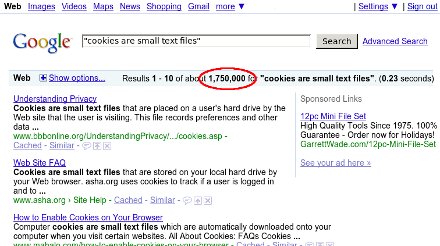
I'm dying to know who started this ridiculous non-explanation,
and why they decided to explain cookies using an implementation
detail from one browser -- at least, I'm guessing IE must implement cookies
using separate small files, or must have done so at one point. Firefox
stores them all in one file, previously a flat file and now an sqlite
database.
How many users who don't know what a cookie is do know what a
"text file" is? No, really, I'm serious. If you're a geek, go ask a few
non-geeks what a text file is and how it differs from other files.
Ask them what they'd use to view or edit a text file.
Hint: if they say "Microsoft Word" or "Open Office",
they don't know.
And what exactly makes a cookie file "text" anyway?
In Firefox, cookies.sqlite is most definitely not a "text file" --
it's full of unprintable characters.
But even if IE stores cookies using printable characters --
have you tried to read your cookies?
I just went and looked at mine, and most of them looked something like this:
Name: __utma
Value: 76673194.4936867407419370000.1243964826.1243871526.1243872726.2
I don't know about you, but I don't spend a lot of time reading text
that looks like that.
Why not skip the implementation details entirely, and just tell users
what cookies are? Users don't care if they're stored in one file or many,
or what character set is used. How about this?
Cookies are small pieces of data which your web browser stores at the
request of certain web sites.
I don't know who started this meme or why people keep copying it
without stopping to think.
But I smell a Fox Terrier. That was Stephen Jay Gould's example,
in his book Bully for Brontosaurus, of a
factoid invented by one writer and blindly copied by all who come later.
The fox terrier -- and no other breed -- was used universally for years to
describe the size of Eohippus. At least it was reasonably close;
Gould went on to describe many more examples where people copied the
wrong information, each successive textbook copying the last with
no one ever going back to the source to check the information.
It's usually a sign that the writer doesn't really understand what
they're writing. Surely copying the phrase everyone else uses must
be safe!
Tags: web, browsers, writing, skepticism, tech, firefox, mozilla
[
21:25 Dec 01, 2009
More tech/web |
permalink to this entry |
]
Wed, 25 Nov 2009
Continuing the discussion of those funny characters you sometimes
see in email or on web pages, today's Linux Planet article
discusses how to convert and handle encoding errors, using
Python or the command-line tool recode:
Mastering
Characters Sets in Linux (Weird Characters, part 2).
Tags: writing, linux, unicode, i18n, charsets, ascii, programming, python
[
15:06 Nov 25, 2009
More writing |
permalink to this entry |
]
Thu, 12 Nov 2009
or: Why do I See All Those Those Weird Characters?
Today's Linux Planet article concerns those funny characters you sometimes
see in email or on web pages, like when somebody puts
“random squiggles’ around a phrase
when they probably meant “double quotes”:
Character
Sets in Linux or: Why do I See Those Weird Characters?.
Today's article covers only what users need to know.
A followup article will discuss character encoding
from a programmer's point of view.
Tags: writing, linux, unicode, i18n, charsets, ascii
[
16:34 Nov 12, 2009
More writing |
permalink to this entry |
]
Thu, 22 Oct 2009
Part III of building your own kernel,
Tricky
kernel options, covers some of the more confusing options
you'll encounter when configuring your kernel.
Meanwhile, I'm still jazzed about the great howto that Nathan Willis
of Worldlabel.com wrote a few days ago for my Gimp labels scripts:
Fast labels and Card layout with Gimplabels.
Tags: writing, linux, kernel
[
15:03 Oct 22, 2009
More writing |
permalink to this entry |
]
Sat, 10 Oct 2009
Part II of building your own kernel,
Configuring
a New Linux Kernel, covers how to run menuconfig, how to disable
modules and slim down the kernel to only the parts you need,
and a few important options to look for.
Part III, in two weeks, will tour some specific kernel options
and what they do.
Tags: writing, linux, kernel
[
10:19 Oct 10, 2009
More writing |
permalink to this entry |
]
Fri, 25 Sep 2009
My latest article is up on Linux Planet:
Building
Your Own Linux Kernel, Part I.
"But aren't there a gazillion howtos already on the web on kernel building?"
I thought so too. But when someone showed up on LinuxChix recently
asking for help building her kernel, I went looking -- and all the
howtos I could find were out of date (even the README in the very
latest kernel gives instructions based on LILO, not GRUB).
More important, none of them offered help in that all-important
question: How do I start with a configuration file I know will work?
My quick-and-dirty howto shows you how to take your distro's
configuration file and build the latest mainstream kernel based on
it. The next article will cover how to change that configuration and
tune it for your own machine.
Tags: writing, linux, kernel
[
10:45 Sep 25, 2009
More writing |
permalink to this entry |
]
Fri, 11 Sep 2009
Linux Planet requested an article on multicore processors and how to
make the most of them. Happily, I've been playing with that anyway
lately, so I was happy to oblige:
Get
the Most Out of Your Multicore Processor:
Two heads are better than one!
Tags: writing, linux, performance
[
22:59 Sep 11, 2009
More writing |
permalink to this entry |
]
Thu, 27 Aug 2009
Part 2 of my Linux bloat article looks at information you can get
from the kernel via some useful files in /proc, at three scripts
that display that info, and also at how to use exmap, an app and
kernel module that shows you a lot more about what resources your
apps are using.
How
Do You Really Measure Linux Bloat?
Tags: writing, programming, linux, performance, bloat
[
20:52 Aug 27, 2009
More writing |
permalink to this entry |
]
Thu, 13 Aug 2009
Continuing my Linux Planet series on Linux performance monitoring,
the latest article looks at bloat and how you can measure it:
Finding
and Trimming Linux Bloat.
This one just covers the basics.
The followup article, in two weeks, will dive into more detail
on how to analyze what resources programs are really using.
Tags: writing, programming, linux, performance, bloat
[
11:27 Aug 13, 2009
More writing |
permalink to this entry |
]
Thu, 09 Jul 2009
I finally dragged myself into 2009 and tried Twitter.
I'd been skeptical, but it's actually fairly interesting and not
that much of a time sink. While it's true that some people tweet
about every detail of their lives -- "I'm waiting for a bus" /
"Oh, hooray, the bus is finally here" / "I got a good seat in the
second row of the bus" / "The bus just passed Second St. and two
kids got on" / "Here's a blurry photo from my phone of the Broadway Av.
sign as we pass it"
-- it's easy enough to identify those people and un-follow them.
And there are tons of people tweeting about interesting stuff.
It's like a news ticker, but customizable -- news on the latest
protests in Iran, the latest progress on freeing the Mars Spirit
Rover, the latest interesting publication on dinosaur fossils,
and what's going on at that interesting conference halfway around
the world.
The trick is to figure out how you want the information delivered.
I didn't want to have to leave a tab open in Firefox all the time.
There was an xchat plug-in that sounded perfect -- I have an xchat
window up most of the time I'm online -- but it turned out it works
by picking one of the servers you're connected to, making a private
channel and posting things there. That seemed abusive to the server
-- what if everyone on Freenode did that?
So I wanted a separate client. Something lightweight and simple.
Unfortunately, all the Twitter clients available for Linux either
require that I install a lot of infrastructure first (either Adobe
Air or Mono), or they just plain didn't work (a Twitter client
where you can't click on links? Come on!)
But then I tried out the Python-Twitter bindings, and they were so
easy to use I decided to write them up for my next Linux Planet article,
which came out today:
Write
Your Own Linux Twitter Client In Less Time Than It Takes To Find One!.
The article shows how to use the bindings to write a bare-bones
client. But of course, I've been hacking on the client all along,
so the one I'm actually using has a lot more features like *ahem*
letting you click on links. And letting you block threads, though
I haven't actually tested that since I haven't seen any threads
I wanted to block since my first day.
You can download the
current version of
Twit, and anyone who's interested can
follow me on Twitter.
I don't promise to be interesting -- that's up to you to decide --
but I do promise not to tweet about every block of my bus ride.
Tags: writing, programming, python, twitter
[
16:09 Jul 09, 2009
More writing |
permalink to this entry |
]
Sun, 28 Jun 2009
Linux Planet asked me for an intro article for prospective
programmers, explaining the pros and cons of various programming
languages. Here it is:
A
Beginner's Guide to Free Software Programming Languages
Tags: writing, programming
[
13:00 Jun 28, 2009
More writing |
permalink to this entry |
]
Sun, 14 Jun 2009
Part 3 of "Graphical Python Programming With PyGTK"
uses object-oriented Python to clean up the code from Part 2,
and also adds handling of key events to get rid of that silly
Quit button.
PythonGTK
Programming part 3: Screensaver, Objects, and User Input
Tags: writing, python, programming
[
12:18 Jun 14, 2009
More writing |
permalink to this entry |
]
Thu, 28 May 2009
Part 2 of Graphical Python Programming With PyGTK gets into how to
do some cool Qix screensaver-style graphics, in:
Graphical
Python Programming With PyGTK, part 2: Write Your Own Screensaver.
There's also a digg link.
Tags: writing, python, programming
[
18:09 May 28, 2009
More writing |
permalink to this entry |
]
Thu, 14 May 2009
This week's Linux Planet article is another one on Python and
graphical toolkits, but this time it's a little more advanced:
Graphical
Python Programming With PyGTK.
This one started out as a fun and whizzy screensaver sort of program
that draws lots of pretty colors -- but I couldn't quite fit it all
into one article, so that will have to wait for the sequel two weeks
from now.
Tags: writing, python, programming
[
19:53 May 14, 2009
More writing |
permalink to this entry |
]
Thu, 23 Apr 2009
Latest Linux Planet article: How to write a "blobify" GIMP plug-in
in Python to make text look three-dimensional.
Creating
a Fancy 3D-Effect GIMP Plugin in Python.
Tags: gimp, writing, python
[
11:46 Apr 23, 2009
More writing |
permalink to this entry |
]
Thu, 09 Apr 2009
Latest Linux Planet article: Part 1 of a two-parter on
Writing
GIMP scripts in Python.
As usual, there's a
Digg
link too.
Tags: gimp, writing, python
[
22:21 Apr 09, 2009
More writing |
permalink to this entry |
]
Wed, 01 Apr 2009
This is a reprinting of an article I wrote for my monthly planet column
in the
SJAA Ephemeris:
Is Pluto a planet, or not?
Maybe you caught the news last month that Illinois,
birthplace of Clyde Tombaugh, has declared Pluto a planet.
It joins New Mexico, Tombaugh's longtime home, which made a
similar declaration two years ago.
When I first heard about the New Mexico resolution, I was told that they
had declared that Pluto would be a planet within the state's
boundaries.
![[Size of Pluto and Charon vs. the US]](http://shallowsky.com/blog/images/pluto-and-statesT.jpg) That made me a bit curious: would Pluto even fit inside New Mexico?
I looked it up: Pluto has a diameter of 2300km, while New Mexico is
about 550km in longitude and a bit more in latitude. Not even close
(see Figure 1). Too bad -- I liked the image of Pluto and Charon coming to
visit and hang out with friends. Though at Pluto's orbital velocity (it
takes it just under 248 years to complete its 18 billion kilometer
orbit, meaning an average speed of 23 million km/year or 63,000
km/day)
and its current distance of about 32 AU (4.8 billion km), it whould
take it about 207 years to get here.
That made me a bit curious: would Pluto even fit inside New Mexico?
I looked it up: Pluto has a diameter of 2300km, while New Mexico is
about 550km in longitude and a bit more in latitude. Not even close
(see Figure 1). Too bad -- I liked the image of Pluto and Charon coming to
visit and hang out with friends. Though at Pluto's orbital velocity (it
takes it just under 248 years to complete its 18 billion kilometer
orbit, meaning an average speed of 23 million km/year or 63,000
km/day)
and its current distance of about 32 AU (4.8 billion km), it whould
take it about 207 years to get here.
But it turns out that's not what the resolution said anyway.
Both states' resolutions said roughly the same thing:
BE IT RESOLVED BY THE LEGISLATURE OF THE STATE OF NEW MEXICO that, as
Pluto passes overhead through New Mexico's excellent night skies, it
be declared a planet and that March 13, 2007 be declared "Pluto Planet
Day" at the legislature.
RESOLVED, BY THE SENATE OF THE NINETY-SIXTH GENERAL ASSEMBLY OF THE
STATE OF ILLINOIS, that as Pluto passes overhead through Illinois'
night skies, that it be reestablished with full planetary status, and
that March 13, 2009 be declared "Pluto Day" in the State of Illinois
in honor of the date its discovery was announced in 1930.
So the law applies to anyone (though it's probably not enforceable
outside state boundaries) -- but only when Pluto is overhead
in New Mexico or Illinois.
But wait -- does Pluto ever actually pass overhead in those states?
New Mexico stretches from 31.2 to about 37 degrees latitude,
while Illinois spans 36.9 to 42.4.
Right now Pluto is in Sagittarius, with a declination of -17° 41';
there's no way anyone in the US is going to see it directly overhead
this year. Worse, it's on its way even farther south. It won't
cross into the northern hemisphere until the beginning of 2111.
But how far north will it go?
My first thought was to add Pluto's inclination -- 17.15 degrees,
very high compared to other planets -- to the 23 degrees of the
ecliptic to get 40.4°. Way far north -- no problem in either
state! But unfortunately it's not as simple as that.
It turns out that when Pluto
gets to its maximum north inclination, it's in Bootes (bet you didn't
know Bootes was a constellation of the zodiac, did you? It's that
17° inclination that puts Pluto just past the Virgo border).
That'll happen in February of 2228.
But in the Virgo/Bootes region, the ecliptic is 8° south of the
equator, not 23° north. So we don't get to add 23 and 17; in fact,
Pluto's declination will only be about 7.3° north. That's no help!
To find the time when Pluto gets as far north as it's going to get,
you have to combine the declination of the ecliptic and the angle of
Pluto above the ecliptic. The online JPL HORIZONS simulator is very
helpful for running data like that over long periods -- much easier
than plugging dates into a planetarium program. HORIZONS told
me that Pluto's maximum northern declination, 23.5°, will happen in
spring of 2193.
Unfortunately, 23.5° isn't far enough north to be overhead even from
Las Cruces, NM. So Pluto, sadly, will never be overhead from either
New Mexico or Illinois, and thus by the text of the two measures, it
will never be a planet.
With that in mind, I'm asking you to support my campaign to persuade
the governments of Ecuador and Hawaii to pass resolutions similar to
the New Mexico and Illinois ones. Please give generously -- and hurry,
because we need your support before April 1!
Tags: science, astronomy, pluto, humor, writing
[
20:09 Apr 01, 2009
More science/astro |
permalink to this entry |
]
Thu, 26 Mar 2009
Latest on Linux Planet: another introductory programming article,
this time on Python's tkinter library:
GUI
Programming in Python For Beginners.
(As usual, there's a
Digg link and also a
Reddit one.)
Tags: writing, python, programming
[
16:36 Mar 26, 2009
More writing |
permalink to this entry |
]
Thu, 12 Mar 2009
I'm beginning a programming series on Linux Planet, starting with a
basic intro to shell scripting for people with no programming experience:
Intro
to Shell Programming: Writing a Simple Web Gallery
(For those inclined, digg and reddit
links).
Tags: writing, shell, CLI
[
23:08 Mar 12, 2009
More writing |
permalink to this entry |
]
Thu, 26 Feb 2009
Probably the last in the commandline series (at least for a while,
today's article covers the meaning of . and .. in Linux pathnames,
and how to tell what permissions a file has.
Sharing
Files in Linux and Understanding Pathnames
Tags: writing, shell, CLI
[
22:26 Feb 26, 2009
More writing |
permalink to this entry |
]
Thu, 12 Feb 2009
My latest Linux Planet article covers how to find your way around
the Linux filesystem in the command-line, for anyone who wants to
graduate from file managers and start using the shell.
Navigating
the Linux Filesystem (and the
Digg
link for those so inclined).
Tags: writing, shell, CLI
[
18:42 Feb 12, 2009
More writing |
permalink to this entry |
]
Mon, 22 Dec 2008
Continuing the basic Linux command-line tutorial series, a
discussion of the difference between a terminal window and a shell:
The
Linux Command Shell For Beginners: What is the Shell?
(Digg
link, for those who digg).
Tags: writing, shell, CLI
[
17:16 Dec 22, 2008
More writing |
permalink to this entry |
]
Fri, 12 Dec 2008
My latest Linux Planet article covers how to find your way around
the Linux filesystem in the command-line, for anyone who wants to
graduate from file managers and start using the shell.
Navigating
the Linux Filesystem (and the
Digg
link for those so inclined).
Tags: writing, shell, CLI
[
13:49 Dec 12, 2008
More writing |
permalink to this entry |
]
Thu, 20 Nov 2008
I have a new Firefox Tips article up on Linux Planet:
The
Plague of Ridiculously Long URLs
(note I didn't choose the title). It discussees how to handle
long URLs broken over several lines, of the sort we so often
see in email messages.
Tags: writing, mozilla, firefox
[
10:43 Nov 20, 2008
More writing |
permalink to this entry |
]
Thu, 06 Nov 2008
My latest Linux Planet article,
Why
Firefox Rocks on Linux, discusses Linux-specific Firefox
shortcuts involving the middle mouse button, the URLbar and
the scrollbar.
It's getting
good
Diggs, too, and comments from people who found the tips helpful,
which is great. A lot of people don't know about some of these great
Linux time-savers, but these are the sort of things that make me
love Linux and stick with it even when it gets frustrating.
I hate to think of people missing out just because there's no
obvious way to discover some of the shortcuts!
Tags: writing, mozilla, firefox, linux
[
21:44 Nov 06, 2008
More writing |
permalink to this entry |
]
Mon, 03 Nov 2008
This posting ended up being published as a Linux Planet Quick Tip.
You can read about my nifty word counting bookmarklet there:
Quick
Firefox Tip: Word Count Bookmarklet.
Tags: firefox, mozilla, bookmarklets, writing, programming
[
23:41 Nov 03, 2008
More tech/web |
permalink to this entry |
]
Sun, 26 Oct 2008
Sun, 28 Sep 2008
An interesting occurrence at a Toastmasters meeting last week
offered a lesson in the difficulties of writing or speaking
about technology.
The member who was running Table Topics had an interesting project
planned: "Bookmarks". I thought, things you put in books to mark your
place? Then I saw the three-page printout he had brought and realized
that, duh, of course, he means browser bookmarks.
The task, he explained, was to scan his eclectic list of bookmarks,
pick three, and tell a story about them.
Members reacted with confusion. Several of them said they didn't
understand what he meant at all. Would he give an example? So
he chose three and gave a short demonstration speech. But the members
still looked confused. He said if they wanted to pick just one, that
would be okay. Nobody looked relieved.
We did a couple rounds. I gave a rambling tale that incorporated
three or four bookmarks. One of our newer members took the list,
and wove a spirited story that used at least five (she eventually won
the day's Best Table Topic ribbon). Then the bookmark list passed to
one of the members who had expressed confusion.
She stared at the list, obviously baffled.
"I still don't understand. What do they have to do with bookmarks?"
"Browser bookmarks," I clarified, and a couple of other
people chimed in on that theme, but it obviously wasn't helping.
Several other members crowded around to get a look at the list.
Brows furrowed. Voices murmured. Then one of them looked up.
"Are these like ... Favorites?"
There was a immediate chorus of "Favorites?" "Oh, like in an Explorer
window?" "You mean like on the Internet?" "Ohhh, I think I get it ..."
Things improved from there.
I don't think the member who presented this project had any idea
that a lot of people wouldn't understand the term "Bookmark", as it
applies to a list of commonly-visited sites in a browser. Nor did I.
I was momentarily confused thinking me meant the other kind of
bookmark (the original kind, for paper books), but realizing that
he meant browser bookmarks cleared it right up for me.
A bigger surprise to me was that
the word "browser" wasn't any help to half the membership --
none of them understood what a "browser" was any more than they knew
what a "bookmark" was. "Like in an Explorer window?" or "on the internet"
was the closest they got to the concept that they were running a
specific program called a web browser.
These aren't stupid people;
they just don't use computers much, and haven't ever learned the
terminology for some of the programs they use or the actions they take.
When you're still learning something, you fumble around, sometimes
getting where you need to go be accident; you don't always know
how you got there, much less the terms describing the steps you took.
Even if you're an übergeek, I'm sure you have programs where
you fumble about and aren't quite sure how you get from A to B.
You may sometimes be surprised at meeting people who still use
Internet Explorer and haven't tried Firefox, let alone Opera.
You may wonder if it's the difficulty of downloading and installing
software that stops them.
But the truth may be that questions like "Have you tried Firefox?"
don't really mean anything to a lot of people; they're not really
aware that they're using Internet Explorer in the first place.
It's just a window they've managed to open to show stuff
on the internet.
Avoiding technical jargon is sometimes harder than you think.
Seemingly basic concepts are not so basic as they seem; terms you
think are universal turn out not to be. You have to be careful with
terminology if you to be understood ... and probably the only way
to know for sure if you're using jargon is to try out your language
on an assortment of people.
Tags: tech, browsers, writing, muggles
[
12:23 Sep 28, 2008
More tech |
permalink to this entry |
]
Mon, 22 Sep 2008
Part
III in the Linux Astronomy series on Linux Planet covers two 3-D apps,
Stellarium and Celestia.
Writing this one was somewhat tricky because
the current Ubuntu, "Hardy", has a bug in its Radeon handling
and both these apps lock my machine up pretty quickly, so I went
through a lot of reboot cycles getting the screenshots.
(I found lots of bug reports and comments on the web, so I know
it's not just me.)
Fortunately I was able to test both apps and grab a few screenshots
on Fedora 8 and Ubuntu "Feisty" without encountering crashes.
(Ubuntu sure has been having a lot of
trouble with their X support lately! I'm going to start keeping
current Fedora and Suse installs around for times like this.)
Tags: writing, astronomy, linux, ubuntu, bugs
[
22:10 Sep 22, 2008
More writing |
permalink to this entry |
]
Fri, 12 Sep 2008
I have a new article on XEphem on Linux Planet,
following up to the KStars article two weeks ago:
Viewing
the Night Sky with Linux, Part II: Visit the Planets With XEphem.
Tags: writing, astronomy, linux
[
11:50 Sep 12, 2008
More writing |
permalink to this entry |
]
Thu, 28 Aug 2008
I have an article on Linux Planet! The first of many, I hope.
At least the first of a short series on Linux astronomy programs,
starting with the one that's easiest to use: KStars.
It's oriented toward binocular observing, with suggestions
for good targets for beginners.
Viewing
the Night Sky with Linux, Part I: KStars
Tags: writing, astronomy, linux
[
22:46 Aug 28, 2008
More writing |
permalink to this entry |
]
Tue, 25 Jan 2005
I've started my
"GIMP for
Beginners" course on the
Linuxchix
Courses mailing list, topic "gimp".
Anyone reading this is welcome to join in!
Here's the first posting, Lesson
0.
Tags: writing
[
11:10 Jan 25, 2005
More writing |
permalink to this entry |
]
Wed, 01 Dec 2004
My article on
Wireless on the
Road,
based on experiences getting wi-fi connections on our recent
southwest
trip, is in Linux Journal online, with a reference in Linux Today.
My first official byline, Yeehaw!
Master wordsmith
Carla Schroder
helped, with both encouragement and proofreading. Thanks, Carla!
(BTW, Carla's new book, The
Linux Cookbook, just came out. I saw a couple of early
pre-production chapters, and it's already solved several Linux
problems I was struggling with. I'm sure the rest of the book is
just as good, and I'll be buying it. Don't confuse it with the
other book by the same name but a different author.)
Tags: writing
[
14:17 Dec 01, 2004
More writing |
permalink to this entry |
]
Sun, 31 Oct 2004
Every time I see someone ask about image formats, I think "Someone
really ought to write up a howto explaining the difference between
GIF, JPG and all the other formats, and what they're good for."
There probably are documents like this, but I've never seen one.
So I wrote one.
Image
Formats for the Web and Elsewhere.
(I'll probably give a Toastmasters talk on the subject as well.)
Tags: writing
[
15:25 Oct 31, 2004
More writing |
permalink to this entry |
]
![[Size of Pluto and Charon vs. the US]](http://shallowsky.com/blog/images/pluto-and-states.jpg)
![[RSS feed]](https://shallowsky.com/images/logos/rssicon-25x25.png)
![[Twitter]](https://shallowsky.com/images/logos/twitter-bird-white-on-blue-25x25.png)
![[envelope]](https://shallowsky.com/images/logos/envelope-25x25.png)


