Shallow Thoughts : tags : hardware
Akkana's Musings on Open Source Computing and Technology, Science, and Nature.
Fri, 17 Aug 2018
Over the years I've picked up a couple of cellphone stands as
conference giveaways. A stand is a nice idea, especially if you
like to read news articles during mealtime, but the stands I've
tried never seem to be quite what I want. Either they're not
adjustable, or they're too bulky or heavy to want to carry them
around all the time.
A while back, I was browsing on ebay looking for something better
than the ones I have. I saw a few that looked like they might be
worth trying, but then it occurred to me: I could make one pretty
easily that would work better than anything I'd found for sale.
I started with plans that involved wire and a hinge -- the hinge so
the two sides of the stand would fold together to fit in a purse or
pocket -- and spent a few hours trying different hinge options.I
wasn't satisfied, though. And then I realized: all I had to do was
bend the wire into the shape I needed. Voilà -- instant
lightweight adjustable cellphone stand.
And it has worked great. I've been using it for months and it's much
better than any of the prefab stands I had before.
Bend a piece of wire
![[Bent wire]](http://shallowsky.com/blog/images/cellphone-stand/img_2635.jpg)
I don't know where this wire came from: it was in my spare-metal-parts
collection. You want something a little thinner than coathanger wire,
so you can bend it relatively easily; "baling wire" or "rebar wire"
is probably about right.
Bend the tips around
![[Tips adjusted to fit your phone's width]](http://shallowsky.com/blog/images/cellphone-stand/img_2638.jpg)
Adjust the curve so it's big enough that your cellphone will fit in
the crook of the wires.
Bend the back end down, and spread the two halves apart
![[Bend the back end down]](http://shallowsky.com/blog/images/cellphone-stand/img_2639.jpg)
Adjust so it fits your phone
![[Instant cellphone stand]](http://shallowsky.com/blog/images/cellphone-stand/img_2640.jpg)
Coat the finished stand with rubberized coating (available at
your local hardware store in either dip or spray-on varieties)
so it won't slide around on tables and won't scratch anything.
The finished product is adjustable to any angle you need -- so you
can adjust it based on the lighting in any room -- and you can fold
the two halves together to make it easy to carry.
Tags: hardware, hack
[
12:06 Aug 17, 2018
More hardware |
permalink to this entry |
]
Sat, 10 Mar 2018
![[Intel Galileo Gen2 by Mwilde2 on Wikimedia commons]](https://upload.wikimedia.org/wikipedia/commons/thumb/f/f8/IntelGalileoGen2.png/320px-IntelGalileoGen2.png) Our makerspace got a donation of a bunch of Galileo gen2 boards from Intel
(image
from Mwilde2
on Wikimedia commons).
Our makerspace got a donation of a bunch of Galileo gen2 boards from Intel
(image
from Mwilde2
on Wikimedia commons).
The Galileo line has been discontinued, so there's no support and
no community, but in theory they're fairly interesting boards.
You can use a Galileo in two ways: you can treat it
like an Arduino, after using the Arduino IDE to download a
Galileo hardware definition since they're not Atmega chips. They
even have Arduino-format headers so you can plug in an Arduino shield.
That works okay (once you figure out that you need to download
the Galileo v2 hardware definitions, not the regular Galileo).
But they run Linux under the hood, so you can also use them as a
single-board Linux computer.
Serial Cable
The first question is how to talk to the board. The documentation is terrible,
and web searches aren't much help because these boards were never
terribly popular. Worse, the v1 boards seem to have been more widely
adopted than the v2 boards, so a lot of what you find on the web
doesn't apply to v2. For instance, the v1 required a special serial cable
that used a headphone jack as its connector.
Some of the Intel documentation talks about how you can load a special
Arduino sketch that then disables the Arduino bootloader and instead
lets you use the USB cable as a serial monitor. That made me nervous:
once you load that sketch, Arduino mode no longer works until you
run a command on Linux to start it up again. So if the sketch doesn't
work, you may have no way to talk to the Galileo.
Given the state of the documentation I'd already struggled with for
Arduino mode, it didn't sound like a good gamble. I thought a real
serial cable sounded like a better option.
Of course, the Galileo documentation doesn't tell you what needs to
plug in where for a serial cable. The board does have a standard FTDI
6-pin header on the board next to the ethernet jack, and the labels on
the pins seemed to correspond to the standard pinout on my Adafruit
FTDI Friend: Gnd, CTS, VCC, TX, RX, RTS. So I tried that first, using
GNU screen to connect to it from Linux just like I would a Raspberry
Pi with a serial cable:
screen /dev/ttyUSB0 115200
Powered up the Galileo and sure enough, I got boot messages and was
able to log in as root with no password. It annoyingly forces orange
text on a black background, making it especially hard to read on
a light-background terminal, but hey, it's a start.
Later I tried a Raspberry Pi serial cable, with just RX (green), TX (white)
and Gnd (black) -- don't use the red VCC wire since the Galileo is already
getting power from its own power brick -- and that worked too. The Galileo
doesn't actually need CTS or RTS. So that's good: two easy ways to talk to
the board without buying specialized hardware. Funny they didn't bother
to mention it in the docs.
Blinking an LED from the Command Line
Once connected, how do you do anything? Most of the
Intel
tutorials on Linux are useless, devoting most of their space
to things like how to run Putty on Windows and no space at all to
how to talk to pins. But I finally found a
discussion thread
with a Python example for Galileo. That's not immediately helpful
since the built-in Linux doesn't have python installed (nor gcc,
natch). Fortunately, the Python example used files in /sys
rather than a dedicated Python library;
we can access /sys files just as well from the shell.
Of course, the first task is to blink an LED on pin 13. That
apparently corresponds to GPIO 7 (what are the other arduino/GPIO
correspondences? I haven't found a reference for that yet.) So you
need to export that pin (which creates /sys/class/gpio/gpio7
and set its direction to out. But that's not enough: the
pin still doesn't turn on when you
echo 1 > /sys/class/gpio/gpio7/value. Why not?
I don't know, but the Python script exports three other pins --
46, 30, and 31 -- and echoes 0 to 30 and 31. (It does this without
first setting their directions to out, and if you try
that, you'll get an error, so I'm not convinced the Python script
presented as the "Correct answer" would actually have worked. Be warned.)
Anyway, I ended up with these shell lines as
preparation before the Galileo can actually blink:
# echo 7 >/sys/class/gpio/export

# echo out > /sys/class/gpio/gpio7/direction

# echo 46 >/sys/class/gpio/export
# echo 30 >/sys/class/gpio/export
# echo 31 >/sys/class/gpio/export

# echo out > /sys/class/gpio/gpio30/direction
# echo out > /sys/class/gpio/gpio31/direction
# echo 0  > /sys/class/gpio/gpio30/value
# echo 0  > /sys/class/gpio/gpio31/value
And now, finally, you can control the LED on pin 13 (GPIO 7):
# echo 1 > /sys/class/gpio/gpio7/value
# echo 0 > /sys/class/gpio/gpio7/value
or run a blink loop:
# while /bin/true; do
> echo 1  > /sys/class/gpio/gpio7/value
> sleep 1
> echo 0  > /sys/class/gpio/gpio7/value
> sleep 1
> done
Searching Fruitlessly for a "Real" Linux Image
All the Galileo documentation is emphatic that you should download
a Linux distro and burn it to an SD card rather than using the Yocto
that comes preinstalled. The preinstalled Linux apparently has no
persistent storage, so not only does it not save your Linux programs,
it doesn't even remember the current Arduino sketch.
And it has no programming languages and only a rudimentary busybox shell.
So finding and downloading a Linux distro was the next step.
Unfortunately, that mostly led to dead ends. All the official Intel
docs describe different download filenames, and they all point to
generic download pages that no longer include any of the filenames
mentioned. Apparently Intel changed the name for its Galileo images
frequently and never updated its documentation.
After forty-five minutes of searching and clicking around,
I eventually found my way to
Intel® IoT Developer Kit Installer Files,
which includes sizable downloads with names like
- iss-iot-linux_12-09-16.tar.bz2 (324.07 MB),
- intel-iot-yocto.tar.xz (147.53 MB),
- intel-iot-wrs-pulsar-64.tar.xz (283.86 MB),
- intel-iot-wrs-32.tar.xz (386.16 MB), and
- intel-iot-ubuntu.tar.xz (209.44 MB)
From the size, I suspect those are all Linux images. But what are they
and how do they differ? Do any of them still have working repositories?
Which ones come with Python, with gcc, with GPIO support,
with useful development libraries? Do any of them get security updates?
As far as I can tell, the only way to tell is to download each image,
burn it to a card, boot from it, then explore the filesystem
trying to figure out what distro it is and how to try updating it.
But by this time I'd wasted three hours and gotten no
further than the shell commands to blink a single LED, and I ran out of
enthusiasm. I mean, I could spend five more hours on this, try several
of the Linux images, and see which one works best. Or I could spend
$10 on a Raspberry Pi Zero W that has abundant documentation,
libraries, books, and community howtos. Plus wi-fi, bluetooth and HDMI,
none of which the Galileo has.
Arduino and Linux Living Together
So that's as far as I've gone. But I do want to note
one useful thing I stumbled upon while searching
for information about Linux distributions:
Starting Arduino
sketch from Linux terminal shows how to run an Arduino sketch
(assuming it's already compiled) from Linux:
sketch.elf /dev/ttyGS0 &
It's a fairly cool option to have. Maybe one of these days, I'll pick
one of the many available distros and try it.
Tags: hardware, linux, intel, galileo, arduino
[
13:54 Mar 10, 2018
More hardware |
permalink to this entry |
]
Sat, 17 Feb 2018
In the previous article I talked about
Multiplexing
input/output using shift registers for a music keyboard project.
I ended up with three CD4021 8-bit shift registers cascaded.
It worked; but I found that I was spending all my time in the
delays between polling each bit serially. I wanted a way to read
those bits faster. So I ordered some I/O expander chips.
![[Keyboard wired to Raspberry Pi with two MCP23017 port expanders]](http://shallowsky.com/blog/images/multiplex/img_1995.jpg) I/O expander, or port expander, chips take a lot of the hassle out of
multiplexing. Instead of writing code to read bits serially, you can use I2C.
Some chips also have built-in pullup resistors, so you don't need all
those extra wires for pullups or pulldowns.
There are lots of options, but two common chips are the MCP23017,
which controls 16 lines, and the MCP23008 and PCF8574p, which each
handle 8. I'll only discuss the MCP23017 here, because if eight is good,
surely sixteen is better! But the MCP23008 is basically the same thing
with fewer I/O lines.
I/O expander, or port expander, chips take a lot of the hassle out of
multiplexing. Instead of writing code to read bits serially, you can use I2C.
Some chips also have built-in pullup resistors, so you don't need all
those extra wires for pullups or pulldowns.
There are lots of options, but two common chips are the MCP23017,
which controls 16 lines, and the MCP23008 and PCF8574p, which each
handle 8. I'll only discuss the MCP23017 here, because if eight is good,
surely sixteen is better! But the MCP23008 is basically the same thing
with fewer I/O lines.
A good tutorial to get you started is
How
To Use A MCP23017 I2C Port Expander With The Raspberry Pi - 2013 Part 1
along
with part
2, Python and
part
3, reading input.
I'm not going to try to repeat what's in those tutorials, just
fill in some gaps I found. For instance,
I didn't find I needed sudo for all those I2C commands in Part 1
since my user is already in the i2c group.
Using Python smbus
Part 2 of that tutorial uses Python smbus, but it doesn't really
explain all the magic numbers it uses, so it wasn't obvious how to
generalize it when I added a second expander chip. It uses this code:
DEVICE = 0x20 # Device address (A0-A2)
IODIRA = 0x00 # Pin direction register
OLATA  = 0x14 # Register for outputs
GPIOA  = 0x12 # Register for inputs

# Set all GPA pins as outputs by setting
# all bits of IODIRA register to 0
bus.write_byte_data(DEVICE,IODIRA,0x00)

# Set output all 7 output bits to 0
bus.write_byte_data(DEVICE,OLATA,0)
DEVICE is the address on the I2C bus, the one you see with
i2cdetect -y 1 (20, initially).
IODIRA is the direction: when you call
bus.write_byte_data(DEVICE, IODIRA, 0x00)
you're saying that all eight bits in GPA should be used for output.
Zero specifies output, one input: so if you said
bus.write_byte_data(DEVICE, IODIRA, 0x1F)
you'd be specifying that you want to use the lowest five bits for output
and the upper three for input.
OLATA = 0x14 is the command to use when writing data:
bus.write_byte_data(DEVICE, OLATA, MyData)
means write data to the eight GPA pins. But what if you want to write to
the eight GPB pins instead? Then you'd use
OLATB  = 0x15
bus.write_byte_data(DEVICE, OLATB, MyData)
Likewise, if you want to read input from some of the GPB bits, use
GPIOB  = 0x13
val = bus.read_byte_data(DEVICE, GPIOB)
The MCP23017 even has internal pullup resistors you can enable:
GPPUA  = 0x0c    # Pullup resistor on GPA
GPPUB  = 0x0d    # Pullup resistor on GPB
bus.write_byte_data(DEVICE, GPPUB, inmaskB)
Here's a full example:
MCP23017.py
on GitHub.
Using WiringPi
You can also talk to an MCP23017 using the WiringPi library.
In that case, you don't set all the bits at once, but instead treat
each bit as though it were a separate pin. That's easier to think
about conceptually -- you don't have to worry about bit shifting
and masking, just use pins one at a time -- but it might be slower
if the library is doing a separate read each time you ask for an input bit.
It's probably not the right approach to use if you're trying to check
a whole keyboard's state at once.
Start by picking a base address for the pin number -- 65 is the lowest
you can pick -- and initializing:
pin_base = 65
i2c_addr = 0x20

wiringpi.wiringPiSetup()
wiringpi.mcp23017Setup(pin_base, i2c_addr)
Then you can set input or output mode for each pin:
wiringpi.pinMode(pin_base, wiringpi.OUTPUT)
wiringpi.pinMode(input_pin, wiringpi.INPUT)
and then write to or read from each pin:
wiringpi.digitalWrite(pin_no, 1)
val = wiringpi.digitalRead(pin_no)
WiringPi also gives you access to the MCP23017's internal pullup resistors:
wiringpi.pullUpDnControl(input_pin, 2)
Here's an example in Python:
MCP23017-wiringpi.py
on GitHub, and one in C:
MCP23017-wiringpi.c
on GitHub.
Using multiple MCP23017s
But how do you cascade several MCP23017 chips?
Well, you don't actually cascade them. Since they're I2C
devices, you wire them so they each have different addresses on the
I2C bus, then query them individually. Happily, that's
easier than keeping track of how many bits you've looped through ona
shift register.
Pins 15, 16 and 17 on the chip are the address lines, labeled A0, A1
and A2. If you ground all three you get the base address of 0x20.
With all three connected to VCC, it will use 0x27 (binary 111 added to
the base address). So you can send commands to your first device at 0x20,
then to your second one at 0x21 and so on. If you're using WiringPi,
you can call mcp23017Setup(pin_base2, i2c_addr2) for your second chip.
I had trouble getting the addresses to work initially, and it turned
out the problem wasn't in my understanding of the address line wiring,
but that one of my cheap Chinese breadboard had a bad power and ground
bus in one quadrant. That's a good lesson for the future: when things
don't work as expected, don't assume the breadboard is above suspicion.
Using two MCP23017 chips with their built-in pullup resistors simplified
the wiring for my music keyboard enormously, and it made the code
cleaner too. Here's the modified code:
keyboard.py
on GitHub.
What about the speed? It is indeed quite a bit faster than the shift
register code. But it's still too laggy to use as a real music keyboard.
So I'll still need to do more profiling, and maybe find a faster way
of generating notes, if I want to play music on this toy.
Tags: hardware, raspberry pi, python
[
15:44 Feb 17, 2018
More hardware |
permalink to this entry |
]
Tue, 13 Feb 2018
I was scouting for parts at a thrift shop and spotted a little
23-key music keyboard. It looked like a fun Raspberry Pi project.
I was hoping it would turn out to use some common protocol like I2C,
but when I dissected it, it turned out there was a ribbon cable with
32 wires coming from the keyboard. So each key is a separate pushbutton.
![[23-key keyboard wired to a Raspberry Pi]](http://shallowsky.com/blog/images/multiplex/img_1986-640.jpg) A Raspberry Pi doesn't have that many GPIO pins, and neither does an
Arduino Uno. An Arduino Mega does, but buying a Mega to go between the
Pi and the keyboard kind of misses the point of scavenging a $3 keyboard;
I might as well just buy an I2C or MIDI keyboard. So I needed some sort
of I/O multiplexer that would let me read 31 keys using a lot fewer pins.
A Raspberry Pi doesn't have that many GPIO pins, and neither does an
Arduino Uno. An Arduino Mega does, but buying a Mega to go between the
Pi and the keyboard kind of misses the point of scavenging a $3 keyboard;
I might as well just buy an I2C or MIDI keyboard. So I needed some sort
of I/O multiplexer that would let me read 31 keys using a lot fewer pins.
There are a bunch of different approaches to multiplexing. A lot of
keyboards use a matrix approach, but that makes more sense when you're
wiring up all the buttons from scratch, not starting with a pre-wired
keyboard like this. The two approaches I'll discuss here are
shift registers and multiplexer chips.
If you just want to get the job done in the most efficient way,
you definitely want a multiplexer (port expander) chip, which I'll
cover in Part 2. But for now, let's look at the old-school way: shift
registers.
PISO Shift Registers
There are lots of types of shift registers, but for reading lots of inputs,
you need a PISO shift register: "Parallel In, Serial Out."
That means you can tell the chip to read some number -- typically 8 --
of inputs in parallel, then switch into serial mode and read all the bits
one at a time.
Some PISO shift registers can cascade: you can connect a second shift
register to the first one and read twice as many bits. For 23 keys
I needed three 8-bit shift registers.
Two popular cascading PISO shift registers are the CD4021 and the SN74LS165.
They work similarly but they're not exactly the same.
The basic principle with both the CD4021 and the SN74LS165:
connect power and ground, and wire up all your inputs to the eight data pins.
You'll need pullup or pulldown resistors on each input line, just like
you normally would for a pushbutton; I recommend picking up a few
high-value (like 1-10k) resistor arrays: you can get these in SIP
(single inline package) or DIP (dual-) form factors that plug easily
into a breadboard. Resistor arrays can be either independent
two pins for each resistor in the array) or bussed (one pin in
the chip is a common pin, which you wire to ground for a pulldown or
V+ for a pullup; each of the rest of the pins is a resistor). I find
bussed networks particularly handy because they can reduce the number
of wires you need to run, and with a job where you're multiplexing
lots of lines, you'll find that getting the wiring straight is a big
part of the job. (See the photo above to see what a snarl this was
even with resistor networks.)
For the CD4021, connect three more pins: clock and data pins (labeled
CLK and either Q7 or Q8 on the chip's pinout, pins 10 and 3),
plus a "latch" pin (labeled M, pin 9).
For the SN74LS165, you need one more pin: you need clock and data
(labeled CP and Q7, pins 2 and 9), latch (labeled
PL, pin 1),
and clock enable (labeled CE,
pin 15).
At least for the CD4021, some people
recommend
a 0.1 uF bypass capacitor across the power/ground connections of each
CD4021.
If you need to cascade several chips with the CD4021, wire DS (pin 11)
from the first chip to Q7 (pin 3), then wire both chips clock lines together
and both chips' data lines together. The SN74LS165 is the same: DS
(pin 10) to Q8 (pin 9) and tie the clock and data lines together.
Once wired up, you toggle the latch to read the parallel data, then
toggle it again and use the clock pin to read the series of bits.
You can see the specific details in my Python scripts:
CD4021.py
on GitHub and
SN74LS165.py
on GitHub.
Some References
For wiring diagrams, more background, and Arduino code for the CD4021, read
Arduino
ShiftIn.
For the SN74LS165, read:
Arduino:
SN74HC165N,
74HC165 8 bit Parallel in/Serial out Shift Register,
or Sparkfun:
Shift Registers.
Of course, you can use a shift register for output as well as input.
In that case you need a SIPO (Serial In, Parallel Out) shift register
like a 74HC595. See
Arduino ShiftOut:
Serial to Parallel Shifting-Out with a 74HC595
Interfacing
74HC595 Serial Shift Register with Raspberry Pi.
Another, less common option is the 74HC164N:
Using
a SN74HC164N Shift Register With Raspberry Pi
For input from my keyboard, initially I used three CD4021s. It basically worked,
and you can see the code for it at
keyboard.py
(older version, for CD4021 shift registers), on GitHub.
But it turned out that looping over all those bits was slow -- I've
been advised that you should wait at least 25 microseconds between
bits for the CD4021, and even at 10 microseconds I found there wasa
significant delay between hitting the key and hearing the note.I
thought it might be all the fancy numpy code to generate waveforms for
the chords, but when I used the Python profiler, it said most of the
program's time was taken up in time.sleep(). Fortunately, there's a
faster solution than shift registers: port expanders, which I'll talk
about in Multiplexing Part 2: Port Expanders.
Tags: hardware, raspberry pi, python
[
12:23 Feb 13, 2018
More hardware |
permalink to this entry |
]
Sun, 21 Jan 2018
When you attach hardware buttons to a Raspberry Pi's GPIO pin,
reading the button's value at any given instant is easy with
GPIO.input(). But what if you want to watch for
button changes? And how do you do that from a GUI program where
the main loop is buried in some library?
Here are some examples of ways to read buttons from a Pi.
For this example, I have one side of my button wired to the Raspberry
Pi's GPIO 18 and the other side wired to the Pi's 3.3v pin.
I'll use the Pi's internal pulldown resistor rather than adding
external resistors.
The simplest way: Polling
The obvious way to monitor a button is in a loop, checking the
button's value each time:
import RPi.GPIO as GPIO
import time

button_pin = 18

GPIO.setmode(GPIO.BCM)

GPIO.setup(button_pin, GPIO.IN, pull_up_down = GPIO.PUD_DOWN)

try:
    while True:
        if GPIO.input(button_pin):
            print("ON")
        else:
            print("OFF")

        time.sleep(1)

except KeyboardInterrupt:
    print("Cleaning up")
    GPIO.cleanup()
But if you want to be doing something else while you're waiting,
instead of just sleeping for a second, it's better to use edge detection.
Edge Detection
GPIO.add_event_detect,
will call you back whenever it sees the pin's value change.
I'll define a button_handler function that prints out
the value of the pin whenever it gets called:
import RPi.GPIO as GPIO
import time

def button_handler(pin):
    print("pin %s's value is %s" % (pin, GPIO.input(pin)))

if __name__ == '__main__':
    button_pin = 18

    GPIO.setmode(GPIO.BCM)

    GPIO.setup(button_pin, GPIO.IN, pull_up_down = GPIO.PUD_DOWN)

    # events can be GPIO.RISING, GPIO.FALLING, or GPIO.BOTH
    GPIO.add_event_detect(button_pin, GPIO.BOTH,
                          callback=button_handler,
                          bouncetime=300)

    try:
        time.sleep(1000)
    except KeyboardInterrupt:
        GPIO.cleanup()
Pretty nifty. But if you try it, you'll probably find that sometimes
the value is wrong. You release the switch but it says the value is
1 rather than 0. What's up?
Debounce and Delays
The problem seems to be in the way RPi.GPIO handles that
bouncetime=300 parameter.
The bouncetime is there because hardware switches are noisy. As you
move the switch from ON to OFF, it doesn't go cleanly all at once
from 3.3 volts to 0 volts. Most switches will flicker back
and forth between the two values before settling down. To see bounce
in action, try the program above without the bouncetime=300.
There are ways of fixing bounce in hardware, by adding a capacitor or
a Schmitt trigger to the circuit; or you can "debounce" the button
in software, by waiting a while after you see a change before
acting on it. That's what the bouncetime parameter is for.
But apparently RPi.GPIO, when it handles bouncetime, doesn't
always wait quite long enough before calling its event function.
It sometimes calls button_handler while the switch is still
bouncing, and the value you read might be the wrong one.
Increasing bouncetime doesn't help.
This seems to be a bug in the RPi.GPIO library.
You'll get more reliable results if you wait a little while before
reading the pin's value:
def button_handler(pin):
    time.sleep(.01)    # Wait a while for the pin to settle
    print("pin %s's value is %s" % (pin, GPIO.input(pin)))
Why .01 seconds? Because when I tried it, .001 wasn't enough, and if
I used the full bounce time, .3 seconds (corresponding to 300 millisecond
bouncetime), I found that the button handler
sometimes got called multiple times with the wrong value. I wish
I had a better answer for the right amount of time to wait.
Incidentally, the choice of 300 milliseconds for bouncetime is arbitrary
and the best value depends on the circuit. You can play around with
different values (after commenting out the .01-second sleep) and
see how they work with your own circuit and switch.
You might think you could solve the problem by using two handlers:
    GPIO.add_event_detect(button_pin, GPIO.RISING, callback=button_on,
                          bouncetime=bouncetime)
    GPIO.add_event_detect(button_pin, GPIO.FALLING, callback=button_off,
                          bouncetime=bouncetime)
but that apparently isn't allowed:
RuntimeError: Conflicting edge detection already enabled for
this GPIO channel
.
Even if you look just for GPIO.RISING, you'll
still get some bogus calls, because there are both rising and falling
edges as the switch bounces. Detecting GPIO.BOTH, waiting
a short time and checking the pin's value is the only reliable method
I've found.
Edge Detection from a GUI Program
And now, the main inspiration for all of this: when you're running a
program with a graphical user interface, you don't have
control over the event loop. Fortunately, edge detection works
fine from a GUI program. For instance, here's a simple TkInter program
that monitors a button and shows its state.
import Tkinter
from RPi import GPIO
import time

class ButtonWindow:
    def __init__(self, button_pin):
        self.tkroot = Tkinter.Tk()
        self.tkroot.geometry("100x60")

        self.label = Tkinter.Label(self.tkroot, text="????",
                                   bg="black", fg="white")
        self.label.pack(padx=5, pady=10, side=Tkinter.LEFT)

        self.button_pin = button_pin
        GPIO.setmode(GPIO.BCM)

        GPIO.setup(self.button_pin, GPIO.IN, pull_up_down=GPIO.PUD_DOWN)

        GPIO.add_event_detect(self.button_pin, GPIO.BOTH,
                              callback=self.button_handler,
                              bouncetime=300)

    def button_handler(self, channel):
        time.sleep(.01)
        if GPIO.input(channel):
            self.label.config(text="ON")
            self.label.configure(bg="red")
        else:
            self.label.config(text="OFF")
            self.label.configure(bg="blue")

if __name__ == '__main__':
    win = ButtonWindow(18)
    win.tkroot.mainloop()
You can see slightly longer versions of these programs in my
GitHub
Pi Zero Book repository.
Tags: hardware, raspberry pi, programming, python
[
11:32 Jan 21, 2018
More hardware |
permalink to this entry |
]
Sat, 16 Dec 2017
Playing with the
ATtiny85
I was struck by how simple the circuit was.
Sure, I'd made a
homemade
Arduino on a breadboard;
but with the crystal and all the extra capacitors and resistors it ends
up seeming like a lot of parts and wires.
If an ATtiny can use a built-in clock and not need all those extra
parts, couldn't I use an Atmega328 the same way?
![[Circuit for Atmega328 on breadboard with ISP]](http://shallowsky.com/blog/images/arduino/bare-atmega-breadboard-isp_bb.jpg) Why, yes, as it turns out. But there are a few tricks.
Why, yes, as it turns out. But there are a few tricks.
Wire it
Wiring a bare Atmega chip is easy.
You'll want to keep a good pinout diagram handy, like this
Arduino
ATmega328 Pinout from HobbyTronics.
For the initial wiring, all you need is
two power and two ground lines, the pins marked - and +,
plus a pullup resistor on RST (something large, like 10kΩ).
The excellent tutorial
From
Arduino to a Microcontroller on a Breadboard is a good guide
if you need additional details: the third section
shows a circuit without external clock.
Add an LED and resistor on pin 13 (atmega pin 19, called SCK) so
you can test it using a blink program.
Now you need to set up the software.
Set up a hardware profile for a bare Arduino
To program it with the Arduino libraries,
you'll need a hardware definition for an atmega328 chip
with an internal clock. I used the download
from the last section of the excellent tutorial,
From
Arduino to a Microcontroller on a Breadboard. (Keep that page
up: it has good wiring diagrams.)
For Arduino 1.8.5, download breadboard-1-6-x.zip and unpack it
in your ~/sketchbook/hardware/ directory, making a directory
there called breadboard. Then you'll need to make one change:
the 1.6 directory is missing a file called pins_arduino.h",
so if you try to compile with this hardware definition, you'll get
an error like:
mkdir -p build-atmega328bb-atmega328
/usr/local/share/arduino/hardware/tools/avr/bin/avr-g++ -x c++ -include Arduino.h -MMD -c -mmcu=atmega328p -DF_CPU=8000000L -DARDUINO=185 -DARDUINO_ARCH_AVR -D__PROG_TYPES_COMPAT__ -I/usr/local/share/arduino/hardware/arduino/avr/cores/arduino -I/home/akkana/sketchbook/hardware/breadboard/avr/variants/standard    -Wall -ffunction-sections -fdata-sections -Os -fpermissive -fno-exceptions -std=gnu++11 -fno-threadsafe-statics -flto blink.ino -o build-atmega328bb-atmega328/blink.ino.o
In file included from :0:0:
/usr/local/share/arduino/hardware/arduino/avr/cores/arduino/Arduino.h:257:26: fatal error: pins_arduino.h: No such file or directory
 #include "pins_arduino.h"
                          ^
compilation terminated.
/usr/share/arduino/Arduino.mk:1251: recipe for target 'build-atmega328bb-atmega328/blink.ino.o' failed
make: *** [build-atmega328bb-atmega328/blink.ino.o] Error 1
The problem is that it's including these directories:
-I/usr/local/share/arduino/hardware/arduino/avr/cores/arduino
 -I/home/akkana/sketchbook/hardware/breadboard/avr/variants/standard
but the actual file is in:
/usr/local/share/arduino/hardware/arduino/avr/variants/standard/pins_arduino.h
You can fix that by making a link from the "standard" directory in your
Arduino install to breadboard/avr/variants/standard. On Linux, that would
be something like this (Mac and Windows people can substitute their
local equivalents):
ln -s /usr/local/share/arduino/hardware/arduino/avr/variants/standard ~/sketchbook/hardware/breadboard/avr/variants/
Now your hardware definition should be ready to go. To check, fire up
the IDE and look in Tools->Board for
ATmega328 on a breadboard (8 MHz internal clock).
Or if you use Arduino-mk, run
ALTERNATE_CORE=breadboard make show_boards
and make sure it lists
atmega328bb ATmega328 on a breadboard (8 MHz internal clock).
Reprogram the Fuses and Bootloader for an Internal Clock
The next trick is that an Atmega chip programmed with the Arduino
bootloader is also fused to use an external, 16MHz clock.
If you wire it to use its internal 8MHz clock, you won't be
able to talk to it with either an ISP or FTDI.
You'll definitely run into this if you pull the CPU out of an Arduino.
But even if you buy new chips you may see it:
many Atmega328s come pre-programmed with the Arduino bootloader.
After all, that's what most people want.
The easiest way to reprogram the fuses is to use the hardware
definition you just installed to burn a new bootloader, which resets
the fuse settings at the same time. So you need an In-System
Programmer, or ISP. You can use an Arduino as an ISP, but I'm told
that this tends to be flaky and isn't recommended. After I had
problems using an Arduino I ordered a cheap USBtinyUSP, which works
fine.
Regardless of which ISP you use, if you wire up your atmega without
an external clock when it's fused for one, you won't be able to burn a
bootloader. A typical error:
[ ... ]
Reading | ################################################## | 100% 0.02s

avrdude: Device signature = 0x000000 (retrying)

Error while burning bootloader.
Reading | ################################################## | 100% 0.02s

avrdude: Device signature = 0x000000
avrdude: Yikes!  Invalid device signature.
     Double check connections and try again, or use -F to override
     this check.
The solution is to burn the bootloader using an external clock.
You can add a crystal and two capacitors to your breadboard circuit
if you have them.
If not, an easy solution is to pull the chip out of the breadboard,
plug it into the socket in an Arduino and burn it there.
(Note: if you're using an Arduino as your ISP, you'll need a second
Arduino.)
Plug your ISP into the Arduino's ISP header: on an Uno, that's the
header labeled ICSP at the end of the chip farthest away from the USB
plug. It's a six-pin connector (2x3), it's easy to plug in backward
and you can't depend on either the Arduino's header or the ISP's cable
being labeled as to direction; if in doubt, use a multimeter in
continuity mode to see which pin is ground on each side, then make
sure those pins match. Once you're sure, mark your connector somehow
so you'll know next time.
In the Arduino IDE, set Tools->Board to
ATmega328 on a breadboard (8 MHz internal clock),
set Programmer to whatever ISP you're using.
then run Tools->Burn Bootloader.
If you're using Arduino-mk instead of the IDE,
set up a Makefile that looks like this:
ALTERNATE_CORE = breadboard
BOARD_TAG      = atmega328bb
ISP_PROG     = usbtiny
include /usr/local/share/Arduino-Makefile/Arduino.mk
Substitute your ISP, if different, and your location for Arduino.mk.
Then type
make burn_bootloader
Program it
Once you're wired, you should be able to program it either with an
FTDI board or an ISP, as I discussed in
homemade
Arduino, Part 1.
You should be able to use your minimal Atmega328 to
run anything you can run on a normal Arduino (albeit at half the
clock speed).
I plan to make a little board with a ZIF socket and connectors for
both the USBtinyISP and the FTDI Friend so I don't have to plug in
all those wires again each time.
Tags: hardware, arduino
[
13:14 Dec 16, 2017
More hardware |
permalink to this entry |
]
Sat, 09 Dec 2017
There are lots of tutorials around for building an Arduino on a
breadboard, using an Atmega328 (or the older 168) chip, a crystal,
a few capacitors and resistors and a power supply.
It's a fun project that every Arduino hacker should try at least once.
But while there are lots of instructions on how to wire up a breadboard
Arduino, most instructions on how to program one are confusing and incomplete.
Of course, you can program your Atmega chip while it's in an Arduino,
then unplug it from the Arduino's socket and move it to the
breadboard. But what a hassle! It's so more convenient to leave the chip
in the breadboard while you test new versions of the code. And you can,
in two different ways: with FTDI, which uses the Arduino bootloader,
or with an ISP, which doesn't.
Either way, start by downloading a good pinout diagram for the
Atmega328 chip. I use this one: the
Arduino
ATmega328 Pinout from HobbyTronics, which is very compact yet does a
good job of including both the mappings to Arduino digital and analog
pins and the functions like RX, TX, MOSI and MISO you'll need for
programming the chip.
Load Programs with FTDI
![[Circuit for Atmega328 on breadboard with FTDI friend]](http://shallowsky.com/blog/images/arduino/bare-atmega-breadboard-ftdi_bb.jpg) An FTDI board is a little trickier to wire than an ISP, but it's
less risky because it loads the code the same way an Arduino would,
so you don't overwrite the bootloader and you
can still put your chip back into an Arduino if things go wrong.
So let's start with FTDI.
An FTDI board is a little trickier to wire than an ISP, but it's
less risky because it loads the code the same way an Arduino would,
so you don't overwrite the bootloader and you
can still put your chip back into an Arduino if things go wrong.
So let's start with FTDI.
I use an
Adafruit "FTDI Friend", but there are lots of similar
FTDI boards from Sparkfun
and other vendors. They have six outputs,
but you'll need only five of those. Referring to your Atmega pinout,
wire up power, ground, TX, and RX. For some FTDI boards you may need
pullup resistors on the TX and RX lines; I didn't need them.
Now you have four pins connected.
Wiring the reset line is more complicated because it requires a
0.1μF capacitor. A lot of tutorials don't mention the capacitor,
but it didn't work for me without one.
Connect from RTS on the FTDI board, through the
0.1μF cap, to the RST line.
A 0.1μF capacitor is an electrolytic cap with a positive and a
negative lead, but the few online tutorials that even mention the
capacitor don't bother to say which side is whick. I connected the
FTDI friend to the cap's negative lead, and the positive lead to the
Atmega chip, and it worked.
You may also need a pullup on that RST/RTS line: a resistor
around 10kΩ from the RST pin 1 of the atmega chip to the 5v power line.
Note: the Fritzing diagram here shows pullup resistors on RST, TX
and RX. You may not need any of them.
Incidentally, RST stands for "reset", while RTS stands for "Ready To
Send"; they're not meant as anagrams of each other. The remaining pin
on the FTDI friend, CTS, is "Clear To Send" and isn't needed for an
Arduino.
Once the wiring is ready, plug in the FTDI board, check to make sure
Port is set to whatever port the FTDI board registered,
and try uploading a program as if you were uploading to a normal Arduino Uno.
And cross your fingers. If it doesn't work, try fiddling with pullups
and capacitor values.
Load Programs with an ISP
An In-System Programmer, or ISP, writes programs straight to the chip,
bypassing (and overwriting) the Arduino bootloader. You can also use
an ISP to burn a new bootloader and reprogram the fuses on your
Arduino, to change parameters like the clock rate. (More on that in Part 2.)
You can use an
Arduino as an ISP, but it's somewhat unreliable and
prone to unexplained errors. A dedicated ISP isn't expensive, is
easier to wire and is more likely to work. A common type of ISP is
called a "USBtinyISP", and you can buy one from vendors like
Sparkfun or
Adafruit,
or search for usbtinyisp on sites like ebay or aliexpress.
Update: I've been curious about this flakiness: why does "Arduino as ISP"
work fine for some people and utterly fail for others? One person I asked
thought it had to do with the way Arduinos reset the RESET line whenever
the serial port is opened: so RESET gets toggled at the wrong time as
the bootloader code is being transferred.
An alternate method that may get around this is
Gammon Forum's
Atmega bootloader programmer, which includes the bootloader bits
as part of the code so it doesn't need to re-open the serial port.
Someone else says a 10 uF capacitor between reset and ground should
prevent that from happening; and another person says it should be a
100nF capacitor between RST on the programmer and RST on the AVR-chip
plus a 10k pullup resistor,
Most Arduino-as-ISP tutorials, including the official ones on arduino.cc,
don't mention either capacitors or pullups,
so that may explain why the method works for some people and not others.
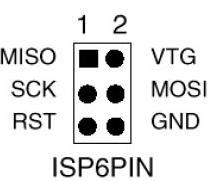 ISPs typically use a six-pin connector (2x3). It's not always easy to
figure out which end is which, so use a multimeter in continuity mode
to figure out which pin is ground. Once you're sure, mark your connector
so you'll know which pin is pin 1 (MISO, the pin opposite ground).
ISPs typically use a six-pin connector (2x3). It's not always easy to
figure out which end is which, so use a multimeter in continuity mode
to figure out which pin is ground. Once you're sure, mark your connector
so you'll know which pin is pin 1 (MISO, the pin opposite ground).
Once you have your ISP pins straight, refer to your handy-dandy
Atmega328 pinout and connect power, ground, MOSI, MISO, SCK, and RST
to the appropriate Atmega pins.
All wired up? In the Arduino IDE, set Programmer to your ISP,
for instance, USBtinyISP or Arduino as ISP
Then use the Upload button to upload sketches.
If you prefer Arduino-mk instead of the IDE, add this to your Makefile:
ISP_PROG = usbtiny
(or whatever ISP you're using). Then type
make ispload
instead of
make upload
Once you have your FTDI or ISP working, then you can think about making
an even simpler circuit -- without the external clock and its associated
capacitors. But there are a couple of additional tricks to that.
Stay tuned for Part 2.
Tags: hardware, arduino
[
15:44 Dec 09, 2017
More hardware |
permalink to this entry |
]
Mon, 04 Dec 2017
![[Raspberry Pi Zero W with LED]](http://shallowsky.com/blog/images/pi-no-headers.jpg) Are you interested in all things Raspberry Pi, or just curious about them?
Come join like-minded people this Thursday at 7pm for the inaugural meeting
of the Los Alamos Raspberry Pi club!
Are you interested in all things Raspberry Pi, or just curious about them?
Come join like-minded people this Thursday at 7pm for the inaugural meeting
of the Los Alamos Raspberry Pi club!
At Los Alamos Makers,
we've had the Coder Dojo for Teens going on for over a year now,
but there haven't been any comparable programs that welcomes adults.
Pi club is open to all ages.
The format will be similar to Coder Dojo: no lectures or formal
presentations, just a bunch of people with similar interests.
Bring a project you're working on, see what other people are working
on, ask questions, answer questions, trade ideas and share knowledge.
Bring your own Pi if you like, or try out one of the Pi 3 workstations
Los Alamos Makers has set up. (If you use one of the workstations there,
I recommend bringing a USB stick so you can save your work to take home.)
Although the group is officially for Raspberry Pi hacking, I'm sure
many attendees will interested in Arduino or other microcontrollers, or
Beaglebones or other tiny Linux computers; conversation and projects
along those lines will be welcome.
Beginners are welcome too. You don't have to own a Pi, know a resistor
from a capacitor, or know anything about programming. I've been asked
a few times about where an adult can learn to program. The Raspberry Pi
was originally introduced as a fun way to teach schoolchildren to
program computers, and it includes programming resources suitable to
all ages and abilities. If you want to learn programming on your own
laptop rather than a Raspberry Pi, we won't turn you away.
Raspberry Pi Club:
Thursdays, 7pm, at Los Alamos Makers, 3540 Orange Street (the old PEEC
location), Suite LV1 (the farthest door from the parking lot -- look
for the "elevated walkway" painted outside the door).
There's a Facebook event:
Raspberry Pi club
on Facebook. We have meetings scheduled for the next few Thursdays:
December 7, 14, and 21, and after that we'll decide based on interest.
Tags: maker, hardware, raspberry pi, programming
[
10:44 Dec 04, 2017
More hardware |
permalink to this entry |
]
Wed, 29 Nov 2017
Having written a basic blink program in C for
my
ATtiny85 with a USBtinyISP (Part 1), I wanted to use it to control other
types of hardware. That meant I wanted to be able to use Arduino libraries.
The Arduino IDE
I normally use Makefiles, but the Arduino IDE is much better supported
so I tried that first. I followed the steps at
High-Low
Tech: Programming an ATtiny w/ Arduino 1.6 (or 1.0).
But the short summary is:
- Run the Arduino IDE
- File->Preferences
- In "Additional Boards Manager" near the bottom, paste this:
https://raw.githubusercontent.com/damellis/attiny/ide-1.6.x-boards-manager/package_damellis_attiny_index.json
and click OK
- Tools->Boards->Board Manager...
- Find the ATTiny entry, click on it, and click Install
- Back in the main Arduino IDE, Tools->Boards should now havea
couple of Attiny entries. Choose the one that corresponds to your
ATTiny; then, under Processor, narrow it down further.
In
Tools->Programmer, choose the programmer you're using
(for example,
USBtinyISP).
Now you should be able to Verify and Upload a blink sketch
just like you would to a regular Arduino, subject to the pin limitations
of the ATTiny.
That worked for blink. But it didn't work when I started adding libraries.
Since the command-line was what I really cared about, I moved on rather
than worrying about libraries just yet.
ATtiny with Arduino-Makefile
For most of my Arduino development I use an excellent package called
Arduino-Makefile.
There's a Debian package called arduino-mk that works fine for normal
Arduinos, but for ATtiny, there have been changes, so use the version
from git.
A minimal blink Makefile looks like this:
BOARD_TAG = uno
include /usr/share/arduino/Arduino.mk
It assumes that if you're in a directory called blink, it
should compile a file called blink.ino. It will also build
any additional .cpp files it finds there. make upload
uploads the code to a normal Arduino.
With Attiny it gets quite a bit more complicated.
The key is that you have to specify an alternate core:
ALTERNATE_CORE = ATTinyCore
But there are lots of different ATtiny cores, they're all different,
and they each need a different set of specifiers like BOARD_TAG in
the Makefile. Arduino-Makefile comes with an example, but it isn't
very useful since it doesn't say where to get the cores that correspond
with the various samples. I ended up filing a documentation bug and
exchanging some back-and-forth with the maintainer of the package,
Simon John, and here's what I learned.
First: as I mentioned earlier, you should use the latest git version
of Arduino-Makefile. The version in Debian is a little older and some
things have changed; while the older version can be made to work with
ATtiny, the recipes will be different from the ones here.
Second, the recipes for each core will be different depending on which
version of the Arduino software you're using. Simon
says he sticks to version 1.0.5 when he uses ATtinys, because newer
versions don't work as well. That may be smart (certainly he has a lot
more experience than I do), but I'm always hesitant to rely on
software that old, so I wanted to get things working with the latest
Arduino, 1.8.5, if i could, so that's what the recipes here will
reflect.
Third, as mentioned in Part 1, clock rate should be 1MHz, not 8MHz
as you'll see in a lot of web examples, so:
F_CPU = 1000000L
Fourth, uploading sketches. As mentioned in the last article, I'm using
a USBtinyISP. For that, I use ISP_PROG = usbtiny and
sketches are uploaded by typing make ispload rather than
the usual make upload. change that if you're usinga
different programmer.
With those preliminaries over:
I ended up getting two different cores working,
and there were two that didn't work.
Install the cores in subdirectories in
your ~/sketchbook/hardware directory. You can have multiple
cores installed at once if you want to test different cores.
Here are the recipes.
CodingBadly's arduino-tiny
This is the core that Simon says he prefers, so it's the one I'm going
to use as my default. It's at
https://github.com/Coding-Badly/arduino-tiny.git,
and also a version on Google Code. (Neither one has been updated since 2013.)
git clone it into your sketchbook/hardware.
Then either cp 'Prospective Boards.txt' boards.txt
or create a new boards.txt and copy from 'Prospective Boards.txt'
all the boards you're interested in (for instance, all the attiny85
definitions if attiny85 is the only attiny board you have).
Then your Makefile should look something like this:
ARDUINO_DIR = /path/to/arduino-1.8.5

BOARD_TAG = attiny85at8
ALTERNATE_CORE = tiny
F_CPU = 1000000L
ISP_PROG = usbtiny

include /path/to/Arduino-Makefile/Arduino.mk
If your Arduino software is installed in /usr/share/arduino you can
omit the first line.
Now copy blink.ino -- of course, you'll have to change pin 13
to be something between 1 and 6 since that's how many pins an ATtiny
has -- and try make and make ispload.
SpenceKonde's ATTinyCore
This core is at https://github.com/SpenceKonde/ATTinyCore.git.
I didn't need to copy boards.txt or make any other changes,
just clone it under sketches/hardware and then use this Makefile:
ARDUINO_DIR = /path/to/arduino-1.8.5

ALTERNATE_CORE = ATTinyCore
BOARD_TAG = attinyx5
BOARD_SUB = 85
F_CPU = 1000000L
ISP_PROG = usbtiny

include /path/to/Arduino-Makefile/Arduino.mk
Non-working Cores
There are plenty of other ATtiny cores around. Here are two that
apparently worked once, but I couldn't get them working with the
current version of the tools. I'll omit links to them to try to
reduce the probability of search engines linking to them rather
than to the more up-to-date cores.
Damellis's attiny (you may see this referred to as HLT after the
domain name, "Highlowtech"), on GitHub as
damellis/attiny,
was the first core I got working with Debian's older version of
arduino-mk and Arduino 1.8.4. But when I upgraded to the latest
Arduino-Makefile and Arduino 1.8.5, it no longer worked. Ironic since
an older version of it was the one used in most of the tutorials I
found for using ATtiny with the Arduino IDE.
Simon says this core is buggy: in particular, there are problems with
software PWM.
I also tried rexxar-tc's arduino-tiny.core2 (also on GitHub).
I couldn't get it to work with any of the Makefile or Arduino
versions I tried, though it may have worked with Arduino 1.0.
With two working cores, I can get an LED to blink.
But libraries are the point of using the Arduino framework ...
and as I tried to move beyond blink.ino, I found that
not all Arduino libraries work with ATtiny.
In particular, Wire, used for protocols like I2C to talk to all
kinds of useful chips, doesn't work without substantial revisions.
But that's a whole separate topic. Stay tuned.
Tags: hardware, arduino, programming
[
19:06 Nov 29, 2017
More hardware |
permalink to this entry |
]
Thu, 02 Nov 2017
![[ATtiny85 and USBtinyISP programmer]](http://shallowsky.com/blog/images/hardware/img_1889sm.jpg) Arduinos are great for prototyping, but for a small, low-power,
cheap and simple design, an ATtiny chip seems like just the ticket.
For just a few dollars you can do most of what you could with an
Arduino and use a lot of the same code, as long as you can make do
with a little less memory and fewer pins.
Arduinos are great for prototyping, but for a small, low-power,
cheap and simple design, an ATtiny chip seems like just the ticket.
For just a few dollars you can do most of what you could with an
Arduino and use a lot of the same code, as long as you can make do
with a little less memory and fewer pins.
I've been wanting to try them, and recently I ordered a few ATtiny85 chips.
There are quite a few ways to program them. You can buy programmers
specifically intended for an ATtiny, but I already had a USBtinyISP,
a chip used to program Arduino bootloaders, so that's what I'll
discuss here.
Wiring to the USBtinyISP
![[ATtiny85 and USBtinyISP wiring]](http://shallowsky.com/blog/images/hardware/attiny-usbtinyISP_bb.jpg) The best reference I found on wiring was
Using USBTinyISP to program ATTiny45 and ATTiny85.
That's pretty clear, but I made my own Fritzing diagram, with colors,
so it'll be easy to reconstruct it next time I need it.
The colors I used:
The best reference I found on wiring was
Using USBTinyISP to program ATTiny45 and ATTiny85.
That's pretty clear, but I made my own Fritzing diagram, with colors,
so it'll be easy to reconstruct it next time I need it.
The colors I used:
| MISO
| yellow
| VCC | red
|
| SCK
| white
| MOSI | green
|
| RESET
| orange
or red/black
| GND | black
|
Programming the ATtiny in C
I found a couple of blink examples at
electronut.in,
Getting Started with ATtiny AVR programming,
and in a Stack Exchange thread,
How
to program an AVR chip in Linux
Here's some basic blink code:
#include <avr/io.h>
#include <util/delay.h>

int main (void)
{
    // Set Data Direction to output on port B, pins 2 and 3:
    DDRB = 0b00001000;
    while (1) {
        // set PB3 high
        PORTB = 0b00001000;
        _delay_ms(500);
        // set PB3 low
        PORTB = 0b00000000;
        _delay_ms(500);
    }

    return 1;
}
Then you need a Makefile. I started with the one linked from the electronut
page above. Modify it if you're using a programmer other than a USBtinyISP.
make builds the program, and make install
loads it to the ATtiny. And, incredibly, my light started blinking,
the first time!
![[ATtiny85 pinout]](http://shallowsky.com/blog/images/hardware/attiny85-pinout.jpg) Encouraged, I added another LED to make sure I understood.
The ATtiny85 has six pins you can use (the other two are power and ground).
The pin numbers correspond to the bits in DDRB and PORTB:
my LED was on PB3. I added another LED on PB2 and made it alternate
with the first one:
Encouraged, I added another LED to make sure I understood.
The ATtiny85 has six pins you can use (the other two are power and ground).
The pin numbers correspond to the bits in DDRB and PORTB:
my LED was on PB3. I added another LED on PB2 and made it alternate
with the first one:
    DDRB = 0b00001100;
[ ... ]
        // set PB3 high, PB2 low
        PORTB = 0b00001000;
        _delay_ms(500);
        // set PB3 low, PB2 high
        PORTB = 0b00000100;
        _delay_ms(500);
Timing Woes
But wait -- not everything was rosy. I was calling _delay_ms(500),
but it was waiting a lot longer than half a second between flashes.
What was wrong?
For some reason, a lot of ATtiny sample code on the web assumes the
chip is running at 8MHz. The chip's internal oscillator is indeed 8MHz
(though you can also run it with an external crystal at various
speeds) -- but its default mode uses that oscillator in "divide by
eight" mode, meaning its actual clock rate is 1MHz. But Makefiles
you'll find on the web don't take that into account (maybe because
they're all copied from the same original source). So, for instance,
the Makefile I got from electronut has
CLOCK = 8000000
If I changed that to
CLOCK = 1000000
now my delays were proper milliseconds, as I'd specified.
Here's my working
attiny85
blink Makefile.
In case you're curious about clock rate, it's specified by what are
called fuses, which sound permanent but aren't: they hold their
values when the chip loses power, but you can set them over and over.
You can read the current fuse settings like this:
avrdude -c usbtiny -p attiny85 -U lfuse:r:-:i -v
which should print something like this:
avrdude: safemode: hfuse reads as DF
avrdude: safemode: efuse reads as FF
avrdude: safemode: Fuses OK (E:FF, H:DF, L:62)
To figure out what that means, go to the
Fuse calculator,
scroll down to Current settings and enter the three values
you got from avrdude (E, H and L correspond to Extended, High and Low).
Then scroll up to Feature configuration
to see what the fuse settings correspond to.
In my case it was
Int. RC Osc. 8 Mhz; Start-up time PWRDWN/RESET; 6CK/14CK+
64ms; [CKSEL=1011 SUT=10]; default value
and Divide clock by 8 internally; [CKDIV8=0] was checked.
More on ports and pins
There's more info on ATtiny ports in
ATTiny
Port Manipulation (Part 1): PinMode() and DigitalWrite()
Nobody seems to have written much about AVR/ATTINY
programming in general. Symbols like PORTB and
functions like _delay_ms() come from files in
/usr/lib/avr/include/, at least on my Debian system.
There's not much there, so if you want library functions to handle
nontrivial hardware, you'll have to write them or find them somewhere else.
As for understanding pins, you're supposed to go to the datasheet and read it
through, all 234 pages. Hint: for understanding basics of reading from and
writing to ports, speed forward to section 10, I/O Ports.
A short excerpt from that section:
Three I/O memory address locations are allocated for each port, one
each for the Data Register - PORTx, Data Direction Register - DDRx,
and the Port Input Pins - PINx. The Port Input Pins I/O location is
read only, while the Data Register and the Data Direction Register are
read/write. However, writing a logic one to a bit in the PINx
Register, (comma sic) will result in a toggle in the
corresponding Data Register. In addition, the Pull-up Disable - PUD
bit in MCUCR disables the pull-up function for all pins in all ports
when set.
There's also some interesting information there about built-in pull-up
resistors and how to activate or deactivate them.
That's helpful, but here's the part I wish they'd said:
PORTB (along with DDRB and PINB) represents all six pins. (Why B? Is
there a PORTA? Not as far as I can tell; at least, no PORTA is
mentioned in the datasheet.) There are six output pins, corresponding
to the six pins on the chip that are not power or ground. Set the bits
in DDRB and PORTB to correspond to the pins you want to set. So if you
want to use pins 0 through 3 for output, do this:
DDRB = 0b00001111;
If you want to set logical pins 1 and 3 (corresponding to pins 6 and 2
on the chip) high, and the rest of the pins low, do this:
PORTB = 0b00001010;
To read from pins, use PINB.
In addition to basic functionality, all the pins have specialized
uses, like timers, SPI, ADC and even temperature measurement (see the
diagram above). The datasheet goes into more detail about how to get
into some of those specialized modes.
But a lot of those specialties are easier to deal with using
libraries. And there are a lot more libraries available for the Arduino
C++ environment than there are for a bare ATtiny using C.
So the next step is to program the ATtiny using Arduino ...
which deserves its own article.
Tags: hardware, arduino, programming
[
18:01 Nov 02, 2017
More hardware |
permalink to this entry |
]
Thu, 28 Sep 2017
Someone at our makerspace found a fun Halloween project we could do
at Coder Dojo: a
motion
sensing pumpkin that laughs evilly when anyone comes near.
Great! I've worked with both PIR sensors and ping rangefinders,
and it sounded like a fun project to mentor. I did suggest, however,
that these days a Raspberry Pi Zero W is cheaper than an Arduino, and
playing sounds on it ought to be easier since you have frameworks like
ALSA and pygame to work with.
The key phrase is "ought to be easier".
There's a catch: the Pi Zero and Zero W don't
have an audio output jack like their larger cousins. It's possible to
get analog audio output from two GPIO pins (use the term "PWM output"
for web searches), but there's a lot of noise. Larger Pis have a built-in
low-pass filter to screen out the noise, but on a Pi Zero you have to
add a low-pass filter. Of course, you can buy HATs for Pi Zeros that
add a sound card, but if you're not super picky about audio quality,
you can make your own low-pass filter out of two resistors and two capacitors
per channel (multiply by two if you want both the left and right channels).
There are lots of tutorials scattered around the web about how to add
audio to a Pi Zero, but I found a lot of them confusing; e.g.
Adafruit's
tutorial on Pi Zero sound has three different ways to edit the
system files, and doesn't specify things like the values of the
resistors and capacitors in the circuit diagram (hint: it's clearer if you
download the Fritzing file, run Fritzing and click on each resistor).
There's a clearer diagram in
Sudomod Forums:
PWM Audio Guide, but I didn't find that until after I'd made my own,
so here's mine.
Parts list:
- 2 x 270 Ω resistor
- 2 x 150 Ω resistor
- 2 x 10 nF or 33nF capacitor
- 2 x 1μF electrolytic capacitor
- 3.5mm headphone jack, or whatever connection you want to use to
your speakers
And here's how to wire it:
![[Adding audio to the Raspberry Pi Zero]](http://shallowsky.com/blog/images/pi-zero-audio_bb.jpg)
(Fritzing file, pi-zero-audio.fzz.)
This wiring assumes you're using pins 13 and 18 for the left and right
channels. You'll need to configure your Pi to use those pins.
Add this to /boot/config.txt:
dtoverlay=pwm-2chan,pin=18,func=2,pin2=13,func2=4
Testing
Once you build your circuit up, you need to test it.
Plug in your speaker or headphones, then make sure you can play
anything at all:
aplay /usr/share/sounds/alsa/Front_Center.wav
If you need to adjust the volume, run alsamixer and
use the up and down arrow keys to adjust volume. You'll have to press
up or down several times before the bargraph actually shows a change,
so don't despair if your first press does nothing.
That should play in both channels. Next you'll probably be curious
whether stereo is actually working. Curiously, none of the tutorials
address how to test this. If you ls /usr/share/sounds/alsa/
you'll see names like Front_Left.wav, which might lead you to
believe that aplay /usr/share/sounds/alsa/Front_Left.wav
might play only on the left. Not so: it's a recording of a voice
saying "Front left" in both channels. Very confusing!
Of course, you can copy a music file to your Pi, play it (omxplayer
is a nice commandline player that's installed by default and handles
MP3) and see if it's in stereo. But the best way I found to test
audio channels is this:
speaker-test -t wav -c 2
That will play those ALSA voices in the correct channel, alternating
between left and right.
(MythTV has a good
Overview
of how to use speaker-test.
Not loud enough?
I found the volume plenty loud via earbuds, but if you're targeting
something like a Halloween pumpkin, you might need more volume.
The easy way is to use an amplified speaker (if you don't mind
putting your nice amplified speaker amidst the yucky pumpkin guts),
but you can also build a simple amplifier.
Here's one that looks good, but I haven't built one yet:
One Transistor Audio for Pi Zero W
Of course, if you want better sound quality, there are various places
that sell HATs with a sound chip and line or headphone out.
Tags: raspberry pi, electronics, audio, linux, hardware
[
15:49 Sep 28, 2017
More hardware |
permalink to this entry |
]
Thu, 10 Aug 2017
![[Curved rod barn-door mount]](http://shallowsky.com/blog/images/barndoor/img_1410sm.jpg) I've been meaning forever to try making a "barn door" tracking mount.
Used mainly for long-exposure wide-field astrophotography, the barn door
mount, invented in 1975, is basically two pieces of wood with a hinge.
The bottom board mounts on a tripod and is pointed toward the North Star;
"opening" the hinge causes the top board to follow the motion of the
sky, like an equatorial telescope mount. A threaded rod and a nut
control the angle of the "door", and you turn the nut manually every
so often. Of course, you can also drive it with a motor.
I've been meaning forever to try making a "barn door" tracking mount.
Used mainly for long-exposure wide-field astrophotography, the barn door
mount, invented in 1975, is basically two pieces of wood with a hinge.
The bottom board mounts on a tripod and is pointed toward the North Star;
"opening" the hinge causes the top board to follow the motion of the
sky, like an equatorial telescope mount. A threaded rod and a nut
control the angle of the "door", and you turn the nut manually every
so often. Of course, you can also drive it with a motor.
We're off to view the eclipse in a couple of weeks.
Since it's my first total eclipse, my plan is to de-emphasize
photography: especially during totality, I want to experience the
eclipse, not miss it because my eyes are glued to cameras and timers
and other equipment. But I still want to take photos every so often.
Constantly adjusting a tripod to keep the sun in frame is another
hassle that might keep my attention away from the eclipse. But real
equatorial mounts are heavy and a time consuming to set up;
since I don't know how crowded the area will be, I wasn't
planning to take one. Maybe a barn door would solve that problem.
Perhaps more useful, it would mean that my sun photos would all be
rotated approximately the right amount, in case I wanted to make an
animation. I've taken photos of lunar and partial solar eclipses, but
stringing them together into an animation turned out to be too much
hassle because of the need to rotate and position each image.
I've known about barn-door mounts since I was a kid, and I knew the
basic theory, but I'd never paid much attention to the details. When I
searched the web, it sounded complicated -- it turned out there are
many types that require completely different construction techniques.
The best place to start (I found out after wasting a lot of time on
other sites) is the
Wikipedia
article on "Barn door tracker", which gives a wonderfully clear
overview, with photos, of the various types. I had originally been
planning a simple tangent or isosceles type; but when I read
construction articles, it seemed that those seemingly simple types
might not be so simple to build: the angle between the threaded rod
and the boards is always changing, so you need some kind of a pivot.
Designing the pivot looked tricky. Meanwhile, the pages I found on
curved-rod mounts all insisted that bending the rod was easy, no
trouble at all. I decided to try a curved-rod mount first.
The canonical reference is a 2015 article by Gary Seronik:
A
Tracking Platform for Astrophotography. But I found three other good
construction guides:
Optical Ed's
"Making a Curve Bolt Barn Door",
a
Cloudy Nights discussion thread "Motorized Barn Door Mount Kit",
and
Massapoag
Pond Photography's "Barn Door Tracker".
I'm not going to reprise all their construction details, so refer to
those sites if you try making your own mount.
![[Barn-door mount, showing piano hinge]](http://shallowsky.com/blog/images/barndoor/img_1405sm.jpg) The crucial parts are a "piano hinge", a long hinge that eliminates
the need to line up two or more hinges, and the threaded rod.
Buying a piano hinge in the right size proved impossible locally,
but the folks at Metzger's assured me that piano hinges can be cut,
so I bought one longer than I needed and cut it to size.
I used a 1/4-20 rod, which meant (per the discussions in the Cloudy
Nights discussion linked above) that a 11.43-inch radius from the
hinge to the holes the rod passes through would call for the nut to
turn at a nice round number of 1 RPM.
The crucial parts are a "piano hinge", a long hinge that eliminates
the need to line up two or more hinges, and the threaded rod.
Buying a piano hinge in the right size proved impossible locally,
but the folks at Metzger's assured me that piano hinges can be cut,
so I bought one longer than I needed and cut it to size.
I used a 1/4-20 rod, which meant (per the discussions in the Cloudy
Nights discussion linked above) that a 11.43-inch radius from the
hinge to the holes the rod passes through would call for the nut to
turn at a nice round number of 1 RPM.
I was suspicious of the whole "it's easy to bend the threaded rod ina
11.43-inch circle" theory, but it turned out to be true. Draw the
circle you want on a sheet of newspaper, put on some heavy gloves
and start bending, frequently comparing your rod to the circle you drew.
You can fine-tune the curvature later.
I cut my boards, attached the hinge, measured about 11.4" and drilled
a hole for the threaded rod. The hole needed to be a bit bigger than
5/8" to let the curved rod pass through without rubbing. Attach the
curved rod to the top wood piece with a couple of nuts and some
washers, and then you can fine-tune the rod's curvature, opening and
closing the hinge and re-bending the rod a little in any place it rubs.
A 5/8" captive nut on the top piece lets you attach a tripod head
which will hold your camera or telescope. A 1/4" captive nut on the
bottom piece serves to attach the mount to a tripod -- you need a
1/4", not 3/8": the rig needs to mount on a tripod head, not just the
legs, so you can align the hinge to the North Star. (Of course, you
could build a wedge or your own set of legs, if you prefer.) The 3/4"
plywood I was using turned out to be thicker than the captive nuts, so
I had to sand the wood thinner in both places. Maybe using half-inch
plywood would have been better.
![[Wing nut on barn-door mount]](http://shallowsky.com/blog/images/barndoor/img_1407.jpg) The final piece is the knob/nut you'll turn to make the mount track.
I couldn't find a good 1/4" knob for under $15.
A lot of people make a wood circle and mount the nut in
the center, or use a gear so a motor can drive the mount. I looked
around at things like jam-jar lids and the pile of metal gears and
sprinkler handles in my welding junkpile, but I didn't see anything
that looked quite right, so I decided to try a wing nut just for
testing, and worry about the knob later. Turns out a wing nut works
wonderfully; there's no particular need for anything else if you're
driving your barn-door manually.
The final piece is the knob/nut you'll turn to make the mount track.
I couldn't find a good 1/4" knob for under $15.
A lot of people make a wood circle and mount the nut in
the center, or use a gear so a motor can drive the mount. I looked
around at things like jam-jar lids and the pile of metal gears and
sprinkler handles in my welding junkpile, but I didn't see anything
that looked quite right, so I decided to try a wing nut just for
testing, and worry about the knob later. Turns out a wing nut works
wonderfully; there's no particular need for anything else if you're
driving your barn-door manually.
Testing time! I can't see Polaris from my deck, and I was too lazy to
set up anywhere else, so I used a protractor to set the hinge angle to
roughly 36° (my latitude), then pointed it approximately north.
I screwed my Pro-Optic 90mm Maksutov (the scope I plan to use for
my eclipse photos) onto the ball head and pointed it at the moon
as soon as it rose. With a low power eyepiece (20x), turning the wing
nut kept the moon more or less centered in the field for the next
half-hour, until clouds covered the moon and rain began threatening.
I didn't keep track of how many turns I was making, since I knew the
weather wasn't going to allow a long session, and right now I'm not
targeting long-exposure photography, just an easy way of keeping an
object in view.
A good initial test! My web searches, and the discovery of all
those different types of barn-door mounts and pivots and flex
couplings and other scary terms, had seemed initially daunting.
But in the end, building a barn-door mount was just as easy as
people say it is, and I finished it in a day.
And what about a motor? I added one a few days later, with a stepper
and an Arduino. But that's a separate article.
Tags: astronomy, hardware, eclipse
[
19:25 Aug 10, 2017
More science/astro |
permalink to this entry |
]
Thu, 06 Jul 2017
It's official: I'm working on another book!
This one will be much shorter than Beginning
GIMP. It's a mini-book for Make Media on the Raspberry Pi Zero W
and some fun projects you can build with it.
![[Raspberry Pi Zero W]](http://shallowsky.com/blog/images/pi-and-quarter.jpg)
I don't want to give too much away at this early stage, but I predict
it will include light shows, temperature sensors, control of household
devices, Twitter access and web scraping. And lots of code samples.
I'll be posting more about the book, and about various Raspberry Pi
Zero W projects I'm exploring during the course of writing it.
But for now ... if you'll excuse me, I have a chapter that's due today,
and a string of addressable LEDs sitting on my desk calling out to be
played with as part of the next chapter.
Tags: writing, raspberry pi, hardware
[
09:50 Jul 06, 2017
More writing |
permalink to this entry |
]
Sun, 19 Jul 2015
I'm sure I'm not the only one who's forever trying to plug in a USB cable
only to find it upside down. And then I flip it and try it the other
way, and that doesn't work either, so I go back to the first side,
until I finally get it plugged in, because there's no easy way to
tell visually which way the plug is supposed to go.
It's true of nearly all of the umpteen variants of USB plug: almost
all of them differ only subtly from the top side to the bottom.
![[USB trident]](https://upload.wikimedia.org/wikipedia/commons/thumb/f/fd/USB_Icon.svg/320px-USB_Icon.svg.png) And to "fix" this, USB cables are built so that they have subtly raised
indentations which, if you hold them to the light just right so you can
see the shadows, say "USB" or have the little USB trident on the top side:
And to "fix" this, USB cables are built so that they have subtly raised
indentations which, if you hold them to the light just right so you can
see the shadows, say "USB" or have the little USB trident on the top side:
In an art store a few weeks ago, Dave had a good idea.
![[USB cables painted for orientation]](http://shallowsky.com/blog/images/painted-usb-cables.jpg) He bought a white paint marker, and we've used it to paint the logo side
of all our USB cables.
He bought a white paint marker, and we've used it to paint the logo side
of all our USB cables.
Tape the cables down on the desk -- so they don't flop around while
the paint is drying -- and apply a few dabs of white paint to the logo
area of each connector. If you're careful you might be able to fill in
the lowered part so the raised USB symbol stays black; or to paint only
the raised USB part. I tried that on a few cables, but after the fifth
or so cable I stopped worrying about whether I was ending up with a
pretty USB symbol and just started dabbing paint wherever was handy.
The paint really does make a big difference. It's much easier now to
plug in USB cables, especially micro USB, and I never go through that
"flip it over several times" dance any more.
Tags: hardware, maker
[
20:37 Jul 19, 2015
More hardware |
permalink to this entry |
]
Wed, 16 Jul 2014
![[Arduino intervalometer]](http://shallowsky.com/blog/images/hardware/img_6213-450.jpg) While testing my
automated critter
camera, I was getting lots of false positives caused by clouds
gathering and growing and then evaporating away. False positives
are annoying, but I discovered that it's fun watching the clouds grow
and change in all those photos
... which got me thinking about time-lapse photography.
While testing my
automated critter
camera, I was getting lots of false positives caused by clouds
gathering and growing and then evaporating away. False positives
are annoying, but I discovered that it's fun watching the clouds grow
and change in all those photos
... which got me thinking about time-lapse photography.
First, a disclaimer: it's easy and cheap to just buy an
intervalometer. Search for timer remote control
or intervalometer and you'll find plenty of options for
around $20-30. In fact, I ordered one.
But, hey, it's not here yet, and I'm impatient.
And I've always wanted to try controlling a camera from an Arduino.
This seemed like the perfect excuse.
Why an Arduino rather than a Raspberry Pi or BeagleBone? Just because
it's simpler and cheaper, and this project doesn't need much compute
power. But everything here should be applicable to any microcontroller.
My Canon Rebel Xsi has a fairly simple wired remote control plug:
a standard 2.5mm stereo phone plug.
I say "standard" as though you can just walk into Radio Shack and buy
one, but in fact it turned out to be surprisingly difficult, even when
I was in Silicon Valley, to find them. Fortunately, I had found some,
several years ago, and had cables already wired up waiting for an experiment.
The outside connector ("sleeve") of the plug is ground.
Connecting ground to the middle ("ring") conductor makes the camera focus,
like pressing the shutter button halfway; connecting ground to the center
("tip") conductor makes it take a picture.
I have a wired cable release that I use for astronomy and spent a few
minutes with an ohmmeter verifying what did what, but if you don't
happen to have a cable release and a multimeter there are plenty of
Canon
remote control pinout diagrams on the web.
Now we need a way for the controller to connect one pin of the remote
to another on command.
There are ways to simulate that with transistors -- my
Arduino-controlled
robotic shark project did that. However, the shark was about a $40
toy, while my DSLR cost quite a bit more than that. While I
did find several people on the web saying they'd used transistors with
a DSLR with no ill effects, I found a lot more who were nervous about
trying it. I decided I was one of the nervous ones.
The alternative to transistors is to use something like a relay. In a relay,
voltage applied across one pair of contacts -- the signal from the
controller -- creates a magnetic field that closes a switch and joins
another pair of contacts -- the wires going to the camera's remote.
But there's a problem with relays: that magnetic field, when it
collapses, can send a pulse of current back up the wire to the controller,
possibly damaging it.
There's another alternative, though. An opto-isolator works like a
relay but without the magnetic pulse problem. Instead of a magnetic
field, it uses an LED (internally, inside the chip where you can't see it)
and a photo sensor. I bought some opto-isolators a while back and had
been looking for an excuse to try one. Actually two: I needed one for
the focus pin and one for the shutter pin.
How do you choose which opto-isolator to use out of the gazillion
options available in a components catalog? I don't know, but when I
bought a selection of them a few years ago, it included a 4N25, 4N26
and 4N27, which seem to be popular and well documented, as well as a
few other models that are so unpopular I couldn't even find a
datasheet for them. So I went with the 4N25.
Wiring an opto-isolator is easy. You do need a resistor across the inputs
(presumably because it's an LED).
380Ω
is apparently a good value for the 4N25, but
it's not critical. I didn't have any 380Ω but I had a bunch of
330Ω so that's what I used. The inputs (the signals from the Arduino)
go between pins 1 and 2, with a resistor; the outputs (the wires to the
camera remote plug) go between pins 4 and 5, as shown in
the diagram on this
Arduino
and Opto-isolators discussion, except that I didn't use any pull-up
resistor on the output.
Then you just need a simple Arduino program to drive the inputs.
Apparently the camera wants to see a focus half-press before it gets
the input to trigger the shutter, so I put in a slight delay there,
and another delay while I "hold the shutter button down" before
releasing both of them.
Here's some Arduino code to shoot a photo every ten seconds:
int focusPin = 6;
int shutterPin = 7;

int focusDelay = 50;
int shutterOpen = 100;
int betweenPictures = 10000;

void setup()
{
    pinMode(focusPin, OUTPUT);
    pinMode(shutterPin, OUTPUT);
}

void snapPhoto()
{
    digitalWrite(focusPin, HIGH);
    delay(focusDelay);
    digitalWrite(shutterPin, HIGH);
    delay(shutterOpen);
    digitalWrite(shutterPin, LOW);
    digitalWrite(focusPin, LOW);
}

void loop()
{
    delay(betweenPictures);
    snapPhoto();
}
Naturally, since then we haven't had any dramatic clouds, and the
lightning storms have all been late at night after I went to bed.
(I don't want to leave my nice camera out unattended in a rainstorm.)
But my intervalometer seemed to work fine in short tests.
Eventually I'll make some actual time-lapse movies ... but that will
be a separate article.
Tags: arduino, hardware, photography, intervalometer, time-lapse, maker
[
18:31 Jul 16, 2014
More hardware |
permalink to this entry |
]
Thu, 03 Jul 2014
![[PIR sensor]](http://shallowsky.com/images/night-vision/img_6122.jpg) In my last crittercam installment,
the
NoIR night-vision crittercam, I was having trouble with false positives,
where the camera would trigger repeatedly after dawn as leaves moved
in the wind and the morning shadows marched across the camera's field of view.
I wondered if a passive infra-red (PIR) sensor would be the answer.
In my last crittercam installment,
the
NoIR night-vision crittercam, I was having trouble with false positives,
where the camera would trigger repeatedly after dawn as leaves moved
in the wind and the morning shadows marched across the camera's field of view.
I wondered if a passive infra-red (PIR) sensor would be the answer.
I got one, and the answer is: no. It was very easy to hook up, and
didn't cost much, so it was a worthwhile experiment; but it gets
nearly as many false positives as camera-based motion detection.
It isn't as sensitive to wind, but as the ground and the foliage heat
up at dawn, the moving shadows are just as much a problem as they were
with image-based motion detection.
Still, I might be able to combine the two, so I figure it's worth
writing up.
Reading inputs from the HC-SR501 PIR sensor
![[PIR sensor pins]](http://shallowsky.com/images/night-vision/img_6124.jpg)
The PIR sensor I chose was the common HC-SR501 module.
It has three pins -- Vcc, ground, and signal -- and two potentiometer
adjustments.
It's easy to hook up to a Raspberry Pi because it can take 5 volts
in on its Vcc pin, but its signal is 3.3v (a digital signal -- either
motion is detected or it isn't), so you don't have to fool with
voltage dividers or other means to get a 5v signal down to the 3v
the Pi can handle.
I used GPIO pin 7 for signal, because it's right on the corner of the
Pi's GPIO header and easy to find.
There are two ways to track a digital signal like this. Either you can
poll the pin in an infinfte loop:
import time
import RPi.GPIO as GPIO

pir_pin = 7
sleeptime = 1

GPIO.setmode(GPIO.BCM)
GPIO.setup(pir_pin, GPIO.IN)

while True:
    if GPIO.input(pir_pin):
        print "Motion detected!"
    time.sleep(sleeptime)
or you can use interrupts: tell the Pi to call a function whenever it
sees a low-to-high transition on a pin:
import time
import RPi.GPIO as GPIO

pir_pin = 7
sleeptime = 300

def motion_detected(pir_pin):
    print "Motion Detected!"

GPIO.setmode(GPIO.BCM)
GPIO.setup(pir_pin, GPIO.IN)

GPIO.add_event_detect(pir_pin, GPIO.RISING, callback=motion_detected)

while True:
    print "Sleeping for %d sec" % sleeptime
    time.sleep(sleeptime)
Obviously the second method is more efficient. But I already had a
loop set up checking the camera output and comparing it against
previous output, so I tried that method first, adding support to my
motion_detect.py
script. I set up the camera pointing at the wall, and, as root, ran the script
telling it to use a PIR sensor on pin 7, and the local and remote
directories to store photos:
# python motion_detect.py -p 7 /tmp ~pi/shared/snapshots/
and whenever I walked in front of the camera, it triggered and took
a photo. That was easy!
Reliability problems with add_event_detect
So easy that I decided to switch to the more efficient interrupt-driven
model. Writing the code was easy, but I found it triggered more often:
if I walked in front of the camera (and stayed the requisite 7 seconds
or so that it takes raspistill to get around to taking a photo),
when I walked back to my desk, I would find two photos, one showing my
feet and the other showing nothing. It seemed like it was triggering
when I got there, but also when I left the scene.
A bit of web searching indicates this is fairly common: that with RPi.GPIO
a lot of people see triggers on both rising and falling edges -- e.g. when
the PIR sensor starts seeing motion, and when it stops seeing motion
and goes back to its neutral state -- when they've asked for just
GPIO.RISING. Reports for this go back to 2011.
On the other hand, it's also possible that instead of seeing a GPIO
falling edge, what was happening was that I was getting multiple calls
to my function while I was standing there, even though the RPi hadn't
finished processing the first image yet. To guard against that, I put
a line at the beginning of my callback function that disabled further
callbacks, then I re-enabled them at the end of the function after the
Pi had finished copying the photo to the remote filesystem. That reduced
the false triggers, but didn't eliminate them entirely.
Oh, well, The sun was getting low by this point, so I stopped
fiddling with the code and put the camera out in the yard with a pile
of birdseed and peanut suet nuggets in front of it. I powered on,
sshed to the Pi and ran the motion_detect script, came back inside
and ran a tail -f on the output file.
I had dinner and worked on other things, occasionally checking the
output -- nothing! Finally I sshed to the Pi and ran ps aux
and discovered the script was no longer running.
I started it again, this time keeping my connection to the Pi active
so I could see when the script died. Then I went outside to check the
hardware. Most of the peanut suet nuggets were gone -- animals had
definitely been by. I waved my hands in front of the camera a few
times to make sure it got some triggers.
Came back inside -- to discover that Python had gotten a segmentation
fault. It turns out that nifty GPIO.add_event_detect() code isn't all
that reliable, and can cause Python to crash and dump core. I ran it
a few more times and sure enough, it crashed pretty quickly every time.
Apparently GPIO.add_event_detect needs a bit more debugging,
and isn't safe to use in a program that has to run unattended.
Back to polling
Bummer! Fortunately, I had saved the polling version of my program, so
I hastily copied that back to the Pi and started things up again.
I triggered it a few times with my hand, and everything worked fine.
In fact, it ran all night and through the morning, with no problems
except the excessive number of false positives, already mentioned.
![[piñon mouse]](http://shallowsky.com/images/night-vision/snap-2014-06-26-23-33-24-400.jpg) False positives weren't a problem at all during the night. I'm fairly
sure the problem happens when the sun starts hitting the ground. Then
there's a hot spot that marches along the ground, changing position in
a way that's all too obvious to the infra-red sensor.
False positives weren't a problem at all during the night. I'm fairly
sure the problem happens when the sun starts hitting the ground. Then
there's a hot spot that marches along the ground, changing position in
a way that's all too obvious to the infra-red sensor.
I may try cross-checking between the PIR sensor and image changes from
the camera. But I'm not optimistic about that working: they both get
the most false positives at the same times, at dawn and dusk when the
shadow angle is changing rapidly. I suspect I'll have to find a
smarter solution, doing some image processing on the images as well
as cross-checking with the PIR sensor.
I've been uploading photos from my various tests here:
Tests of the
Raspberry Pi Night Vision Crittercam.
And as always, the code is on
github:
scripts/motioncam with some basic documentation on my site:
motion-detect.py:
a motion sensitive camera for Raspberry Pi or other Linux machines.
(I can't use github for the documentation because I can't seem to find
a way to get github to display html as anything other than source code.)
Tags: crittercam, hardware, raspberry pi, nature, photography, maker
[
20:13 Jul 03, 2014
More hardware |
permalink to this entry |
]
Thu, 26 Jun 2014
![[Mouse caught on IR camera]](http://shallowsky.com/images/night-vision/snap-2014-06-20-00-27-58-close.jpg)
When I built my
http://shallowsky.com/blog/hardware/raspberry-pi-motion-camera.html
(and part
2), I always had the NoIR camera in the back of my mind. The NoIR is a
version of the Pi camera module with the infra-red blocking
filter removed, so you can shoot IR photos at night without disturbing
nocturnal wildlife (or alerting nocturnal burglars, if that's your target).
After I got the daylight version of the camera working, I ordered a NoIR
camera module and plugged it in to my RPi. I snapped some daylight
photos with raspstill and verified that it was connected and working;
then I waited for nightfall.
In the dark, I set up the camera and put my cup of hot chocolate in
front of it. Nothing. I hadn't realized that although CCD
cameras are sensitive in the near IR, the wavelengths only slightly
longer than visible light, they aren't sensitive anywhere near
the IR wavelengths that hot objects emit. For that, you need a special
thermal camera. For a near-IR CCD camera like the Pi NoIR, you need an
IR light source.
Knowing nothing about IR light sources, I did a search and came up
with something called a
"Infrared IR 12 Led Illuminator Board Plate for CCTV Security CCD Camera"
for about $5. It seemed similar to the light sources used on a few
pages I'd found for home-made night vision cameras, so I ordered it.
Then I waited, because I stupidly didn't notice until a week and a half
later that it was coming from China and wouldn't arrive for three weeks.
Always check the shipping time when ordering hardware!
When it finally arrived, it had a tiny 2-pin connector that I couldn't
match locally. In the end I bought a package of female-female SchmartBoard
jumpers at Radio Shack which were small enough to make decent contact
on the light's tiny-gauge power and ground pins.
I soldered up a connector that would let me use a a universal power
supply, taking a guess that it wanted 12 volts (most of the cheap LED
rings for CCD cameras seem to be 12V, though this one came with no
documentation at all). I was ready to test.
Testing the IR light
![[IR light and NoIR Pi camera]](http://shallowsky.com/images/night-vision/img_6092-lightsource.jpg)
One problem with buying a cheap IR light with no documentation:
how do you tell if your power supply is working? Since the light is
completely invisible.
The only way to find out was to check on the Pi. I didn't want to have
to run back and forth between the dark room where the camera was set
up and the desktop where I was viewing raspistill images. So I
started a video stream on the RPi:
$ raspivid -o - -t 9999999 -w 800 -h 600 | cvlc -vvv stream:///dev/stdin --sout '#rtp{sdp=rtsp://:8554/}' :demux=h264
Then, on the desktop: I ran vlc, and opened the network stream:
rtsp://pi:8554/
(I have a "pi" entry in /etc/hosts, but using an IP address also works).
Now I could fiddle with hardware in the dark room while looking through
the doorway at the video output on my monitor.
It took some fiddling to get a good connection on that tiny connector
... but eventually I got a black-and-white view of my darkened room,
just as I'd expect under IR illumination.
I poked some holes in the milk carton and used twist-ties to seccure
the light source next to the NoIR camera.
Lights, camera, action
Next problem: mute all the blinkenlights, so my camera wouldn't look
like a christmas tree and scare off the nocturnal critters.
The Pi itself has a relatively dim red run light, and it's inside the
milk carton so I wasn't too worried about it.
But the Pi camera has quite a bright red
light that goes on whenever the camera is being used.
Even through the thick milk carton bottom, it was glaring and obvious.
Fortunately, you can
disable
the Pi camera light: edit /boot/config.txt and add this line
disable_camera_led=1
My USB wi-fi dongle has a blue light that flickers as it gets traffic.
Not super bright, but attention-grabbing. I addressed that issue
with a triple thickness of duct tape.
The IR LEDs -- remember those invisible, impossible-to-test LEDs?
Well, it turns out that in darkness, they emit a faint but still
easily visible glow. Obviously there's nothing I can do about that --
I can't cover the camera's only light source! But it's quite dim, so
with any luck it's not spooking away too many animals.
Results, and problems
For most of my daytime testing I'd used a threshold of 30 -- meaning
a pixel was considered to have changed if its value differed by more
than 30 from the previous photo. That didn't work at all in IR: changes
are much more subtle since we're seeing essentially a black-and-white
image, and I had to divide by three and use a sensitivity of 10 or 11
if I wanted the camera to trigger at all.
With that change, I did capture some nocturnal visitors, and some
early morning ones too. Note the funny colors on the daylight shots:
that's why cameras generally have IR-blocking filters if they're not
specifically intended for night shots.
![[mouse]](http://shallowsky.com/images/night-vision/snap-2014-06-20-02-02-00T.jpg)
![[rabbit]](http://shallowsky.com/images/night-vision/snap-2014-06-26-05-01-43T.jpg)
![[rock squirrel]](http://shallowsky.com/images/night-vision/snap-2014-06-26-08-22-44T.jpg)
![[house finch]](http://shallowsky.com/images/night-vision/snap-2014-06-26-10-14-58T.jpg)
Here are more photos, and larger versions of those:
Images from my
night-vision camera tests.
But I'm not happy with the setup. For one thing, it has far too many
false positives. Maybe one out of ten or fifteen images actually has
an animal in it; the rest just triggered because the wind made the
leaves blow, or because a shadow moved or the color of the light changed.
A simple count of differing pixels is clearly not enough for this task.
Of course, the software could be smarter about things: it could try to
identify large blobs that had changed, rather than small changes
(blowing leaves) all over the image. I already know
SimpleCV
runs fine on the Raspberry Pi, and I could try using it to do
object detection.
But there's another problem with detection purely through camera images:
the Pi is incredibly slow to capture an image. It takes around 20 seconds
per cycle; some of that is waiting for the network but I think most of
it is the Pi talking to the camera. With quick-moving animals,
the animal may well be gone by the time the system has noticed a change.
I've caught several images of animal tails disappearing out of the
frame, including a quail who visited yesterday morning. Adding smarts
like SimpleCV will only make that problem worse.
So I'm going to try another solution: hooking up an infra-red motion detector.
I'm already working on setting up tests for that, and should have a
report soon. Meanwhile, pure image-based motion detection has been
an interesting experiment.
Tags: crittercam, hardware, raspberry pi, photography, programming, maker
[
13:31 Jun 26, 2014
More hardware |
permalink to this entry |
]
Sat, 24 May 2014
I wrote recently about the hardware involved in my
Raspberry
Pi motion-detecting wildlife camera.
Here are some more details.
The motion detection software
I started with the simple and clever
motion-detection
algorithm posted by "brainflakes" in a Raspberry Pi forum.
It reads a camera image into a PIL (Python Imaging Library) Image object,
then compares bytes inside that Image's buffer to see how many pixels
have changed, and by how much. It allows for monitoring only a test
region instead of the whole image, and can even create a debug image
showing which pixels have changed. A perfect starting point.
Camera support
As part of the PiDoorbell project,
I had already written a camera wrapper that could control either a USB
webcam or the pi camera module, if it was installed.
Initially that plugged right in.
But I was unhappy with the Pi camera's images --
it can't focus closer than five feet (though a commenter to my
previous article pointed out that it's possible to
break
the seal on the lens and refocus it manually.
Without refocusing, the wide-angle lens means
that a bird five feet away is pretty small, and even when you get
something in focus the images aren't very sharp. And a web search for
USB webcams with good optical quality was unhelpful -- the few people
who care about webcam image quality seem to care mostly about getting
the widest-angle lens possible, the exact opposite of what I wanted
for wildlife.
![[Motion detector camera with external high-res camera]](http://shallowsky.com/blog/images/gphoto-vs-pi/img_5850.jpg) Was there any way I could hook up a real camera, and drive it from the
Pi over USB as though it were a webcam? The answer turned out to be
gphoto2.
Was there any way I could hook up a real camera, and drive it from the
Pi over USB as though it were a webcam? The answer turned out to be
gphoto2.
But only a small subset of cameras are controllable over USB with gphoto2.
(I think that's because the cameras don't allow control, not because
gphoto doesn't support them.) That set didn't include any of the
point-and-shoot cameras we had in the house; and while my Rebel DSLR
might be USB controllable, I'm not comfortable about leaving it out in
the backyard day and night.
With gphoto2's camera compatibility list in one tab and ebay in another,
I looked for a camera that was available, cheap
(since I didn't know if this was going to work at all),
and controllable. I ordered a used Canon A520.
As I waited for it to arrive, I fiddled with my USB-or-pi-camera
to make a start at adding gphoto2 support. I ended up refactoring the
code quite a bit to make it easy to add new types of cameras besides
the three it supports now -- pi, USB webcam, and gphoto2.
I called the module
pycamera.
Using gphoto2
When the camera arrived, I spent quite a while fiddling with gphoto2
learning how to capture images. That turns out to be a bit tricky --
there's no documentation on the various options, apparently because
the options may be different for every camera, so you have to run
$ gphoto2 --set-config capture=1 --list-config
to get a list of options the camera supports, and then, for each of
those options, run
$ gphoto2 --get-config name [option]
to see what values that option can take.
Dual-camera option
Once I got everything working, the speed and shutter noise of capturing
made me wonder if I should worry about the lifespan of the Canon if I
used it to capture snapshots every 15 seconds or so, day and night.
Since I still had the Pi cam hooked up, I fiddled the code so that I
could use the pi cam to take the test images used to detect motion,
and save the real camera for the high-resolution photos when something
actually changes. Saves wear on the more expensive camera, and it's
certainly a lot quieter that way.
Uploading
To get the images off the Pi to where other computers can see them,
I use sshfs to mount a filesystem from another machine on our local net.
Unfortunately, sshfs on the pi doesn't work quite right.
Apparently it uses out-of-date libraries (and gives a warning
to that effect).
You have to be root to use it at all, unlike newer versions of sshfs,
and then, regardless of the permissions of the remote filesystem or
where you mount it locally,
you can only access the mounted filesystem as root.
Fortunately I normally run the motion detector as root anyway, because
the picamera Python module requires it, and I've just gotten in the
habit of using it even when I'm not using python-picamera.
But if you wanted to run as non-root, you'd probably have to use
NFS or some other remote filesystem protocol. Or find a newer version
of sshfs.
Testing the gphoto setup
![[Rock squirrel using Raspberry Pi camera]](http://shallowsky.com/blog/images/gphoto-vs-pi/snap-2014-05-18-13-23-14T.jpg) For reference, here's an image using the previous version of the setup,
with the Raspberry Pi camera module. Click on the image to see a crop of
the full-resolution image in daylight -- basically the best the camera can do.
Definitely not what I was hoping for.
For reference, here's an image using the previous version of the setup,
with the Raspberry Pi camera module. Click on the image to see a crop of
the full-resolution image in daylight -- basically the best the camera can do.
Definitely not what I was hoping for.
So I eagerly set up the tripod and hooked up the setup with the Canon.
I had a few glitches in trying to test it. First, no birds; then later
I discovered Dave had stolen my extension cord, but I didn't discover
that until after the camera's batteries needed recharging.
A new extension cord and an external power supply for the camera,
and I was back in business the next day.
![[Rock squirrel using Raspberry Pi camera]](http://shallowsky.com/blog/images/gphoto-vs-pi/snap-2014-05-20-10-03-52T.jpg) And the results were worth it. As you can see here, using a
real camera does make a huge difference. I used a zoom setting of 6
(it goes to 12). Again, click on the image to see a crop of the
full-resolution photo.
And the results were worth it. As you can see here, using a
real camera does make a huge difference. I used a zoom setting of 6
(it goes to 12). Again, click on the image to see a crop of the
full-resolution photo.
In the end, I probably will order one of the No-IR Raspberry pi cameras,
just to have an easy way of seeing what sorts of critters visit us at
night. But for daylight shots, an external camera is clearly the way
to go.
The scripts
The current version of the script is
motion_detect.py
and of course it needs my
pycamera
module.
And here's
documentation
for the motion detection camera.
Tags: crittercam, hardware, raspberry pi, photography, maker
[
20:09 May 24, 2014
More hardware |
permalink to this entry |
]
Thu, 15 May 2014
I've been working on an automated wildlife camera, to catch birds at
the feeder, and the coyotes, deer, rabbits and perhaps roadrunners (we
haven't seen one yet, but they ought to be out there) that roam the
juniper woodland.
This is a similar project to the
PiDoorbell project presented at PyCon, and my much earlier
proximity
camera project that used an Arduino and a plug computer
but for a wildlife camera I didn't want to use a sonar rangefinder.
For one thing, it won't work with a bird feeder -- the feeder is
always there, so the addition of a bird won't change anything as
far as a sonar rangefinder is concerned. For another, the rangefinders
aren't very accurate beyond about six feet.
Starting with a Raspberry Pi was fairly obvious.
It's low power, cheap, it even has an optional integrated camera module
that has reasonable resolution, and I could re-use a lot of the
camera code I'd already written for PiDoorbell.
I patched together some software for testing.
I'll write in more detail about the software in a separate article,
but I started with the simple
motion
detection code posted by "brainflakes" in the Raspberry Pi forums.
It's a slick little piece of code you'll find in various versions
all over the net; it uses PIL, the Python Imaging Library, to compare
a specified region from successive photos to see how much has changed.
One aside about the brainflakes code: most of the pages you'll find
referencing it tell you to install python-imaging-tk. But there's
nothing in the code that uses tk, and python-imaging is really all
you need to install. I wrote a GUI wrapper for my motion detection code
using gtk, so I had no real need to learn the Tk equivalent.
Once I had some software vaguely working, it was time for testing.
The hardware
One big problem I had to solve was the enclosure. I needed something
I could put the Pi in that was moderately waterproof -- maybe not
enough to handle a raging thunderstorm, but rain or snow can happen
here at any time without much warning. I didn't want to have to spend
a lot of time building and waterproofing it, because this is just a
test run and I might change everything in the final version.
I looked around the house for plastic objects that could be repurposed
into a camera enclosure. A cookie container from the local deli looked
possible, but I wasn't quite happy with it. I was putting the last of
the milk into my morning coffee when I realized I held in my hand a
perfect first-draft camera enclosure.
![[Milk carton camera enclosure]](http://shallowsky.com/blog/images/cartoncam/img_5652.jpg) A milk carton must be at least somewhat waterproof, right?
Even if it's theoretically made of paper.
A milk carton must be at least somewhat waterproof, right?
Even if it's theoretically made of paper.
![[cut a hole to mount the Pi camera]](http://shallowsky.com/blog/images/cartoncam/img_5653.jpg) I could use the flat bottom as a place to mount the Pi camera with its
two tiny screw holes,
I could use the flat bottom as a place to mount the Pi camera with its
two tiny screw holes,
![[Finished milk cartnn camera enclosure]](http://shallowsky.com/blog/images/cartoncam/img_5654.jpg) and then cut a visor to protect the camera from rain.
and then cut a visor to protect the camera from rain.
![[bird camera, installed]](http://shallowsky.com/blog/images/cartoncam/img_5655.jpg) It didn't take long to whip it all together: a little work with an
X-acto knife, a little duct tape. Then I put the Pi inside it, took it
outside and bungeed it to the fence, pointing at the bird feeder.
It didn't take long to whip it all together: a little work with an
X-acto knife, a little duct tape. Then I put the Pi inside it, took it
outside and bungeed it to the fence, pointing at the bird feeder.
A few issues I had to resolve:
Raspbian has rather complicated networking. I was using a USB wi-fi dongle,
but I had trouble getting the Pi to boot configured properly to talk
to our WPA router. In Raspbian networking is configured in about six
different places, any one of which might do something like prioritize
the not-connected eth0 over the wi-fi dongle, making it impossible
to connect anywhere. I ended up uninstalling Network Manager and
turning off ifplugd and everything else I could find so it would
use my settings in /etc/network/interfaces, and in the end, even
though ifconfig says it's still prioritizing eth0 over wlan0, I got
it talking to the wi-fi.
I also had to run everything as root.
The python-picamera module imports RPi.GPIO and
needs access to /dev/mem, and even if you chmod /dev/mem to give
yourself adequate permissions, it still won't work except as root.
But if I used ssh -X to the Pi and then ran my GUI program with sudo,
I couldn't display any windows because the ssh permission is for the
"pi" user, not root.
Eventually I gave up on sudo, set a password for root, and used
ssh -X root@pi to enable X.
The big issue: camera quality
But the real problem turned out to be camera quality.
The Raspberry Pi camera module has a resolution of 2592 x 1944, or 5
megapixels. That's terrific, far better than any USB webcam. Clearly
it should be perfect for this tast.
![[House finch with the bad Raspberry Pi camera module]](http://shallowsky.com/blog/images/cartoncam/snap-2014-03-23-01-57-34.jpg) Update: see below. It's not a good camera, but it turns out I had a
lens problem and it's not this bad.
Update: see below. It's not a good camera, but it turns out I had a
lens problem and it's not this bad.
So, the Pi camera module might be okay if all I want is a record of
what animals visit the house. This image is good enough, just barely,
to tell that we're looking at a house finch (only if we already rule
out similar birds like purple finch and Cassin's finch -- the photo
could never give us enough information to distinguish among similar birds).
But what good is that? I want decent photos that I can put on my web site.
I have a USB camera, but it's only one megapixel and gives lousy
images, though at least they're roughly in focus so they're better
than the Pi cam.
So now I'm working on a setup where I drive an external camera
from the Pi using gphoto2. I have most of the components working,
but the code was getting ugly handling three types of cameras instead
of just two, so I'm refactoring it. With any luck I'll have something
to write about in a week or two.
Meanwhile, the temporary code is in my
github rpi
directory -- but it will probably move from there soon.
I'm very sad that the Pi camera module turned out to be so bad. I was
really looking forward to buying one of the No-IR versions and setting up
a night wildlife camera. I've lost enthusiasm for that project
after seeing how bad the images were. I may have to investigate how
to remove the IR filter from a point-and-shoot camera, after I get
the daylight version working.
![[rock squirrel with cheeks full of sunflower seeds]](http://shallowsky.com/blog/images/cartoncam/snap-2014-05-18-10-32-08.jpg) Update, a few days later: It turns out I had some spooge on the lens.
It's not quite as bad as I made it out to be.
Here's a sample.
It's still not a great camera, and it can't focus anywhere near as
close as the 2 feet I've seen claimed -- 5 feet is about the closest
mine can focus, which means I can't get very close to the wildlife,
which was a lot of the point of building a wildlife camera.
I've seen suggestions of putting reading glasses in front of the lens
as a cheap macro adaptor.
Update, a few days later: It turns out I had some spooge on the lens.
It's not quite as bad as I made it out to be.
Here's a sample.
It's still not a great camera, and it can't focus anywhere near as
close as the 2 feet I've seen claimed -- 5 feet is about the closest
mine can focus, which means I can't get very close to the wildlife,
which was a lot of the point of building a wildlife camera.
I've seen suggestions of putting reading glasses in front of the lens
as a cheap macro adaptor.
Instead, I'm going ahead with the gphoto2 option, which is about ready to
test -- but the noIR Pi camera module might be marginally acceptable for
a night wildlife camera.
Tags: crittercam, hardware, raspberry pi, photography, maker
[
13:30 May 15, 2014
More hardware |
permalink to this entry |
]
Sun, 06 Apr 2014
Things have been hectic in the last few days before I leave for
Montreal with last-minute preparation for our PyCon tutorial,
Build
your own PiDoorbell - Learn Home Automation with Python
next Wednesday.
![[Snow-hail coming down on the Piñons]](http://shallowsky.com/lasenda/img_5634T.jpg) But New Mexico came through on my next-to-last full day with some
pretty interesting weather. A windstorm in the afternoon gave way
to thunder (but almost no lightning -- I saw maybe one indistinct flash)
which gave way to a strange fluffy hail that got gradually bigger until
it eventually grew to pea-sized snowballs, big enough and snow enough
to capture well in photographs as they came down on the junipers
and in the garden.
But New Mexico came through on my next-to-last full day with some
pretty interesting weather. A windstorm in the afternoon gave way
to thunder (but almost no lightning -- I saw maybe one indistinct flash)
which gave way to a strange fluffy hail that got gradually bigger until
it eventually grew to pea-sized snowballs, big enough and snow enough
to capture well in photographs as they came down on the junipers
and in the garden.
Then after about twenty minutes the storm stopped the sun came out.
And now I'm back to tweaking tutorial slides and thinking about packing
while watching the sunset light on the Rio Grande gorge.
But tomorrow I leave it behind and fly to Montreal.
See you at PyCon!
Tags: raspberry pi, python, hardware, programming, speaking, conferences, maker
[
18:55 Apr 06, 2014
More misc |
permalink to this entry |
]
Wed, 29 Jan 2014
![[Raspberry Pi from wikipedia]](http://upload.wikimedia.org/wikipedia/commons/thumb/3/3d/RaspberryPi.jpg/300px-RaspberryPi.jpg) The first batch of hardware has been ordered for Rupa's and my
tutorial at PyCon in Montreal this April!
The first batch of hardware has been ordered for Rupa's and my
tutorial at PyCon in Montreal this April!
We're presenting
Build
your own PiDoorbell - Learn Home Automation with Python on
the afternoon of Wednesday, April 9.
It'll be a hands-on workshop, where we'll experiment with the
Raspberry Pi's GPIO pins and learn how to control simple things like
an LED. Then we'll hook up sonar rangefinders to the RPis, and
build a little device that can be used to monitor visitors at your
front door, birds at your feeder, co-workers standing in front of your
monitor while you're away, or just about anything else you can think of.
Participants will bring their own Raspberry Pi computers and power supplies
-- attendees of last year's PyCon got them there, but a new Model A
can be gotten for $30, and a model B for $40.
We'll provide everything else.
We worried that requiring participants to bring a long list of esoteric
hardware was just asking for trouble, so we worked a deal with PyCon
and they're sponsoring hardware for attendees. Thank you, PyCon!
CodeChix is fronting the money
for the kits and helping with our travel expenses, thanks to donations
from some generous sponsors.
We'll be passing out hardware kits and SD cards at the
beginning of the workshop, which attendees can take home afterward.
We're also looking for volunteer T/As.
The key to a good hardware workshop is having lots of
helpers who can make sure everybody's keeping up and nobody's getting lost.
We have a few top-notch T/As signed up already, but we can always
use more. We can't provide hardware for T/As, but most of it's quite
inexpensive if you want to buy your own kit to practice on. And we'll
teach you everything you need to know about how get your PiDoorbell
up and running -- no need to be an expert at hardware or even at
Python, as long as you're interested in learning and in helping
other people learn.
This should be a really fun workshop! PyCon tutorial sign-ups just
opened recently, so sign up for the tutorial (we do need advance
registration so we know how many hardware kits to buy). And if you're
going to be at PyCon and are interested in being a T/A, drop me or
Rupa a line and we'll get you on the list and get you all the
information you need.
See you at PyCon!
Tags: raspberry pi, python, hardware, programming, speaking, conferences, maker
[
20:32 Jan 29, 2014
More hardware |
permalink to this entry |
]
Wed, 18 Sep 2013
I found myself wanting to upload a sketch to an Arduino Pro Mini
recently, using an FTDI
Friend, and found that how to do it was surprisingly undocumented.
![[Arduino Pro Mini]](http://shallowsky.com/blog/images/arduino/ArduinoProMini.jpg)
![[Arduino Pro Mini]](http://shallowsky.com/blog/images/arduino/ftdi-friend.jpg)
First, the important thing is that the six FTDI pins do match up with
the six pins at the edge of the Pro Mini, though obviously you have
to figure out which way to rotate the two boards so you won't be 180
degrees off. I wasn't clear on that since the labels on the pins
don't seem to match (see below).
Second, if you haven't soldered headers to your Pro Mini, you can
stick a female-female header into the FTDI Friend's female header.
then insert the other side of the header into the holes in the Pro
Mini at an angle -- hold them with some tension so that the header
pins are making contact with the copper-plated rims of the Pro Mini
holes.
Okay, so the big question is which way to match the pins.
It's complicated by the Pro Mini's having both outer holes unlabeled.
Usually when trying to match pins I start by looking for Ground,
and make sure the two Grounds match. That doesn't work here --
the FTDI has the Gnd on one of the outer pins, while the
Pro Mini has Gnd on the second pin in. The pin parked Gnd on the Pro
Mini goes to CTS on the FTDI, while the pin parked Gnd on the FTDI
corresponds to a pin on the Pro Mini that's unmarked.
If you turned one of them 180 degrees, then you'd have Gnd (Pro Mini)
- Rx (FTDI), and Gnd (FTDI) - unmarked (Pro Mini). No help there.
So ignore Ground and use VCC as your guide. It's on the third pin in --
so only in one orientation will VCC on both boards match. That's the
orientation you want, and it works.
On some Pro Minis and some FTDI boards, you'll also have a label for
"GREEN" or "GRN" on one side, and "BLACK" or "BLK" on the other.
Match those if you have them, but you may not find that on all boards,
particularly if you ever hook up to clone or third-party boards.
So stick to VCC as a guide and you should be okay.
So what are those outer two holes on the Pro Mini?
An image search for
Arduino Pro Mini Pinout gives some pages showing GRN as
TX and BLK as +9V (I assume that would be Vin, but actually those pages
seem to be referring to the Arduino Mini, not the Pro Mini).
But another shows GRN as RESET and BLK as Gnd.
The official
Pro Mini schematic shows the outer pins on JP1 as DTR and GND.
So that seems most likely.
Tags: arduino, hardware, maker
[
16:28 Sep 18, 2013
More hardware |
permalink to this entry |
]
Sun, 11 Aug 2013
Want to get started controlling hardware from your BeagleBone Black?
I've found a lot of the documentation and tutorials a little sketchy,
so here's what I hope is a quick start guide.
I used the
Adafruit
Python GPIO library for my initial hacking.
It's easy to set up:
once you have your network set up, run these commands:
opkg update && opkg install python-pip python-setuptools python-smbus
pip install Adafruit_BBIO
Pinout diagrams
First, where can you plug things in? The BBB has two huge header blocks,
P8 and P9,
but trying to find pinout diagrams for them is a problem. Don't blindly
trust any diagram you find on the net; compare it against several
others, and you may find there are big differences. I've found a
lot of mislabeled BBB diagrams out there.
The best I've found so far are the two tables at
elinux.org/BeagleBone.
No pictures, but the tables are fairly readable and seem to be
correct.
The
official
BeagleBone Black hardware manual is the reference you're actually
supposed to use.
It's a 121-page PDF full of incomprehensible and unexplained abbreviations.
Good luck! The pin tables for P8 and P9 are on pp. 80 and 82.
P8 and P8 are identified on p. 78.
Blinking an LED: basic GPIO output
For basic GPIO output, you have a wide choice of pins.
Use the tables to identify power and ground, then pick a GPIO pin
that doesn't seem to have too many other uses.
The Adafruit library can identify pins either by their location
on the P8 and P9 headers, e.g. "P9_11", or by GPIO number, e.g.
"GPIO0_26". Except -- with the latter designation, what's that extra
zero between GPIO and _26? Is it always 0? Adafruit doesn't explain it.
So for now I'm sticking to the PN_NN format.
I plugged my LED and resistor into ground (there are lots of ground
terminals -- I used pin 0 on the P9 header) and pin 11 on P9.
It's one line to enable it, and then you can turn it on and off:
import Adafruit_BBIO.GPIO as GPIO

GPIO.setup("P9_11", GPIO.OUT)
GPIO.output("P9_11", GPIO.HIGH)
GPIO.output("P9_11", GPIO.LOW)
GPIO.output("P9_11", GPIO.HIGH)
Or make it blink:
import time
while True:
    GPIO.output("P9_11", GPIO.HIGH)
    time.sleep(.5)
    GPIO.output("P9_11", GPIO.LOW)
    time.sleep(.5)
Fading an LED: PWM output
PWM is harder. Mostly because it's not easy to find out which pins
can be used for GPIO. All the promotional literature on the BBB says
it has 8 GPIO outputs -- but which ones are those?
If you spend half an hour searching for "pwm" in that long PDF manual
and collecting a list of pins with "pwm" in their description,
you'll find 13 of them on P9 and 12 on P8. So that's no help.
After comparing a bunch of references and cross-checking pin numbers
against the descriptions in the hardware manual, I think this is the list:
P9_14 P9_16 P9_21 P9_22 P9_28 P9_31
P8_13 P8_19
I haven't actually verified all of them yet, though.
Once you've found a pin that works for PWM, the rest is easy.
Start it and set an initial frequency with PWM.start(pin, freq),
and then you can change the duty cycle with set_duty_cycle(pin, cycle)
where cycle is a number between 0 and 100. The duty cycle
is the reverse of what you might expect: if you have an LED plugged
in, a duty cycle of 0 will be brightest, 100 will be dimmest.
You can also change the frequency with PWM.set_frequency(pin, freq).
I'm guessing freq is in Hertz, but they don't actually say.
When you're done, you should call PWM.stop() and PWM.cleanup().
Here's how to fade an LED from dim to bright ten times:
import Adafruit_BBIO.PWM as PWM

PWM.start("P9_14", 50)

for j in range(10):
    for i in range(100, 0, -1):
        PWM.set_duty_cycle("P9_14", i)
        time.sleep(.02)

PWM.stop("P9_14")
PWM.cleanup()
Tags: hardware, linux, beaglebone, maker
[
13:36 Aug 11, 2013
More hardware |
permalink to this entry |
]
Tue, 16 Jul 2013
Just a couple of tips for communicating with your BeagleBone Black
once you have it flashed with the latest Angstrom:
Configure the USB network
The Beaglebone Black running Angstrom has a wonderful feature:
when it's connected to your desktop via the mini USB cable, you
can not only mount it like a disk, but you can also set up networking
to it.
If the desktop is running Linux, you should have all the drivers you need.
But you might need a couple of udev rules to make the network device
show up. I ran the
mkudevrule.sh
from the official Getting Started page, which creates four rules
and then runs sudo udevadm control --reload-rules to enable them
without needing to reboot your Linux machine.
Now you're ready to boot the BeagleBone Black running Angstrom.
Ideally you'll want it connected to your desktop machine by
the mini USB cable, but also plugged in to a separate power supply.
Your Linux machine should see it as a new network device, probably
eth1: run ifconfig -a to see it.
The Beagle is already configured as 192.168.7.2. So you can talk
to it by configuring your desktop machine to be .1 on the same network:
ifconfig eth1 192.168.7.1
So now you can ssh from your desktop machine to the BBB,
or point your browser at the BBB's built in web pages.
Make your Linux machine a router for the Beaglebone
If you want the Beaglebone Black to have access to the net, there are
two more things you need to do.
First, on the BBB itself, run these two lines:
/sbin/route add default gw 192.168.7.1
echo "nameserver 8.8.8.8" >> /etc/resolv.conf
You'll probably want to add these lines to the end of
/usr/bin/g-ether-load.sh on the BBB, so they'll be run
automatically every time you boot.
Then, back on your Linux host, do this:
sudo iptables -A POSTROUTING -t nat -j MASQUERADE
echo 1 | sudo tee /proc/sys/net/ipv4/ip_forward > /dev/null
Now you should be able to ping, ssh or otherwise use the BBB to get
anywhere on the net.
Once your network is running, you might want to run
/usr/bin/ntpdate -b -s -u pool.ntp.org
to set the time, since the BBB doesn't have a real-time clock (RTC).
Serial monitor
![[Beaglebone Black with serial cable]](http://shallowsky.com/blog/images/hardware/beagle/img_7788.jpg)
If you're serious about playing with hardware, you'll probably want
a serial cable, for those times when something goes wrong and your
board isn't talking properly over USB.
I use the Adafruit
console cable -- it's meant for Raspberry Pi but it works fine
with the BeagleBone, since they both use the same 3.3v logic levels.
It plugs in to the pins right next to the "P9" header, on the
power-supply-plug side of the board.
The header has six pins: plug the black wire (ground) into pin 1,
the one closest to the power plug and ethernet jack. Plug the green wire
(RXD) into pin 4, and the white wire (TXD) into 5, the next-to-last pin.
Do not plug in the red power wire -- leave it hanging.
It's 5 volts and might damage the BBB if you plug it in to the
wrong place.
In case my photo isn't clear enough (click for a larger image),
Here's a diagram made by a helpful person on #beagle:
BeagleBone
Black serial connections.
Once the cable is connected, now what? Easy:
screen /dev/ttyUSB0 115200
That requires read-write privileges on the serial device /dev/ttyUSB0;
if you get a Permission Denied type error, it probably means you need
to add yourself to group dialout. (Changing groups requires logging out
and logging back in, so if you're impatient, just run screen as root.)
I used the serial monitor while flashing my new Angstrom image
(which is how I found out about how it spends most of that hour
updating Gnome desktop stuff). On the Raspberry Pi, I was dependent
on the serial cable for all sorts of things while I worked on hardware
projects; on the BeagleBone, I suspect I may use the USB networking
feature a lot more. Still, the serial cable will be handy to have when
things go wrong, or if I use a different Linux distro (like Debian) that
doesn't enable the USB networking feature.
Tags: hardware, linux, beaglebone, maker
[
19:41 Jul 16, 2013
More hardware |
permalink to this entry |
]
Sat, 13 Jul 2013
I finally got a shiny new BeagleBone Black! This little board
looks like it should be just the ticket for robotics, a small, cheap,
low-power Linux device that can also talk to hardware like an Arduino,
with plenty of GPIO pins, analog, PWM, serial, I2C and all.
I plugged in the BeagleBone Black via the mini USB cable, and it
powered up and booted. It comes with a Linux distro, Angstrom, already
installed on its built-in flash memory. I had already known that it
would show up as a USB storage device -- you can mount it like a disk,
and read the documentation (already there on the filesystem) that way.
Quite a nice feature.
What I didn't know until I read the
Getting
Started guide was that it had an even slicker feature: it also
shows up as a USB network device.
All I had to do was run a script,
mkudevrule.sh,
to set up some udev rules, and then
ifconfig -a on my desktop showed a new device named eth1.
The Beagle is already configured as 192.168.7.2, so I configured eth1
to be on the same network:
ifconfig eth1 192.168.7.1
and I was able to point my browser directly at a mini http server
running on the device, which gives links to all the built-in documentation.
Very slick and well thought out!
But of course, what I really wanted was to log in to the machine
itself. So I tried ssh 192.168.7.2 and ... nothing.
It turns out that the Angstrom that ships on current BBBs has a bug,
and ssh often doesn't work. The cure is to download a new Angstrom
image and re-flash the machine.
It was getting late in the evening, so I postponed that until the
following day. And a good thing I did: the flashing process turned out
to be very time consuming and poorly documented, at least for Linux users.
So here's how to do it.
Step 1: Use a separate power supply
Most of the Beaglebone guides recommend just powering
the BBB through its provided mini USB cable. Don't believe it.
At least, my first attempt at flashing failed, while repeating
exactly the same steps with the addition of an external power supply
worked just fine, and I've heard from other people who have had
similar problems trying to power the BBB through cable USB cable.
Fortunately, when I ordered the BBB I ordered a 2A power supply with
it. It's hard to believe that it ever really draws 2 amps, but that's
what Adafruit recommended, so that's what I ordered.
One caution: the BBB will start booting as soon as you
apply any power, whether from an external supply or the USB cable.
So it might be best to leave the USB cable disconnected during
the flashing process.
Get the eMMC-flasher image and copy it to the SD card
Download the image for the BeagleBone Black eMMC flasher from
Beagleboard
Latest Images.
They don't tell you the size of the image, but it's 369M.
The uncompress it. It's a .xz file, which I wasn't previously familiar
with, but I already had an uncompressor for it, unxz:
unxz BBB-eMMC-flasher-2013.06.20.img.xz
After uncompressing, it was 583M.
You'll need a microSD card to copy the image to. The Beagleboard folks
don't say how much space you need, but I found a few pages
talking about needing a 4G card. I'm not clear why you'd need that
for an image barely over half a gig, but 4G is what I happened to
have handy, so that's what I used.
Put the card in whatever adapter you need, plug it in to your Linux
box, and unmount it if got mounted automatically. Then copy the image
to the card -- just the base card device, not the first partition.
Replace X with the appropriate drive name (b in my case):
dd bs=1M if=BBB-eMMC-flasher-2013.06.20.img of=/dev/sdX
The copy will take quite a while.
Boot off the card
With the BBB powered off, insert the microSD card.
Find the "user boot" button. It's a tiny button right on top of the
microSD card reader. While holding it down, plug in your power supply
to power the BBB on. Keep holding the button down until you see all
four of the bright blue LEDs come on, then release the button.
Then wait. A long time. A really long time.
The LEDs should flash erratically during this period.
Most estimates I found on the web estimated 30-45 minutes to flash a
new version of Angstrom, but for me it took an hour and six minutes.
You'll know when it's done when the LEDs stop blinking erratically.
Either they'll all turn on steady (success) or they'll all go off
(failure).
Over an hour? Why so long?
I wondered that, of course, so in my second attempt at flashing, once
I had the serial cable plugged in, I ran ps periodically to see what
it was doing.
And for nearly half that time -- over 25 minutes -- what it was doing
was configuring Gnome.
Seriously. This Angstrom distribution for a tiny board half the size
of your hand runs a Gnome desktop -- and when it flashes its OS,
it doesn't just copy files, it runs Gnome configuration scripts for
every damn program on the system.
Okay. I'm a little less impressed with the Beagle's Angstrom setup now.
Though I still think this USB-ethernet thing is totally slick.
Tags: hardware, linux, beaglebone, maker
[
14:30 Jul 13, 2013
More hardware |
permalink to this entry |
]
Sat, 29 Jun 2013
![[GetSET Robots and Sensors workshop]](http://shallowsky.com/blog/images/getset2013/img_7756.jpg) Wednesday I taught my "Robotics and Sensors" workshop at
the SWE GetSET summer camp.
Wednesday I taught my "Robotics and Sensors" workshop at
the SWE GetSET summer camp.
It was lots of fun, and definitely better than last year. It helped that
I had a wonderful set of volunteers helping out -- five women from
CodeChix (besides myself), so we had
lots of programming expertise, plus a hardware engineer who was
wonderfully helpful with debugging circuits. Thanks so much to all the
volunteers! You really made the workshop!
We also had a great group of girls -- 14 high school seniors, all smart
and motivated, working in teams of two.
How much detail?
One big issue when designing a one-day programming workshop is how
much detail to provide in each example, and how much to leave to the
students to work out. Different people learn differently. I'm the sort
who learns from struggling through a problem, not from simply copying
an example, and last year I think I erred too much in that direction,
giving minimal information and encouraging the girls to work out the rest.
Some of them did fine, but others found it frustrating. In a one-day
workshop, if you have to spend too much time working everything out,
you might never get to the fun stuff.
So this year I took a different approach. For each new piece of hardware,
I gave them one small, but complete, working example, then suggested
ways they could develop that. So for the first example
(File->Examples->Basic->Blink is everyone's first
Arduino exercise), I gave everyone two LEDs and two resistors, and
as soon as they got their first LED blinking, I encouraged them to
try adding another.
It developed that about half the teams wired their second
LED right next to the first one, still on pin 13. Clever! but not what
I'd had in mind.
So I encouraged them to try moving the second LED to a different pin,
like pin 12, and see if they could make one LED turn on while the
other one turned off.
Another challenge with workshops is that people work at very different
speeds. You have to have projects the fast students can work on to keep them
from getting bored while the rest are catching up. So for LEDs, having
a box full of extra LEDs helped, and by the time we were ready to move on,
they had some great light shows going -- tri-colored blinkers, fast
flashers, slow double-blinks.
I had pushbuttons on the tentative agenda but I was pretty sure that
we'd skip that part. Pushbuttons are useful but they aren't really all
that much fun. You have to worry about details like pull-down resistors
and debouncing, too much detail when you have only six hours total.
Potentiometers are more rewarding. We went through
File->Examples->03.Analog->AnalogInput,
and a few teams also tried LED fading with
File->Examples->03.Analog->AnalogInOutSerial.
Music
![[GetSET Robots and Sensors workshop]](http://shallowsky.com/blog/images/getset2013/img_7761.jpg) But then we moved on to what was really the highlight of the day,
piezo speakers.
Again, I provided a small working
example
program to create a rising tone. The Arduino IDE has no good
speaker examples built in, so I'd made a short url for my
Robots and Sensors
workshop page,
But then we moved on to what was really the highlight of the day,
piezo speakers.
Again, I provided a small working
example
program to create a rising tone. The Arduino IDE has no good
speaker examples built in, so I'd made a short url for my
Robots and Sensors
workshop page, is.gd/getset, to make it easyto
copy/paste code. It took no time at all before their speakers were
making noise.
I was afraid they'd just stop there ...
but as it turned out, everybody was energized
(including me and the other volunteers) by all the funny noises,
and without any prompting the girls immediately got to work changing
their tones, making them rise faster or slower, or (with some help
from volunteers) making them fall instead of rise. Every team had
different sounds, and everybody was laughing and having fun as they
tweaked their code.
In fact, that happened so fast that we ended up with plenty of time
left before lunch. My plan was to do speakers right before lunch because
noise is distracting, and after you've done that you can't to
concentrate on anything else for a while. So I let them continue to
play with the speakers.
I was glad I did. At least three different teams took the initiative
to search the web and find sample code for playing music.
There were some hitches -- a lot of the code samples needed to be
tweaked a bit, from changing the pin where the speaker was plugged in,
to downloading an include file of musical notes. One page gave code
that didn't compile at all. But it was exciting to watch -- after all,
this sort of experimentation and trial-and-error is a big part
of what programmers do, and they all eventually got their music projects
working.
One thing I learned was that providing a complete working
.ino file makes a big difference. Some of the "music on Arduino"
pages the girls found provided C functions but no hints as to how
to call those functions. (It wasn't obvious to me, either.)
Some of my own examples for the afternoon projects were like that,
providing code snippets without setup() and loop(), and some teams
were at sea, unsure how to create setup() and loop(). Of course
I'd explained about setup() and loop() during the initial blink
exercise. But considering how much material we covered in such a short
time, it's not reasonable to expect everybody to remember details like
that. And the Arduino IDE error messages aren't terribly easy to read,
especially showing up orange on black in a tiny 3-line space at the
bottom of the window.
So, for future workshops, I'll provide complete .ino files for all my
own examples, plus a skeleton file with an empty setup() and loop()
already there.
It's okay to spoon feed basic details like the structure of an .ino
file if it gives the students more time to think about the really
interesting parts of their project.
Afternoon projects
![[Working on the robotic car]](http://shallowsky.com/blog/images/getset2013/img_7766.jpg) After lunch, the afternoon was devoted to projects. Teams could pick
anything we had hardware for, work on it throughout the afternoon and
present it at the end of the workshop. There were two teams working on
robotic cars (sadly, as with so many motor projects, the hardware
ended up being too flaky and the cars didn't do much).
Other teams worked with sonar rangefinders, light sensors or tilt
switches, while some continued to work on their lights and music.
After lunch, the afternoon was devoted to projects. Teams could pick
anything we had hardware for, work on it throughout the afternoon and
present it at the end of the workshop. There were two teams working on
robotic cars (sadly, as with so many motor projects, the hardware
ended up being too flaky and the cars didn't do much).
Other teams worked with sonar rangefinders, light sensors or tilt
switches, while some continued to work on their lights and music.
Everybody seemed like they were having a good time, and I'd seen a lot of
working (or at least partly working) projects as I walked around
during the afternoon, but when it came to present what they'd done,
I was a little sad.
There was a lot of "Well, I tried this, but I couldn't get it to work,
so then I switched to doing this." Of course, trying things and
changing course are also part of engineering ... that sentence
describes a lot of my own playing with hardware, now that I think of
it. But still ... I was sad hearing it.
Notes for next time
So, overall, I was happy with the workshop. I haven't seen the evaluation
forms yet, but it sure seemed like everybody was having fun,
and I know we volunteers did.
What are the points I want to remember for next time?
- Start with small but complete working examples to introduce each
new hardware component.
- Provide complete .ino files, not just code snippets.
- Skip pushbuttons, but do try to cover AnalogInOutSerial and PWM output.
Or at least have printed handouts explaining the PWM outputs and LED fading.
- Turnkey kits are good: the less "connect the blue wire to pin 7,
the green one to pin 8" the better. For things like cars, I'd
like something already wired up with battery and shield,
"Just add Arduino".
- Keep a closer eye on the afternoon projects -- try to make sure
each team has something they're proud to show off.
Thanks again to the great volunteers! I'm looking forward to giving
this workshop again.
Tags: robots, arduino, education, hardware, programming, maker
[
20:36 Jun 29, 2013
More education |
permalink to this entry |
]
Sun, 23 Jun 2013
![[Servo wired up to Arduino, without separate battery]](http://shallowsky.com/arduino/class/servo-wired.jpg) My quest to make physical things move with Arduinos continues as we
ramp up to Wednesday's GetSET workshop.
My quest to make physical things move with Arduinos continues as we
ramp up to Wednesday's GetSET workshop.
A few nights ago I finally broke out some old airplane servos and
hooked them up to the Arduino. Don't know why I'd never gotten around
to that, but I hadn't.
I had to decode the wire colors, aided by this excellent
Connector
Types page from Servo City. The GWS Naro servo I chose, with a
JR plug, has a red wire (power), a brown wire (ground) and an orange
wire (signal). Easy enough.
The Arduino software has a built-in
Servo library,
with instructions on wiring things up and a sample "Sweep" program
to run the servo through its paces. Easy. I hooked it up and in just a
few minutes I had the servo arm sweeping. Servos are so easy!
Or so I thought.
The next day, I tried turning it into a real application, and
that's where my problems started. I added a couple of photoresistors
to my basic servo circuit and wrote a quick sketch to hook up the servo
and print the output from the photoresistors to the serial port,
as a first step before making it actually move the servos in response
to the light coming in.
And ... nothing. Not only did I not get any output on my serial
console, but I couldn't even open the serial console -- /dev/ttyACM0
didn't exist on my computer, or if it did, I got an error trying to
open it. I couldn't even download new versions of the sketch,
since those, too, are downloaded over the ACM0 serial device.
It turns out that servos, like larger motors, need a separate power
source. Sometimes you can get away with powering them from the
Arduino's 5v supply, but sometimes it will lead to flaky results.
This is contrary to every tutorial I found on the web.
The official Arduino.cc
Servo library documentation says
"The power wire is typically red, and should be connected to the 5V
pin on the Arduino board."
and adds
"Note that servos draw considerable power, so if you need to drive
more than one or two, you'll probably need to power them from a
separate supply (i.e. not the +5V pin on your Arduino). Be sure to
connect the grounds of the Arduino and external power supply together."
And the Adafruit motor
shield documentation says,
"Servos are powered off of the same regulated 5V that the Arduino
uses. This is OK for the small hobby servos suggested. If you want
something beefier, cut the trace going to + on the servo connectors
and wire up your own 5-6V supply!"
Basically, everywhere you turn people will tell you that for one or two
servos, there's no point in fussing with a separate power supply.
But when I went to the #arduino IRC channel, the experts there assured
me that all the web tutorials were wrong, and that power was almost
certainly my problem -- even with a single tiny GWS Naro servo.
And sure enough, when I added a 7.4v li-po battery as the power source
for the servo, all my problems went away. Serial communication worked
fine, and the servo was less jumpy. It's probably less risky to the
Arduino, too.
The weirdest part of all this? When I tried to power it all off the
Arduino's power supply (from USB), the servo was working fine, moving
to wherever I told it. It was just serial communications to the PC
that was failing.
I still have yet to find a good, simple way to power servos
if you can't power them off the Arduino's 5v supply.
Apparently their maximum voltage is 6V, and it's risky giving them
any more than that.
Right now I have a 7.4V li-po pack going through a speed controller;
I'm not using the speed controller for anything except voltage regulation.
Pretty silly.
I tried using a 4 AA pack, but that didn't seem to have enough oomph
to power the servos. Maybe the answer is to add a 5v voltage regulator
to the circuit, but that makes it a little difficult for robotics classes.
So, anyway, don't believe what you read on the net. That little 5v port
is not a reliable power source even for one small hobby servo.
Spread the word! And have fun playing with servos, whatever you end
up using as a power source.
Tags: arduino, hardware, maker
[
21:43 Jun 23, 2013
More hardware |
permalink to this entry |
]
Thu, 30 May 2013
Last summer I led a
one day robotics workshop
for high school girls
as part of the Society of Women Engineers'
GetSET summer camp.
I'm giving it again this year, on June 26.
We're still lining up volunteers to help teach the workshop,
and I'd love help from bay area women -- you don't have to be a
robotics or programming expert, just willing to learn and play.
The workshop is based around the
Arduino open-source
microcontroller: we hook up Arduinos, then wire up LEDs, buzzers
and other parts on breadboards and make them do things.
It's a programming workshop as well as a hardware one:
most of the girls had a workshop the previous summer on
Ruby programming,
but that's their only exposure to programming.
So it's a challenge to see how much we can cover in one day --
and a testament to the girls that they do so well.
Last year we spent the morning covering wiring Arduinos to the basics
like breadboards, LEDs, pushbuttons and potentiometers. Then in the
afternoon, teams worked on projects --
some of them wired together lots of colored LEDs, some worked with
making sounds with buzzers, and one team built a robotic truck.
I was hoping to be able to show them more motorized projects,
and I'd brought several toy cars and trucks scavenged from thrift
shops (radio controlled toys that had lost their radio controller).
But
the
wiring needed for the H-bridge to control the motor is complex,
and the team that chose the truck project had their hands full getting
the truck running by the end of the day -- forget about adding
any bells and whistles. I wanted to make that easier.
![[Homemade, super cheap Arduino motor shield]](http://shallowsky.com/blog/images/hardware/motorshield/motorshield1T.jpg)
So for this year, with a little more time to prepare,
I'm wiring up some Arduino motor shields.
Shields are devices that stack on top of an Arduino. You can do all
the difficult wiring beforehand, and just plug in the shield when you're
ready to use it. The down side is that shields can be expensive --
motor shields typically cost around $25. That's okay if you're buying
one, but if you're trying to outfit a classroom, that can add up
pretty quickly.
But I found a way of building motor shields cheaply. The H-bridge chip
I'm using, the
SN754410, is $1.75 at Jameco
if you buy 5 or more.
Jameco also carries a proto-shield
PC board
($4.25 in quantity) and
stacking
headers ($1.59). So that's only $7.59 per shield, plus shipping,
not counting a few sundries like battery connectors that I'd already
bought for last year's class.
Then I had to wire up the shields. I was all fired up about having a
good excuse to use wire-wrap instead of soldering. But then I realized
that tiny 30-gauge wire-wrap wire probably wasn't adequate for the current
going to the motors. So I soldered wires for the motors,
the power lines from the battery connector to the H-bridge chip,
and from the battery connector to the Arduino's Vin.
Then I wire-wrapped everything else.
![[Car sporting super cheap Arduino motor shield]](http://shallowsky.com/blog/images/hardware/motorshield/car-motorshieldT.jpg)
The end result looks nice and clean from the top (please avert your
eyes from my messy soldering underneath). There's no scary rats-nest
of wires, like with the breadboards I used last year, and there's plenty
of empty space on the board to velcro a battery or attach sensors like
an ultrasonic rangefinder. I think this will work well and will
encourage the girls to get some little cars zipping around the
computer room.
I'm looking forward to setting up some simple projects I can
combine with the cars -- light sensors, sonar or IR rangefinders,
other ideas? I'd love suggestions from anybody, and I'd especially
love to line up some volunteers (women only for the day of the
workshop, please).
Workshop day -- June 26 -- mostly means walking around checking on how
the girls are doing, cheering them on, helping them debug problems by
checking their wiring and looking over their programs (very simple
code -- remember, they've never seen C code before).
And if anybody (male or female) wants to get together before the
workshop and play with Arduinos, help me solder the rest of the shields,
and brainstorm fun projects for the girls, please drop me a line!
The rough outline, handouts and wiring diagrams so far are at my
Robots and Sensors Workshop
page.
Tags: arduino, hardware, robots, maker
[
19:40 May 30, 2013
More hardware |
permalink to this entry |
]
Sat, 25 May 2013
When I'm working with an embedded Linux box -- a plug computer, or most
recently with a Raspberry Pi -- I usually use GNU screen as my
terminal program.
screen /dev/ttyUSB0 115200 connects to the appropriate
USB serial port at the appropriate speed, and then you can log in
just as if you were using telnet or ssh.
With one exception: the window size. Typically everything is fine
until you use an editor, like vim. Once you fire up an editor, it
assumes your terminal window is only 24 lines high, regardless of
its actual size. And even after you exit the editor, somehow your
window will have been changed so that it scrolls at the 24th line,
leaving the bottom of the window empty.
Tracking down why it happens took some hunting.
Tthere are lots of different places the
screen size can be set. Libraries like curses can ask the terminal
its size (but apparently most programs don't). There's a size built
into most terminfo entries (specified by the TERM environment
variable) -- but it's not clear that gets used very much any more.
There are environment variables LINES and COLUMNS,
and a lot of programs read those; but they're often unset, and even if
they are set, you can't trust them. And setting any of these didn't
help -- I could change TERM and LINES and COLUMNS all I wanted, but
as soon as I ran vim the terminal would revert to that
scrolling-at-24-lines behavior.
In the end it turned out the important setting was the tty setting.
You can get a summary of what the tty driver thinks its size is:
% stty size
32 80
But to set it, you use rows and columns rather than
size.
I discovered I could type stty rows 32 (or whatever my
current terminal size was), and then I could run vim and it would stay
at 32 rather than reverting to 24. So that was the important setting vim
was following.
The basic problem was that screen, over a serial line, doesn't have a
protocol for passing the terminal's size information, the way
a remote login program like ssh, rsh or telnet does. So how could
I get my terminal size set appropriately on login?
Auto-detecting terminal size
There's one program that will do it for you, which I remembered
from the olden days of Unix, back before programs like telnet had this
nice size-setting built in. It's called resize, and on Debian,
it turned out to be part of the xterm package.
That's actually okay on my current Raspberry Pi, since I have X
libraries installed in case I ever want to hook up a monitor.
But in general, a little embedded Linux box shouldn't need X,
so I wasn't very satisfied with this solution. I wanted something with
no X dependencies. Could I do the same thing in Python?
How it works
Well, as I mentioned, there are ways of getting the size of the
actual terminal window, by printing an escape sequence and parsing
the result.
But finding the escape sequence was trickier than I expected. It isn't
written about very much. I ended up running script and
capturing the output that resize sent, which seemed a little crazy:
'\e[7\e[r\e[999;999H\e[6n' (where \e means the escape character).
Holy cow! What are all those 999s?
Apparently what's going on is that there isn't any sequence to ask
xterm (or other terminal programs) "What's your size?" But there is
a sequence to ask, "Where is the cursor on the screen right now?"
So what you do is send a sequence telling it to go to row 999 and
column 999; and then another sequence asking "Where are you really?"
Then read the answer: it's the window size.
(Note: if we ever get monitors big enough for 1000x1000 terminals,
this will fail. I'm not too worried.)
Reading the answer
Okay, great, we've asked the terminal where it is, and it responds.
How do we read the answer?
That was actually the trickiest part.
First, you have to write to /dev/tty, not just stdout.
Second, you need the output to be available for your program to read,
not just echo in the terminal for the user to see. Setting the tty
to noncanonical mode
does that.
Third, you can't just do a normal blocking read of stdin -- it'll
never return. Instead, put stdin into non-blocking mode and use
select()
to see when there's something available to read.
And of course, you have to make sure you reset the terminal back
to normal canonical line-buffered mode when you're done, whether
or not your read succeeds.
Once you do all that, you can read the output, which will look
something like "\e[32;80R". The two numbers, of course, are the
lines and columns values you want; ignore the rest.
stty in python
Oh, yes, and one other thing: once you've read the terminal size,
how do you set the stty size appropriately? You can't just run
system('stty rows %d' % (rows) seems like it should work,
but it doesn't, probably because it's using stdout instead of /dev/tty.
But I did find one way to do it, the enigmatic:
fcntl.ioctl(fd, termios.TIOCSWINSZ,
            struct.pack("HHHH", rows, cols, 0, 0))
Here it all is in one script, which you can install on your Raspberry Pi
(or other embedded Linux box) and run from .bash_profile:
termsize:
set stty size to the size of the current terminal window.
Update, 2017:
Turns out this doesn't quite work in Python 3, but I've updated the
script, so use the code in the script rather than copying and pasting
from this article. The explanation of the basic method hasn't changed.
Tags: embedded, raspberry pi, hardware, programming, python, maker
[
19:47 May 25, 2013
More hardware |
permalink to this entry |
]
Wed, 22 May 2013
![[Timex Expedition Chrono Alarm Timer]](http://www.timex.com/sites/default/files/imagecache/related_image/T49660_2.jpg) For half a year now my Timex watch (yes, I'm one of those old fogeys
who actually wears a watch) hasn't had a light. And it doesn't beep
when I use the stopwatch. I don't care so much about the beep, but
the light was handy.
For half a year now my Timex watch (yes, I'm one of those old fogeys
who actually wears a watch) hasn't had a light. And it doesn't beep
when I use the stopwatch. I don't care so much about the beep, but
the light was handy.
I replaced the battery at some point, and apparently got something
wrong when I put it back together. I've been meaning to go back in
and figure out what I got wrong, but life intervened, so I've been
putting up with it for way too long, until now.
I felt a bit better about having messed up when some web searching
showed that many, many people have this exact same problem.
Some of the web pages I found had succestions that got the beeper
working again; but the light still didn't work.
Curiously, it worked fine with the watch disassembled: the watch's
brains and battery are all in one self-contained module, and if you
push the tiny button in the front, the light comes on. It's just that
the big button in the front didn't push the tiny button on the watch
module.
Maybe there was some tiny piece that went sproinging off to
freedom the first time I opened the watch. No matter; if so, it's long
gone now.
But you know what? Several pieces of masking tape stacked up over
the inner button worked fine -- and now my Indiglo light works again.
A few other tips for Timex fixers, some of which aren't obvious from
the how-to sites:
-
The "scratches" on my crystal -- so bad I'd been thinking it was time
to buy a new watch -- were actually melamine (or some such material)
that had rubbed off from the artists' table I use as a desk.
It cleaned off nicely with alcohol.
- I used a needle to open the spring clip over the battery.
-
Rotating the back cover 180° was probably what fixed the beeper.
-
You may or may not need to reset the watch by shorting the two contacts
as suggested on the label inside the watch. If you see an error code
or the watch doesn't work right, try shorting the contacts.
Tags: hardware, maker
[
15:56 May 22, 2013
More hardware |
permalink to this entry |
]
Sat, 18 May 2013
In my post about
Controlling
a toy car with a Raspberry Pi, I skipped over one important detail:
the battery. How do you power the RPi while it's driving around the room?
Most RPi sites warn that you shouldn't use the Pi with a power supply
drawing less than an amp. I suspect that's overstated, and it probably
doesn't draw more than half of that most of the time; but add the draw
of two motors and we're talking a fairly beefy battery, not a couple
of AAs or a 9V.
Luckily, as an R/C plane pilot,
I have a fridge full of small 2- and 3-cell lithium-polymer batteries
(and a li-po charger to go with them). The problem is:
the Pi is rather picky about its input voltage. It wants 5V and nothing
else. A 2-cell li-po is 7.4V. So I needed some sort of voltage regulator.
![[5V voltage regulator]](http://www.jameco.com/Jameco/Products/ProdImag/51262.jpg) It's easy enough to get a simple
5V
voltage regulator (pictured at right) -- 30c at Jameco, not much
more locally. But they're apparently fairly inefficient, and need a
heat sink for high current loads.
It's easy enough to get a simple
5V
voltage regulator (pictured at right) -- 30c at Jameco, not much
more locally. But they're apparently fairly inefficient, and need a
heat sink for high current loads.
![[5V step-down power converter]](http://www.adafruit.com/images/ID1065.jpg) So I decided to blow the big bucks ($15) for a
5V step-down power
converter (left) that claims to be 94% efficient with no need for
a heat sink.
So I decided to blow the big bucks ($15) for a
5V step-down power
converter (left) that claims to be 94% efficient with no need for
a heat sink.
Unlike most of Adafruit's products, this one comes with no tutorials
and no hints as to pinouts, but after a little searching, I determined
that the pins worked the same way as the cheap voltage regulators.
With the red logo facing you, the left pin (your left) is input power
from the battery; middle is ground (connect this to the battery's
ground which is shared with the Pi's ground); the right pin is the
regulated 5V output, which goes to pin 2 on the Pi's GPIO connector.
I was able to run both the RPi and the motor drive circuit off the
same 7.4 volt 2-cell li-po battery (which almost certainly wouldn't
work with 4 AAs, though it might work with 8). A 500 mAh battery seems
to be plenty to drive the RPi and the car, though I don't know how long
the battery life will be. I'll probably be using 610 mAh batteries for
most of my testing, since I have a collection of them for the aerial
combat planes.
Here's a wiring diagram made with Fritzing
showing how to hook up the battery to power a RPi. If you're driving motors,
you can run a line from the battery's + terminal (the left pin of the
voltage regulator) as your motor voltage source, and use the right pin
as your 5V logic source for whatever motor controller chip you're using.
![[Battery-powered Raspberry Pi]](http://shallowsky.com/blog/images/hardware/pi-battery-bb.jpg)
Tags: hardware, raspberry pi, robots, maker
[
17:50 May 18, 2013
More hardware |
permalink to this entry |
]
Sun, 12 May 2013
![[Raspberry Pi robotic car]](http://shallowsky.com/blog/images/rpi/img_7522T.jpg)
In my previous article about
pulse-width
modulation on Raspberry Pi, I mentioned that the reason I wanted
PWM on several pins at once was to drive several motors, for a robotic car.
But there's more to driving motors than just PWM. The GPIO output pins
of a Pi don't have either enough current or enough voltage to drive
a motor. So you need to use a separate power supply to drive the motors,
and do some sort of switching -- at minimum, a transistor or relay for
each motor.
There are lots of motor driver chips. For Arduinos, "motor shields",
and such things are starting to become available for the Pi as well.
But motor shields are expensive, usually more than the Pi costs
itself. If you're trying to outfit a robotics class, or to help
low-income students build robots, it's not a great solution.
When I struggled with this problem for the Arduino, the solution I
eventually hit on was a
SN754410
H-bridge chip. For under $2, you get bidirectional control of two
DC motors. For each motor, you send input to the chip via a PWM line
and two directional control lines.
![[Snarl of wires driving a car with a Raspberry Pi]](http://shallowsky.com/blog/images/rpi/img_7514T.jpg) The only problem is the snarl of wiring. One PWM and two direction
lines per motor is six wires, plus power for the chip's logic side,
power for the motors, and ground, and the three pins for a serial cable,
and you're talking a lot of wires to plug in.
Although this is all easy in comcept, it's also easy
to get a wire plugged in one spot over on the breadboard from where
it ought to be, and then nothing works.
The only problem is the snarl of wiring. One PWM and two direction
lines per motor is six wires, plus power for the chip's logic side,
power for the motors, and ground, and the three pins for a serial cable,
and you're talking a lot of wires to plug in.
Although this is all easy in comcept, it's also easy
to get a wire plugged in one spot over on the breadboard from where
it ought to be, and then nothing works.
I spent too much time making tables of what should get plugged into where.
I ended up with a table like this:
| Pi connector pin | GPIO (BCM) | SN754410 pin
|
| Pi 2 | 5V power | Breadboard bottom V+ row
|
| Pi 18 | 24 | 1 (motor 1 PWM)
|
| Pi 15 | 22 | 1 (motor 0 PWM)
|
| Pi 24 | 8 (SPI CE0) | 4 (motor 1 direc 0)
|
| Pi 26 | 7 (SPI CE1) | 14 (motor 1 direc 1)
|
| Pi 25 | Gnd | Breadboard both grounds
|
| Pi 19 | 10 (MOS1) | 3 (motor 0 direc 0)
|
| Pi 21 | 9 (MOS0) | 13 (motor 0 direc 1)
|
| motor 0 | | 5, 11
|
| motor 1 | | 6, 12
|
... though, as you'll see, some of those pin assignments ended up
getting changed later.
One more thing: I found that I had to connect the chip's logic V+
(pin 2 on the SN754410) to the 5v pin on the RPi, not the 3.3V pin.
The SN754410 is okay with 3.3V logic signals, but it seems to need
a full 5V of power.
Programming it
The software control is a little trickier than it ought to be, too,
because of the 2-wire control lines on each motor. With both lines high
or both lines low, nothing moves. (Some motor driver chips distinguish
between those two states: e.g. both low might be a brake, while both
high lets the motor freewheel; but I haven't seen anything indicating
the SN754410 makes any distinction.) Then set one line high, the other
low, and the motor spins one way; reverse the lines, and the motor
spins the other way. Assuming, of course, the PWM line is sending
a signal.
Of course, you need RPI.GPIO version 0.5.2a or later to do any of this
PWM control. Get it via pip install --upgrade RPi.GPIO
-- the RPI.GPIO in Raspbian mis-reports its version and is really 0.5.1a.
Simple enough in concept. Okay, now try explaining that to beginning
programmers. No, thanks! So I wrote a PiMotor class in
Python that takes care of all those details. Initialize it with the pins
you want to use, then use calls like set_speed(s)
and stop(). It's on GitHub at
pimotors.py.
I put the H-bridge chip on a breadboard, wired up all the lines to the
Pi and a lithium-polymer airplane battery, and (after several hours of
head-banging while I found all the errors in my wiring), sure enough,
I could get the motors to spin.
But one thing I found while wiring was that I couldn't always use the
GPIO lines I'd intended to use. The RPi has seemingly a lot of GPIO
lines -- but
nearly all of
the GPIO lines have other purposes, except I haven't found any
good explanation of what those uses are and how to know when they're
in use. I found that quite frequently, I'd try a
GPIO.setup(pin, GPIO.OUT) and get
"This channel is already in use". Sometimes GPIO.cleanup()
helped, and sometimes it didn't. None of this stuff has much
documentation, and I haven't found any IRC channel or mailing list
for discussing RPi GPIO. And of course, there's no relation between
the pin number on the header and the GPIO pin number. So I spent a lot
of time counting breadboard rows and correlating to a printout I'd made
of the RPi's GPIO socket.
Putting the circuit on a proto-board
Once I got it working, I realized how much I didn't relish the
thought of ever doing it again -- like whenever I needed to unplug
the motors from the Pi and use it for something else.
Fortunately, at some point I'd bought an
Adafruit Pi Plate,
sort of the RPi equivalent of Adafruit's Arduino ProtoShield. I love
protoshields. I have a bunch of them, and I use them for all sorts of
Arduino projects, so I'd bought the Pi Plate thinking it might come in
handy some day. It's not quite like a protoshield, because it's
expensive and heavy, loaded up with lots of pointless screw terminals.
But you don't have to solder the screw terminals on; just solder the
headers and you have a protoshield for your RPi on which you can put
a mini breadboard and build your motor circuit.
I do wish, though, that Adafruit or someone made a simple, basic
proto board PCB with headers for the Pi. No screw terminals, no extra
parts, just the PCB and headers, to make it easy and cheap to swap
between different RPi projects. The
HobbyTronics
Slice of Pi looks intriguing, but the GPIO pins it exposes don't seem
to be the same ones exposed on the RPI's GPIO header. I'd be
interested in hearing from anyone who's tried one of these.
![[Raspberry Pi motor circuitn]](http://shallowsky.com/blog/images/rpi/motors-pi-plateT.jpg) Anyway, with the Pi Plate shield, my motor circuit looks much neater,
and I can unplug it from my RPi without fear that it'll mean
another half hour if I ever want to get the motors hooked up again.
I did have to change some of the pin assignments yet again, because
the Pi Plate doesn't expose all the GPIO pins available on the RPi header.
I ended up using 25, 23, 24 for the first motor, and 17, 21, 22 for
the second.
Anyway, with the Pi Plate shield, my motor circuit looks much neater,
and I can unplug it from my RPi without fear that it'll mean
another half hour if I ever want to get the motors hooked up again.
I did have to change some of the pin assignments yet again, because
the Pi Plate doesn't expose all the GPIO pins available on the RPi header.
I ended up using 25, 23, 24 for the first motor, and 17, 21, 22 for
the second.
I wanted to make a circuit diagram with Fritzing, but it turns out the
Fritzing I have can't import part definitions like the one for
Raspberry Pi, and the current Fritzing doesn't work on Debian Wheezy.
So that'll have to wait. But here's a photo of my
breadboarded circuit on the Pi Plate, and a link to my
motor
breadboarded circuit using a cable to the GPIO.
Kevin Mark tipped me off that Fritzing is quite easy to build under
Debian, if you first
apt-get install qt4-qmake libqt4-dev libboost1.49-dev
I had to add one more package to Kevin's list, libqt4-sql-sqlite,
or I got a lot of QSQLITE driver not loaded and other errors
on the terminal, and a dialog saying "Unable to find the following 114 parts"
followed by another dialog too big to fit on the screen with a list of
all the missing parts.
Once those packages are installed, download the Fritzing source tarball,
qmake, make, and sudo make install.
And my little car can go forward, spin around in both directions, and
then reverse! Now the trick will be to find some sensors I can use with
the pins remaining ...
Tags: hardware, raspberry pi, robots, maker
[
14:08 May 12, 2013
More hardware |
permalink to this entry |
]
Sat, 04 May 2013
I've written about how to
drive
small DC motors with an Arduino, in order to
drive
a little toy truck around.
But an Arduino, while great at talking to hardware, isn't very powerful.
It's easy to add simple sensors to the truck so it can stop before hitting
the wall; but if I wanted to do anything complicated -- like, say,
image processing with a camera -- the Arduino really isn't enough.
![[Raspberry Pi set up for motor control]](http://shallowsky.com/blog/images/hardware/img_7494.jpg) Enter Raspberry Pi. It isn't a super-fast processor either, but it's
fast enough to run Linux, Python, and image processing packages like
SimpleCV.
A Raspberry-Pi driven truck would be a lot more powerful: in theory,
I could make a little Mars Rover to drive around my backyard.
If, that is, I could get the RPi driving the car's motors.
Enter Raspberry Pi. It isn't a super-fast processor either, but it's
fast enough to run Linux, Python, and image processing packages like
SimpleCV.
A Raspberry-Pi driven truck would be a lot more powerful: in theory,
I could make a little Mars Rover to drive around my backyard.
If, that is, I could get the RPi driving the car's motors.
Raspberry Pi, sadly, has a lot of limitations as a robotics platform.
It's picky about input voltages and power; it has no analog inputs,
and only one serial port (which you probably want to use for a console
if you're going to debug your robot reliably).
But my biggest concern was that it has only one pulse-width modulation
(PWM) output, while I needed two of them to control the car's two motors.
It's theoretically possible to do software PWM on any pin -- but
until recently, there were no libraries supporting that.
Until recently. I've been busy for the last month or two and haven't
been doing much RPi experimenting. As I got back into it this week, I
discovered something delightful: in the widely available python library
RPi.GPIO,
Software PWM is available starting with 0.5.2a.
Getting the right RPi.GPIO
Just what I'd been wanting! So I got an LED and resistor and plugged
them into a breadboard.
I ran a black wire from the RPi's pin 6, ground, to the short LED pin,
and connected the long pin via the resistor to the RPi's pin 18
(GPIO 24) (see the
RPi Low-level
peripherals for the official GPIO pin diagrams).
With the LED wired up, I
plugged
in my serial cable, powered up the RPi with its Raspbian SD card,
and connected to it with screen /dev/ttyUSB0 115200.
I configured the network to work on my local net and typed
sudo apt-get install python-rpi.gpio
to get the latest version. It got 0.5.2a-1. Hooray!
I hurried to do a test:
pi@raspberrypi:~$ sudo python
Python 2.7.3 (default, Jan 13 2013, 11:20:46)
[GCC 4.6.3] on linux2
Type "help", "copyright", "credits" or "license" for more information.
>>>
>>> import RPi.GPIO as GPIO
>>> GPIO.setmode(GPIO.BCM)
>>> GPIO.setup(24, GPIO.OUT)
>>> led = GPIO.PWM(24, 100)
Traceback (most recent call last):
  File "<stdin>", line 1, in <module>
AttributeError: 'module' object has no attribute 'PWM'
Whoops! But Raspbian said it was the right version ...
I checked again with aptitude show python-rpi.gpio --
yep, 0.5.2a-1. Hmph!
After some poking around, I discovered that help(GPIO),
after printing out an interminable list of exception classes,
eventually gets to this:
VERSION = '0.5.1a'
In other words, Rapsbian is fibbing: that package that Raspbian says
is version 0.5.2a-1 is actually version 0.5.1a.
(This is the sort of thing that makes Raspberry Pi such a joy to work with.
Yes, that's sarcasm.)
Okay. Let's try removing that bogus Raspbian package and getting it from
pypi instead:
apt-get remove python-rpi.gpio
pip install --upgrade RPi.GPIO
Then I tried the same test as before. Success!
And now I was able to set the LED to half brightness:
led.start(50)
I was able to brighten and dim the LED at will:
led.ChangeDutyCycle(90)
led.ChangeDutyCycle(25)
I played with it a little while longer, then cleaned up:
led.stop()
GPIO.cleanup()
If you're experimenting with RPi.GPIO's PWM, you'll want to check
out this useful 2-part tutorial:
What about motors?
So PWM works great for LEDs. But would it drive my little robotic car?
I unplugged my LED and wired up one of the
SN754410
motor drivers circuits I'd wired up for the Arduino. And it worked
just as well! I was able to control the motor speed using ChangeDutyCycle().
I'll write that up separately, but I do have one caveat:
GPIO.cleanup(), for some reason, sets the pin output to HIGH.
So if you have your car plugged in and sitting on the ground when you
run cleanup(), it will take off at full speed.
I recommend testing with the car on a stand and the wheels off the ground.
Update: the motor post is up now, at
Driving
two DC motors with a Raspberry Pi.
Tags: raspberry pi, hardware, electronics, robots, maker
[
21:00 May 04, 2013
More hardware |
permalink to this entry |
]
Sat, 16 Mar 2013
I'm at PyCon, and I spent a lot of the afternoon in the Raspberry Pi lab.
Raspberry Pis are big at PyCon this year -- because everybody at
the conference got a free RPi! To encourage everyone to play, they
have a lab set up, well equipped with monitors, keyboards, power
and ethernet cables, plus a collection of breadboards, wires, LEDs,
switches and sensors.
I'm primarily interested in the RPi as a robotics controller,
one powerful enough to run a camera and do some minimal image processing
(which an Arduino can't do).
And on Thursday, I attended a PyCon tutorial on the Python image processing
library SimpleCV.
It's a wrapper for OpenCV that makes it easy to access parts of images,
do basic transforms like greyscale, monochrome, blur, flip and rotate,
do edge and line detection, and even detect faces and other objects.
Sounded like just the ticket, if I could get it to work on a Raspberry Pi.
SimpleCV can be a bit tricky to install on Mac and Windows, apparently.
But the README on the SimpleCV
git repository gives an easy 2-line install for Ubuntu. It doesn't
run on Debian Squeeze (though it installs), because apparently it
depends on a recent version of pygame and Squeeze's is too old;
but Ubuntu Pangolin handled it just fine.
The question was, would it work on Raspbian Wheezy? Seemed like a
perfect project to try out in the PyCon RPi lab. Once my RPi was
set up and I'd run an apt-get update, I used
used netsurf (the most modern of the lightweight browsers available
on the RPi) to browse to the
SimpleCV
installation instructions.
The first line,
sudo apt-get install ipython python-opencv python-scipy python-numpy python-pygame python-setuptools python-pip
was no problem. All those packages are available in the Raspbian repositories.
But the second line,
sudo pip install https://github.com/ingenuitas/SimpleCV/zipball/master
failed miserably. Seems that pip likes to put its large downloaded
files in /tmp; and on Raspbian, running off an SD card, /tmp quite
reasonably is a tmpfs, running in RAM. But that means it's quite small,
and programs that expect to be able to use it to store large files
are doomed to failure.
I tried a couple of simple Linux patches, with no success.
You can't rename /tmp to replace it with a symlink to a directory on the
SD card, because /tmp is always in use. And pip makes a new temp directory
name each time it's run, so you can't just symlink the pip location to
a place on the SD card.
I thought about rebooting after editing the tmpfs out of /etc/fstab,
but it turns out it's not set up there, and it wasn't obvious how to
disable the tmpfs. Searching later from home, the size is
set in /etc/default/tmpfs. As for disabling the tmpfs and using the
SD card instead, it's not clear. There's a block of code in
/etc/init.d/mountkernfs.sh that makes that decision; it looks like
symlinking /tmp to somewhere else might do it, or else commenting out
the code that sets RAMTMP="yes". But I haven't tested that.
Instead of rebooting, I downloaded the file to the SD card:
wget https://github.com/ingenuitas/SimpleCV/master
But it turned out it's not so easy to pip install from a local file.
After much fussing around I came up with this, which worked:
pip install http:///home/pi/master --download-cache /home/pi/tmp
That worked, and the resulting SimpleCV install worked nicely!
I typed some simple tests into the simplecv shell, playing around
with their built-in test image "lenna":
img = Image('lenna')
img.show()
img.binarize().show()
img.toGray().show()
img.edges().show()
img.invert().show()
And, for something a little harder, some face feature detection:
let's find her eyes and outline them in yellow.
img.listHaarFeatures()
img.findHaarFeatures('eye.xml').draw(color=Color.YELLOW)
![[Lenna, edges]](http://shallowsky.com/blog/images/screenshots/simplecv/lenna-edges.jpg)
![[Lenna, eyes detected]](http://shallowsky.com/blog/images/screenshots/simplecv/lenna-eyes.jpg)
SimpleCV is lots of fun! And the edge detection was quite fast on the RPi --
this may well be usable by a robot, once I get the motors going.
Tags: raspberry pi, python, programming, hardware, linux, maker
[
21:43 Mar 16, 2013
More linux/install |
permalink to this entry |
]
Sun, 17 Feb 2013
I've done a few experiments with
playing
music on an Arduino over the years -- the Arduino library has a
tone() call that gives you a nice tinny monophonic
"chiptunes" style noise. But for playing anything more complex,
you need more processing power.
I had a silly little project in mind. I like some pink noise when I'm
sleeping (in summer, I usually have a fan running). You can buy
electronic devices called "sleep soothers" that have tracks of the
ocean, rain, trains etc. but they often have annoying misfeatures
(like foghorns or train whistles in the middle of a track). Wouldn't
it be more fun to make my own, with sound samples of my choice?
Pink noise samples
Of course, I needed some sound samples, and
I found a great resource: Laptop.org's list of
Free sound samples.
I downloaded a few sample collections that looked like they might have
some nice ambient pink-noise sounds -- rain, ocean and so forth.
Some of the samples were usable right away.
But others are only available at 44.1k, and the
Adafruit Wave Shield, the hardware I was targeting first, will only play
WAV audio at 16k. So they needed to be converted.
A simple shell loop did that:
for fil in *.wav ; do
  avconv -i $fil -ar 16000 ../samples16/$fil
  echo $fil
done
Arduino hardware
There are several Arduino shields for playing sound files.
The simplest (and probably cheapest) is the
Adafruit Wave Shield,
and that's what I started with. It comes as a kit that you solder
together (an easy soldering project) and it has its own volume control
and SD card reader. On the down side, it can only play .WAV files, not
other formats like .MP3 or .OGG. But for my sleep soother project that
was okay.
Getting basic sounds playing was easy, following Adafruit's tutorial
and sample code. But for my project, I also needed some external
buttons, to allow for jumping from one track to the next. I was a
little confused about which pins are used by the shield, and I ended
up wiring my button to one of the pins that the shield uses for
talking to the SD card reader. Things didn't work at all. And then
while I was fumbling with plugging/unplugging things, at some point
I installed the shield onto the Arduino wrong, with the pins off by one.
I'm not sure whether it was the miswired button or the off-by-one shield,
but something got fried in the wave shield and it was never able to
read an SD card again after that (yes, even after plugging it in properly).
I thought about ordering another Wave Shield. But I was leery -- if
it's so delicate that a stray 5v signal in the wrong place can fry it
permanently, how long did I expect a second one to last? Besides, I was
tired of soldering things, and I happened to be putting in an Amazon
order for some other things. So I ran a search and found that there was
an MP3 player shield available through them, made by Seeed Studio.
It even had buttons built in, so I wouldn't need any extra hardware.
It was a little more expensive than the Wave shield, but it claimed to
play MP3 and OGG as well as WAV, and it comes pre-assembled, no
soldering needed.
The hardware arrived and looked nice. Two simple buttons plus a
"multifunction" button you can press or rock left or right. I grabbed
a micro SD card, put some MP3s on it, and went to
Seeed's page
on the Music Shield.
Hacking the Seeed library
I was a little worried when I discovered that they have three
different demos there -- each of which comes with a different library,
and you have to remove one set of libraries before you can try a
different demo. Not a good sign.
And indeed, it wasn't. None of the demos worked at all. When I added
some debug Serial.printlns, I found that it wasn't opening
the SD card.
Much web searching found a couple of people saying they'd discovered that
the Seeed shield only works with 2G or smaller microSD cards. Good luck
finding one of those! The next day, I drove all over town looking for
one, without success, and was on the verge of giving up when Dave remembered a
little cheapie camera he'd bought a few years ago for taking airplane
movies. It came with a microSD card. Success! It was a 2G card.
Back to trying the various demos and their incompatible libraries again.
And this time, one of the demos, the first one (the one that comes with
the Music v1 14.zip library), worked. I could play tracks,
sequentially as they were loaded on the SD card.
Unfortunately, that wasn't what I wanted to do -- I wanted to play the
same track over and over, jumping to the next track when the user
presses a button. I tried the other demos. None of them worked at all.
Long story short, after struggling for the better part of a week and
reverse-engineering a fair amount of the Music v1 14 library, I finally
got my sketch working.
Sharing the changes
I come from the open-source world. I keep my
Arduino sketches on GitHub
(at least once they work well enough to be useful to anybody).
So of course I wanted to share the work I'd put into fixing this
library.
I had it all laid out and ready to commit, and was working on
some documentation on how to use it, when I noticed the readme.txt
in the library directory. It begins:
Copyright (c) 2010 Seedstudio. All right reserved.
Pffft! So after finally getting things working, I can't share my working
version of the library! What are they thinking? What on earth is the
point of distributing a library for your hardware, one that you know
doesn't work very well (or you wouldn't be distributing four different
incompatible versions of it), and then not letting anyone fix it for you?
I posted a query in one of the many
threads
discussing problems with the Music Shield, asking if Seeed would
consider releasing the library under a license that allowed redistribution.
It's been a few weeks now, and no answer yet.
Incidentally, even posting the query wasn't easy. Seeed doesn't let
you post in their forums unless you register -- and the registration
process requires full name, address, and phone number! Fortunately,
they have no way of knowing whether the info you give them is fake,
so that's what I did.
Since I don't have permission to share the code directly, I've checked
in a patch that updates their library so it can play arbitrary tracks,
not just sequential ones, and can re-play the same track. It's here:
Music Shield
library on GitHub, along with my sample app, called play-repeat.
Conclusions
So my app is working now. Well, mostly; sometimes the volume randomly
jumps in the middle of the night, which I think is a hardware glitch,
but since it only happens after several hours of play, it's hard to debug.
But if you're looking for an Arduino sound project, I can't recommend
either the Wave Shield or the Seeed Music Shield. The Wave Shield
seems too fragile and its formats are limited, though the
tutorials and support are great.
And I'll certainly never buy anything from Seeed again.
If I had it to do over again, I'd spend the big bucks and buy
the Sparkfun
MP3 Player Shield. It's more expensive ($40) and doesn't have nice
buttons like the Seeed shield, but it plays all the formats the Seeed
shield does, and they offer tons of documentation and examples,
including an open-source library and code contributed by users.
Tags: arduino, hardware, music, maker
[
12:37 Feb 17, 2013
More hardware |
permalink to this entry |
]
Sun, 06 Jan 2013
For a recent Raspberry Pi project, I decided to use the
Adafruit Pi Cobbler
to give me easy access to the RPi's GPIO pins.
My Cobbler arrived shortly before I had to leave for a short trip.
I was planning to take my RPi with me -- but not my soldering iron.
So the night before I left,
I hastily soldered together the Cobbler along with a few other parts I
wanted to play with. No problem -- it's an easy solder project, lots of
pins but no delicate parts or complicated circuitry.
Later, far from home, I opened up my hardware hack box, set up a breadboard and
started plugging in wires, following one of the tutorials mentioned below.
Except -- wait, the pins didn't seem to be in the place I expected them.
I quickly realized I'd soldered the ribbon cable connector on backward.
Argh!
There's no way I could unsolder 26 pins all at once, even at home;
but away from home, without even a soldering iron, how could I possibly
recover?
![[ribbon cable connector]](http://upload.wikimedia.org/wikipedia/commons/d/da/Stiftwanne2x13v2.jpg) (image courtesy of
PANAMATIK
of Wikipedia)
(image courtesy of
PANAMATIK
of Wikipedia)
The ribbon cable connector is basically symmetrical, two rows of 13 pins.
The connector on the cable is keyed -- it has a dingus sticking out of
it that's supposed to fit into the slot in the connector's plastic box.
If I could, say, cut another slot on the opposite side of the plastic
box, something big enough for the ribbon cable's sticky-out dingus
(sorry for the highly technical language!),
I could salvage this project and play with my RPi.
I was just about to dig in with the diagonal cutter when someone on IRC
suggested that I try to slide the plastic box (it turns out this is
called a "box header") up off the pins, turn it around and slide it back
on. They suggested that using a heat gun to soften the plastic might help.
I didn't have a heat gun where I was staying, but I did have a hairdryer.
I slipped a jeweler's screwdriver under the bottom of one side of the box,
levered against the circuit board to apply pressure upward, and hit it
with the hairdryer. It slid a few millimeters immediately.
I switched to the other side of the box and
repeated; that side obligingly slid too. About ten minutes of
alternating sides and occasional blasts from the hairdryer, and
the box was off! Sliding it back on was even easier. Project rescued!
(Incidentally, you may be thinking that the Cobbler is really just a
way to connect the Pi's header pins to a breadboard. I could have used
the backwards-soldered Cobbler and just kept track of which pins should
map to which other pins. True!
But all the pin numbers would have been mislabeled, and I know myself
well enough to know that eventually, I would have gotten the pin mapping
wrong and plugged something in to the wrong place. Having
destroyed an Adafruit Wave Shield earlier that day by doing just that,
connecting 5V to an I/O pin that it turned out wasn't expecting it
(who knew the SD reader chip was so sensitive?),
I didn't want to take the same risk with my only Raspberry Pi.)
Tags: hardware, raspberry pi, ribbon cable, box header, maker
[
16:29 Jan 06, 2013
More hardware |
permalink to this entry |
]
Fri, 09 Nov 2012
I've been using my
Raspberry
Pi mostly headless -- I'm interested in using it to control hardware.
Most of my experimenting is at home, where I can plug the Pi's built-in
ethernet directly into the wired net.
But what about when I venture away from home, perhaps to a group
hacking session, or to give a talk? There's no wired net at most of
these places, and although you can buy USB wi-fi dongles, wi-fi is so
notoriously flaky that I'd never want to rely on it, especially as my
only way of talking to the Pi.
Once or twice I've carried a router along, so I could set up my own
subnet -- but that means an extra device, ten times as big as the Pi,
and needing its own power supply in a place where power plugs may be scarce.
The real solution is a crossover ethernet cable.
(My understanding is that you can't use a normal ethernet cable
between two computers; the data send and receive lines will end up crossed.
Though I may be wrong about that -- one person on #raspberrypi reported
using a normal ethernet cable without trouble.)
Buying a crossover cable at Fry's was entertaining. After several minutes
of staring at the dozens of bins of regular ethernet cables, I finally
found the one marked crossover, and grabbed it. Immediately, a Fry's
employee who had apparently been lurking in the wings rushed over to
warn me that this wasn't a normal cable, this wasn't what I wanted,
it was a weird special cable. I thanked him and assured him that was
exactly what I'd come to buy.
Once home, with my laptop connected to wi-fi, I plugged one end into
the Pi and the other end into my laptop ... and now what? How do I
configure the network so I can talk to the Pi from the laptop, and
the Pi can gateway through the laptop to the internet?
The answer is IP masquerading. Originally I'd hoped to give the
Pi a network address on the same networking (192.168.1) as the laptop.
When I use the Pi at home, it picks a network address on 192.168.1,
and it would be nice not to have to change that when I travel elsewhere.
But if that's possible, I couldn't find a way to do it.
Okay, plan B: the laptop is on 192.168.1 (or whatever network the wi-fi
happens to assign), while the Pi is on a diffferent network, 192.168.0.
That was relatively easy, with some help from the
Masquerading
Simple Howto.
Once I got it working, I wrote a script, since there are quite a few
lines to type and I knew I wouldn't remember them all.
Of course, the script has to be run as root.
Here's the script, on github:
masq.
I had to change one thing from the howto: at the end, when it sets
up security, this line is supposed to enable incoming
connections on all interfaces except wlan0:
iptables -A INPUT -m state --state NEW -i ! wlan0 -j ACCEPT
But that gave me an error, Bad argument `wlan0'.
What worked instead was
iptables -A INPUT -m state --state NEW ! -i wlan0 -j ACCEPT
Only a tiny change: swap the order of -i and !. (I sent a correction
to the howto authors but haven't heard back yet.)
All set! It's a nice compact way to talk to your Pi anywhere.
Of course, don't forget to label your crossover cable, so you don't
accidentally try to use it as a regular ethernet cable.
Now please excuse me while I go label mine.
Update: Ed Davies has a great followup,
Crossover Cables
and Red Tape, that talks about how to set up a
subnet if you don't need the full masquerading setup, why
non-crossover cables might sometimes work, and a good convention for
labeling crossover cables: use red tape. I'm going to adopt that
convention too -- thanks, Ed!
Tags: raspberry pi, hardware, linux, networking, maker
[
16:57 Nov 09, 2012
More hardware |
permalink to this entry |
]
Thu, 09 Aug 2012
I have an old tool bag I bought at a surplus store a zillion years ago
to carry tools in the trunk of my Fiat X1/9, while I was
learning
to work on cars. It's reasonably compact, with two pockets, which
I designated as "wrenches" and "everything else", and it carried nearly
all my tools for over a decade.
But over that time, it's been getting progressively shabbier and
dirtier -- funny thing about something that gets tossed on roadsides
and parking lots. And I've been getting tired of the way, when I need
to find that 10mm wrench, I have to dump everything in the "wrenches"
pocket out on the garage floor and sort through them. Then the last
straw was the zipper breaking.
Lately, every time I have to find a tool, an idle thought flits through
the back of my mind, like ... wouldn't it be nice if I had some flat
thing that held all the tools in some sort of order, which then rolled
up into a compact bag?
It took an embarrassingly long time before it occurred to me that
if I was thinking this,
maybe someone else had had the same idea ... and to go to Amazon and
search for "tool roll". And discover that there were dozens of these
things, and they're not even expensive. Under $20 for a nice one.
So I ordered one.
![[Tool roll, open]](http://shallowsky.com/blog/images/toolroll/toolroll-openT.jpg)
When it arrived, I took all my tools out of the old bag, washed and
dried them, and sorted them. (What ever happened to my 14mm socket?
Or the short 3/8-inch extension?) Then I laid out the tool roll
and started choosing pockets.
I was glad I'd chosen the 25-pocket model instead of one of the
smaller ones. I didn't have any problem filling out the pockets,
and I'm still not sure what to do with my set of deep sockets.
Maybe I should get an even bigger roll!
![[Tool roll, closed]](http://shallowsky.com/blog/images/toolroll/toolroll-closedT.jpg) But I'm very happy with my tool roll for now.
I'm jazzed about how organized the tools are now and how easy it'll
be to find things, and to pack up after a repair job. And it rolls up
much smaller than the old tool bag, so it'll be easy to store in the
Miata's trunk. Not that I expect to need to carry tools with the Miata,
like I sometimes needed for the Fiats ... but it never hurts to be
prepared. And having my tools in one compact place will also it easy
to toss them in the back of the Rav4 when we go on desert trips.
But I'm very happy with my tool roll for now.
I'm jazzed about how organized the tools are now and how easy it'll
be to find things, and to pack up after a repair job. And it rolls up
much smaller than the old tool bag, so it'll be easy to store in the
Miata's trunk. Not that I expect to need to carry tools with the Miata,
like I sometimes needed for the Fiats ... but it never hurts to be
prepared. And having my tools in one compact place will also it easy
to toss them in the back of the Rav4 when we go on desert trips.
(And no, I don't know how the large Vice-Grips got so rusty. They
never got wet.)
Tags: hardware, cars, maker
[
16:10 Aug 09, 2012
More hardware |
permalink to this entry |
]
Tue, 31 Jul 2012
Raspberry Pi, the tiny, cheap,
low-power Linux computer, dropped their order restrictions a few weeks
ago, and it finally became possible for anyone to order one. I
immediately (well, a day later, since the two sites that sell them
were slashdotted with people trying to order) put in an order with
Newark/element14. They said they were backordered six weeks, but
I wasn't in a hurry -- I just wanted to get in the queue.
Imagine my surprise when half a week later I got a notice that my
Pi had shipped! I got it yesterday. Thanks, Element14!
The Pi comes with no OS preloaded -- it boots off the SD card.
a download page where you can get an image of Debian Wheezy
their recommendation), Arch, or several other Linux distros.
I downloaded their latest Wheezy image and unzipped it.
But instructions on what to do from there are scanty, and tend to be
heavy on "click on this, then drag to here" directives that
make no sense if you're not using whatever desktop they assume you have.
So here's what ended up working.
Writing the SD card with dd
First, make sure you downloaded the image correctly:
sha1sum 2012-07-15-wheezy-raspbian.zip and compare the
sum it prints out with the one on the download page.
Then get an appropriate SD card. The image is sized for a 2G card, so
that's what I used, but you can use a larger card if needed ...
you'll only get 2G initially but you can resize the partition later.
Plug the SD card into a reader on your regular Linux desktop/laptop
machine, and figure out which device it is:
I used cat /proc/partitions.
Then, assuming the SD card is in /dev/sdb (make sure of this! you don't
want to destroy your system disk by writing the wrong place!)
dd bs=1M if=2012-07-15-wheezy-raspbian.img of=/dev/sdb
sync
Wait a while, make sure all the lights are off in your SD drive,
then remove the SD card from the reader. (Yes, even if you're about
to mount it to change something.)
Headless Raspberry Pi
Now you have an SD card that will probably boot your Pi.
If you want to run X on it and see a desktop, you'll need a USB keyboard
and mouse, some sort of monitor, and the appropriate cable.
That stopped me.
The Pi needs either an HDMI to DVI cable -- which I don't have, though
I will buy one as soon as I get a chance -- or an RCA composite video cable.
I think our old CRT TV can take composite video, but what I see
on the net suggests this is a poor solution for the Pi since
the resolution and image quality aren't really adequate.
But in any case, one of my main intended uses for the Pi involves using
it headless, as a robotics controller, in connection with an
Arduino or other
hardware for analog device control.
So the Pi needs to be able to boot without a monitor, taking commands
via its built-in ethernet interface, probably using ssh.
That means making some changes to the SD card.
Reinsert the card. (Why not just leave it in place? Because the image
you just wrote changed the partition table, and your computer won't
see the change unless you remove and reinsert the card.)
The card now has two partitions on it -- you can check that via
/proc/partitions. The first is the /boot partition,
where you shouldn't need to change anything. The second is the root
filesystem. Mount the second partition if your system didn't do that
automatically:
mount /dev/sdb2 /mnt
Now specify a static IP address, so you'll always know how to
get to your Pi. Edit /mnt/etc/network/interfaces and change the
iface eth0 inet dhcp line to something like this,
using numbers that will work for your local network:
iface eth0 inet static
address 192.168.1.50
netmask 255.255.255.0
gateway 192.168.1.1
Now, if you google for other people who want to ssh in to their
Raspberry Pis or run them headless, you will find approximately
1,532,776 pages telling you that to enable sshd you'll need to
rename a file named boot_enable_ssh.rc somewhere on the /boot partition
to boot.rc.
Disregard this. There is no such file on the current
official wheezy pi images, and you will go crazy looking for it.
Happily, it turns out that the current images have the ssh server
enabled by default. You can verify that by looking at /mnt/etc/init.d/ssh
and seeing that it starts sshd. So after setting a static IP, you're
ready to umount /mnt
You're done! Remove the card, stick it in the Raspberry Pi,
plug in an ethernet cable, then power it with a micro USB cable.
Wait a minute or two (it's not the world's fastest booter,
and you should be able to ssh pi@192.168.1.50 or whatever
address you gave it. Log in with the password specified on the
Downloads page where you got the OS image ... and you're good to go.
Fun! Now I'm off to find an HDMI-DVI cable.
Tags: raspberry pi, hardware, linux, maker
[
21:26 Jul 31, 2012
More hardware |
permalink to this entry |
]
Mon, 25 Jun 2012
Some time ago, I wrote about my explorations into the options for
driving
motors from an Arduino.
Motor shields worked well -- but they cost around $50 each, more than
the Arduino itself. That's fine for a single one, but I'm teaching an
Arduino workshop (this Thursday!) for high school girls, and I needed
something I could buy more cheaply so I could get more of them.
(Incidentally, if any women in the Bay Area want to help with the
workshop this Thursday, June 28 2012,
I could definitely use a few more helpers! Please drop me an email.)
What I found on the web and on the Arduino IRC channel was immensely
confusing to someone who isn't an electronics expert -- most people
recommended things like building custom H-bridge circuits out of zener
diodes.
![[Simple Arduino h-bridge (half-bridge) circuit]](http://shallowsky.com/arduino/class/hbridge-dual-motor_bb.jpg) But it's not that complicated after all.
I got the help I needed from ITP Physical Computing's
DC Motor
Control Using an H-Bridge.
It turns out you can buy a chip called an SN754410 that implements an
H-bridge circuit -- including routing a power source to the motors
while keeping the Arduino's power supply isolated -- for under $2.
I ordered my
SN754410
chips from Jameco and they arrived the next day.
But it's not that complicated after all.
I got the help I needed from ITP Physical Computing's
DC Motor
Control Using an H-Bridge.
It turns out you can buy a chip called an SN754410 that implements an
H-bridge circuit -- including routing a power source to the motors
while keeping the Arduino's power supply isolated -- for under $2.
I ordered my
SN754410
chips from Jameco and they arrived the next day.
(Technically, the SN754410 is a "quad half-bridge" rather than an "dual
h-bridge". In practice I'm not sure of the difference. There's another
chip, the L298, which is a full h-bridge and is also cheap to buy --
but it's a bit harder to use because the pins are wonky and it doesn't
plug in directly to a breadboard unless you bend the pins around.
I decided to stick with the SN754410;
but the L298 might be better for high-powered motors.)
Now, the SN754410 isn't as simple to use as a motor shield. It has a
lot of wires -- for two motors, you'll need six Arduino output pins,
plus a 5v reference and ground, the four wires to the two motors,
and the two wires to the motor power supply. Here's the picture
of the wiring, made with Fritzing.
![[Half-bridge circuit on breadboard]](http://shallowsky.com/blog/images/hardware/halfbridge-spider.jpg) With all those wires, I didn't want to make the girls wire them up
themselves -- it's way too easy to make a mistake and connect the wrong
pin (as I found when doing my own testing). So I've wired up several of
them on mini-breadboards so they'll be more or less ready to use.
They look like little white mutant spiders with all the wires going
everywhere.
With all those wires, I didn't want to make the girls wire them up
themselves -- it's way too easy to make a mistake and connect the wrong
pin (as I found when doing my own testing). So I've wired up several of
them on mini-breadboards so they'll be more or less ready to use.
They look like little white mutant spiders with all the wires going
everywhere.
A simple library for half-bridge motor control
The programming for the SN754410 is a bit less simple than motor shields
as well. For each motor, you need an enable pin on the Arduino -- the
analog signal that controls the motor's speed, so it needs to be one
of the Arduino's PWM output pins, 9, 10 or 11 -- plus two logic pins,
which can be any of the digital output pins.
To spin the motor in one direction, set
the first logic pin high and the second low; to spin in the other
direction, reverse the pins, with the first one low and the second one high.
That's simple enough to program -- but I didn't look forward to trying
to explain it to a group of high school students with basically no
programming experience.
To make it simpler for them, I wrote a drop-in library that simplifies
the code quite a bit. It defines a Motor object that you can initialize
with the pins you'll be using -- the enable pin first, then the two logic pins.
Initialize them in setup() like this:
#include

Motor motors[2] = { Motor(9, 2, 3), Motor(10, 4, 5) };

void setup()
{
    motors[0].init();
    motors[1].init();
}
Then from your loop() function, you can make calls like this:
    motors[0].setSpeed(128);
    motors[1].setSpeed(-85);
Setting a negative speed will tell the library to reverse the logic pins
so the motor spins the opposite direction.
I hope this will make motors easier to deal with for the girls who
choose to try them. (We'll be giving them a choice of projects, so
some of them may prefer to make light shows with LEDs, or
music with piezo buzzers.)
You can get the code for the HalfBridge library, and a sample sketch
that uses it, at
my
Arduino github repository
Cheap and easy motor control -- and I have a fleet of toy cars to
connect to them. I hope this ends up being a fun workshop!
Tags: arduino, hardware, education, programming, maker
[
22:32 Jun 25, 2012
More hardware |
permalink to this entry |
]
Tue, 06 Mar 2012
![[Linux controlled Air Swimmers flying robotic shark]](http://shallowsky.com/blog/images/arduino/Air-Swimmers-TM-Radio-Controlled-Flying-Shark.jpg) I got a request from SVLUG to fill in at the last minute for a speaker
with a health emergency. Fortunately, I'd been slated to give them my
Arduino talk from SCALE in a few months, so I was happy to accept.
I'm always glad for a chance to show off Bruce, my
Arduino-
and Linux-controlled 6-foot flying robotic shark.
I got a request from SVLUG to fill in at the last minute for a speaker
with a health emergency. Fortunately, I'd been slated to give them my
Arduino talk from SCALE in a few months, so I was happy to accept.
I'm always glad for a chance to show off Bruce, my
Arduino-
and Linux-controlled 6-foot flying robotic shark.
And if anyone
reading this happens to be in town for PyCon, Symantec isn't that
far from Santa Clara, roughly a 10-minute drive ... and I promise there
will be at least two interesting Python scripts presented.
It's free, of course, so come hear the talk!
Here are the SVLUG meeting
details and directions.
Tags: speaking, arduino, hardware, robots, radio control, maker
[
19:25 Mar 06, 2012
More speaking |
permalink to this entry |
]
Fri, 02 Mar 2012
Working on projects that might be fun for a proposed Arduino high school
workshop, I realized I hadn't done much with Arduinos and sound.
I'd made clicking noise for my
sonar
echolocation device, but nothing more than that.
But the Arduino library has a nice function to control a speaker:
tone(int pin,
int frequency, int length).
tone() works much better than trying to make your own
square wave, because it uses interrupts and doesn't glitch when
the processor gets busy doing other things. You can leave off the
length parameter and the tone will continue until you
tell it to stop or change frequency.
Random tones
So you can produce random tones like this (SPEAKER is the pin the
speaker is plugged into):
uint8_t SPEAKER = 8;

void setup()
{
    pinMode(SPEAKER, OUTPUT);
    // Seed the random number generator from floating analog pin 0:
    randomSeed(analogRead(0));
}

void loop()
{
    // Random frequency between 20 and 1400 (Hz).
    unsigned long freq = random(20, 1400);
    long duration = random(5, 50);

    tone(SPEAKER, freq, duration);
    delay(random(100, 300));
}
Light theremin
Purely random tones aren't very interesting to listen to, though, as
it turns out.
How about taking input from a photo-resistor, to make
a light theremin that wails as I move my hand up and down above the
sensor? The photoresistor I was using typically reads, on the Arduino,
between 110 (with my hand over the sensor) and 800. So I wanted
to map that range to audible frequencies the speaker could handle,
between about 20 Hz and 5000.
uint8_t LIGHTSENSOR = 0;
void loop()
{
    // Set the frequency according to the light value read off analog pin 0.
#define MAX_SIGNAL 800
#define MAX_FREQ  5000
#define MIN_SIGNAL 380
#define MIN_FREQ    20
    int lightsensor = analogRead(LIGHTSENSOR);
    int freq = (lightsensor - MIN_SIGNAL)
                * (float)(MAX_FREQ - MIN_FREQ)
                / (MAX_SIGNAL - MIN_SIGNAL)
               + MIN_FREQ;
    tone(SPEAKER, freq);
}
Random music (chiptunes)
That was fun, but
I still wanted to try some random music that actually sounded ... musical.
So how about programming the standard scale, and choosing frequencies from
that list?
I looked up the frequency for Middle C, then used fractions to
calculate the rest of the
"just" diatonic
scale for C major:
float middle_c = 262.626;
float just[] = { 1., 9./8, 5./4, 4./3, 3./2, 5./3, 15./8 };
#define NUMNOTES (sizeof(just)/sizeof(*just))
float cur_octave = 1.;
Multiplying the frequency by 2 transposes a note up one octave;
dividing by two, down one octave. cur_octave will keep track
of that.
Now if whichnote is a number from 0 to 7,
cur_octave * just[whichnote] * middle_c
will give the next frequency to play.
Just choosing notes from this list wasn't all that interesting either.
So I adjusted the code to make it more likely to choose a note just one
step up or down from the current note, so you'd get more runs.
    rand = random(0, 6);
    if (rand == 0)
        whichnote = (whichnote + 1) % NUMNOTES;
    else if (rand == 1)
        whichnote = (whichnote + 1) % NUMNOTES;
    else
        whichnote = random(0, NUMNOTES);

    float freq = middle_c * just[whichnote];

    // Change octave?
    rand = random(0, 10);
    if (rand == 1 && cur_octave <= 3) {
        cur_octave *= 2.;
    } else if (rand == 2 && cur_octave >= 1) {
        cur_octave /= 2.;
    }
    freq *= cur_octave;
It's still not great music, but it's a fun experiment and I'm looking
forward to adding more rules and seeing how the music improves.
Bach
But this left me hungry for real music. What if I wanted to play
a real piece of music? Certainly I wouldn't want to type in an array
of frequency numbers, or even fractions. I'd like to be able to say
A, Ab (for A-flat), Cs (for C-sharp), etc.
So I defined the frequency for each of the notes in the scale:
#define NOTE_Ab 207.652
#define NOTE_A  220.000
#define NOTE_As 233.082
#define NOTE_Bb NOTE_As
#define NOTE_B  246.942
#define NOTE_C  261.626
#define NOTE_Cs 277.183
#define NOTE_Db NOTE_Cs
#define NOTE_D  293.665
#define NOTE_Ds 311.127
#define NOTE_Eb NOTE_Ds
#define NOTE_E  329.628
#define NOTE_F  349.228
#define NOTE_Fs 369.994
#define NOTE_Gb NOTE_Fs
#define NOTE_G  391.995
#define NOTE_Gs 415.305

#define NOTE_REST     0.0
#define NOTE_SUSTAIN -1.0
Then the first part of Bach's 2-part invention #4 in D minor
looks like this:
float composition[] = {
    NOTE_D, NOTE_E, NOTE_F, NOTE_G, NOTE_A*2, NOTE_As*2,
    NOTE_Db, NOTE_As*2, NOTE_A*2, NOTE_G, NOTE_F, NOTE_E,
    NOTE_F, NOTE_REST, NOTE_A*2, NOTE_REST, NOTE_D*2, NOTE_REST,
    NOTE_G, NOTE_REST, NOTE_Cs*2, NOTE_REST, NOTE_E*2, NOTE_REST,

    NOTE_D*2, NOTE_E*2, NOTE_F*2, NOTE_G*2, NOTE_A*4, NOTE_As*4,
    NOTE_Db*2, NOTE_As*4, NOTE_A*4, NOTE_G*2, NOTE_F*2, NOTE_E*2,
};
And the code to play it looks like:
    unsigned long note = composition[i++];
    if (note == NOTE_REST)
        noTone(SPEAKER);
    else if (note == NOTE_SUSTAIN)
        ;      // Don't do anything, just let the current tone continue
    else
        tone(SPEAKER, note);
It's a bit tedious to type in the notes one by one like that, which
is why I stopped when I did. And as far as I know, the Arduino can
only emit one tone at once -- to play the real 2-part invention,
you either need a second Arduino, or extra hardware like a
wave shield.
Anyway, it was a fun series of experiments, even if none of it
produces great music. You can see the source at
github:
akkana/arduino/music.
Tags: arduino, hardware, music, maker
[
19:54 Mar 02, 2012
More hardware |
permalink to this entry |
]
Thu, 16 Feb 2012
![[Arduino Nano]](http://arduino.cc/en/uploads/Guide/ArduinoNanoUSBCable.jpg) I just got an Arduino
Nano. Cute little thing -- I'm looking forward to
using it in portable projects. But I had one problem when first plugging
it in. It was getting power just fine, and blinking its LED -- but it
wasn't showing up as a USB serial port in Linux. dmesg said things like:
I just got an Arduino
Nano. Cute little thing -- I'm looking forward to
using it in portable projects. But I had one problem when first plugging
it in. It was getting power just fine, and blinking its LED -- but it
wasn't showing up as a USB serial port in Linux. dmesg said things like:
usb 1-3.4: new full speed USB device number 7 using ehci_hcd
usb 1-3.4: device descriptor read/64, error -32
usb 1-3.4: device descriptor read/64, error -32
with several different device numbers each time, and an occasional
unable to enumerate USB device on port 4 thrown in.
A web search found a few other people seeing this problem on Linux
or Linux-based devices, with some people saying that pressing the RESET
button multiple times helps. It didn't for me. What solved the problem
for me was switching cables. The mini-USB cable I'd been using -- which
has worked fine for other purposes, including programming other Arduinos
through an FTDI Friend -- apparently was missing something the
Nano needs for downloading. With a different cable,
dmesg showed a much more civilized
usb 1-3.4: new full speed USB device number 20 using ehci_hcd
ftdi_sio 1-3.4:1.0: FTDI USB Serial Device converter detected
usb 1-3.4: Detected FT232RL
usb 1-3.4: Number of endpoints 2
usb 1-3.4: Endpoint 1 MaxPacketSize 64
usb 1-3.4: Endpoint 2 MaxPacketSize 64
usb 1-3.4: Setting MaxPacketSize 64
usb 1-3.4: FTDI USB Serial Device converter now attached to ttyUSB0
What was wrong with the cable? I did some testing with a multimeter versus a
pinout
diagram. Didn't get a definitive answer, but I did find that on the
cable that doesn't work for the Nano, it was hard to get a solid
connection on the D- (#2) pin inside the Type A connector. But since
that's the connector that goes to the computer end (in my case, a powered
hub), if it wasn't making good contact, I would expect it to show up
everywhere, not just with the Nano. Maybe the Nano is more sensitive to
a good solid D- connection than other devices.
I'm not really convinced. But Arduino's
Troubleshooting
Guide suggests:
"Try a different USB cable; sometimes they don't work."
So I guess they don't know what's special about some cables either.
So if your Arduino Nano doesn't initially connect properly, don't panic.
Try a few different cables (everybody has about a zillion mini-USB
cables lying around, right? If not, here, have five of mine).
The Nano is happily composing random chiptunes as I write this.
Tags: hardware, arduino, usb, maker
[
16:24 Feb 16, 2012
More hardware |
permalink to this entry |
]
Sat, 11 Feb 2012
![[Arduino-powered truck]](http://shallowsky.com/arduino/slides/pix/projects/messytruck.jpg)
This is the story of my adventures learning to drive a little toy truck
from an Arduino: specifically, how to drive the motors.
Motor control turned out to be trickier than I expected, and I don't
see a lot of "Arduino motor control for dummies" pages on the web,
so I'm writing one.
My truck is from a thrift shop. It has two brushed motors (about 280-350
size, in R/C plane parlance). It was originally radio controlled.
It has space for 4 AA batteries, nominal 6v, which I thought should be perfect
for the Arduino.
Connecting directly to the Arduino (don't)
First, you can drive a small motor directly by plugging one lead into
ground and the other into an Arduino digital or analog output line.
(Analog output isn't real analog output -- it uses PWM, pulse width modulation.)
Don't do this. You risk damaging your Arduino, either by putting
too much current through it (the Arduino maxes out at 40ma per pin, 200ma
total; a small motor can pull several amps), or from
back-EMF when
the motor stops.
Motor shields
![[Freeduino motor shield]](http://shallowsky.com/arduino/slides/pix/arduinos/motorshield.jpg) Lots of Arduino-oriented shops sell "motor shields". I bought a
Freeduino
motor shield because I could get it from Amazon and it was cheap.
It's a kit you have to solder together, but it's a very easy soldering job.
The demo code is easy, too. I wired it up to the Arduino, loaded the demo
code, hooked up my Arduino to the truck's onboard batteries, and ...
nothing. Sometimes the motor would twitch a bit, or hum, but the truck
didn't move.
Lots of Arduino-oriented shops sell "motor shields". I bought a
Freeduino
motor shield because I could get it from Amazon and it was cheap.
It's a kit you have to solder together, but it's a very easy soldering job.
The demo code is easy, too. I wired it up to the Arduino, loaded the demo
code, hooked up my Arduino to the truck's onboard batteries, and ...
nothing. Sometimes the motor would twitch a bit, or hum, but the truck
didn't move.
I wondered if maybe it was something about the batteries (though they
were brand new). I tried plugging the Arduino in to the universal AC
power supply I use for testing. No improvement.
At first I suspected that the motor shield was junk because its 1 amp
maximum wasn't enough. But I was wrong -- the problem was the batteries.
Neither the truck's 4xAA batteries nor the (supposedly) 1 amp AC adaptor could
put out enough current to drive motors.
When it finally occurred to me to try
a lithium-polymer model airplane battery (2 cells, 7.4 volts, 500 mAh),
the truck immediately zipped across the floor and smashed into a chair leg.
So motor shields work fine, and they're very easy to use -- but don't
underestimate the importance of your power supply. You need a battery
capable of supplying a fairly beefy current.
But why is that, when the truck was designed for 4xAA batteries?
Well, the 4xAAs can drive the motors, but they can't drive the motors,
the Arduino and the shield all at the same time. If I power the
Arduino separately off a 9v battery, the truck will move. It doesn't zip
across the room like with the li-po battery, but at least it moves.
Motor Driver
So I had a solution. Except I wanted something a little cheaper. A
$20-30 motor shield is fine for a one-time project, but I was also
shopping for parts to teach a summer camp class in robotics. We're on
a shoestring budget, and an additional $20 per team is a little too much.
![[Pololu TB6612FNG Dual Motor Driver]](http://b.pololu-files.com/picture/0J903.200.jpg?2f6bdb33ecdebb9d8f4d69952fa75527) On a recommendation from Eugene at
Linux Astronomy, who's been
teaching wonderful robotics classes for several years, I discovered
Pololu as a source of robotics
equipment. Poking around their site, I found the
TB6612FNG Dual
Motor Driver Carrier, which is under $8 in quantity. Sounded like
a much better deal, so I ordered one to try it out.
On a recommendation from Eugene at
Linux Astronomy, who's been
teaching wonderful robotics classes for several years, I discovered
Pololu as a source of robotics
equipment. Poking around their site, I found the
TB6612FNG Dual
Motor Driver Carrier, which is under $8 in quantity. Sounded like
a much better deal, so I ordered one to try it out.
The TB6612FNG comes with headers not yet soldered. I substituted female
headers, so it would be easier to plug in jumper wires to the Arduino
and the male leads from the motors.
Writing an Arduino program for the TB6612FNG is a little more
complicated than for the motor shield. It has two direction pins for
each motor, plus a STDBY pin you have to keep high. So there
are a lot more pins to manage, and when you change motor direction
you have to toggle two pins, not just one.
That'll make it more confusing for the students (who are
beginning programmers), but I've written wrappers like
drive(int whichmotor, int direc, int speed) to make it simpler.
The motor driver has the same power supply issue as the motor shield did:
I can't power it, the Arduino and the motors all from the 4xAA batteries.
Like the shield, it works okay with the Arduino on 9v, and great with
one li-po powering everything.
Electronic Speed Controllers
![[electronic speed controller]](http://shallowsky.com/arduino/slides/pix/projects/ESC.jpg)
I also tried using ESCs, the electronic speed controllers I've used
with radio controlled airplanes. You can talk to them using the Arduino
Servo library (there are lots of examples online). That works,
but there are two issues:
- ESCs all have wierd proprietary arming sequences,
so you have to figure out what they are (e.g. run the voltage up to maximum,
hold there for two seconds, then down to zero, then hold for two seconds,
then you're ready to drive) and write that into your code. If you switch
ESCs, you may have to rewrite the arming code.
- ESCs only go in one direction -- fine for driving a truck forward,
not so good if you need to drive a steering motor both ways.
I'm sure ESCs have the same battery issue as the other two options,
but I didn't even try running one off the AAs.
Anyone who has ESCs sitting around probably has beefy batteries too.
Custom H-bridges
All the cool robotics hipsters (cHipsters?) buy H-bridge chips
and build their own circuits around them, rather than using things like
motor shields or motor drivers.
This
H-bridge
circuit by Bob Blick is one popular example.
(Those double-transistor-in-a-circle things are Darlington transistors.)
But a web search like arduino h-bridge circuit turns
up other options.
For driving big motors, you definitely need your own H-bridge circuit
(or an ESC), since all the available motor shields and drivers are
limited to 2 amps or less. For small motors like my toy truck,
I'm not sure what the advantage is. Except being one of the cool cats.
Summary
- For any sort of motor, either use a beefy battery (lithium polymer
is idea, but you need a special charger and safety precautions for them),
or use separate batteries for the Arduino and the motors.
- Motor shields are the easiest and most turnkey option.
- A motor driver is cheaper and smaller, but slightly more hassle to use.
- Use an ESC for big motors that only need to go in one direction,
or if you're already a model airplane junkie and have some lying around.
- Use a custom H-bridge circuit if you're a cHipster or you have a
really big motor project.
Tags: arduino, hardware, robots, maker
[
13:45 Feb 11, 2012
More hardware |
permalink to this entry |
]
Tue, 07 Feb 2012
![[Ardweeny]](http://a248.e.akamai.net/origin-cdn.volusion.com/aes3n.okhn2/v/vspfiles/photos/MKSB012-2T.jpg?1319644269) I've wanted an
Ardweeny
for a long time. It's just so cute -- it's an Arduino compatible
that's barely bigger than the Atmega 328 chip driving it. Plus, it's cheap:
$10 including the chip.
I've wanted an
Ardweeny
for a long time. It's just so cute -- it's an Arduino compatible
that's barely bigger than the Atmega 328 chip driving it. Plus, it's cheap:
$10 including the chip.
Like most small or low-cost Arduino clones, the Ardweeny doesn't have its
own USB connection; instead, you use an adaptor such as an
FTDI Friend,
which slides onto a 6-pin header on the Ardweeny.
I knew that ahead of time.
One thing I hadn't realized was that the Ardweeny gets its only power
from the USB adaptor. So if you want to use an Ardweeny by itself
with no computer connection, you need a regulated 5v power supply.
Those are easy enough to build (see the
Breadboard
Arduino), but don't forget to allow for that when designing projects.
The Ardweeny comes as a kit that needs soldering -- something that
isn't made clear in the sales literature, though for the price, it didn't
surprise me. I downloaded the Ardweeny
soldering steps (PDF) and got to work.
Easy initial build
The PDF estimates 15 minutes for the construction. The first part,
soldering the 10 components, was a snap, and took maybe 10 minutes.
At this point you can take the Ardweeny and nestle it down over the
Atmega chip, and test it to check your soldering work.
I plugged in my FTDI Friend and the LED immediately started blinking.
Success! (It's nice of them to pre-program the chip with blink code,
so it's easy to tell it's working.) Downloading my own version
of the blink sketch (use the Duemilanove w/Atmega 238 setting,
or atmega328 if you use my Makefile) also worked fine.
The last step: soldering the legs
Except that I wasn't done. The next step of the build is to solder all
28 legs of the Ardweeny directly to the Atmega chip's legs. Scary idea
-- won't all that heat kill the chip? But the instructions didn't have
any warnings about that. I took a deep breath and forged ahead.
This part put me way over the 15-minute estimate -- 28 pins is a lot
of pins, and I took it slowly, careful to be sparing with heat and solder.
When I was finally done, I plugged the FTDI Friend back in and
... nothing. Not a blink. And when I checked voltage on one of the V+
pins versus the ground pin, it measured around 1.5v, not the 5v I
expected to see.
So I'd messed something up. Somehow, even though it worked without
soldering the legs, that additional soldering had broken it.
I went through all the pins with a voltmeter checking for shorts,
and tested everything I could. Nothing obviously wrong.
It might have been nice to inspect my solder joints on the Ardweeny --
but once the Ardweeny is soldered to the chip, the solder is all inside
and you can't see it. But anyway, I'd tested it and it had worked fine.
Detaching the backpack from the chip
So I figured I must have destroyed the chip with heat or static during that
soldering process. My Ardweeny was a brick. Nothing salvageable at all.
Unless -- if I could somehow de-solder the legs and pull the two apart,
I could use the Ardweeny with another chip.
But how do you de-solder 28 legs? I tried a solder sucker (a
pen-shaped vacuum pump) and de-soldering braid, but neither one
broke the bond between the two sets of legs.
I tried sliding an X-acto knife in between the Ardweeny's legs and the
chip's while heating the leg with solder; no luck, the knife blade was
too good a heat sink and the solder never melted.
Dave finally found a solution. With my assurance that the chip was
probably dead anyway, he rolled the Ardweeny on its back, and used
the tip of the heated soldering iron to bend each chip leg inward away
from the Ardweeny leg. When he was done, the chip looked bent and sad,
like a squashed millipede -- but the pieces were separated.
Testing to find the problem
And now I could take the Ardweeny and stick it on an Atmega 328 I
pulled out of another Arduino. Plugged in the FTDI Friend and -- nothing.
Wait, it was the backpack that was bad? But I tested it before doing that
last soldering phase!
I took the sad squashed-millipede Atmega and carefully bent all the pins
back into shape, or at least close enough that I could plug it into a socket
in my Diecimila. And, amazingly -- that poor abused overheated
squashed bent 328 still worked just fine.
Okay, so the problem is definitely in the Ardweeny backpack.
Now that the solder joints were exposed again, I examined them all
and found two that looked questionable. I re-soldered them -- and
everything worked.
Lessons for the Ardweeny
I still don't know why my board worked the first time, then failed after
the step of soldering the legs. But it makes me nervous about repeating
that leg-soldering step. What if something else, something that's
working now, stops working?
For now, I'll probably solder just a few pins -- maybe the
four outermost ones -- and rely on pressure for the other contacts.
Of course, in a real environment where the Ardweeny might be subject
to vibration and temperature changes, that might not be good enough.
But until then, it seems the safest option.
Tags: arduino, hardware, maker
[
17:26 Feb 07, 2012
More hardware |
permalink to this entry |
]
Fri, 27 Jan 2012
When SCALE approved my talk proposal,
Fun
with Linux and Devices, I had a challenge: I needed some good,
visual Arduino demos that would work in front of an audience.
In particular, I wanted something that moved. A little toy truck?
A moving penguin? A rotating sunflower? I fiddled with this and that,
not fully satisfied with anything. And then suddenly I realized what I needed.
Something cool. Something BIG.
Something I'd been wanting an excuse to buy anyway.
An Air Swimmers Shark.
I'd seen these things on video, but never in person. They're available
all over, even on Amazon, so I put in an order there and got a shark
in a few days.
These things are ridiculous and cool. It's huge, about 5 feet long,
and filled with helium. It takes maybe half an hour to assemble.
It has a small motor to beat the tail, an infrared transmitter,
and a weighted receiver that moves back and forth on a track to tilt
the fish up or down as it swims.
Once it's assembled, you can get it filled with helium at a party
store (which costs $3 to $6 depending on where you go).
Once the shark is filled, you add clay as ballast until the shark is
neutrally buoyant, neither rising nor sinking. It's quite sensitive:
you'll find yourself needing to add or remove pea-sized chunks of clay
as the temperature in the room changes, but being a little over- or
under-ballasted doesn't hurt it much.
With its tail beating, the shark really does look like it's swimming
through the air.
My shark is named Bruce, after the mechanical shark used for the movie
"Jaws". My Bruce, I'm happy to say, has been much more tractable than
his famously intemperate namesake.
Okay, now how do we turn this ridiculous-but-cool thing into an Arduino
project?
Hacking the transmitter
![[Air Swimmers IR transmitter, front]](http://shallowsky.com/blog/images/arduino/img_5238.jpg)
There were two possible approaches. First, mount an Arduino directly
on the shark, and let it be totally self-directed. Second, patch the
Arduino into the shark's transmitter and control it from Linux.
I chose the second option, for several reasons. First, I was fairly
sure it would be easier, and less invasive (the shark would still be
usable with manual control). I also liked the idea of keeping the
transmitter as a manual override, in case my control program didn't
work right. Finally, I liked the idea of keeping a Linux machine in the
loop -- the shark would actually be controlled by Linux, not just by
the Arduino.
So the first thing I did was take the transmitter apart (4 Philips screws).
Inside are 4 pushbuttons, for right, left, up, and down, and the circuit
board is nice and simple. Whew -- this might be doable!
![[Air Swimmers IR transmitter, back]](http://shallowsky.com/blog/images/arduino/img_5245.jpg)
Four more screws and I had access to the back of the board, which was
equally simple. Now I could get my voltmeter on the contacts while I
pushed buttons.
It turned out the contacts (indicated with arrows on the photo) on the
downstream side of each switch were normally high (4.5 volts -- the transmitter
uses 3 AAA batteries). When I pushed the button, the contact went to ground.
Okay, so what I needed was some way for the Arduino to ground those
contacts at will.
First I needed to solder some wires to the contacts.
(How do you tell which side of the pushbutton is the one you need to solder?
Well, one side changes voltage when you press the button, and the other
side stays constant. The one that changes is the one you need to connect
to the Arduino, so the Arduino can change it too.)
I figured I needed 6 wires: ground, power, and one for each switch.
(It turned out I didn't need the power wire, but I figured it didn't
hurt to include it just in case.)
I wanted to have a nice small connector on the side of the transmitter,
but I couldn't find any 6-pin connectors that didn't look big and bulky,
so I gave up and decided I'd just let my ribbon cable dangle from the
transmitter. If I got a nice multi-colored one, maybe it would look festive.
I couldn't find any 6-conductor ribbon cable, so I got a
wider one and separated 6 wires from the rest. Then I soldered the
six wires to the appropriate places (marked by arrows in the photo).
On the other end, I tinned the six wires with solder so I could plug
the stranded wires into my breadboard.
Simulating button presses
I've done enough reading to know of three ways to simulate a button press.
You can put a relay between the two contacts of the switch; you can do
the same thing, but with an optocoupler (opto-isolator) instead of a relay;
or you can do some magic with a transistor. I was fuzzy on the
transistor magic bit, so a relay sounded easiest.
I played around with a relay and a spare switch and convinced myself I
knew how to wire them up. Then it was off to my local parts store to
buy four matched relays small enough to fit on my little mini breadboard.
There followed a several-day fiasco wherein I bought lots of relays
that turned out not to be suitable, and got increasingly frustrated at
how large and clunky all the available relays were.
There are smaller ones, but I couldn't get them to work.
And I learned that relays mostly come without documentation on which
pin does which, so there's a lot of experimenting with each new type.
Frustrated, I tried some optocouplers I'd bought on a whim last year.
No dice ... couldn't get them to work either.
![[testing my transistor circuit]](http://shallowsky.com/blog/images/arduino/img_5246.jpg)
Desperate, I turned to IRC, #arduino on Freenode. The folks there are
mostly electronics wizards, and I'm sure my questions must have seemed
very dumb, but they were patient with me, and pointed me toward
a very simple circuit,
LED4dummies,
that was just what I needed. (They also suggested
Wikipedia's Open
collector article, but I found that less clear.)
It took me some
experimenting with a transistor, an LED and a couple of resistors
(I blew out a couple of transistors before I realized I had the R2 resistor
in the wrong place) but eventually I got it working, and felt confident
enough to try it with the real shark transmitter. The key was to simplify
the circuit so it had no extra parts, then once it was working, add more
parts to build it up to what I needed.
![[Circuit for the Arduino-controlled Air Swimmers Shark]](http://shallowsky.com/blog/images/arduino/sharkcircuit.jpg)
At left, the circuit I ended up with. For each button, I have one
transistor and one resistor (I don't need the second resistor from the
LED4dummies circuit, since that was just to keep the LED from burning out).
![[testing my transistor circuit]](http://shallowsky.com/blog/images/arduino/sharkboard.jpg)
At right is the circuit assembled on a mini-breadboard on top of the
proto-shield.
Note that the ends of the ribbon cable are plugged in to a spare header I had
lying around; a header makes a passable connector, so I can plug it in
fairly easily right before a talk. The green and blue wires in the back
are going to Arduino digital output pins 3 through 6 (leaving 0 and 1
for serial I/O). The red wires go from the transistors back to the
ribbon cable wires that go to the shark's transmitter buttons.
The software side
Now I could make the shark think I'd pressed a button on its transmitter.
How do I control that from Linux?
On the Arduino side, I wrote a simple program that reads and parses
commands coming over the USB cable. So from the computer, I might send
a line like L 300, and the Arduino would "press" the Left
button for 300 milliseconds. I had already written something like this
for a couple of other Arduino programs. That program is
shark.pde.
On the Linux side, first I needed something that established a serial
connection and sent commands to the Arduino. I wrote a Python class
for that,
shark.py.
That let me send commands from the Python console to test the shark.
Then I needed something more visual, something I could show during a talk.
In particular, the shark doesn't swim unless someone's pressing left,
right, left, right buttons over and over. Of course I wanted the computer
to handle that part.
So I wrote a little Python-GTK application that keeps the shark swimming,
and lets me drag a mouse around to adjust its left/right up/down direction:
sharkwindow.
Purely by coincidence, the week before SCALE, Scott Adams introduced a
roboshark character:
Dilbert, Jan 11 2012.
Nice timing for the debut of my own roboshark!
Sadly, I don't have any photos or video of the shark in action.
But if you're a LWN subscriber, there's an article on my talk
with a couple of great pictures:
Robots rampage (in a
friendly way) at SCALE 10X.
And you can see my slides and notes at
Arduino notes.
Tags: arduino, hardware, robots, radio control, maker
[
14:02 Jan 27, 2012
More hardware |
permalink to this entry |
]
Sat, 12 Nov 2011
Yesterday Dave and I attended a "Robot Hackathon" in Redwood City,
part of a "nerd new year" 11/11/11 celebration.
What a fun event! O'Reilly/Make
generously sponsored hardware, so everybody got an Arduino Uno
as well as a Grid Kit, a couple of sheets of cardboard pre-scored
in a grid to encourage cutting and bending into various robot shapes,
and a couple of motors. Tools were provided -- there were big bins
of wire, soldering irons, glue guns, box cutters and other odds and ends.
People of all ages were there having fun -- lots of kids there with
their parents, as well as adults of all ages and experience levels.
The adults were mostly fiddling with the Arduinos; the younger kids
mostly eschewed the electronics and concentrated on building cool
monsters and vehicles with the cardboard kits. I saw some great models
-- penguins, squid, tanks, cherrypickers, many-legged bugs.
Wish I'd thought to take a camera along.
No instructions were provided, but I didn't see many people looking
lost; there were enough people there with experience in Arduino,
soldering and the other tools who were happy to help others.
I was able to help some folks with their Arduino projects
while I worked on copying a grid penguin model from a nearby table.
There were lots of friendly volunteers (I think they were from Robotics
for Fun) wandering around offering advice, in between building a
cardboard city out of GridKits.
There was even pizza, from host Pizza & Pipes.
I had to leave before finishing my penguin, but it does have me
inspired to do more with Arduinos and motors. I had a blast, both
fiddling with my own projects and helping other people get started
with Arduinos, and I'm pretty sure everybody else in the room was
having an equally good time.
Thanks, sponsors O'Reilly/Make,
Robotics for Fun,
The Grid Kit,
Mozilla,
MS and
Andreessen Horowitz!
Controlling motors from an Arduino
One point of confusion: everybody got their Arduino LEDs blinking quickly,
but then how do you control a motor? I wasn't sure about that either,
but one of the volunteers found a printout of sample code, and it
turned out to be simplicity itself: just plug in to one of the digital
outputs, and set it to HIGH when you want the motor to spin.
There was much discussion at my table over how to reverse a motor.
I suggested you could plug the two motor leads into two digital pins,
then set one HIGH and the other LOW; then to reverse the motor, just
swap the HIGH and LOW pin. Nobody believed me, and there were a lot
of fervent assertions that there was some magic difference between
a pin being LOW and a real ground. I should have coded it up then
to demonstrate ... I wish I had, rather than spending so much time
hot-gluing penguin parts.
Now that I'm home and it's too late, here's an example of how to
reverse a motor by plugging in to two digital outputs.
// Arduino basic motor control

#define DELAYTIME   1000      // milliseconds

int motorPins[2] = { 5, 6 };  // plug the motor leads into these pins
int direction = 0;            // toggle between 0 and 1

void setup()
{
    pinMode(motorPins[0], OUTPUT);
    digitalWrite(motorPins[0], LOW);
    pinMode(motorPins[1], OUTPUT);
    digitalWrite(motorPins[1], LOW);
}

// Alternate between two directions and motionless.
// Assume we start with both pins low, motor motionless.
void loop()
{
    delay(DELAYTIME);
    digitalWrite(motorPins[direction], HIGH);
    delay(DELAYTIME);
    digitalWrite(motorPins[direction], LOW);
    direction = !direction;
}
Incidentally, powering robot motors directly from an Arduino is
generally a bad idea. It's okay for testing or for small servos, but
if you're going to be driving a truck with the motors or otherwise
pulling a lot of current, it's better to use a
separate power
supply for the motors rather than trying to power them from the Arduino.
The easy way is to buy something like this
Motor/Stepper/Servo Shield
that plugs in to the top of your Arduino and has its own power supply.
Arduino Uno on the command line
As I've written before, I prefer to do my
Arduino
hacking from the command line ... but I didn't know the settings
needed for an Uno, and avrdude is quite particular about settings
and can't auto-configure anything.
So I ended up using the standard Arduino IDE while I was at the event ...
there was theoretically wifi at the site, but it wasn't working for me
so I had to wait 'til I got home to search for solutions.
Now I've uploaded a new, more flexible version of my Arduino Makefile
with presets for the Uno, Duemilanove and Diecimila models:
Makefile-0022-v3.
Tags: hardware, arduino, robots, maker
[
15:01 Nov 12, 2011
More hardware |
permalink to this entry |
]
Sun, 16 Oct 2011
Debugging Arduino sensors can sometimes be tricky.
While working on my Arduino sonar
project, I found myself wanting to know what values
the Arduino was reading from its analog port.
It's easy enough to print from the Arduino to its USB-serial line.
First add some code like this in setup():
Serial.begin(9600);
Then in loop(), if you just read the value "val":
Serial.println(val);
Serial output from Python
That's all straightforward --
but then you need something that reads it on the PC side.
When you're using the Arduino Java development environment, you can
set it up to display serial output in a few lines at the bottom of
the window. But it's not terrifically easy to read there, and I
don't want to be tied to the Java IDE -- I'm much happier doing my
Arduino
development from the command line. But then how do you read serial
output when you're debugging?
In general, you can use the screen program to talk to serial
ports -- it's the tool of choice to log in to plug computers.
For the Arduino, you can do something like this:
screen /dev/ttyUSB0 9600
But I found that a bit fiddly for various reasons. And I discovered
that it's easy to write something like this in Python, using
the serial module.
You can start with something as simple as this:
import serial

ser = serial.Serial("/dev/ttyUSB0", 9600)
while True:
    print ser.readline()
Serial input as well as output
That worked great for debugging purposes.
But I had another project (which I will write up separately)
where I needed to be able to send commands to the Arduino as well
as reading output it printed. How do you do both at once?
With the select module, you can monitor several file descriptors
at once. If the user has typed something, send it over the serial line
to the Arduino; if the Arduino has printed something, read it and
display it for the user to see.
That loop looks like this:
while True :
    # Check whether the user has typed anything (timeout of .2 sec):
    inp, outp, err = select.select([sys.stdin, self.ser], [], [], .2)

    # If the user has typed anything, send it to the Arduino:
    if sys.stdin in inp :
        line = sys.stdin.readline()
        self.ser.write(line)

    # If the Arduino has printed anything, display it:
    if self.ser in inp :
line = self.ser.readline().strip()
print "Arduino:", line
Add in a loop to find the right serial port (the Arduino doesn't always
show up on /dev/ttyUSB0) and a little error and exception handling,
and I had a useful script that met all my Arduino communication needs:
ardmonitor.
Tags: arduino, hardware, programming, python, maker
[
20:27 Oct 16, 2011
More hardware |
permalink to this entry |
]
Sun, 02 Oct 2011
A recent Jon Carroll column
got me thinking about Making and Fixing.
This was the passage that got me started:
... I took it to Dave up at the repair place. "You need a new
battery," he said. Looked like a fine battery to me, but what do I
know? I had a second opinion from the guy who wanted to sell me a
battery. What could go wrong?
I brooded about this on the way. I realized how much we are at the
mercy of the repair people in our lives, and how much we do not know
about, well, most things.
At their mercy
That took me back. I grew up with the idea that mechanical things
like cars were a little scary, something one doesn't really muck with.
This despite the many happy afternons I spent building little
balsa-wood gliders with my father. Later, I learned a little
electronics, and built little things like a switchbox so my mom could
switch between cable and VCR without unplugging anything.
But knowing I could handle an X-Acto knife and soldering iron somehow
didn't translate to the notion that I could work on anything as
scarily mechanical as a car or a home appliance.
When I was just getting out on my own, my car -- a 200SX turbo, my
pride and joy -- developed a terrible ticking sound. When I got on the
gas hard, it would make this loud tick tick tick tickticktick.
I took it to the mechanic. He listened to the noise and said "Lady,
it's your turbo." He said it needed replacement.
I was pretty sure that wasn't right. I had read the turbo spun at something
like 100,000 RPM. This sound was more like -- I don't know, a few
ticks a second, maybe a few hundred RPM? Shouldn't something spinning
at a hundred thousand RPM (let's see, that's ... divide by 60 ... 1667 Hz),
shouldn't that make a sort of a whine, not ticks?
I asked the mechanic that. He shook his head. "Lady, it's your turbo.
You have to replace it."
I was pretty sure I was being lied to. But what could I do?
As Jon Carroll says, "we are at the mercy of the repair people in our lives."
I arranged for a replacement. The warranty covered part of it; I still had
to pay quite a bit.
And when it was over, the tick-tick-ticking noise was still there.
I'd been right -- the noise wasn't coming from the turbo.
Somehow that didn't make me feel better.
Becoming Kaylee
I saw a movie some time around then -- some awful movie involving
motorcycles, I forget the details -- that had a character I liked.
You've probably seen the archetype -- she's been in other movies.
You know, the girl-mechanic with the grease smudge on one cheek and the
bright eyes. Think Kaylee from Firefly, only this was long before Firefly.
I wanted to be that girl -- the one who never had to put up with
mechanics lying to her, the one who'd never get stuck somewhere.
She had control over her life. She understood the machines.
But how do you even get started learning something like that?
All the guys I knew who knew how to work on cars had grown up in a
culture where they learned it from their father or brothers.
I set a goal: I'd do my own oil change. I found instructions somewhere.
I bought a crescent wrench -- one of those adjustable things --
and an oil pan to catch the oil, and a new filter.
I lay down in the dirt and slid under the car and got the wrench on the
bolt and ... it kept sliding off. I couldn't get the bolt loose,
and I was rounding off the corners so maybe no one could ever get
it loose. Oh no! The instructions didn't say what to do if that happened.
I got in the car, drove to the local mechanics' shop (not the same one
that had lied to me about the turbo) and threw myself on their mercy.
I said I'd be happy to pay whatever an oil change cost, but I didn't
want them to do it -- just please show me how to get the bolt loose.
They were super nice about it. They broke it loose (they said whoever
did it last way over-tightened it). They took a look at my crescent
wrench and told me never to use it again -- that I should stop at Napa
on the way home and buy a 14mm box-end wrench. I don't think they even
charged me anything.
Back at home, armed with my new 14mm wrench, I got the drain plug off,
and the rest of the oil change went smoothly. I changed the filter and
put the new oil in and closed up. My hands were shaking as I drove off --
surely all the oil was going to fall out right away, trashing my
engine forever. But it didn't.
When I got back, one of my housemates was home. He said "You look adorable."
Apparently I had that grease smudge on my cheek -- you know, just like
the girl mechanic in the movie. Maybe there was hope!
And you know what? Once I knew how to do an oil change, I found it took less
time to do it myself than it did to drive to the shop, drop off the
car, arrange a ride home, and all the other hassle associated with
having someone else do it.
Beyond oil changes
Doing my own oil change boosted my confidence incredibly. But I wanted
to learn more. I wanted to be able to fix things when they broke down.
It was around this time that I took up autocross racing. Of course,
a lot of the guys at the autocrosses were great mechanics. I started
asking them questions, picking their brains.
My car still made that tick-tick-tick sound -- I'd pretty much learned
to live with it since it seemed to be this mysterious thing no one
knew how to fix. I asked one of my autocrosser friends.
He said "Yeah, I've noticed you have an exhaust leak. You
should fix that" He said it like, duh, doesn't everybody recognize the
sound of an exhaust leak when they hear it?
What's an exhaust leak? How would I fix it? Turns out it means the gasket
between the exhaust manifold and the head is bad. You have to unbolt
the manifold and pull it back so you can slip a new gasket in. (He showed
me what all those things were so I'd know what he was talking about.)
Normally that would be pretty easy, but on a turbo car it meant
disconnecting all the turbo plumbing and moving the turbo out of the
way. Eesh!
Another autocrosser, an expert mechanic, offered to help.
We did the job. It turned out to be harder than expected.
Seems that previous mechanics, probably the nim-nuts who replaced the
turbo, had messed up the threads in the aluminum head -- and instead
of fixing it right, they'd just taken a stud with different threads
and jammed it in. I learned all about taps, and Heli-coils, and
other techniques that weren't part of the original plan.
And the noise went away. We fixed it right. Not like the shop
that was only interested in screwing another ignorant customer out of
whatever they could get.
Books
I still wanted to learn more, and not be so dependent on helpful guys.
I looked around for books.
Shop manuals and Haynes and Chilton and Clymer manuals all assume you're
already pretty comfortable working on cars. I needed something that
explained things.
I'd been kicking around the idea of getting a car just for autocross --
some older, simpler car that would be easy to learn on. One option
I was considering was a Scirocco, and that put me on to Poor
Richard's Rabbit Book: How to Keep Your VW Rabbit/Scirocco Alive.
It was fabulous. It explained everything from the beginning -- what the
various parts do, how to find them in a Rabbit/Scirocco -- but it was
clear enough that it worked for any car, not just a VW. I inhaled that
book. It was my bible for years, even after I gave up on the Scirocco
idea. I chose a Fiat X1/9 instead.
Colibri
Everyone knows Fiat's reputation. The joke is that it stands for "Fix
It Again, Tony" (though I always preferred "Fix It Alla Time").
A Fiat would surely force me to learn, fast.
![[Colibri, my Fiat X1/9]](http://shallowsky.com/images/cars/colibri-small.jpg) My new baby, Colibri (Italian for "hummingbird") was a mess of a car.
It had been in several accidents. Just about everything needed some
amount of work. It was perfect. I loved it.
My new baby, Colibri (Italian for "hummingbird") was a mess of a car.
It had been in several accidents. Just about everything needed some
amount of work. It was perfect. I loved it.
My first big job was a brake job in the parking lot of a San Diego Pep Boys,
Poor Richard's and the Haynes manual in hand, the store handy
so I could go in and buy tools I discovered I needed, a pay phone
nearby so I could make long-distance calls to my boyfriend when I hit snags.
(We were in the process of moving, but the brake job couldn't wait
until he was there in person -- and besides, I wanted to learn how to
do things myself!)
I was there for hours, and used the pay phone several times. But I emerged
triumphant -- covered in grime, but with brakes that worked great.
Over the next few years of driving and racing Fiats, I learned how to
re-jet a carburetor (and how to do it really fast when a bit of
fluff from your sketchy aftermarket performance air filter clogs a
carburetor jet when you're stuck in traffic on 101 and the car
suddenly isn't getting any power from the primary). I got good at
replacing the alternator,
doing alignments,
working on suspension; I replaced the exhaust system a few times,
and eventually the head.
We don't have to be at the mercy of the repair people in our lives.
Fixing and Making
And that brings me to the Maker movement -- because fixing things,
very often, is making,
and that's something I hadn't realized at first.
I remember watching my master mechanic boyfriend (the one who'd helped
me with the 200SX) faced with
the problem of a pop-up headlight that rattled. The link that held the
light in place was worn from so many years of rattling along potholed
roads. The part was available -- but look at it, he said. This will
just wear out again in a couple of years. There's no lubrication, no
adjustment, no compensation for how the angle changes as the headlight
goes up and down.
He redesigned it using a
rod end --
a lovely piece of hardware that has a threaded rod (adjustable!) at
one end and a nylon-encased ball bearing at the other. It came out
far more solid and adjustable than the original ever was. No more bouncing!
Later, when I got more confidence in my own automotive ability, I
could do some of that myself. My proudest accomplishment was a set of
adjustable spring perches made out of a toilet part from the hardware
store. They cost about a tenth as much as the custom spring perches
the top-flight autocrossers were using, and worked almost as well. I only
wish I'd been prescient enough to have taken photos for a future website.
When you take your car to a mediocre mechanic, like the one who lied
to me about my turbo because he was too inept to recognize the real
problem, you get the wrong idea.
You come away thinking that fixing things is all about
replacing one part after another until the customer stops coming back.
But real fixers aren't like that. They look at a design
and ponder how to make it better. They fiddle with things, and try out
new ideas. If they're not sure what's wrong, they set up experiments,
just like a programmer does chasing a bug, or a scientist testing a new theory.
In today's world,
being a Maker is hot now,
while being a mere fixer isn't held in such high regard. But it should be.
People who fix old stuff -- who can figure out how to take
something broken and make it better than it was to begin with -- not only
are creative Makers, they're also environmental heroes. They're our
best hope to keep us from drowning in a sea of discarded junk.
I'm still not that good at it. I try to fix my computer stuff when it
breaks. I've learned a little
woodworking,
painting, plumbing and other home-maintenance skills from my husband,
who grew up in a culture where most people worked on things like that.
(That definitely wasn't true where I grew up.)
I don't work on the car nearly as often as I used to in the Fiat days --
I have more money and less energy and free time -- but I try to do
enough that I know what does and doesn't need fixing. When I don't
know something (which is still most of the time), I google for help,
and fiddle with things, and invent solutions, and sometimes I succeed,
sometimes not. When I do go to a repair person, I can ask the right
questions, and I can tell if I'm being lied to.
Jon Carroll is right, of course. There's so "much we do not know about,
well, most things." None of us has time to know everything about
everything we own. But that isn't going to stop me from trying. Fixing
is just as cool as making ... and maybe they're the same thing, really.
And I still want to be Kaylee. Maybe I'm making progress.
Tags: hardware, cars, autocross, maker
[
21:34 Oct 02, 2011
More hardware |
permalink to this entry |
]
Sun, 18 Sep 2011
The first time I saw a
Maxbotix Ultrasonic
Rangefinder, I knew I had to have one. My mind filled with thoughts
of bats and dolphins, echolocating. I'm the kind of geek-slash-animal-lover
who, as a kid, used to swim underwater making noises trying to
echolocate like a dolphin.
(I probably shouldn't admit to that. And anyway, it never worked.)
Only in the last few years have I learned that some blind people
actually do echolocate, though not underwater.
But it takes a long time to learn, and not everyone can do it.
Wouldn't it be great (especially if you were blind)
if you could build something you attach to a
hat or glasses? You could walk around hearing pings indicating whether
you're about to walk into anything, or get walked into. How cool is that?
I already had a sonar rangefinder, which I used for a simple
proximity
webcam demo in a talk on plug computing.
With the demo over and the device known to work, I could finally try
making a sonar device.
Clicks in earbuds
I wanted to use earbuds -- no reason everyone else should need to hear
your sonar as you walk around. But how do you do that?
The obvious way works, as it turns out. Connect one earbud wire to
one of the Arduino's digital outputs (via a resistor, to reduce the volume),
the other to ground. Of course
you can connect both earbuds to the same output, or to different outputs
if you want to send different signals to each ear.
Then program the Arduino to set the line high, pause a short time, then
set it low again, like this:
#define EARBUD       1    /* pin number */
#define clicklen    10    /* milliseconds */
#define timeout   2000    /* milliseconds */

void loop()
{
    while (1) {
        digitalWrite(EARBUD, 1);
        delay(clicklen);
        digitalWrite(EARBUD, 0);
        delay(timeout);
    }
}
This gives a short click ever 2 seconds. Once the rangefinder is
hooked up, I'll make timeout a variable and adjust it according
to the rangefinder signal.
I used cheap earbuds: the digital output is sending a square wave and
probably isn't good for earbuds, so don't risk a set you care about.
I had to experiment to find a good resistor value to keep
the volume audible but quiet enough not to be annoying. 10k was about
right for my dollar-store earbuds.
Of course, if you were actually building this device you'd want
to use a potentiometer so you'll be able to adjust the volume as you walk,
or use earbuds that come with one.
One sound-on-arduino page I found put a capacitor inline with the resistor
... to smooth out the waveform?
I tried a 47 uF capacitor, but it didn't make any difference I could hear.
Adding the rangefinder
The rangefinder plugs in just like in my
proximity
webcam project: Power on the rangefinder to 5v on the Arduino,
Gnd to ground, and AN (analog signal) to the Arduino's analog pin 1.
Then I just need to read the rangefinder output and map it to an
appropriate delay between clicks. That took some tuning. Initially
I just made the equation linear, for simplicity, and I experimented
to see when I wanted to hear the clicks getting closer together.
Something like this, added at the beginning of loop():
#define FACTOR       15
#define MINRANGE     20

    float range = analogRead(RANGEFINDER);
    int timeout = FACTOR * (range-MINRANGE);
Pretty cool -- now I could hear the clicks get really close together
as I put my hand in front of the sensor.
But when I took the device outside, I found sometimes it would stop
making noise for a long time, or even forever.
Some of that was due to an earlier equation I used, where the values
could sometimes be negative. (With the equation I showed above, they
probably won't be -- I've never seen the rangefinder return single
digits.) So I added a minimum:
#define MIN_TIMEOUT  5
    if (timeout < MIN_TIMEOUT) timeout = MIN_TIMEOUT;
That got rid of the "stops clicking and never starts again" problem.
But I still had delays that were too long: if you face an open area,
you might have a timeout of 6 seconds, and you could easily turn and
walk into a tree before those 6 seconds are up. So I made a maximum
timeout of 2 seconds: it will never go longer than that between checks.
#define MAX_TIMEOUT  2000
    if (timeout > MAX_TIMEOUT) timeout = MAX_TIMEOUT;
Much better! Now I could walk around and -- usually -- get warned before
I got too close to obstacles.
You can grab the source and a Makefile for my test program program at
sonarduino.
It's not perfect. Sometimes it gets a spurious reading from the
rangefinder, and waits too long before warning you. It would really
be better if it continued to check during those long timeouts.
And the rangefinder really doesn't give very reliable results much
beyond a meter and a half. There are other models of rangefinder,
and you'd probably want to experiment with several models before
trying to use one of these gizmos to walk around at normal speed.
You might even want to have two different types of
So this is just a start. I'm not going to give dolphins or bats any
competition yet, and it's certainly not good enough that a blind person
could use it to walk around at full speed.
But it's a fun project, very easy to build, and I'm looking forward
to playing with it further.
Tags: arduino, hardware, sonar, echolocation, maker
[
16:54 Sep 18, 2011
More hardware |
permalink to this entry |
]
Sat, 11 Jun 2011
![[Densitron LCD display with Arduino]](http://shallowsky.com/blog/images/hardware/img_5202.jpg) Every now and then I think it might be handy to have some sort of
display on the Arduino ... something a little more detailed than
an LED that either blinks or doesn't.
Every now and then I think it might be handy to have some sort of
display on the Arduino ... something a little more detailed than
an LED that either blinks or doesn't.
Adafruit's 2-line LCD text display comes with a great
Character LCD
tutorial, but it's quite heavy, and includes a backlight I
don't need. I wanted something more minimal.
The local surplus store always has
lots of cheap LCDs, but they unfortunately tend to be unlabeled, so
you can't tell which pin is which.
But the other day I spied a very lightweight little display for $2.95
that actually had a label on it, so I grabbed it, figuring I'd be able
to get the pinout from google. It said:
DENSITRON 2
617ASNG0441
0201 TAIWAN
Alas, googling produced no useful information for any of those numbers.
Foiled again! It might as well have been unlabeled!
Wait -- let's not give up quite so quickly.
Adafruit's LCD
Shield tutorial says most parallel displays have either 14 or 16 pins,
while this one has 15. That's close, at least ... but comparing the
two Ada tutorials, I could see that the pin assignments for the two
displays were completely different even though both were 16-pin.
I wasn't going to get pin assignments there.
Searching for just densitron 15-pin lcd found
lots of displays that clearly weren't this one. But apparently a lot of
them were similar to a display called an LM50. Perhaps mine used that
pinout too.
So I tried it, and it worked with only a little experimentation.
Here's the pinout:
| LCD pin | Function | Arduino pin
|
| 1 | Gnd | Gnd
|
| 2 | +5 V | +5 V
|
| 3 | Contrast | pot
|
| 4 | RS | 7
|
| 5 | RW | Gnd
|
| 6 | EN | 8
|
| 7 | D0 |
|
| 8 | D1 |
|
| 9 | D2 |
|
| 10 | D3 |
|
| 11 | D4 | 9
|
| 12 | D5 | 10
|
| 13 | D6 | 11
|
| 14 | D7 | 12
|
| 15 | (nonexistent backlight)
|
Or I can use the nice cable with the 8x2 connector that came with the
display, which maps to these functions:
| 1 = Gnd | Contrast | RW | D0 | D2 | D4 | D6 |
|
| +5V | RS | EN | D1 | D3 | D5 | D7 |
|
The Arduino LiquidCrystal library works just fine with it, using
this initialization:
LiquidCrystal lcd(7, 8, 9, 10, 11, 12);
in the
Liquid Crystal
Arduino sketch.
Works great! I went back and grabbed another $3 display.
So the moral is, even a complete hardware klutz shouldn't give up too easily:
with the right web search terms and a little fiddling, you might just
get it to work after all.
Update: apparently something has changed in the LiquidCrystal library,
and you now need a trick to get this to work. Specifically, to see
the rightmost 8 characters, you need to call
lcd.setCursor(40, 0). See this discussion:
16x1 LCD
showing only first 8 characters (lcd.setCursor(0,1) not working).
Tags: arduino, hardware, electronics, maker
[
20:25 Jun 11, 2011
More hardware |
permalink to this entry |
]
Mon, 30 May 2011
I've been doing more Arduino development lately.
But I don't use the Arduino Java development environment -- programming
is so much easier when you have a real editor, like emacs or vim, and
key bindings to speed everything up.
I've found very little documentation on how to do command-line Arduino
development, and most of the Makefiles out there are old and no longer
work. So I've written up a tutorial. It ended up too long for a blog
post, so I've made it a separate article:
Command-line Arduino development.
Tags: hardware, arduino, cmdline, programming, maker
[
14:45 May 30, 2011
More programming |
permalink to this entry |
]
Mon, 11 Apr 2011
In the last article, I wrote about how to get a very
simple
webcam demo running on a plug computer, also known as a Sheevaplug.
Okay, a webcam is sorta cool, but it's still a pretty easy thing to do
from any laptop. I wanted to demonstrate some lower-level hardware control.
As I mentioned in the previous article, trying to run hardware directly from a plug
computer is an exercise in frustration.
So what do you do when you want to drive low-level hardware?
Use an Arduino, of course!
Add the Arduino
![[light sensor and Arduino]](http://shallowsky.com/blog/images/hardware/img_5165s.jpg) Happily, the sheeva.with-linux
kernels include the FTDI driver you need to talk to an Arduino.
So you can plug the Arduino to the plug computer, then let the Arduino
read the sensor and write its value to the serial port, which you
can read on the plug.
Happily, the sheeva.with-linux
kernels include the FTDI driver you need to talk to an Arduino.
So you can plug the Arduino to the plug computer, then let the Arduino
read the sensor and write its value to the serial port, which you
can read on the plug.
First I tried a simple light
sensor from Adafruit, using the circuit from the
LadyAda photocell
tutorial.
I wrote a very simple Arduino sketch to read the analog output:
lightsensor.pde.
I'm allergic to Java IDEs, so I compiled the sketch from
the commandline using this
lightsensor
Arduino Makefile. Edit the Makefile to point to wherever you've
installed the Arduino software.
Now, on the plug, I needed a Python script to read the numbers coming in on
the serial line. I ran apt-get install python-serial, then wrote
this script:
readsensor.py.
The script loops, reading the sensor and writing the output to an
HTML file called arduino.html. Visit that in a browser from
your desktop or laptop, and watch it reload and change the number as
you wave your hand or a flashlight over the photocell.
Ultrasonic rangefinder for proximity detection
Pretty cool ... if you're extremely geeky and have no life. Otherwise,
it's maybe a bit limited. But can we use this Arduino technique to
do something useful in combination with the webcam exercise?
How about an
ultrasonic
sonar rangefinder?
The rangefinder comes with a little PC board, and you have to solder
wires to it. I wanted to be able to plug and unplug -- the rangefinger
also has digital outputs and I may want to experiment with those some day.
So I soldered an 8-pin header to the board. (The rangefinder board only
has 7 holes, so I had to cut off the 8th pin on the header.)
I ran power and ground wires to 5v and Gnd on the Arduino, and a wire from
the rangefinder's analog out to the Arduino's Analog In 2. A little
heatshrink keeps the three wires together.
Then I rubber-banded the rangefinder to the front of the webcam,
and I was ready to test.
![[rangefinder and Arduino]](http://shallowsky.com/blog/images/hardware/img_5181s.jpg)
![[camera with rangefinder]](http://shallowsky.com/blog/images/hardware/img_5169s.jpg)
Use a sketch almost identical to the one for the light sensor:
rangefinder.pde, and its
rangefinder Arduino Makefile.
I used pin 2 so I could leave the light sensor plugged in on Pin 1.
Now I ran that same readsensor.py script, paying attention to the
numbers being printed out. I found that they generally read around 35-40
when I was sitting right in front of it (camera mounted on my laptop
screen), and more like 150-250 when I got out of the way and pointed
it across the room.
So I wrote a script,
proximity.py,
that basically does this:
  if data < 45 :
    if verbose :
      print "Snapping photo!"
    os.system("fswebcam --device /dev/video0 -S 1 output.jpg")
It also rewrites the HTML file to display the value it read from the
rangefinder, though that part isn't so important.
Put it all together, and the proximity-sensitive camera
snaps a photo any time something is right in front of it;
otherwise, it keeps displaying the last photo and doesn't snap a
new one. Sample uses: find out who's using your
computer when you're away at lunch, or run a security camera at home,
or set up a camera to snap shots of the exotic wildlife that's
visiting your feeder or research station.
You could substitute an infra-red motion sensor and use it as a
motion-operated security camera or bird feeder camera. I ordered one,
but got bogged down trying to reverse-engineer the sensor (I should
have just ordered one from Adafruit or Sparkfun).
I'm happy to say this all worked pretty well as a demo. But mostly,
it's fun to know that I can plug in virtually any sensor and collect
any sort of data I want. Adding the Arduino makes the plug computer
much more fun and useful.
Tags: hardware, arduino, plug, programming, maker
[
21:23 Apr 11, 2011
More tech |
permalink to this entry |
]
Sun, 10 Apr 2011
I was asked to give a talk on plug computers ("sheevaplugs") at a local LUG.
I thought at first I didn't have much to say about them, but after
writing down an outline I realized that wouldn't be a problem.
But plugs aren't that interesting unless you have something fun to
demonstrate. Sure, plugs can run a web server or a file server, but
that doesn't make for a very fun demo -- "woo, look, I'm loading a
web page!" What's more fun? Hardware.
The first step to running any hardware off a plug computer is to get
an upgraded kernel. The kernels that come with these things can't
drive any useful external gizmos.
I've often lamented how the folks who build plug computers
seem oblivious to the fact that a large part of their potential customer
base wants to drive hardware -- temperature and light sensors,
weather stations, garage door openers, servos, whatever.
By not including drivers for GPIO, 1-wire, video and so forth,
they're shutting out anyone who doesn't feel up to building a kernel.
And make no mistake: building a kernel for a sheevaplug is quite a bit
harder than building one for your laptop or workstation. Some of the
hardware isn't supported by fully open source drivers, and most Linux
distros don't offer a cross-compiler that can do the job.
I covered some of the issues in my LinuxPlanet article on
Cross-compiling
Custom Kernels for Plug Computers.
Fortunately, the sheeva.with-linux
kernels include a webcam driver. That seemed like a good start for a demo.
A simple webcam demo
My demo plug is running Debian Squeeze, which has a wealth of webcam
software available. Although there are lots of packages to stream live
video to a web server, they all have a lot of requirements, so
I settled for a simple snapshot program, fswebcam.
The command I needed to snap a photo is:
fswebcam --device /dev/video0 -S 1 output.jpeg
The
-S 1 skips a frame to account for the fact that my
cheap and crappy webcam (a
Gearhead
Sound FX) tends to return wildly striped green and purple images otherwise.
So I run that in a loop, something like:
while /bin/true; do
  fswebcam --device /dev/video0 -S 1 output.jpeg
  sleep 2
done
Now that I have a continuously updating image,
I need to run some sort of web server on the plug.
Plugs are perfectly capable of running apache or lighttpd or whatever
server you favor. But for this simple demo, I used
a tiny Python server script:
simpleserver.py.
Then all I have to do is a simple web page that includes <img
src="output.jpg"> and point my computer at http://192.168.1.102:8080
to see the image. Either refresh the page to see the image update, or
add something like
<meta http-equiv="Refresh" content='2'>
to make it refresh
The next parts of the demo added an Arduino to the mix. But this is
already getting long and I'm out of time ... so the second part of
this demo will follow in a day or two.
Tags: hardware, plug, programming, maker
[
22:18 Apr 10, 2011
More tech |
permalink to this entry |
]
Mon, 27 Oct 2008
I wrote in my OSCON report a few months back that I came home from the
conference with an
Arduino
microcontroller kit and just enough knowledge and software to make
LEDs blink. And so it sat, for a month or two, while I tried to come
up with some reason I desperately needed a programmable LED blinker
(and time to play with it).
But it turned out I actually did have a practical need for a
customizable programmable gizmo. One of the problems with
R/C combat
flying is that you're so focused on keeping track of which plane
is yours that it's tough to keep track of how long you've gone on
the current battery. You don't want to fly a lithium-polymer battery
until it gets so weak you notice the drop in power -- that's really
bad for the battery. So you need a timer.
My transmitter (a JR 6102) has a built-in timer, but it's hard to use.
As long as you remember to reset it when you turn on the
transmitter, it displays minutes and seconds since reset.
Great -- so all I need is somebody standing next to me who can
read it to me. Looking away from the sky long enough
to read the timer is likely to result in flying into a tree, or worse.
(The new uber-fancy transmitters have programmable beeping
timers. Much more sensible. Maybe some day.)
I could buy a kitchen timer that dings after a set interval, but
what's the fun of that? Besides, I could use some extra smarts
that kitchen timers don't have.
Like audible codes for how long I've flown, so I can make my own
decision when to land based on how much throttle I've been using.
Enter the Arduino. Those digital outputs that can make an LED
blink work just dandy for powering a little piezo beeper, and it turns
out the Atmel ATmega168 has a built-in clock, which you can read
by calling millis().
So I wired up the beeper to pin 8 (keeping an LED on pin 13 for
debugging) and typed up a trivial timer program,
battimer.pde.
It gives a couple of short beeps when you turn it on (that's so you
know it's on if you can't see it), then gives a short beep at 9
minutes, a long one at 10, shorter one at 11, and thereafter gives
(minutes MOD 10) beeps, i.e. two for 12, three for 13 and so forth.
Fun and easy, and it works fine at the field once I worked out a way
to carry it (it's in a camera bag hanging on my belt, with the beeper
outside the bag so I can hear it).
Fun! It could use better codes, and a pause switch (for when I land,
fiddle with something then go back up on the same battery).
Of course, in the long run I don't actually want to devote my only
Arduino kit to being a glorified stopwatch forever. I have further
plans to address that, but that's for a later posting ...
Tags: hardware, arduino, electronics, maker
[
13:10 Oct 27, 2008
More tech/hardware |
permalink to this entry |
]
Sat, 13 Sep 2008
I turned on my printer to print out a form I needed to mail and it
emitted a nasty high-pitched noise ... not quite a squeal, but almost.
And it refused to feed paper more than about an inch at a time.
Pressing the paper feed button made it roll the paper about an inch
farther down, stop, and squee again. Another press, another inch,
stop and squee. Each time it seemed to advance the paper quite
smoothly -- it wasn't slipping, jamming or feeding at an angle.
How do you google for a weird high pitched noise? I tried a few
phrases in combination with epson c86 OR c84 OR c88
and hit several promising-looking URLs with domain names like
fixyourownprinter.com ... but every hit turned out either to be
someone describing a problem, then the discussion morphing into
a discussion of unclogging ink cartridges, or someone describing
a paper feed problem like mine and someone answering with
unhelpful advice like "you could fix the mechanism if you could
get the back panel off, but that's hard if you're not a printer
repair shop and printer repair shops charge more than the printer
is worth, so throw it away and buy a new printer."
I try to be green -- I recycle, turn off lights, try to use low
power PC and monitor, and I'll be damned if I'm going to throw out
a great big hunk of mostly nonrecycleable plastic every couple years
without at least trying to fix it.
Giving up on web searching, I unplugged the printer and started
pushing and poking at it to see what I could disassemble.
The back cover clearly was tucked into the two side covers ...
it clearly wasn't going anywhere until those side covers came off.
The side covers had several holes to the plastic piece underneath, with
arrows near them seeming to invite "push and slide". But there
didn't seem to be much consistency to whether I was supposed to push
the outer cover, or the inner tab, in the direction of the arrow.
I finally just ignored the arrows and used screwdrivers and pliers
to poke and compress and wedge and slide until I got the left side
cover (left as seen from the front of the printer) off.
The right side cover was more challenging -- I had all the tabs
loose, but the cover seemed to stick at a point near the front, near
the "Dura-Brite" oval. After twenty minutes of attempted finesse, I
switched to trying to force it (since the alternatives were to throw
the printer in the garbage or pay a repair shop more than the price
of a new printer). I heard two sharp CRACKs as of
plastic tabs breaking ... and the stuck front side popped loose.
Curiously, I couldn't find any obviously broken plastic inside; forcing
it was apparently the right and only way to get that side cover off.
![[Epson with paper jam]](http://shallowsky.com/blog/images/epsonjamT.jpg) Inside ... everything in the paper path looked fine. I pulled out an
errant paper shard that's been floating in there for about a year (I
knew right away when I fed that sheet of business cards with some of
the cards already removed that it had been a bad idea) but it hadn't been
touching any of the mechanism.
Inside ... everything in the paper path looked fine. I pulled out an
errant paper shard that's been floating in there for about a year (I
knew right away when I fed that sheet of business cards with some of
the cards already removed that it had been a bad idea) but it hadn't been
touching any of the mechanism.
What's this on the left side, though? There was a tiny ink-smudged
piece of paper between one of the pulleys and its toothed belt.
Hmm. Doesn't look like it ought to be related, but it clearly
doesn't belong ... so I pulled it out.
I poked and prodded and shone flashlights for a while longer, but
couldn't find anything else. Darn! Well, just for the heck of it, I
plugged the printer back in and switched it on. No squee tone!
Hmm ... I fed it a piece of scratch paper and pushed the paper feed
key ... and the paper went straight through, no noise, no fuss.
Whee! I hooked it up to the computer and tried a nozzle
test (escputil -r /dev/usblp0 -mC86 -u -n) and it seems
fine! The printer is back in its normal place now ... sans side
covers, of course. I figure putting them back on so soon is just
an invitation for the problem to come back. I'll put them back on
eventually ...
The moral of the story is: don't let ignorance stop you from trying
to fix things.
Maybe the problem was that little piece of paper wedged in the wheel after all.
Or maybe, as I often suspect, sometimes hardware just gets lonely and wants
some attention ... and if you're willing to spend an hour dinking with it,
it doesn't matter how little you know about what's actually wrong.
All it really wanted was your attention.
Tags: hardware, printing, maker
[
14:12 Sep 13, 2008
More tech |
permalink to this entry |
]
Mon, 04 Aug 2008
No postings for a while -- I was too tied up with getting ready for
OSCON, and now that it's over, too tied up with catching up with
stuff that gotten behind.
A few notes about OSCON:
It was a good conference -- lots of good speakers, interesting topics
and interesting people. Best talks: anything by Paul Fenwick,
anything by Damian Conway.
The Arduino
tutorial was fun too. It's a little embedded processor with a
breadboard and sockets to control arbitrary electronic devices,
all programmed over a USB plug using a Java app.
I'm not a hardware person at all (what do
those resistor color codes mean again?) but even I, even after coming
in late, managed to catch up and build the basic circuits they
demonstrated, including programming them with my laptop. Very cool!
I'm looking forward to playing more with the Arduino when I get a
spare few moments.
The conference's wi-fi network was slow and sometimes flaky (what else is new?)
but they had a nice touch I haven't seen at any other conference:
Wired connections, lots of them, on tables and sofas scattered
around the lounge area (and more in rooms like the speakers' lounge).
The wired net was very fast and very reliable. I'm always surprised
I don't see more wired connections at hotels and conferences, and
it sure came in handy at OSCON.
The AV staff was great, very professional and helpful. I was speaking
first thing Monday morning (ulp!) so I wanted to check the room Sunday
night and make sure my laptop could talk to the projector and so
forth. Everything worked fine.
Portland is a nice place to hold a convention -- the light rail is
great, the convention center is very accessible, and street parking
isn't bad either if you have a car there.
Dave went with me, so it made more sense for us to drive.
The drive was interesting because the central valley was so thick
with smoke from all the fires (including the terrible Paradise fire
that burned for so long, plus a new one that had just started up near
Yosemite) that we couldn't see Mt Shasta when driving right by it.
It didn't get any better until just outside of Sacramento. It must
have been tough for Sacramento valley residents, living in that for
weeks! I hope they've gotten cleared out now.
![[Redding Sundial bridge]](http://shallowsky.com/images/sundial/showpix.php?pic=img_6968.jpg) I finally saw that Redding Sundial bridge I've been hearing so much
about. We got there just before sunset, so we didn't get to check the
sundial, but we did get an impressive deep red smoky sun vanishing
into the gloom.
Photos here.
I finally saw that Redding Sundial bridge I've been hearing so much
about. We got there just before sunset, so we didn't get to check the
sundial, but we did get an impressive deep red smoky sun vanishing
into the gloom.
Photos here.
End of my little blog-break, and time to get back to
scrambling to get caught up on writing and prep for the
GetSET Javascript class for high
school girls. Every year we try to make it more relevant and
less boring, with more thinking and playing and less rote typing.
I think we're making progress, but we'll see how it goes next week.
Tags: oscon08, conferences, linux, travel, portland, hardware, maker
[
23:00 Aug 04, 2008
More conferences |
permalink to this entry |
]
Sat, 29 Mar 2008
Dave and I were helping out with replacing the keyboard on a friend's
computer. Isn't it funny how keyboards never come with cables that
are quite long enough to go from the front of a desk to the back,
down and around to the computer that sits underneath?
This particular desk has a backboard that makes the cable take a
more circuitous path than most, and when we unplugged the old
keyboard, we discovered that it was plugged in using an extension
cord.
![[keyboard cable by Rube Goldberg]](http://shallowsky.com/blog/images/rubegoldbergcable.jpg)
And what an extension cord! It's a PS/2 to 5-pin AT plug
adaptor ... connected to an AT to AT extension cable ... connected
to an AT to PS/2 cable on the other end. Each of the three pieces
is yellowed with age, but to three different colors.
Unfortunately the mass spectrometer is on the fritz again so we
weren't able to establish accurate Carbon-14 dates for each of
the three pieces.
Tags: humor, hardware, maker
[
13:09 Mar 29, 2008
More misc |
permalink to this entry |
]
![[Curved rod barn-door mount]](http://shallowsky.com/blog/images/barndoor/img_1410.jpg)
![[Barn-door mount, showing piano hinge]](http://shallowsky.com/blog/images/barndoor/img_1405.jpg)
![[IR light and NoIR Pi camera]](http://shallowsky.com/images/night-vision/?pic=img_6092-lightsource.jpg)
![[Rock squirrel using Raspberry Pi camera]](http://shallowsky.com/blog/images/gphoto-vs-pi/snap-2014-05-18-13-23-14.jpg)
![[Rock squirrel using Raspberry Pi camera]](http://shallowsky.com/blog/images/gphoto-vs-pi/snap-2014-05-20-10-03-52.jpg)
![[Snow-hail coming down on the Piñons]](http://shallowsky.com/lasenda/img_5634.jpg)
![[Homemade, super cheap Arduino motor shield]](http://shallowsky.com/blog/images/hardware/motorshield/motorshield1.jpg)
![[Car sporting super cheap Arduino motor shield]](http://shallowsky.com/blog/images/hardware/motorshield/car-motorshield.jpg)
![[Raspberry Pi robotic car]](http://shallowsky.com/blog/images/rpi/img_7522.jpg)
![[Snarl of wires driving a car with a Raspberry Pi]](http://shallowsky.com/blog/images/rpi/img_7514.jpg)
![[Raspberry Pi motor circuitn]](http://shallowsky.com/blog/images/rpi/motors-pi-plate.jpg)
![[ribbon cable connector]](http://en.wikipedia.org/wiki/File:Stiftwanne2x13v2.jpg)
![[Tool roll, open]](http://shallowsky.com/blog/images/toolroll/toolroll-open.jpg)
![[Tool roll, closed]](http://shallowsky.com/blog/images/toolroll/toolroll-closed.jpg)
![[Air Swimmers IR transmitter, front]](http://shallowsky.com/arduino/slides/pix/shark/img_5238.jpg)
![[Air Swimmers IR transmitter, back]](http://shallowsky.com/arduino/slides/pix/shark/img_5245.jpg)
![[testing my transistor circuit]](http://shallowsky.com/arduino/slides/pix/shark/img_5246.jpg)
![[Circuit for the Arduino-controlled Air Swimmers Shark]](http://shallowsky.com/blog/images/arduino/sharkcircuit.svg)
![[testing my transistor circuit]](http://shallowsky.com/arduino/slides/pix/shark/sharkboard.jpg)
![[Epson with paper jam]](http://shallowsky.com/blog/images/epsonjam.jpg)
![[RSS feed]](https://shallowsky.com/images/logos/rssicon-25x25.png)
![[Mastodon icon]](https://shallowsky.com/images/logos/mastodon.svg)
![[Twitter icon]](https://shallowsky.com/images/logos/twitter-bird-white-on-blue-25x25.png)
![[envelope]](https://shallowsky.com/images/logos/envelope-25x25.png)